


People turn to ChatGPT for researching, building tools, and—yes—even buying.
But many brands have no idea what’s happening inside ChatGPT. They’re showing up in thousands of responses without knowing which queries mention them, what’s being said, or how they stack up against the competition.
You can build basic vibe-coded tools to monitor your ChatGPT visibility, but tracking a small number of prompts is like trying to predict the weather by looking out of your window every once in a while.
The reality is AI prompts, responses, and citations shift constantly. You need thousands of data points to cut through the variance if you want to see actual trends.
There’s an easy fix. You can track your ChatGPT visibility across 13.5 million existing prompts inside Ahrefs Brand Radar database, and even set up your own custom queries to monitor what matters most.
Here are seven steps for using Brand Radar to measure, monitor, and improve your AI visibility.
Brand Radar lets you track up to ten competitors alongside your brand to see exactly how you stack up in ChatGPT responses.
Just enter your competitors manually or hit “Suggest more” for AI recommendations.
It’s important to add your competitors’ domains or URLs in setup, if you want to track their page visibility and citations in ChatGPT later down the line.
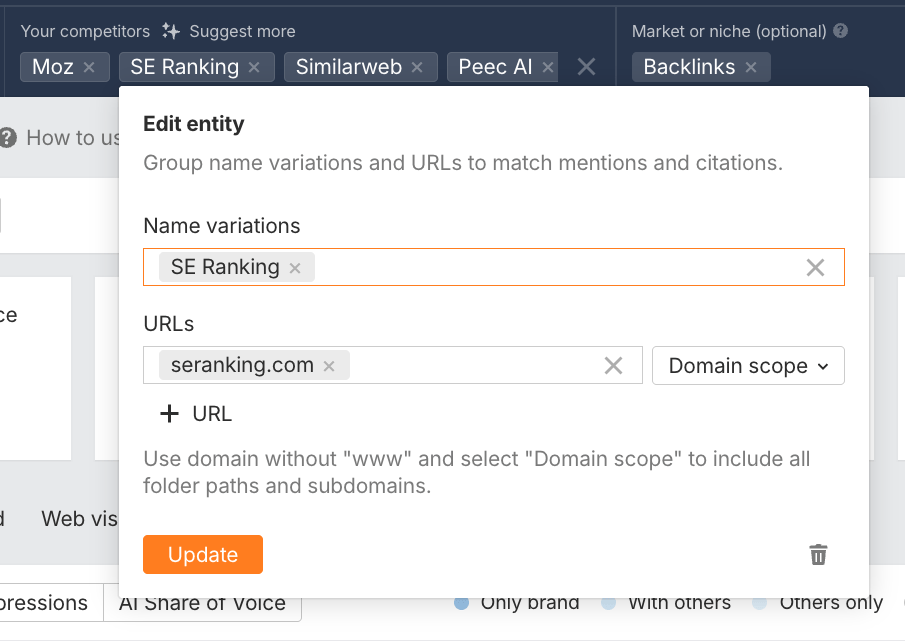
To refine your analysis, you can also include name variations—this is especially useful when a competitor’s brand name is also a commonly used word.
Once you’re fully set up, you’ll see side-by-side metrics for every brand, including:
- Mentions: The total times each brand appears in AI responses
- Citations: The number of responses that cite the brand URL at least once
- Impressions: Weighted mentions based on search demand
- AI Share of Voice: The percentage of total impressions vs. the competition
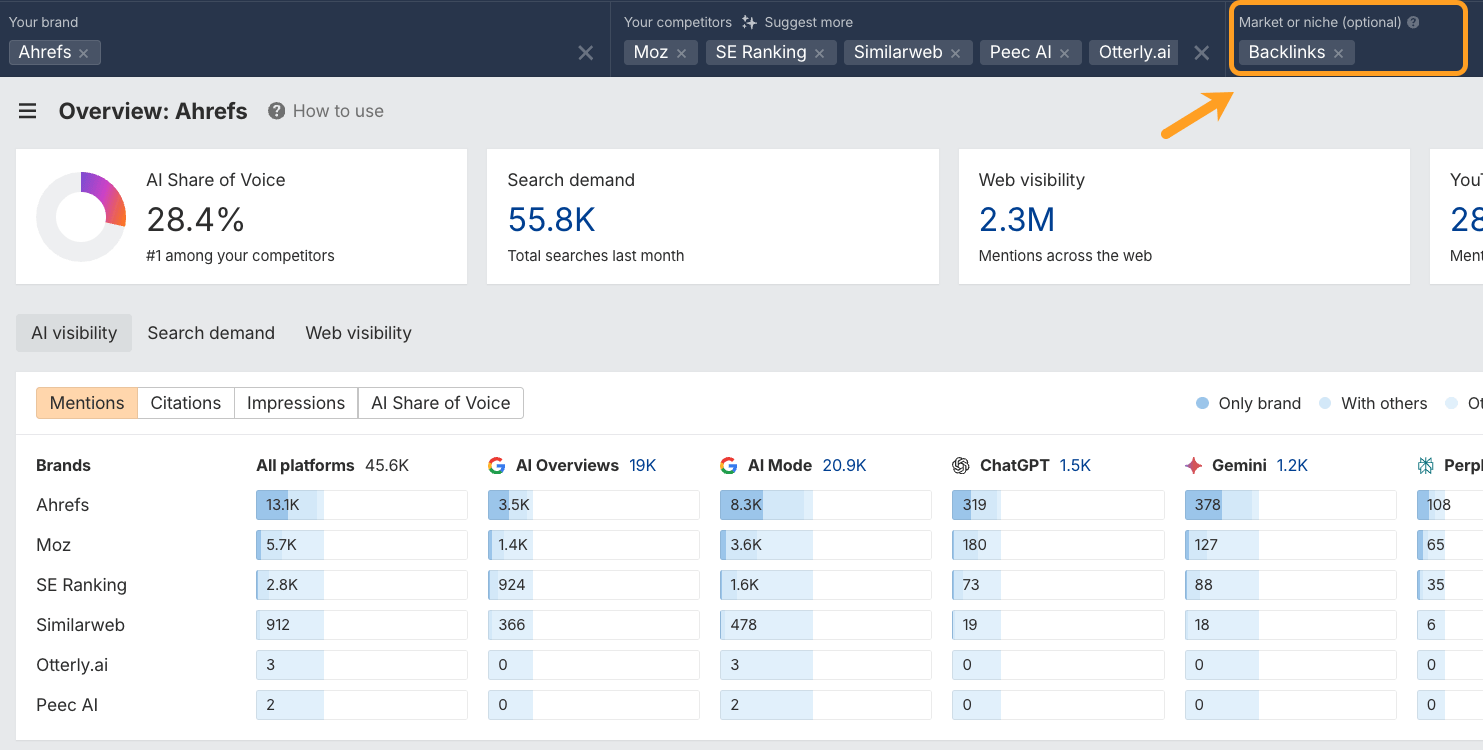
From there, you can run a competitor analysis across the full Brand Radar database, or alternatively narrow your focus by market or niche.
For example, for Ahrefs we might zero-in on the topic of “Backlinks”, since it’s one of our core topics and is heavily embedded in our product.
If you’re wondering: “Who is more visible in ChatGPT: me, or my biggest competitor?” you can find the answer, and even see how it changes over time, with a report called “AI Share of Voice” (AI SoV).
Here’s how to check it:
- Enter your brand name into the Brand Radar dashboard
- Drop in your competitors, or hit “Suggest more” for AI suggestions
- Check your AI Share of Voice percentage
- For an even deeper breakdown, hit the AI Share of Voice tab
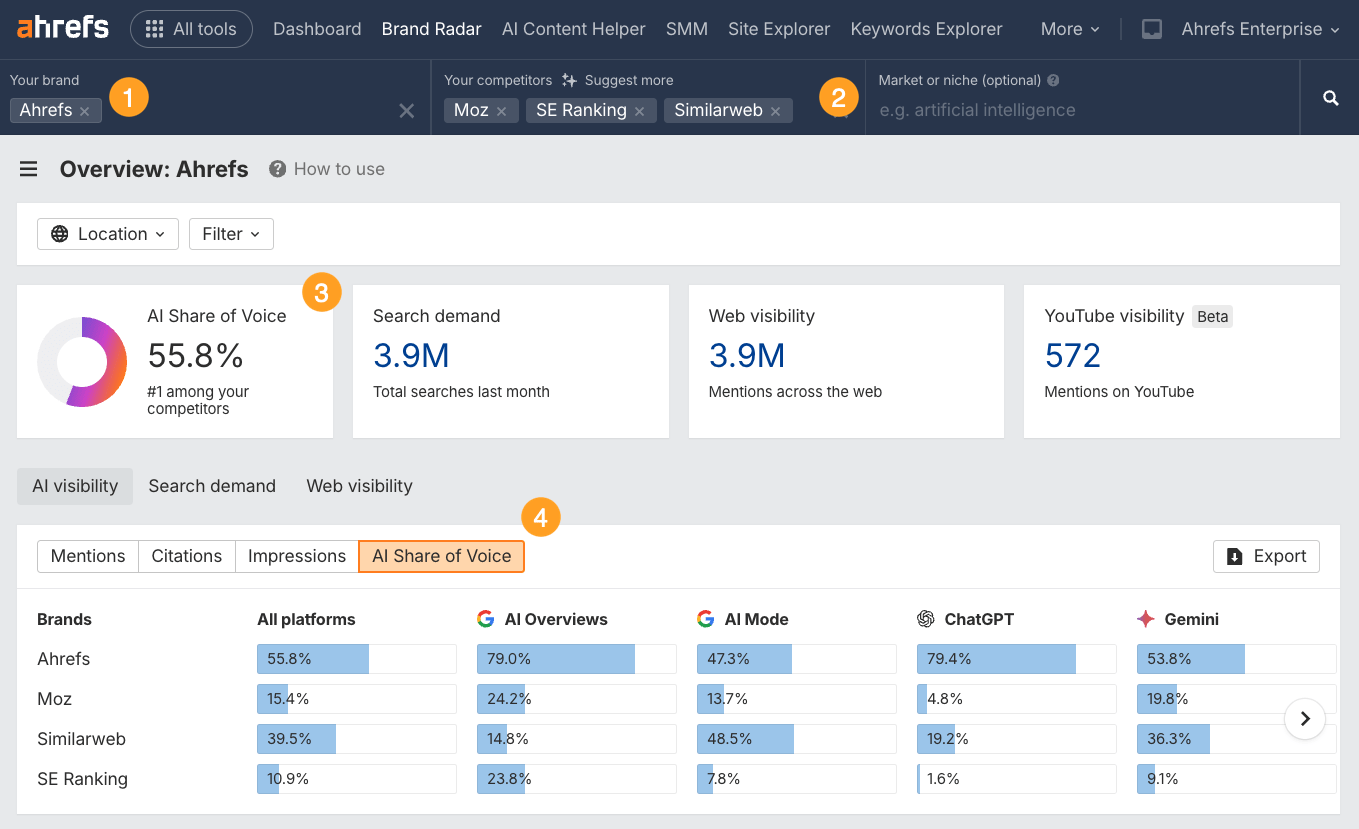
This shows your brand’s share of voice across the prompts most likely to be seen by real users.
That’s because Brand Radar focuses on popularity-weighted visibility—not just whether you appear, but whether you appear where it counts.
Sidenote.
Every prompt in Brand Radar is seeded from search demand data, meaning each one comes with associated impressions to give you a clearer idea of topic popularity. You can also think of these impressions as prompt “volumes”. We track in this way to help you prioritize the prompts that are most likely to matter.
You can track AI Share of Voice over time to see if your content strategy, PR efforts, or brand-building activities are actually improving your AI visibility.
Rising AI SoV means ChatGPT is recommending you more often. Declining AI SoV means you’re losing ground.
Use this benchmark as your starting point, then dig into the specific strategies in the rest of this guide to understand why your AI SoV is what it is and how to improve it.
You’ve seen which competitors are beating you (and which you’re beating)—now it’s time to track the actual content that’s earning you visibility in AI search.
The aim is to work out what ChatGPT already “knows” about your brand, and believes you to be an expert in.
Brand Radar breaks down exactly which topics you’re recommended for, which queries mention you most often, and which domains are responsible for your brand getting mentioned and cited.
Here’s how to find your top topics:
- Navigate to the Topics tab
- Filter the AI platform by:
ChatGPT - Focus on your brand topics with the filter:
your brand: mentioned - View a list of the topics most closely associated with your brand in ChatGPT
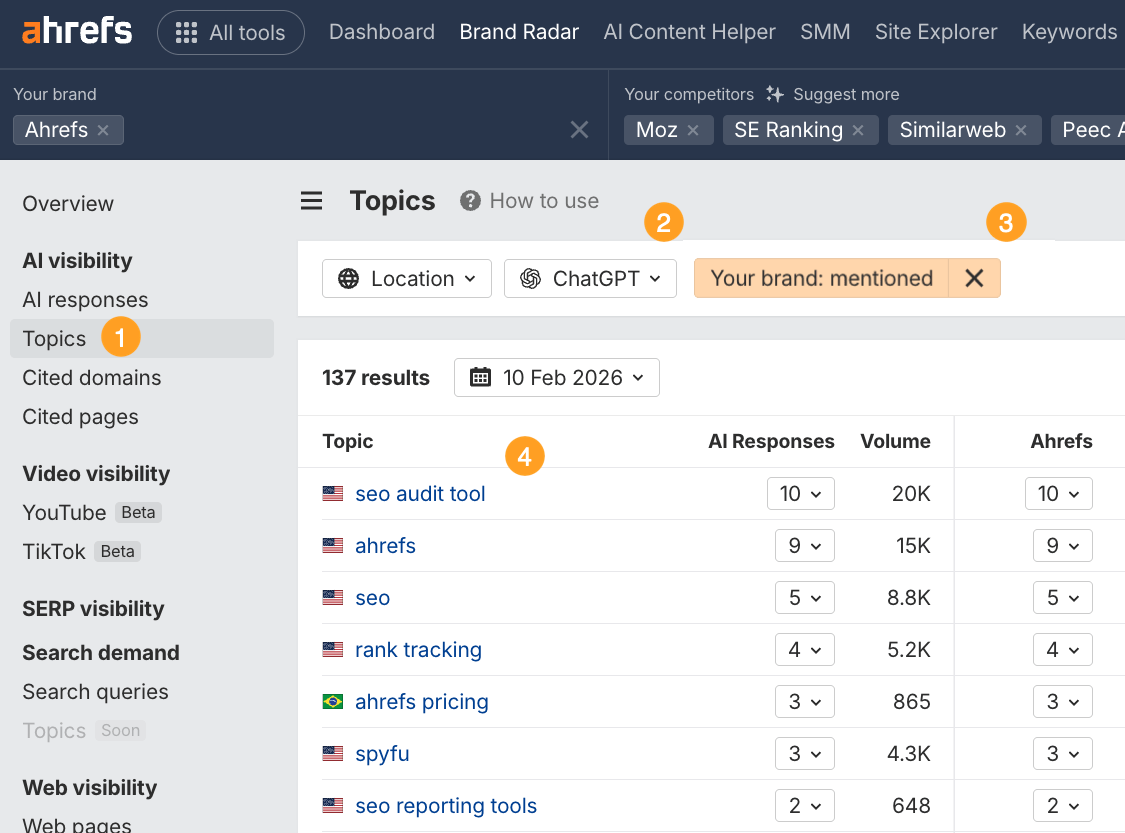
This report gives you a brief overview of the core topics ChatGPT surfaces your brand for, but for more detail, head to the AI responses report.
This is where you’ll find the exact prompts and answers your brand is included in.
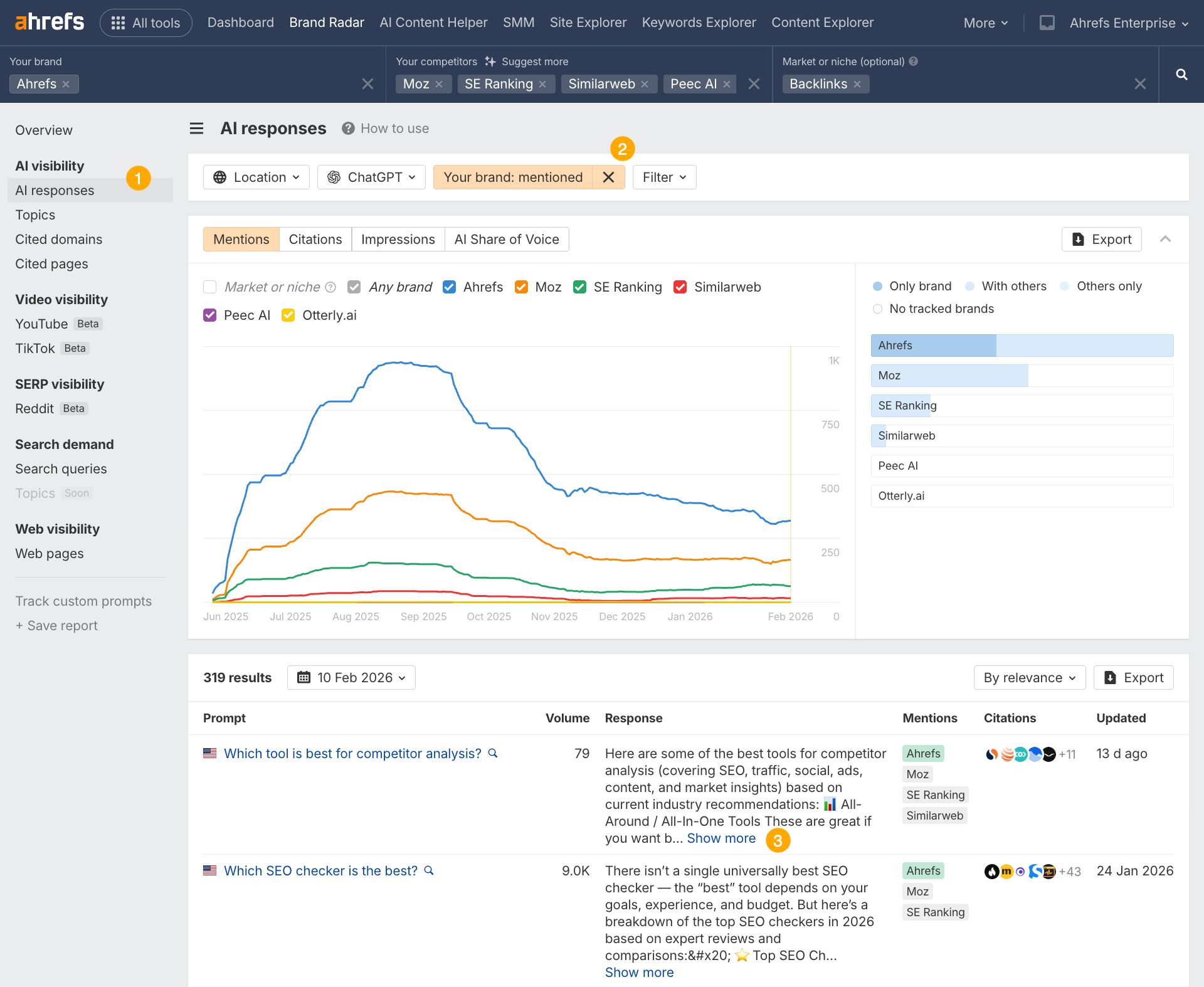
Hitting “Show more” ³ will let you view the actual response, so you can understand the context of your mentions.
For instance, below, Ahrefs is mentioned in answer to the query “Which tool is best for competitor analysis?” thanks to a recommendation from the site One Little Web.
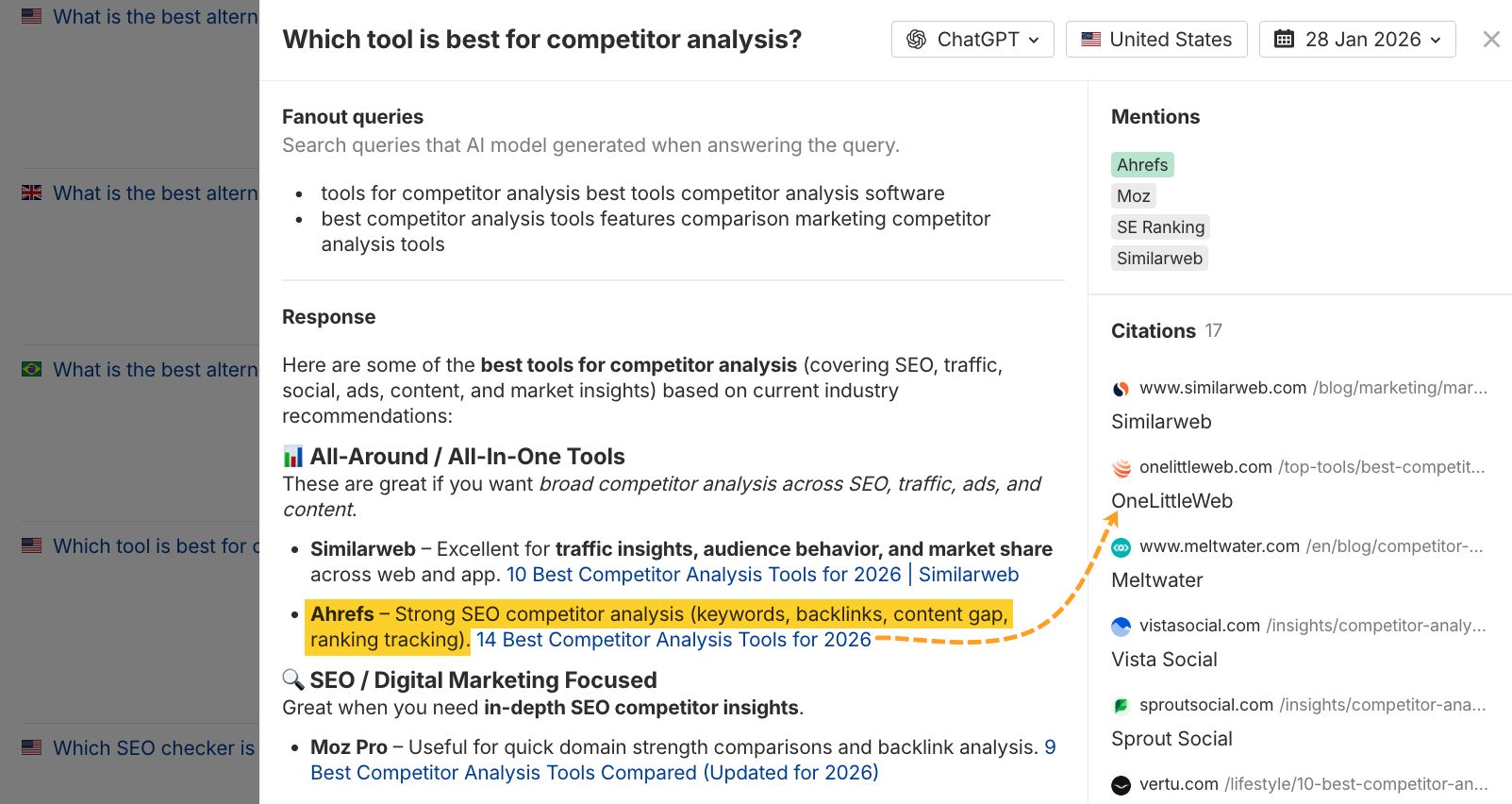
Responses show you exactly what ChatGPT says about your brand, so you can spot outdated information, incorrect claims, or missing features that need publicizing. Use this knowledge to write new articles that fill in information gaps, or update old articles to correct anything outdated.
And finally, you can audit your cited pages: the URLs that are most likely responsible for your mentions in ChatGPT responses—in our case, that’s a Wiki about “Google Search Console”, a Tech Radar review, and a Forbes tool list.
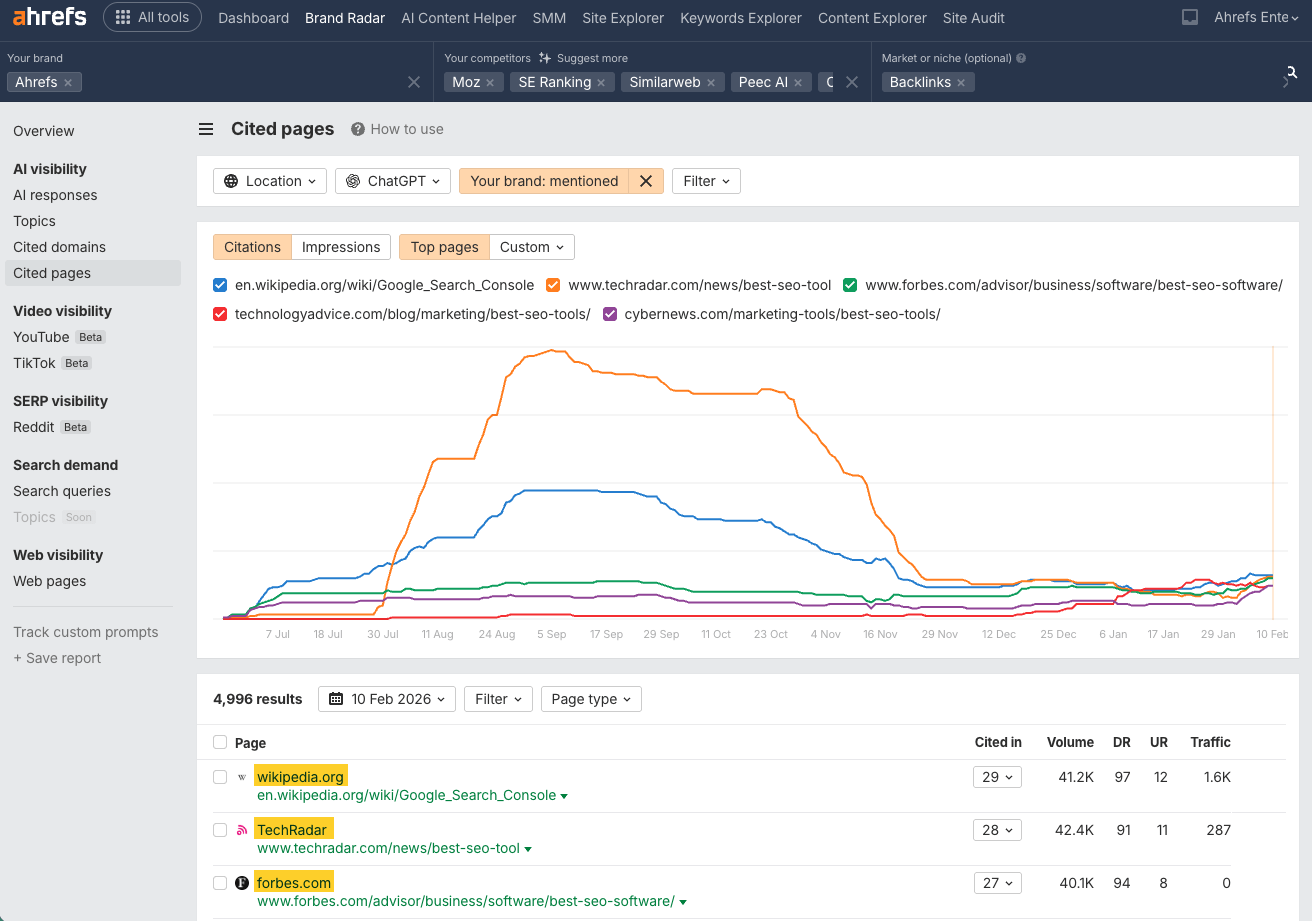
Some of these pages will explicitly mention your brand, and others will just be cited in the AI responses alongside your brand mention.
Treat pages that don’t recommend you as an outreach target, to strengthen your visibility in ChatGPT.
In this report, you can also see which of your website pages get cited the most by ChatGPT, by adding a domain filter.
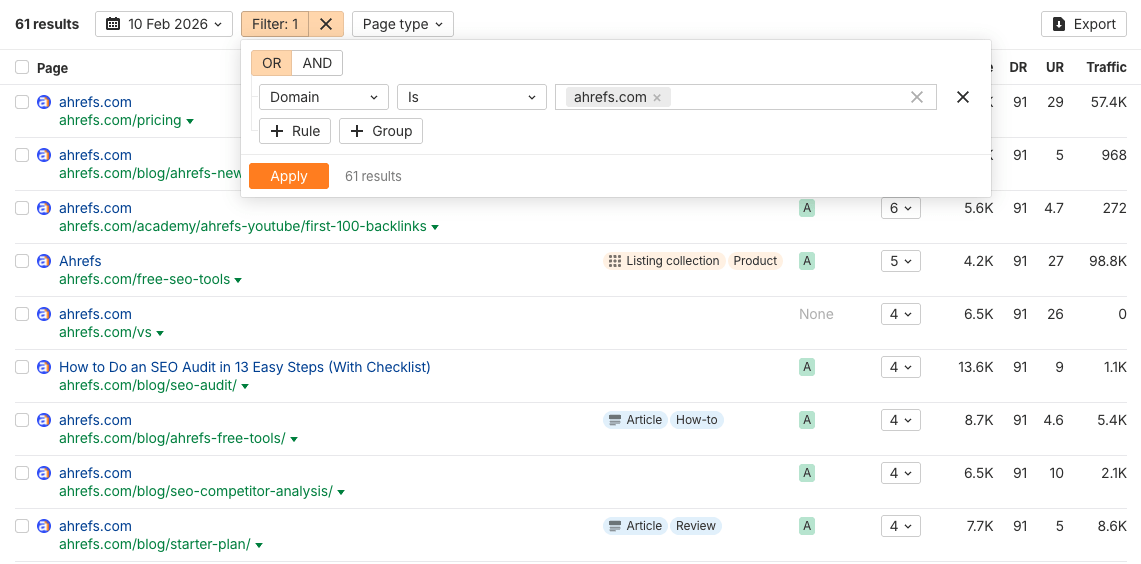
Since you control these pages, and you already know they are preferred sources, updating and optimizing them is the fastest way to fill gaps in what ChatGPT knows about your brand.
Which brings me neatly on to the next step…
The most actionable thing you can do when tracking your ChatGPT visibility is find topics where competitors get mentioned but you don’t, then target those gaps.
There’s a quick and easy way to do this in Brand Radar straight from the dashboard.
Just head to the ChatGPT “Mentions” bar chart and hover over your brand, then click “Others only”.
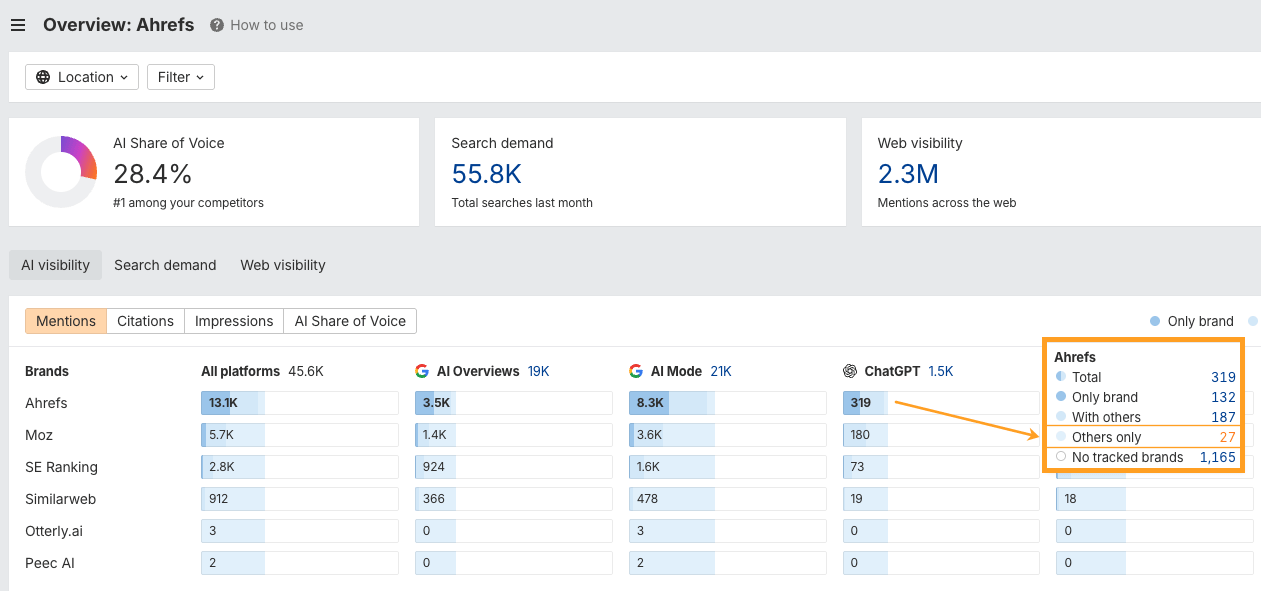
This will instantly generate a selection of filters in the AI responses report, showing you the prompts, responses, and fan-out queries that exclude your brand, but include your competitors.
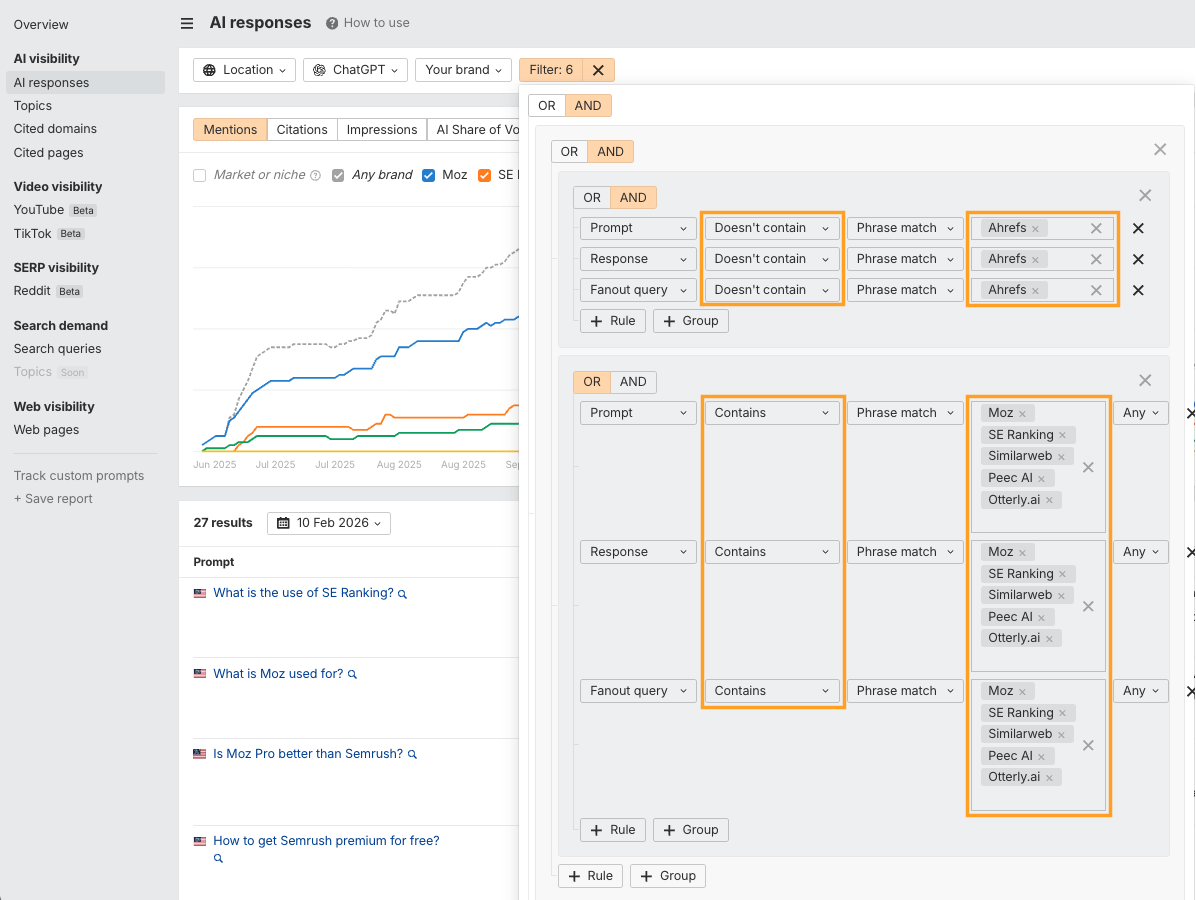
Use this topic direction to create new content, optimize existing posts, and reclaim some of that market share from your competitors.
Here’s an example of what I mean.
Recently, I ran a gap analysis for Ahrefs across a small number of bottom-funnel custom prompts that we really care about right now.
I discovered we were getting mentioned in 42 ChatGPT responses while a competitor appeared in 66.
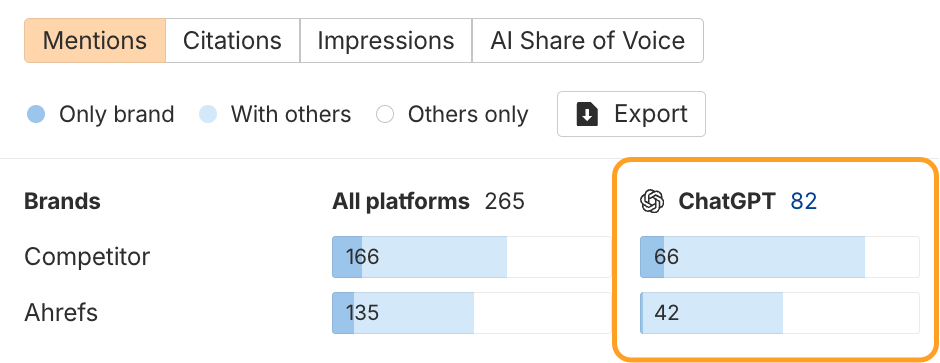
From that small mention gap, I was able to find out exactly where we were losing ground and which topics we needed to target to have a better chance of closing that visibility gap.
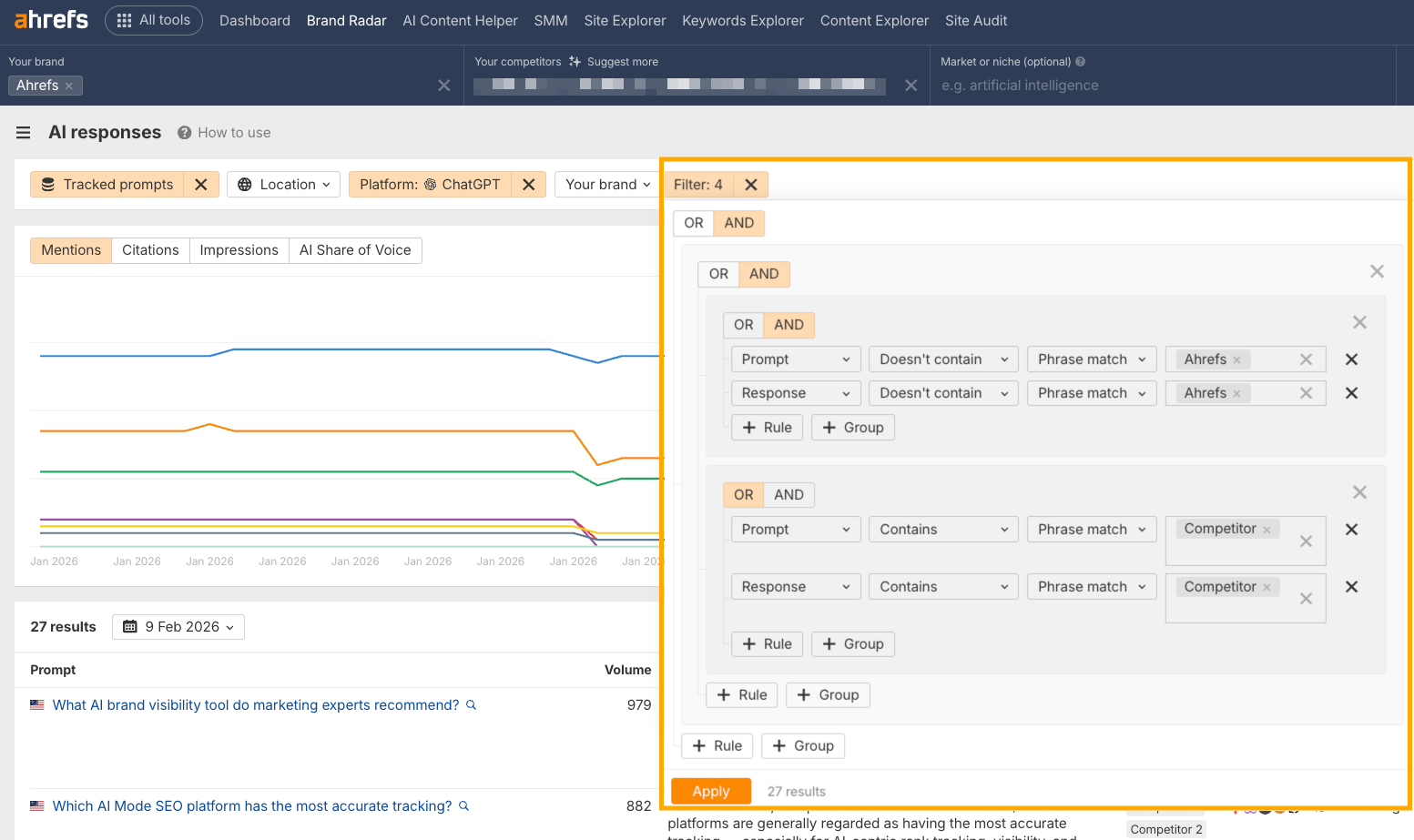
By analyzing prompts and fan-outs in the AI responses report, I learned that our topics gaps range from expert endorsements (highlighted in yellow below) to ROI justification (green), and platform coverage (orange).
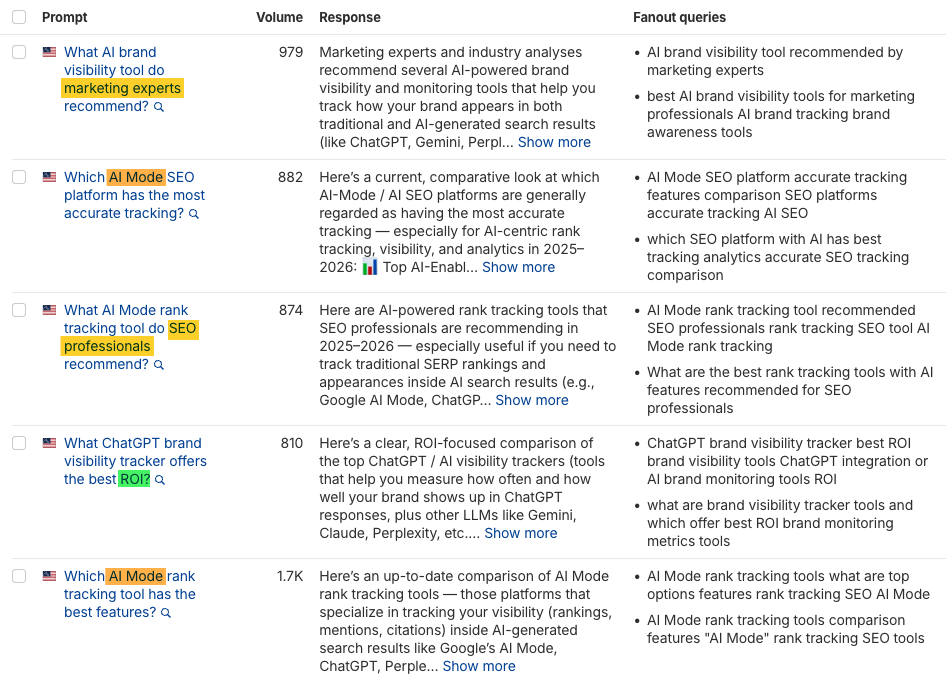
In other words, we need to create more decision-stage content in clear formats.
For example:
- Expert case studies on how teams use Brand Radar to act on AI visibility (“How Hostinger gains visibility in AI and automates repetitive tasks”).
- ROI and budget evaluation guides (“What ROI actually looks like for AI visibility tracking”).
- And practical, platform-specific blogs (“Tracking brand visibility across AI Mode: Our approach”).
This will help us show up more often in high-purchase-intent queries in ChatGPT.
And it’s not just about “Mention” gaps. You can also track where your competitors are getting cited, but you aren’t.
Just hit the Citations tab on the dashboard, hover, and click “Others only”.
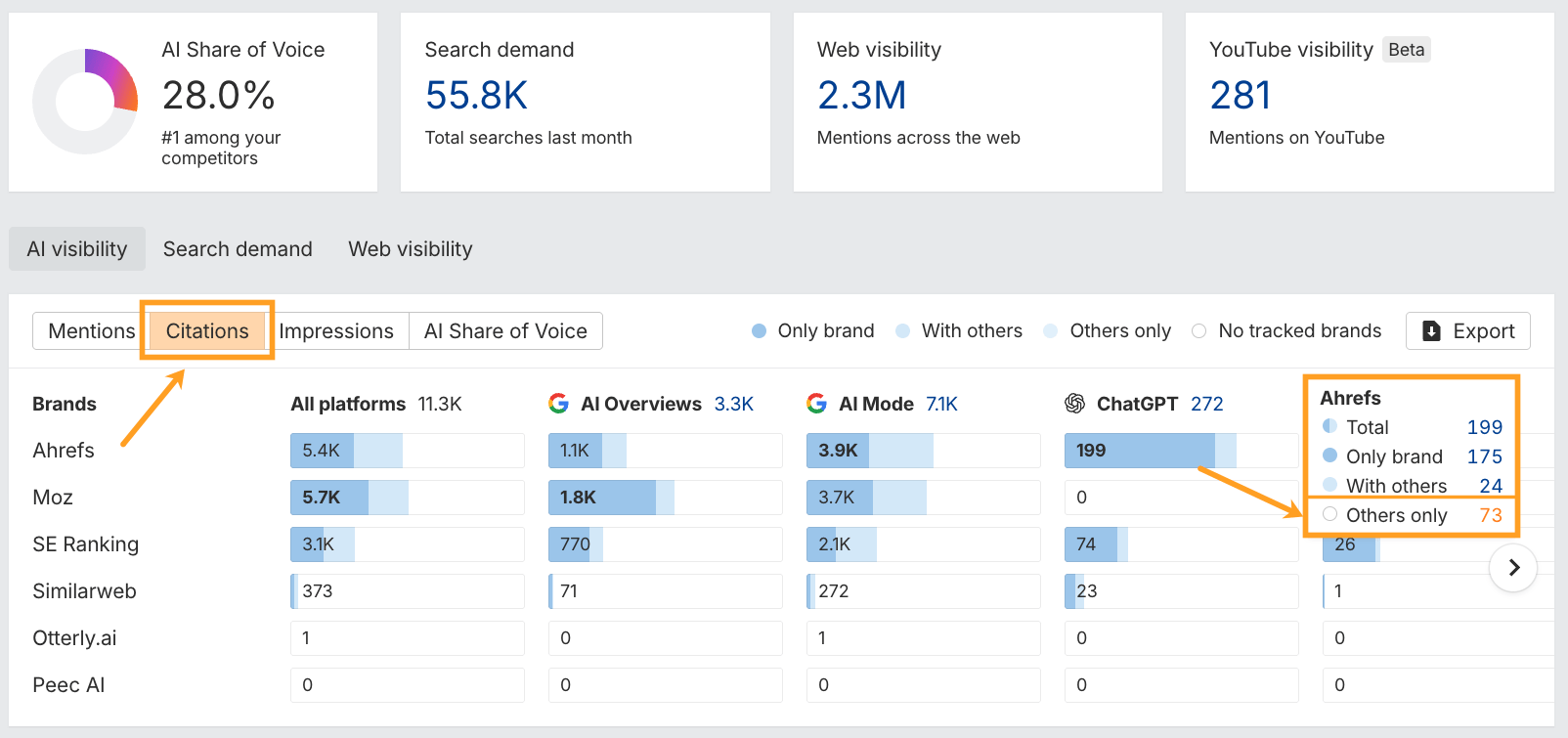
From there you’ll see ChatGPT responses where rival domains are cited, but you aren’t.
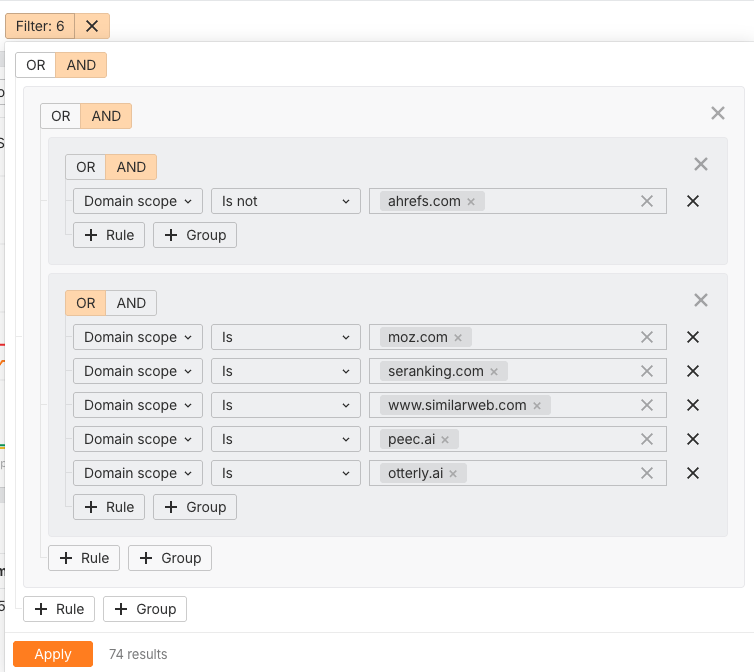
To get a complete picture of your missed visibility, add an extra filter so you’re looking at conversations where you’re neither cited nor mentioned.
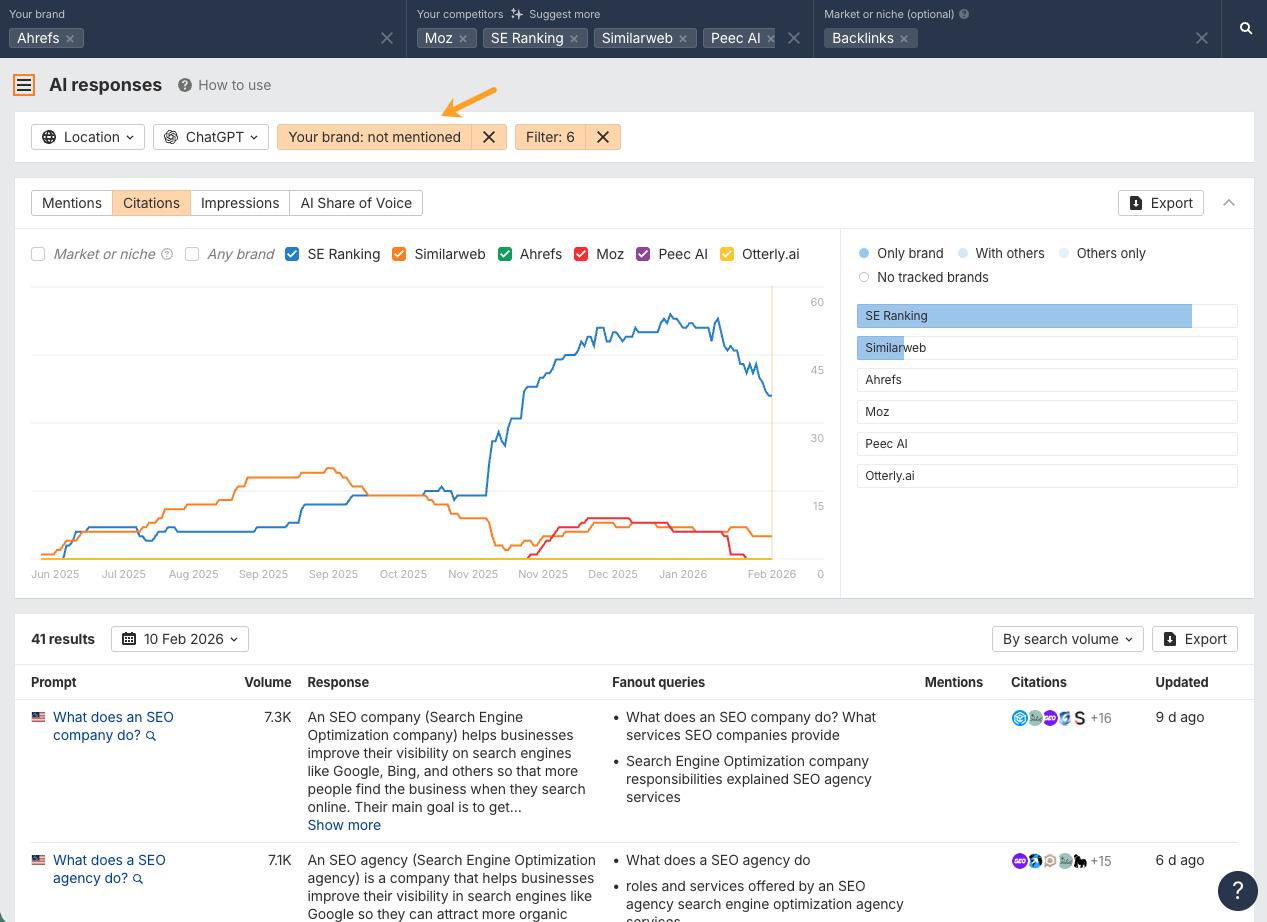
Then grab ideas from competitors’ pages to enrich your own content—whether that’s adding in original data and statistics, improving formatting and structure, reducing time-to-insight, optimizing meta data and snippets, or building out your coverage across the topic on the whole.
Your AI visibility doesn’t exist in a vacuum. ChatGPT pulls from content that’s already performing across the web, YouTube, Reddit, and other platforms.
Brand Radar lets you track your brand across all these channels in one place, so you can see how your broader visibility feeds into AI mentions.
Here’s how to analyze each channel:
Track your YouTube visibility
YouTube is the second-largest search engine and the third most-cited source by ChatGPT for brand recommendations.
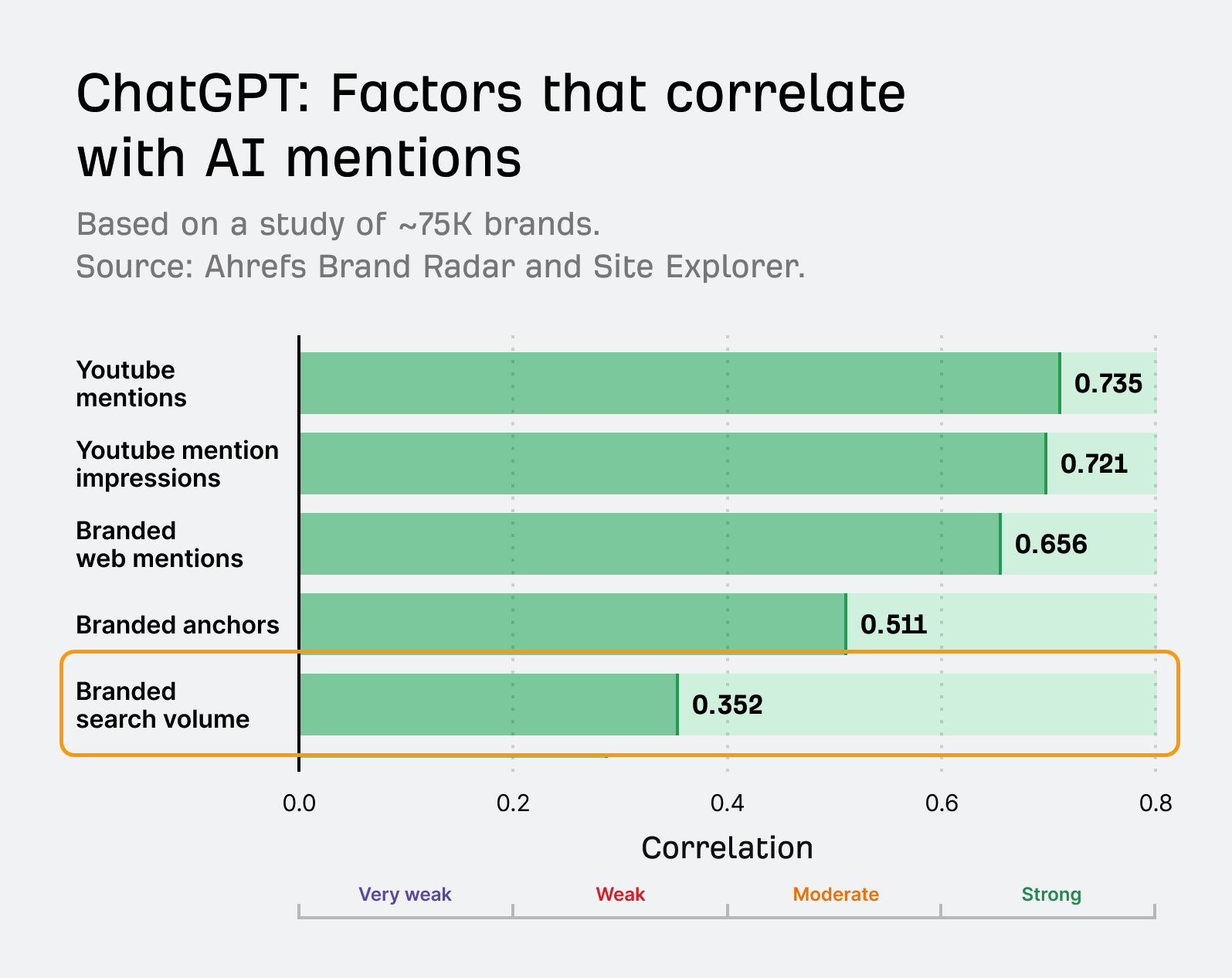
YouTube mentions also correlates most closely with brand mentions in ChatGPT, according to our own research of eleven different AI brand visibility factors.
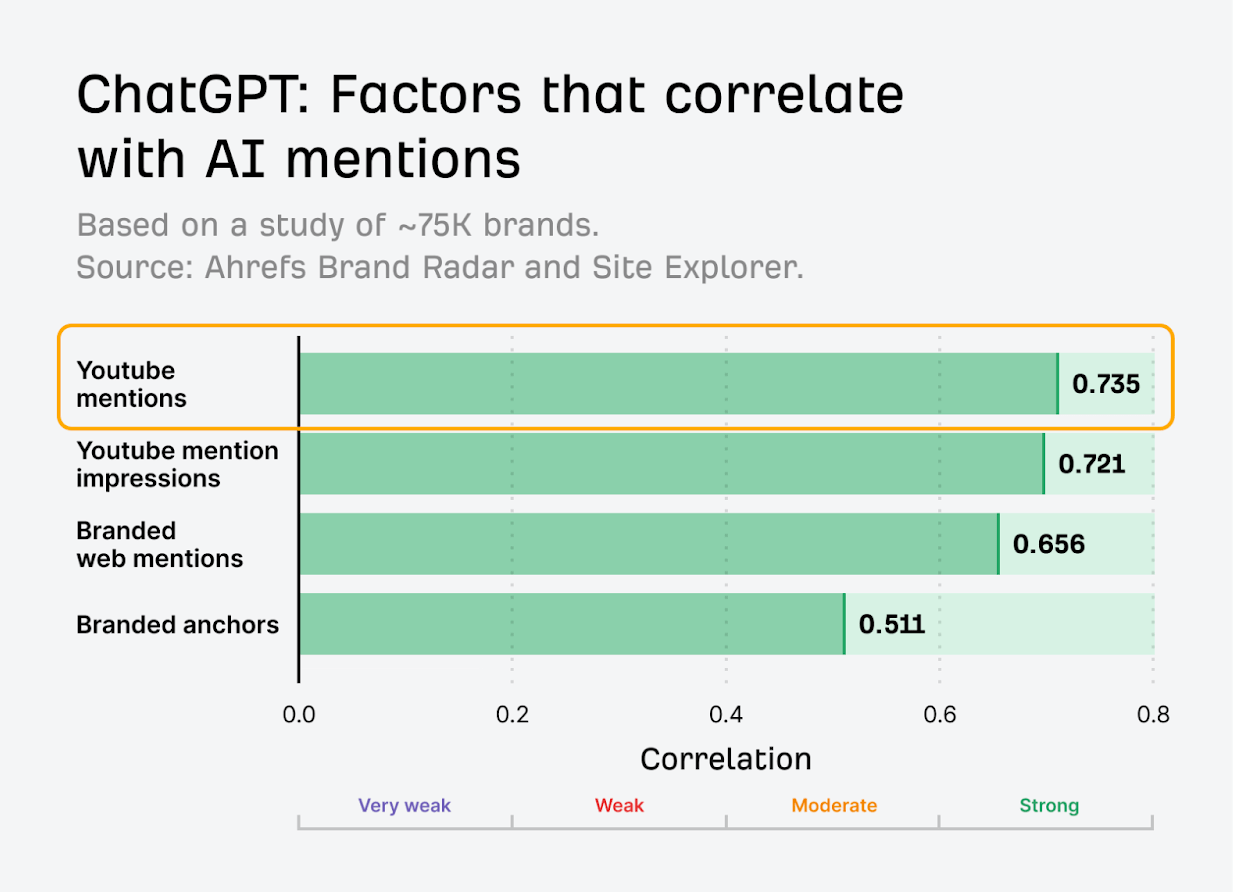
Meaning that when creators make videos about your product, ChatGPT may use that content as source material for recommendations.
Click into Video visibility > YouTube to see videos mentioning your brand.
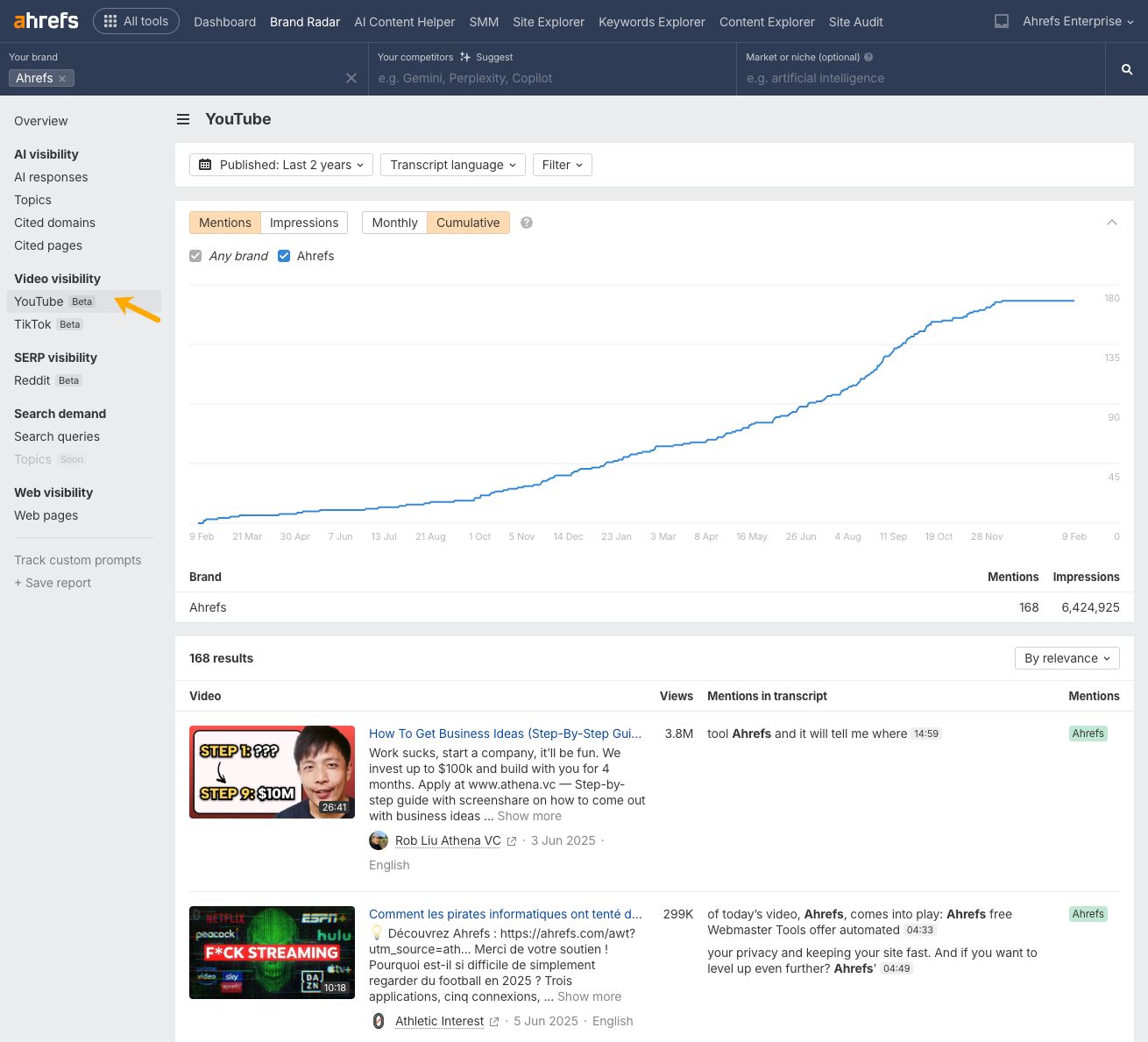
You can cross-reference this data against the Cited pages report to see which videos containing mentions of your brand are also informing ChatGPT answers.
Look for patterns in what topics are covered and which creators mention you—then it’s just a case of producing and sponsoring more of that content.
Check your web visibility
According to our own research of 75,000 brands, branded web mentions have one of the strongest correlations with visibility in ChatGPT.
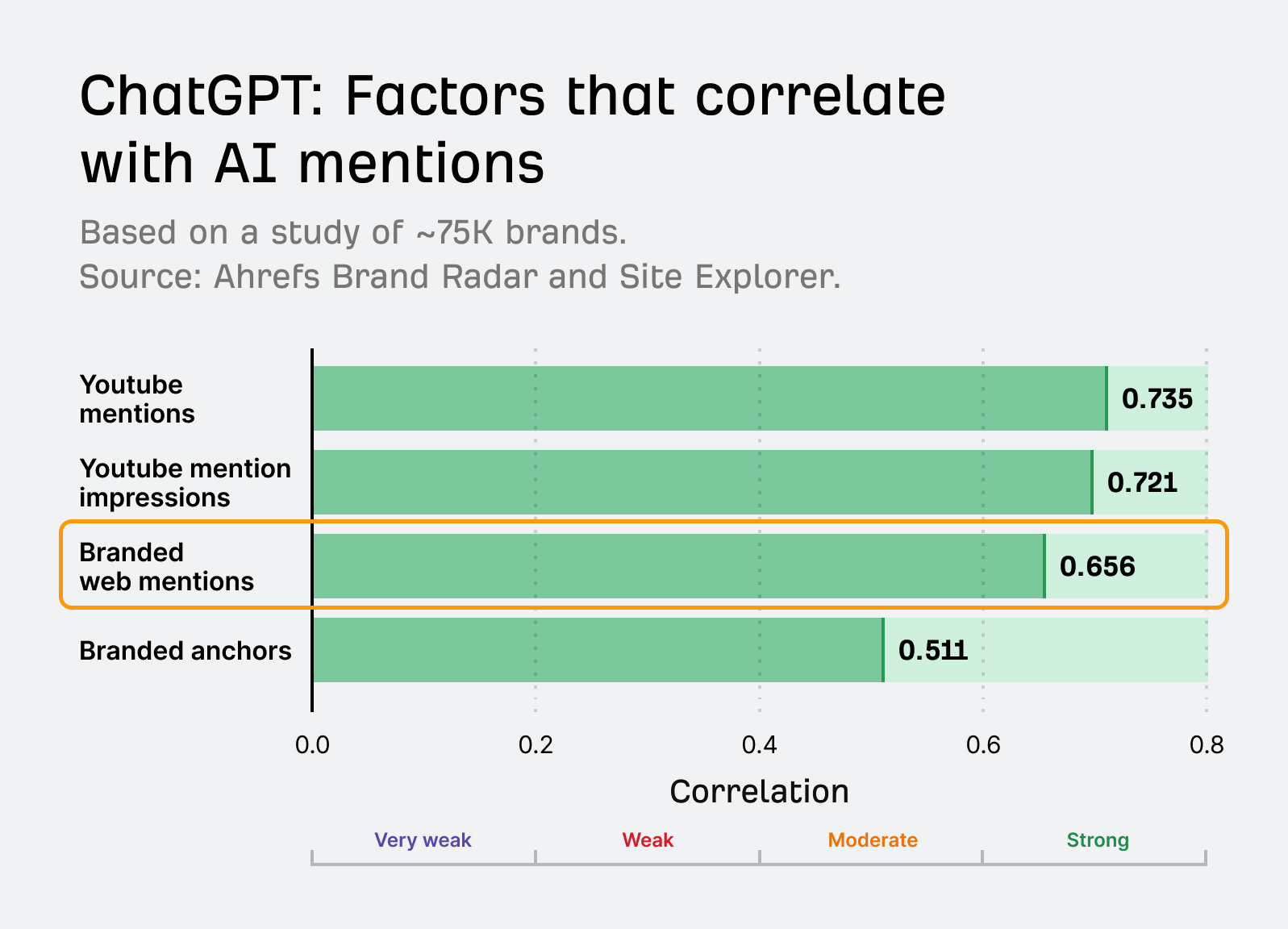
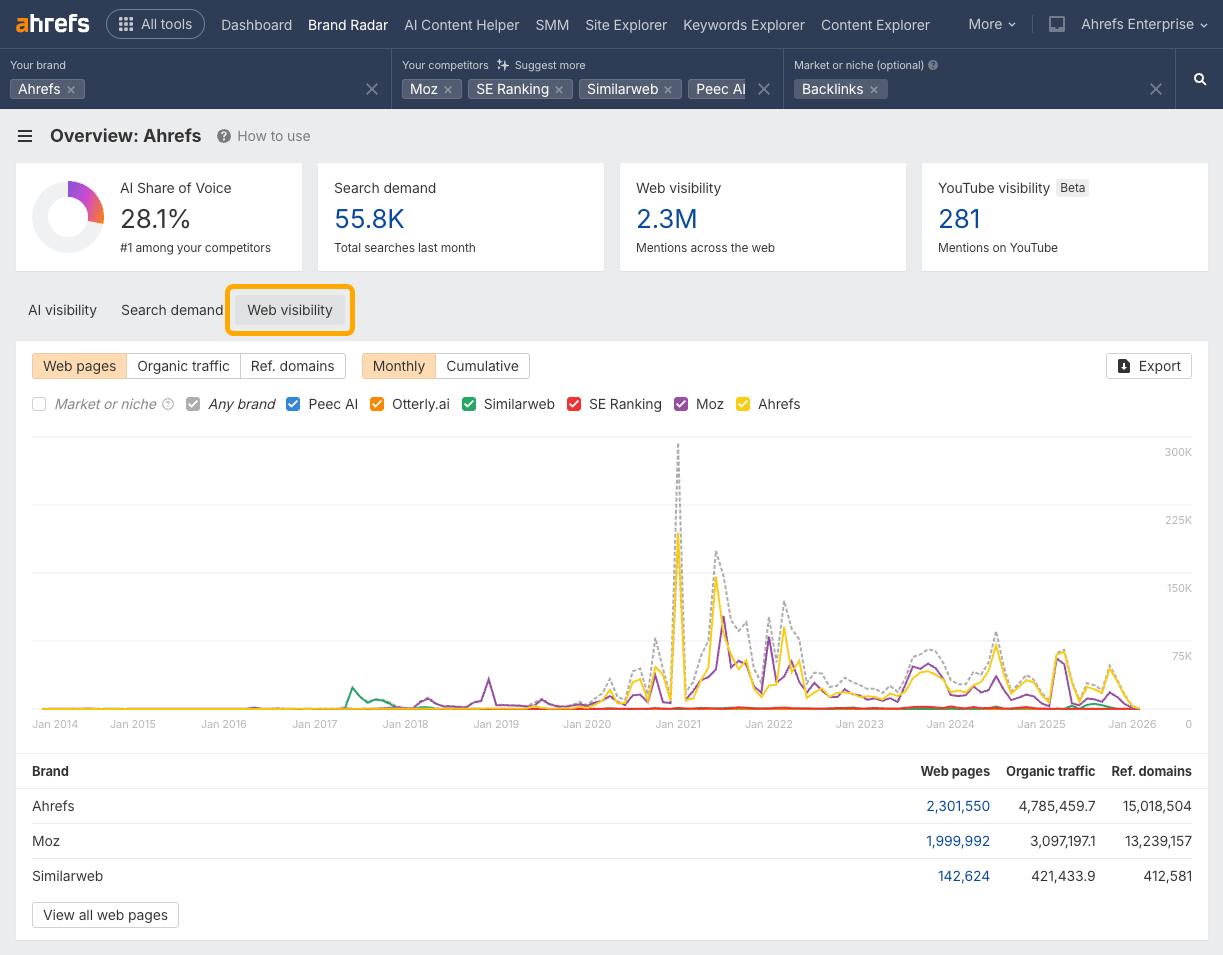
So, being able to see trends in both your web mentions and AI visibility can help you work out how your off-site efforts are impacting your ChatGPT performance.
Navigate to the Web visibility tab to view those trends, and see which exact pages mention your brand across the web.
There’s another easy way to spot when you’ve been mentioned by a page that’s cited in ChatGPT.
Just head to the Cited pages report and check out the “Mentions” column.
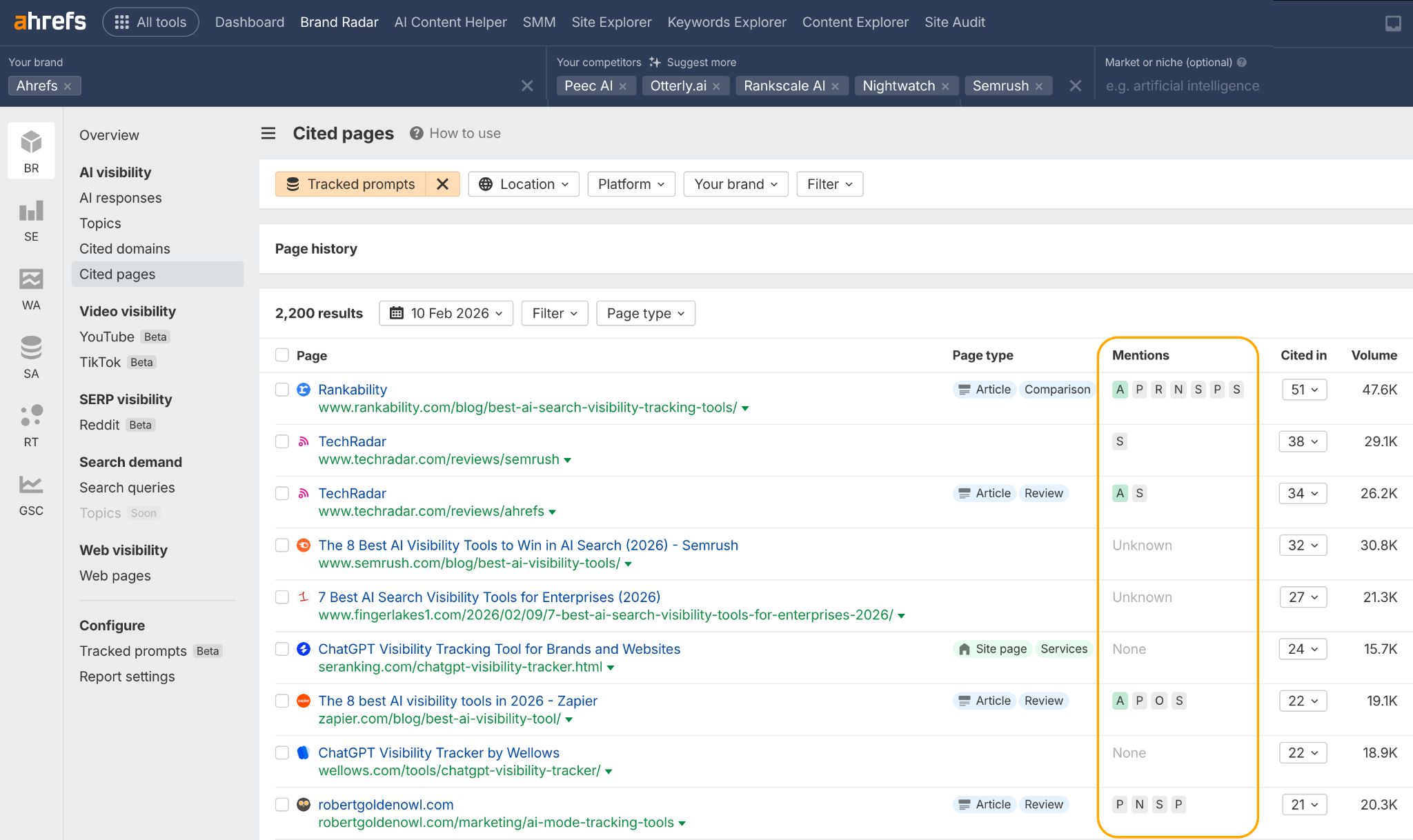
Whenever you spot your brand’s initials in green, it means that the URL in question has mentioned your brand name within the content of the page.
Tracking metrics like brand mentions can help prove how impactful your PR and brand awareness efforts are in driving ChatGPT visibility.
Track your search demand
Rising search volume for your brand is often a leading indicator of ChatGPT growth.
For example, here’s Canva’s ChatGPT visibility and branded search volume side-by-side.
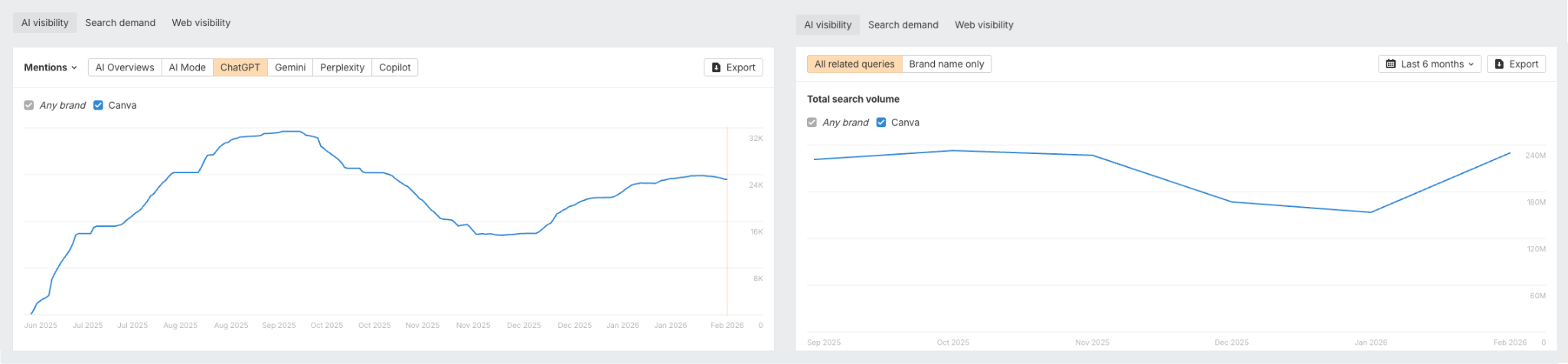
While search volume is not as strongly correlated as brand mentions, there is still a clear positive relationship.
If your brand is searched for more often, it’s more likely to appear in search results—and that visibility can increase the chances of it being grounded in ChatGPT answers.
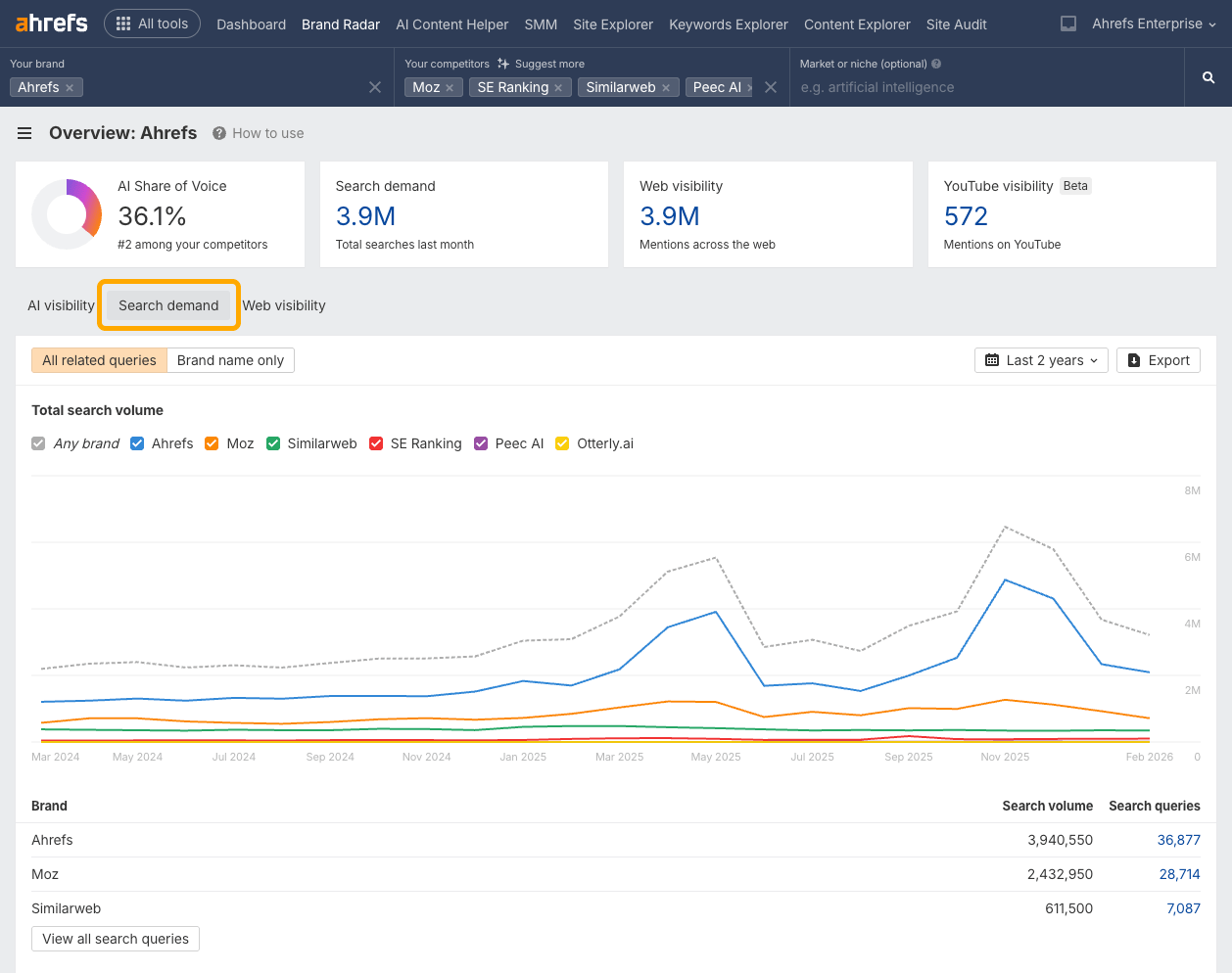
You can track your branded search demand trends and queries within Brand Radar in the Search demand tab.
Scan Reddit conversations
Reddit discussions are a goldmine for ChatGPT because they contain real user opinions and recommendations.
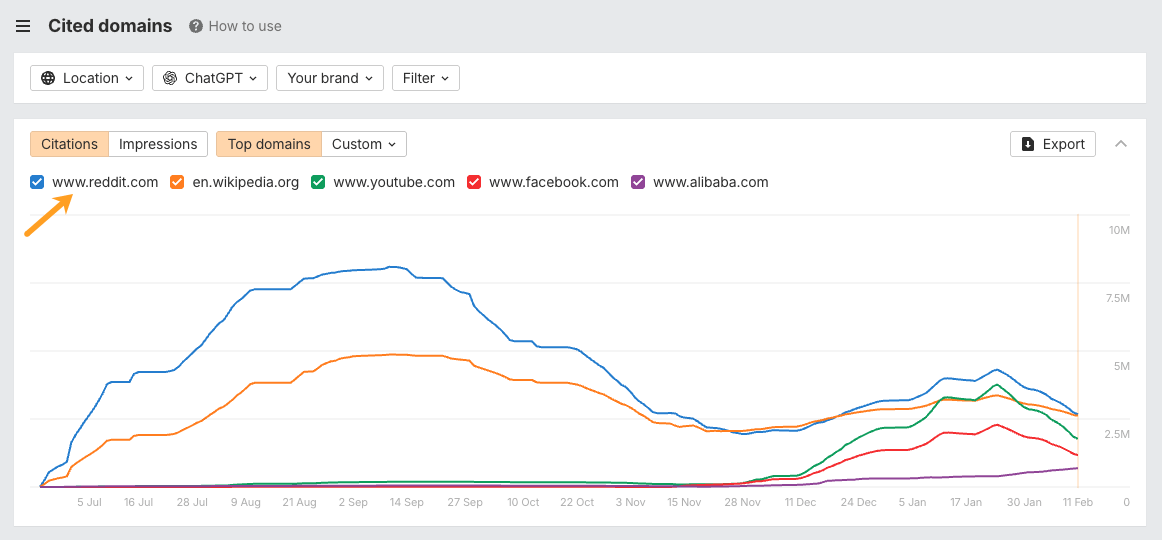
In fact, Reddit is ChatGPT’s #1 cited domain across 13.5M prompts, according to Brand Radar.
When someone asks “What’s the best SEO tool?” on Reddit and 15 people recommend Ahrefs, ChatGPT absorbs that consensus.
Navigate to SERP visibility > Reddit to see Reddit threads mentioning your brand.
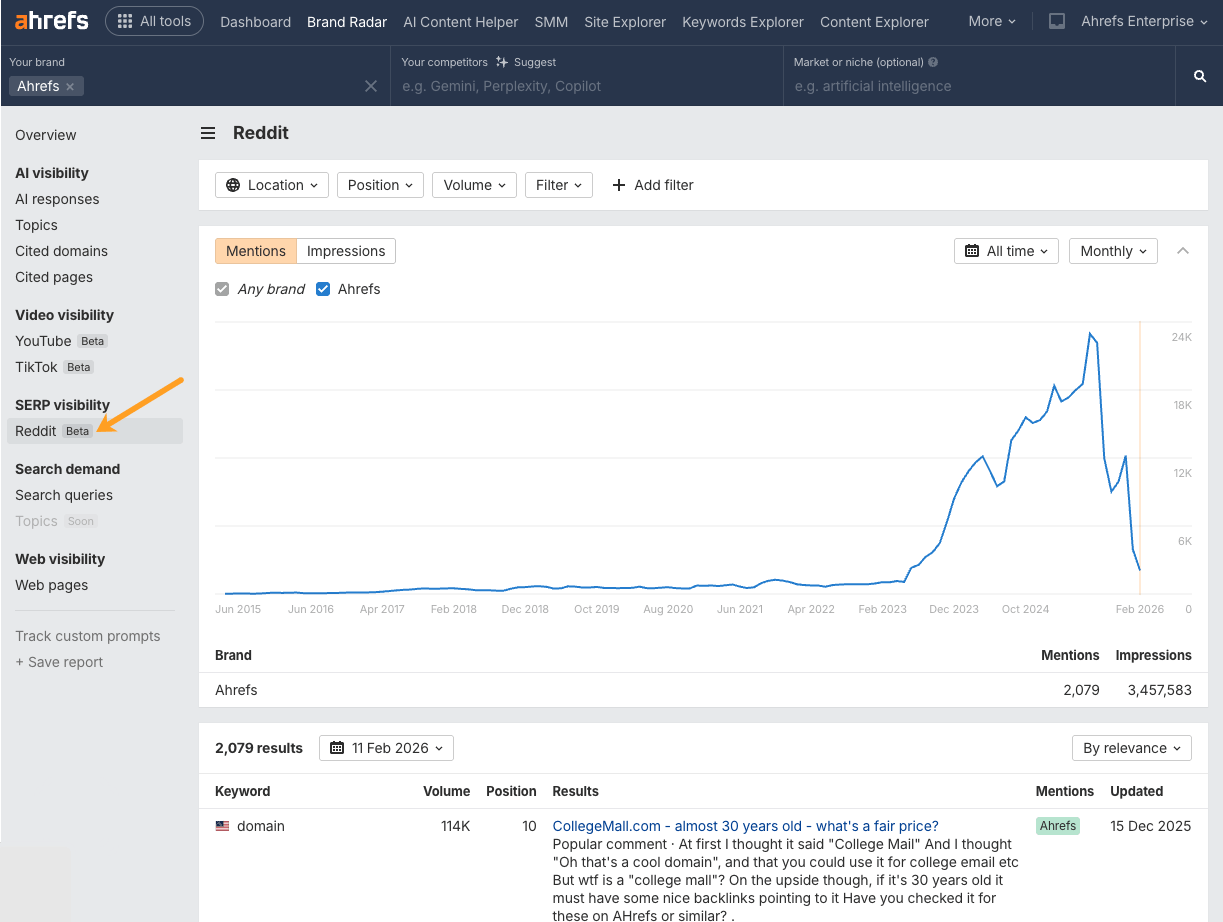
Review high-traffic subreddits that mention your brand, gauge the sentiment of those discussions, and create a plan to address questions and guide the narrative without coming across as overly promotional.
Track TikTok mentions
TikTok might seem unrelated to AI search, but it’s increasingly influential.
Videos explaining how to use your product or comparing you to competitors help establish your category positioning—which ChatGPT then reflects.
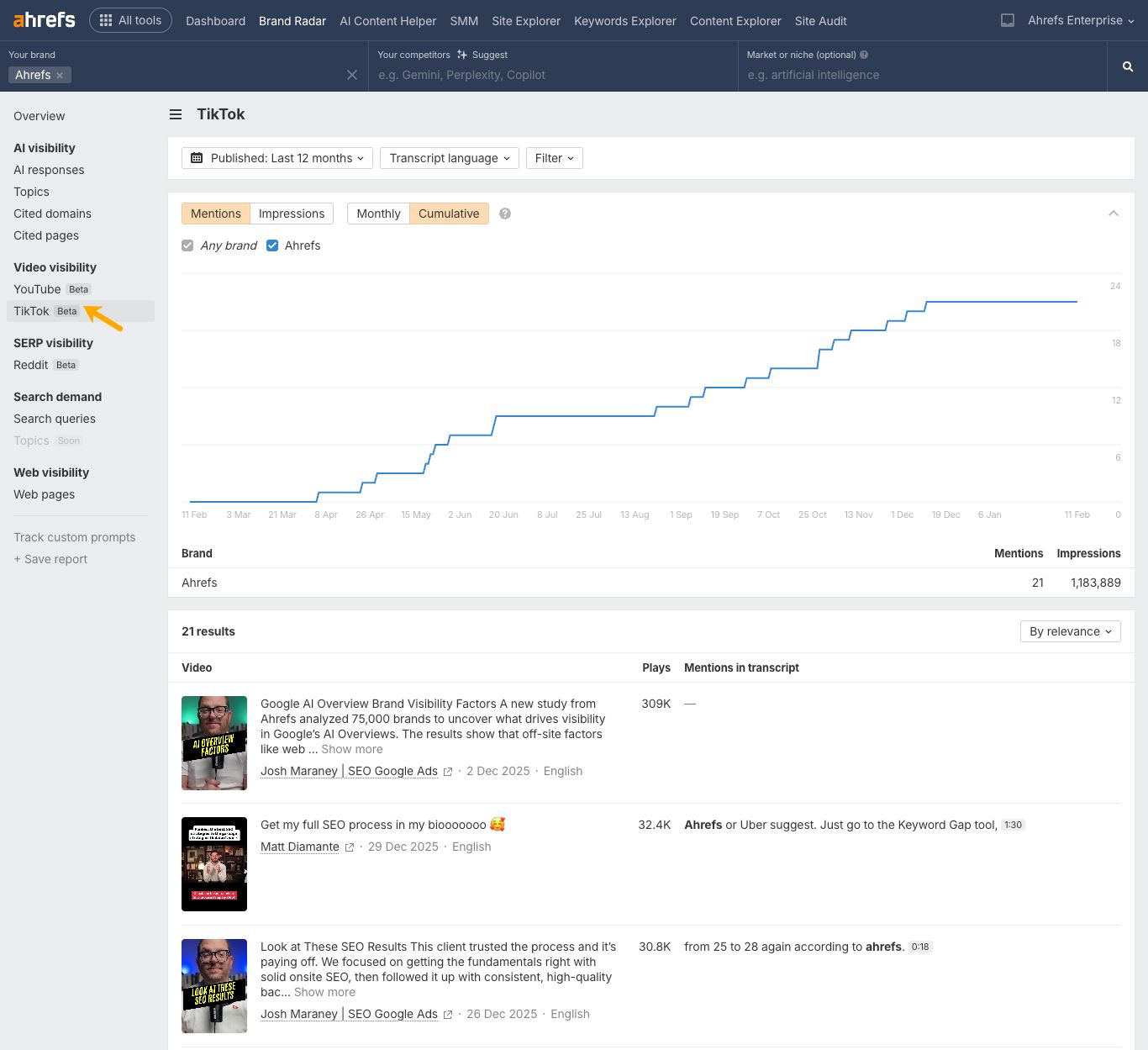
Go to Video visibility > TikTok to see TikTok videos featuring your brand.
Brand Radar gives you instant visibility into millions of prompts across ChatGPT, but you’ll probably want to also monitor the queries that matter most to your business on your own schedule and across the platforms you care about.
Thankfully, custom prompt tracking in Brand Radar lets you do exactly that. You can track the exact questions your customers are asking, whether that’s “best CRM for construction companies” or “is [your product] worth it in 2026.”
The key is grouping related queries together and analyzing aggregate patterns. This gives you a reliable directional view of your brand’s performance.
For example, you can cluster your custom prompts by intent, funnel stage, or product category.
Here are some more ideas:
- Branded queries: To fact check and spot misinformation patterns. (e.g. “Is Ahrefs data accurate?”)
- Bottom of funnel queries: To understand how the AI recommends your brand during purchase decisions. (e.g. “Best SEO tool for a small agency?”)
- Mid funnel queries: To understand your ability to educate AI audiences. (e.g. “What is keyword difficulty and how is it calculated?”)
- Feature based queries: To zero-in on conversations surrounding your focus products, and understand how better to position and promote them. (e.g. “What can you do with Ahrefs Content Gap tool?”)
- Campaign related queries: To assess the impact of your PR and marketing efforts on ChatGPT visibility (“What is Ahrefs’ AI brand visibility correlation study about?”).
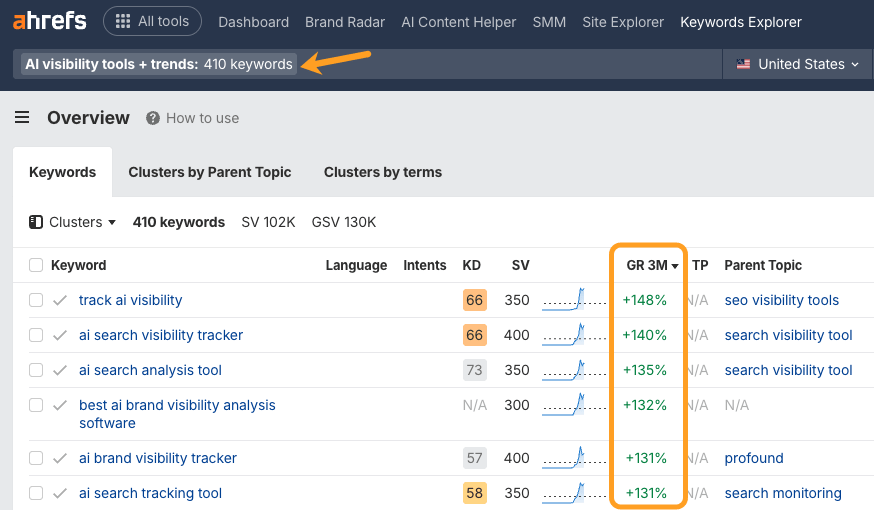
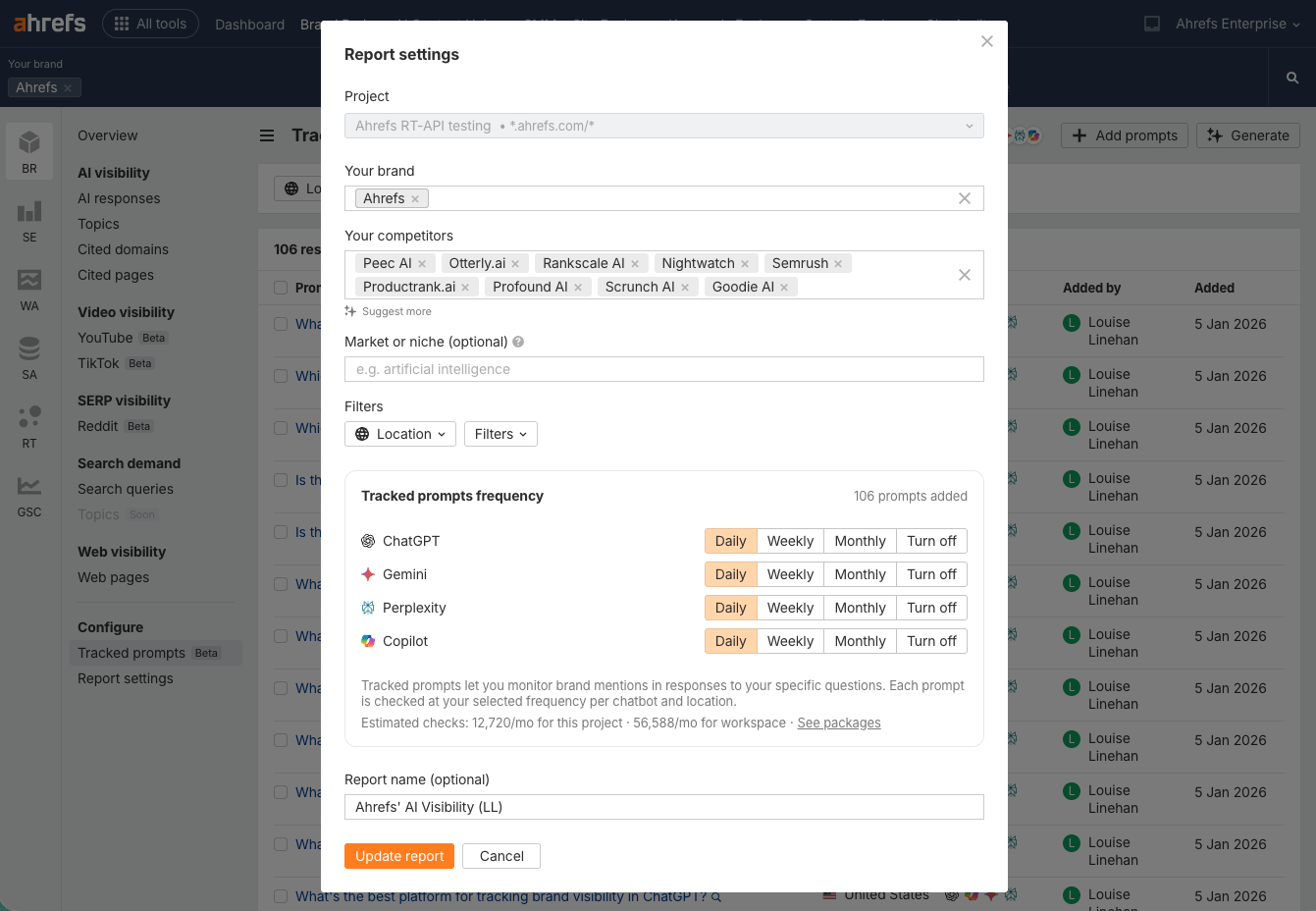
As another example, I’ve set up a group of 100+ BOFU custom prompts pertaining to the topic of “AI visibility tools”, since that’s actively where we’re trying to grow our brand awareness right now.
I did this by expanding hundreds of trending AI visibility keywords (discovered in Ahrefs Keywords Explorer) into fuller “prompt-like” queries.
To monitor your own custom ChatGPT prompts, just select a Project and choose your monitoring schedule—daily for high-priority terms, weekly for mid-priority queries, or monthly for brand sentiment.
Then you can select which platforms, locations, and competitors to monitor.
And finally, track your progress.
Think: which brands are mentioned most frequently on average, which of your own pages are consistently cited, and how does your visibility trend over time?
This gives you actionable insights without getting lost in response volatility.
When ChatGPT can’t confidently answer a question using its training data alone, it retrieves information from external sources such as Google, in a process known as retrieval-augmented generation (RAG).
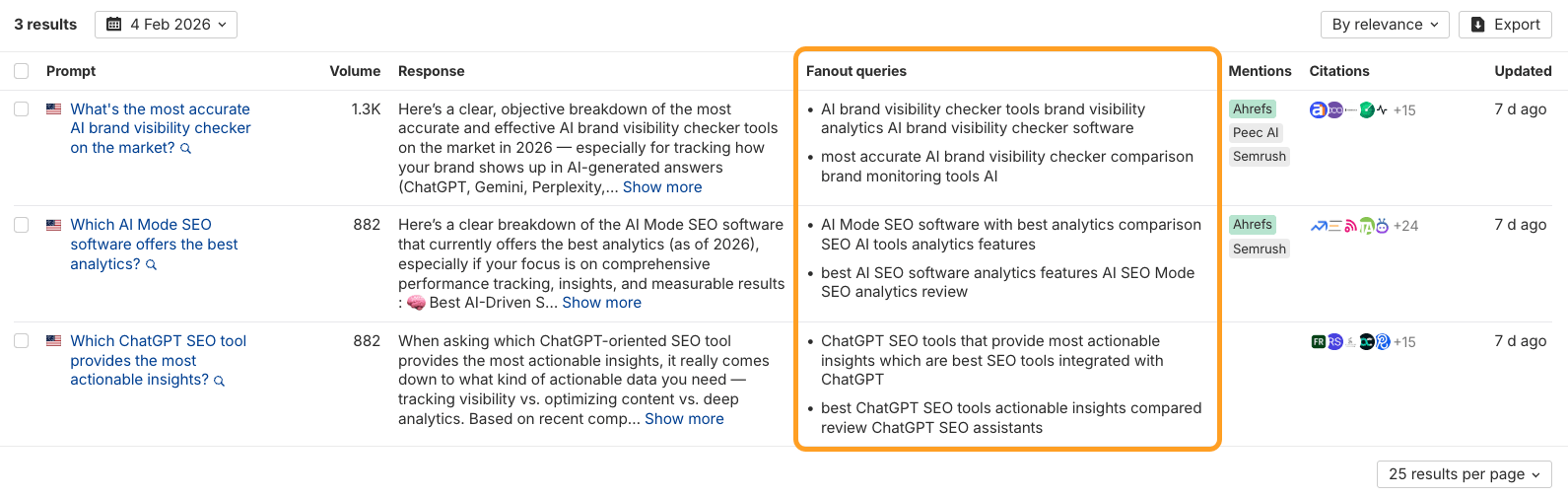
As part of this process, it generates “fan-out queries,” breaking a single question into multiple related sub-queries to explore different angles and offer up a more complete answer.
For example, if a user searches “What is the best website hosting company?” ChatGPT generates fan-out queries to better explore two angles: recent product reviews, and feature comparisons.

Many SEOs believe that building and optimizing content clusters around fan-out queries is key to AI visibility.
The issue is, fan-out queries are just as changeable as prompts.
That’s why you need to study lots of them in aggregate, if you want to identify recurring themes/topics/angles to build into your topic clusters.
Luckily you can track millions of ChatGPT fan-out queries in Brand Radar.
Just head to the AI responses report, and look out for the Fan-out queries column.
Pro tip:
Replicate top-cited content—then enhance it with fan-out optimization
Head to the Cited pages report, and find the most-cited URL in your category.
Copy it.
Then head back to the AI responses report and paste that URL into the filter box.
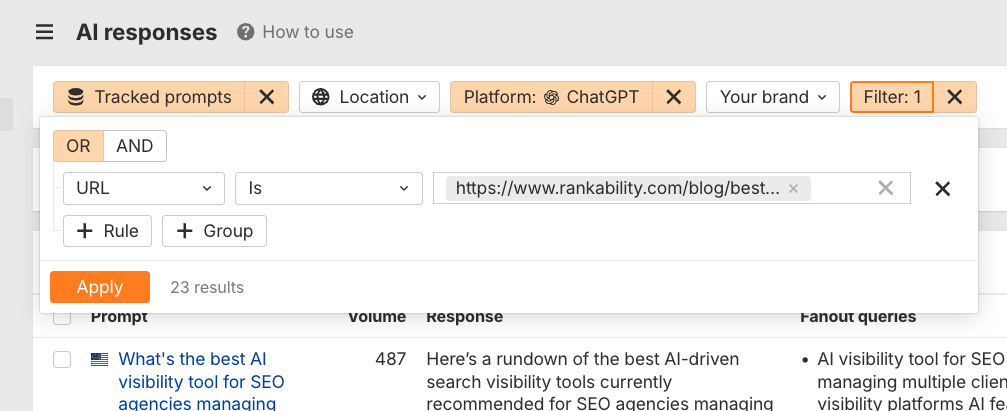
You’ll find all of the prompts, responses, and fan-out queries needed to either create or update your own version of that content—and you can even spin out multiple cluster pieces from the fan-out subtopics you uncover.
This will stand you in better stead to be cited by ChatGPT.
Here’s your action plan:
- Start with your benchmark. Check your AI Share of Voice versus competitors across all queries in Brand Radar—this is your baseline for measuring your overall visibility in ChatGPT.
- Set up comprehensive monitoring. Create custom prompt tracking for your most important queries (branded searches, bottom-funnel terms, and new product features) and schedule them to run daily, weekly, or monthly.
- Track in context of other channels: Periodically monitor the channels that feed into AI visibility: YouTube mentions, Reddit conversations, web citations, and branded search demand.
- Review and act on gaps. Every month, run a competitive gap analysis to find topics where competitors appear but you don’t. Study the fan-out queries and cited pages in those responses, then create or update content clusters that address both the main prompts and their related subtopics.
- Track the impact. Watch how your AI SoV trends upward—both at the category and database level—as you publish optimized content, earn citations across high-authority pages, and build presence elsewhere online—proving that your cross-channel efforts are translating into ChatGPT visibility.
If you’re curious where you stand, get started with Brand Radar.

💸 Earn Instantly With This Task
No fees, no waiting — your earnings could be 1 click away.
Start Earning
