


Let’s face it; payroll isn’t the most glamorous part of running a business, but it’s one of the most consequential. A simple payroll error can lead to a trust problem that’s very hard to walk back.
Whenever I speak to my HR or payroll teams, the biggest issues they have to deal with are missing a pay date, miscalculated tax withholding, pay input inaccuracies, and tax enforcement. The end result? Dissatisfied employees are taking a quiet exit.
This is why I set about evaluating the best payroll software from a list of 40+ tools using G2 Data and reviews. From that pool, I narrowed it down to seven tools that consistently delivered across pay scheduling, compensation management, tax compliance, and benefits administration: RUN Powered by ADP, Gusto, Rippling, Deel Payroll, UKG Ready, Remote, and Paylocity.
As my goal throughout this experiment was to evaluate the best payroll software that can be a useful addition to the HR teams, I hope this list gives you useful insights to make an informed decision.
7 best payroll software for 2026: My top picks
- RUN Powered by ADP: Best for small business payroll and compliance management
Payroll entry, compliance management, automated tax filing (Available on request) - Gusto: Best for small business benefits administration and payroll Time-off accrual, W-2 delivery, benefits management ($49/mo)
- Rippling: Best for all-in-one HR, IT, and payroll management
Pre-tax deductions, benefits administration, HR integration ($8/user/mo) - Deel Payroll: Best for global payroll and contractor payments
Wage access, direct deposits, invoice management workflows ($49/contractor/mo) - UKG Ready: Best for direct deposit and employee data automation
Direct deposit, employee information management, HR automation (Available on request) - Remote: Best for global compliance and international payroll
Global payroll, contractor management, compliance automation ($29/employee/mo) - Paylocity: Best for employee reimbursement and wage garnishment
Employee reimbursement, wage garnishment, payroll automation (Available on request)
These payroll software are top-rated in their category according to G2 Spring Grid Reports. I have also added their monthly pricing to make comparisons easier for you.
7 best payroll software I evaluated and loved
Payroll software is used to automate payroll, schedule payouts, and compute tax deductions during final payroll processing to disburse timely payments. However, the list of what it actually does has grown considerably.
During my evaluation, I found that modern payroll software has evolved well beyond pay runs. Most of the tools I evaluated now function as comprehensive workforce management and HR automation suites that meaningfully improve employee experience and confidence in compliance. Some tools are also well equipped with built-in income tax portals and contract management, while others provide self-service payroll and payroll automation capabilities.
And the importance of these tools is reflected in the market shift. Businesses using payroll software see 31% fewer errors, and those using automated payroll systems report 70% fewer compliance issues, as per the data. That urgency has only grown with new EU pay transparency mandates coming into effect in 2026. G2 recorded over 30,000 new reviews in its Payroll Software category over the past year, which is a 90% increase and the largest year-over-year growth in the category’s history.
At the end of the day, I would recommend focusing on tools that provide accuracy, visibility, and confidence in compliance, to focus on the work that actually moves the business forward.
How did I find and evaluate the best payroll software?
To start, I reviewed the latest G2’s Grid® Report, which included 40+ tools, and narrowed it down to 7. I mostly narrowed down the best options based on features, ease of use, pricing, real user feedback, and prioritized tools ranked higher on the proprietary G2 score.
To go deeper, I used AI-driven research to analyze G2 product reviews, uncovering real-time buyer sentiment, user emotions, and recurring themes in payroll software adoption. I also collaborated with our in-house market research experts to assess pros and cons, review quality, and customer segment scores, ensuring a well-rounded perspective.
When hands-on testing wasn’t possible, I validated insights by consulting professionals with direct payroll software experience and comparing their input with verified G2 reviews. The screenshots featured in this article may include both those captured during evaluations and those obtained directly from the vendor’s G2 page.
What I look for in the best payroll software: My honest take
Regardless of whether you need one or several payroll tools, here are the core features I evaluated.
- Automated tax calculations and filing: Payroll software should handle tax computation for employees and contractors on a full-time or retainer basis and support the timely submission of tax forms such as TDS, W-2, and quarterly filings. According to G2 review data, users highlight automated tax calculations and direct deposit capabilities as standout features, with compliance with changing regulations frequently cited as a key reason for adoption. It is a tool that alerts you about upcoming tax cycles and sends reminders to file returns is a genuine time-saver.
- Legal and regulatory compliance management: Every country has different corporate laws, data protection rules, and government regulations. Payroll software needs to monitor and comply with those policies in every jurisdiction where your team operates. The most critical parameters to verify are ACA reporting, GDPR compliance, and labor law updates, especially with new EU pay transparency mandates coming into effect in 2026.
- Batch input and multiple payroll entry support: Having batch input or multiple entry support enables HR teams to automate payroll entries simultaneously for employees on a similar pay scale, significantly reducing time spent on manual data entry and minimizing the risk of input errors.
- Multiple payment gateways and currency conversion: I evaluated tools based on their support for domestic and international payment methods: direct deposit, wire transfer, payment wallets, and cheque deposits. For globally distributed teams, currency conversion and card creation facilities are essential to maintaining pay parity across borders.
- Integrated time tracking and attendance management: Payroll software should include a timesheet that connects via APIs to your time-tracking and leave management systems. The solutions below provide time tracking, leave encashment, system activity tracking, and auto check-in and check-out, covering the full picture of employee hours before payroll is ever run.
- AI-assisted error detection and payroll automation: Leading payroll platforms now use AI to flag anomalies before payroll is processed, reducing costly corrections after the fact. Beyond error-catching, AI is increasingly embedded in workflow automation: routing approvals, flagging compliance risks, and surfacing compensation insights without manual intervention. The strongest platforms embed AI directly into workflows rather than offering it as standalone features, delivering consistent execution-level value in everyday HR tasks.
- Customizable reporting and analytics: Payroll software should provide advanced analytics dashboards to build custom reports that can be shared with senior HR or accounting teams. This includes summarizing payroll data, identifying trends, and organizing information for legal or compliance purposes.
- Secure authentication and data privacy: role-based access control (RBAC) or multi-factor authentication (MFA) that allows select personnel to access payroll data while restricting others from confidential information. Tools that offer seamless authentication without compromising data integrity are essential for any organization handling sensitive employee pay data.
These features allow you to automate employee accounts, build income slips, and calculate invoices. The right combination ensures high levels of employee engagement and sustains employee-oriented workflows.
To be included in the Payroll Software category, a platform must:
- Calculate and pay employee salaries
- Follow employee pay rules, such as minimum wage and overtime pay
- Calculate and deduct withholdings, such as payroll taxes, insurance, and retirement contributions
- Print or deposit paychecks directly and manage employee payment data, such as bank accounts
- Generate payroll reports like salary statements, benefits reports, or leave summaries
- Comply with local and national workplace laws and privacy regulations
*This data was pulled from G2 in 2026. Some reviews may have been edited for clarity.
1. RUN Powered by ADP: Best for small business payroll and compliance management
I’ve noticed that G2 users often appreciate how employee account management is simplified in RUN Powered by ADP, especially when automating payroll forms and tax entries with accurate accounting integrations. For teams prioritizing simplicity and control, ADP often ranks among the best software for easy payroll processing, thanks to its guided entries and compliance guardrails. Payroll entry and tax calculation are rated at 95% by G2 reviewers, reflecting the day-to-day reliability that over 900,000 small businesses have come to depend on.
I’ve read multiple reviewers mention that the payroll dashboard stands out for its user-friendly design and wide range of form templates. From managing new hires to tracking attendance and taxes, users feel it comprehensively covers most HR needs without requiring them to navigate between multiple systems. I’ve also seen users highlight how easy it is to intervene in payroll automation when errors are made during data entry. Pausing the process mid-run offers more control and minimizes potential payroll mistakes before they become costly corrections.
I’ve come across several reviews praising how seamlessly RUN connects payroll with time and attendance, so hours flow directly into pay runs without manual re-entry. For field-based or hourly teams, especially, this is what makes the platform feel genuinely end-to-end. Time tracking integration is rated 86% and direct deposit 96% by G2 reviewers, underscoring how well the platform handles the full journey from hours worked to payments disbursed.
I’ve also seen reviewers highlight how the employee self-service portal makes it easy for employees to locate payslips, tax forms, and IDs without going through HR, and the expense reimbursement module draws consistent praise for its ability to import invoices and auto-generate expense reports.
I’ve come across reviews that go beyond payroll to praise the platform as a cloud-based HCM system covering workers’ compensation, accruals, tax policies, and workplace operations in one place. Performance and reliability is rated at 94% and scalability at 93% by G2 reviewers, making it a strong long-term investment for businesses that expect to grow without switching platforms.
RUN Powered by ADP’s support team is widely praised for the quality and accuracy of the guidance they provide, particularly for complex tasks like compensation updates and tax compliance. Based on G2 reviews, wait times to reach a live agent can be longer during peak periods like tax season and year-end, though most users agree the resolution they receive is thorough and worth the wait.
Some G2 users note that pricing can feel less transparent as teams scale, with add-on costs for features like off-cycle payrolls and timekeeping modules that can add up beyond the base rate. That said, reviewers broadly acknowledge that the platform’s compliance infrastructure, automatic tax filing, and enterprise-grade reliability justify the investment for businesses that need a solution they can depend on in the long term.
What I like about RUN Powered by ADP:
- Automated tax filing and compliance guardrails handle federal, state, and local submissions without manual intervention, with alerts for upcoming deadlines and filing reminders built in.
- Integrated time and attendance flows directly into payroll processing, eliminating manual hour entry and reducing errors for hourly and field-based teams.
What G2 users like about RUN powered by ADP:
“I use RUN Powered by ADP for my small business, and overall, it has made payroll and tax filing much easier to manage. The platform is user-friendly, and I like that I can process payroll quickly and keep everything organized in one place.
One of the biggest benefits is the automatic tax calculations and filings, which save me time and help reduce errors. The employee access features are also helpful, allowing staff to view their pay stubs and information without needing to contact me directly.
Customer support has been responsive when needed, and I appreciate the guidance when navigating certain features. As a business owner, having a reliable system like ADP gives me peace of mind knowing payroll is being handled correctly.
Overall, RUN by ADP is a solid choice for small businesses looking for an efficient and dependable payroll solution.”
– RUN Powered by ADP review, Latricia D.
What I dislike about RUN Powered by ADP
- Based on G2 reviews, wait times to reach a live agent can be longer during peak periods like tax season and year-end. Most users agree, however, that the resolution they receive once connected is thorough and worth the wait.
- Some G2 users note that pricing can feel less transparent as teams scale, with add-on costs for features like off-cycle payrolls and timekeeping modules adding up beyond the base rate.
What G2 users dislike about RUN Powered by ADP:
“I do think that RUN Powered by ADP is a little bit on the expensive side compared to some of the other payroll companies out there. For what I pay, I’m only able to run one payroll each month. Whereas if I switched over to a different company, I could run two payrolls a month for the same price. It’s a little confusing when it comes to taxes at the end of the year, and I pay an extra fee for them to prepare taxes. I’m not exactly sure what I’m paying for. Additionally, I always have to request a special custom report for my account, which means I need to learn more about that.”
– RUN Powered by ADP review, Brittney W.
RUN Powered by ADP is also a top-ranking solution for its time and attendance capabilities. Explore our full list of the best time and attendance software to compare top options.
2. Gusto: Best for small business benefits administration and payroll
Gusto has earned its place as the go-to payroll platform for small businesses that want powerful automation without the complexity that usually comes with it. I’ve seen G2 users frequently praise how easy it is to set up and configure Gusto’s payroll dashboard, especially with its auto-saved payroll forms and pre-filled employee identification details. Direct deposit is rated at 97% and payroll entry at 95% by G2 reviewers, reflecting the day-to-day reliability that small businesses have come to depend on.
I’ve noticed strong feedback around Gusto’s HR and accounting integrations. Users appreciate how the platform handles general ledger accounting, benefits administration, time tracking, and essential HR processes without requiring separate tools. Web portal is rated at 96% by G2 reviewers, underlining how well everything comes together in a single navigable interface.
Multiple reviewers have highlighted that Gusto’s tax and compliance capabilities, including wage garnishments, withholdings, and TDS, help HR teams stay audit-ready with minimal effort. Tax calculation is rated at 94% and tax filing at 93% by G2 reviewers, making it a dependable choice for teams that can’t afford compliance slip-ups.
I’ve come across several users who were impressed by Gusto’s onboarding module. From uploading documentation to completing e-signatures, the process is described as smooth and glitch-free, with most reviewers noting it significantly reduces the administrative load during new hire setup.
I’ve seen G2 reviews emphasize how much time teams save through end-to-end automation. Features like automated tax filing, direct deposits, and reprocessing of failed payments stand out, along with integrations into workforce, accounting, and applicant tracking tools during hiring.
I’ve also noticed consistent praise for Gusto’s customer support responsiveness. Multiple reviewers mention fast response times, patient guidance for first-time users, and reps who stay engaged until the issue is fully resolved, which is particularly valued by small teams without dedicated HR staff.
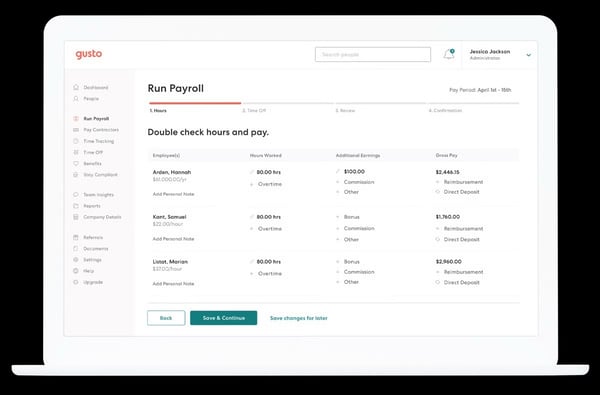
While Gusto’s out-of-the-box reporting covers day-to-day payroll needs well, some G2 users note that the platform’s custom report-building tools are limited. For teams that need to drill into specific cost breakdowns or produce detailed analytics for senior leadership, the standard templates don’t always go far enough, though most reviewers agree the core reporting holds up well for routine payroll tasks.
Gusto’s pricing is competitive for solo users and very small teams, and most reviewers feel the automation and compliance support more than justify the cost. That said, some G2 users note that pricing can escalate as headcount grows, with the jump between plans feeling significant for businesses on tighter budgets.
Overall, Gusto strikes a strong balance between ease of use and payroll depth, making it a natural fit for small and mid-sized teams that want reliable automation without a steep learning curve.
What I like about Gusto:
- The payroll dashboard is easy to configure from day one, with auto-saved forms, pre-filled employee details, and automated tax filing that handles state and federal submissions without manual intervention.
- Gusto’s onboarding module simplifies new hire setup considerably, covering documentation uploads and e-signatures in a process that most reviewers describe as smooth and glitch-free.
What G2 users like about Gusto:
“I like how many features Gusto has built in, which makes it very useful for handling various tasks. The interface is intuitive and user-friendly, which helps me save time and focus on other tasks. I also love the dashboard on the home screen that shares reminders and prompts for action, which is especially helpful because it means I don’t need another platform to keep track of these tasks. Additionally, the initial setup was very easy, which made starting with Gusto a breeze.”
– Gusto review, Dionte G.
What I dislike about Gusto
- While Gusto’s out-of-the-box reporting covers day-to-day payroll needs well, some G2 users note that custom report-building tools are limited for teams that need deeper cost breakdowns or detailed analytics for senior leadership.
- Gusto’s pricing is competitive for solo users and very small teams, but some G2 users note that costs can escalate as headcount grows, with the jump between plans feeling significant for businesses on tighter budgets.
What G2 users dislike about Gusto:
“The only thing that would be a negative is the price per month. I feel it could be more competitive with other payroll platforms, especially for clients who have been using it for years.”
– Gusto review, Russell S.
Employees strive to progress and continue acquiring education while working. Be on their radar as a “people-sensitive brand” by offering tuition reimbursement and streamlining the employee approval process.
3. Rippling: Best for all-in-one HR, IT, and payroll management
Rippling is a tool that needs no introduction. Widely praised by teams that use it for payroll, HR, and IT, all running from a single platform without the operational overhead of managing multiple systems. While going through G2 reviews, I’ve seen many users appreciate how Rippling centralizes core HR functions, such as payroll, tax management, and company-wide updates, into a single accessible platform. Direct deposit is rated at 97% and payroll entry at 95% by G2 reviewers, reflecting the accuracy and reliability that fast-scaling teams depend on.
Several reviewers have emphasized how HR automation and compliance management help streamline their day-to-day work. I’ve come across feedback where users say the system makes it easier to manage onboarding, process leave requests, and handle payroll confidently, even for international staff. Performance and reliability are rated at 95%, and scalability at 95% by G2 reviewers, making it one of the strongest performers in the category for teams expecting rapid growth.
Based on the reviews I’ve read, Rippling’s ability to run global workflows from a single server is another strong point. Users often describe the implementation process as efficient, with document uploads, employee surveys, and performance tracking integrated seamlessly into one platform. Time-off accrual and approvals are rated at 95% by G2 reviewers, underscoring how well the platform handles the end-to-end employee lifecycle beyond just pay runs.
I’ve noticed strong praise for Rippling’s SSO and app integrations across reviews. Users highlight how RPass and single sign-on give employees access to all their tools through one login, with core HR integration rated at 93% and API/integration at 91% by G2 reviewers, reflecting a platform that connects cleanly with the broader tech stack most mid-market teams already use.
I’ve also seen reviewers highlight how Rippling’s time tracking and PTO management feed directly into payroll without manual intervention. For teams managing complex schedules across multiple locations or time zones, this real-time connection between attendance and pay is a significant operational advantage.
To round out the positives, I’ve come across consistent praise for Rippling’s customer support team’s responsiveness, with implementation managers frequently named by reviewers and described as hands-on and thorough. Most users agree that the quality of guidance during setup and onboarding sets the tone for a smooth, long-term experience on the platform.

Rippling’s breadth is one of its biggest strengths, but it can also be its steepest initial challenge. Based on G2 reviews, new users and admins frequently feel overwhelmed by the volume of features and modules available, with finding specific settings often requiring more clicks than expected. That said, most reviewers agree that once the platform becomes familiar, the depth of functionality more than justifies the initial investment of time spent learning it.
Rippling operates on a modular pricing model, which means costs can compound quickly as more features and integrations are added. Some G2 users note that key capabilities they expected to be included required additional payment, making the final bill higher than anticipated. Reviewers broadly acknowledge, however, that the platform’s all-in-one depth and automation capabilities deliver strong value for teams that fully utilize what it offers.
In practice, Rippling is a strong fit for mid-market and fast-scaling teams that need HR, IT, and payroll running from one place without stitching together multiple tools.
What I like about Rippling:
- Rippling centralizes HR, IT, and payroll in one platform, with SSO and app integrations giving employees seamless access to all their tools through a single login.
- Time tracking and PTO management feed directly into payroll without manual intervention, making it especially valuable for teams managing complex schedules across multiple locations.
What G2 users like about Rippling:
“Rippling’s biggest strength is bringing HR, payroll, and IT into one unified platform, which eliminates the need for multiple tools. At Certa, Rippling provides the information on my pay, the organization chart, company information, and employee information. Merging HR, payroll, and IT on a single platform is extremely efficient and easy to use. As a technical consultant in the sales department, I use the organization chart feature frequently to understand the hierarchy of the organization and departments.”
– Rippling review, Suyash S.
What I dislike about Rippling:
- Rippling’s breadth is one of its biggest strengths, but based on G2 reviews, new users and admins frequently feel overwhelmed by the volume of features available, with finding specific settings often requiring more clicks than expected.
- Rippling operates on a modular pricing model, which means costs can compound quickly as more features are added, with some G2 users noting that key capabilities they expected to be included required additional payment.
What G2 users dislike about Rippling:
“Rippling can be as simple or as complex as you need it to be. What was a little stressful was that many features we were used to being built in needed to be set up manually. I am very grateful for the hands-on support during implementation. I don’t think we would have been able to set up the system to work as well as it does for us without that guidance. Rippling’s complexity ended up being to our benefit as it allowed for more customization to our use case, but it led to difficulty getting buy-in from middle managers on our team when we spoke to them about the transition before we had all the answers. They were nervous about how changes might impact them. In the end, everyone ended up happy with the product and more satisfied than they were with our previous systems. If I were to do this process again, I would have handled the training and involvement of other users differently.”
– Rippling review, Delaney W.
4. Deel Payroll: Best for global payroll and contractor payments
Deel Payroll is purpose-built for distributed teams that need to pay people across borders without turning compliance into a full-time job. It offers a unified view of HR and payroll workflows, making it easier to track income statements, manage payroll cycles, and stay aligned with revenue goals, all from a single dashboard. The web portal and payroll entry are rated 94% by G2 reviewers, reflecting how well the platform delivers on its promise of simplicity at scale.
From what I’ve read, users really value Deel Payroll’s clean interface and one-click access to core features like payroll administration, holiday tracking, compliance tools, and tax calculations. The platform simplifies everything from contract creation to employee onboarding, with ease of use rated at 95% and ease of setup at 94% by G2 reviewers.
I’ve come across consistent praise for Deel Payroll’s global payroll capabilities. Users appreciate how it ensures legal compliance across jurisdictions and supports payments in multiple currencies, with real-time updates and email alerts about international transactions proving especially helpful for teams managing staff across multiple countries. Performance and reliability are rated at 93% by G2 reviewers, and scalability at 93%, making it a dependable choice for teams expanding their global footprint.
I’ve noticed strong praise across reviews for Deel’s flexibility in how contractors and employees receive their pay. Users frequently highlight the variety of withdrawal options available, including local bank transfers, Wise, PayPal, Payoneer, crypto, and the Deel virtual card, giving individuals control over how and where they receive their funds, regardless of location.
I’ve also seen consistent mentions of Deel Advance as a standout feature. Reviewers describe it as a genuine differentiator, giving contractors the ability to access a portion of their earned pay before the scheduled pay date with minimal friction and automatic repayment built in, which is particularly valued during cash flow gaps.
I’ve read multiple reviewers highlight how Deel’s auto-withdrawal feature removes the need to manually transfer funds after each payment. The ability to set percentage-based automatic transfers to multiple accounts is frequently described as one of those small but meaningful conveniences that make Deel feel genuinely built for the way international contractors actually work.
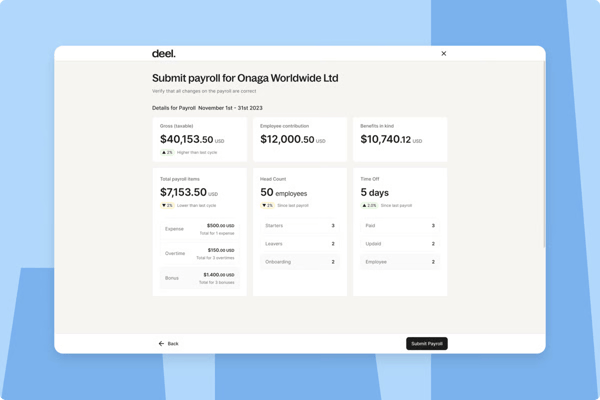
Deel Payroll’s exchange rates are a recurring topic in G2 reviews, particularly among contractors in Latin America, Africa, and Southeast Asia. The gap between Deel’s conversion rate and the prevailing market rate can meaningfully reduce take-home pay over time, especially for users receiving USD or EUR and withdrawing in a local currency. That said, most reviewers acknowledge that the breadth of withdrawal options and the speed of transfers offset much of this frustration for day-to-day use.
Based on G2 reviews, the Android app in particular is frequently flagged for slow load times and sluggish tab navigation, occasionally requiring users to close and reopen the app to restore normal functionality. Given that many Deel users rely primarily on mobile to manage their payments, this is a friction point worth noting. Most reviewers are quick to add, however, that the web experience is smooth and that the mobile issues haven’t been significant enough to diminish their overall confidence in the platform.
For teams that need to pay people across borders reliably and without excessive administrative overhead, Deel Payroll delivers a compelling combination of compliance coverage, payment flexibility, and contractor-friendly features that few platforms can match at this scale.
What I like about Deel Payroll:
- Deel Payroll supports a wide range of withdrawal options, including local bank transfers, Wise, PayPal, Payoneer, crypto, and the Deel virtual card, giving contractors full control over how and where they receive their funds.
- The Deel Advance feature allows contractors to access a portion of their earned pay before the scheduled pay date, with automatic repayment built in and minimal friction to get started.
What G2 users like about Deel Payroll:
“What I like best about Deel Payroll is the ease with which I can pay people in different countries. The whole process seems very simple, not complicated in any way.
The design is very clean, so I can easily find what I need without getting confused. It has made my life easier and helped me save some time.”
– Deel Payroll review, Abdelaziz A.
What I dislike about Deel Payroll
- Deel Payroll’s exchange rates are a recurring topic in G2 reviews, particularly among contractors in Latin America, Africa, and Southeast Asia, where the gap between Deel’s conversion rate and the prevailing market rate can meaningfully reduce take-home pay over time.
- Based on G2 reviews, some users note that the mobile app can feel slower to load compared to the desktop experience, particularly on Android devices when switching between tabs, though most reviewers confirm the web experience remains smooth and reliable.
What G2 users dislike about Deel Payroll:
“While the platform itself is excellent, the iOS mobile app performance could be smoother. All the features I need are there, but I occasionally experience lag or UI glitches where a button requires a double-tap to respond. It’s not a dealbreaker and the desktop version is flawless, but the mobile experience would benefit from some optimization to make it feel as snappy as the rest of the service.”
– Deel Payroll review, Ar S.
Once you start working with cross-border contractors, manual payments quickly break down. Explore more dedicated contractor payment tools like Deel that can handle compliance, currencies, and tax forms in one place.
5. UKG Ready: Best for direct deposit and employee data automation
If your organization needs a centralized, automated HR and payroll system that works just as well on the floor as it does in the back office, UKG Ready is built for you. I’ve seen G2 users consistently highlight how UKG Ready’s cloud-based HR and payroll automation helps streamline workflows. Many said it made them more confident in managing employee records, experimenting with forms, and centralizing HR data more efficiently. Direct deposit is rated at 93% and payroll entry at 92% by G2 reviewers, reflecting the reliability that mid-market and enterprise teams have come to expect.
I’ve noticed that users appreciate UKG Ready for automating core HR tasks like talent acquisition, reporting, tax compliance, and benefits administration. The employee self-service portal is frequently mentioned for making HR functions accessible without requiring HR intervention, and the web portal is rated 92% by G2 reviewers, underscoring how well the platform serves employees who need self-service access to their own data.
I’ve read multiple reviewers highlight how clearly UKG Ready presents paycheck and pay stub information. Users value the transparent breakdown of deductions, accruals, and net pay, with easy access to historical pay stubs and W-2 downloads, removing the need to chase HR for basic payroll documentation. Tax calculation is rated 90% and tax filing 89% by G2 reviewers, reflecting the accuracy teams rely on when pay transparency matters most.
I’ve come across strong and consistent praise for UKG Ready’s PTO tracking and accrual visibility. Users value being able to see real-time leave balances, pre-submit future time off requests, and track accruals without having to contact HR, which, for larger teams, significantly reduces the volume of routine queries that land on HR’s desk.
I’ve heard strong praise for UKG Ready’s shift management and scheduling capabilities. Managers highlight the ability to assign shifts, view coverage gaps, and facilitate shift swaps directly through the platform, with the scheduling module described as a genuine time-saver for operations teams managing hourly or rotating workforces.
Another praised feature was the UKG Ready mobile app. Users say it allows them to manage payroll, approve expenses, check PTO balances, and run reports remotely, making payroll tasks more autonomous and less dependent on office access. Ease of use is rated at 89% by G2 reviewers, and for frontline and field-based teams especially, the mobile experience is what makes the platform feel genuinely accessible day to day.
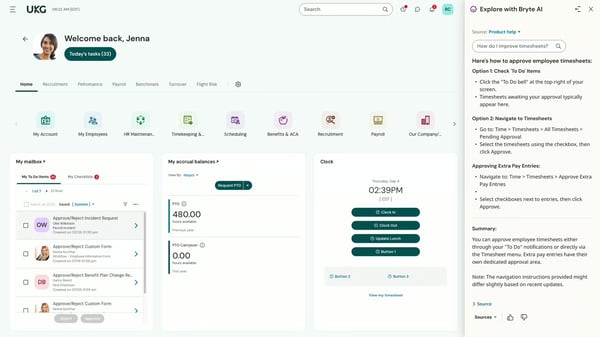
While UKG Ready’s employee-facing interface is widely praised for its clean design and accessibility, G2 reviews tell a different story on the admin side. HR managers and payroll admins frequently note that completing routine back-end tasks requires more clicks than expected, with nested menus and multi-step workflows adding friction to what should be straightforward processes. That said, most reviewers agree that once familiar with the layout, the depth of configuration available makes the extra navigation worthwhile for complex organizational needs.
Based on G2 reviews, the implementation process for UKG Ready can be more involved than teams initially anticipate, with some users describing it as lengthy and requiring significant time investment before the platform is fully operational. For organizations with complex pay structures or large headcounts, having a dedicated HRIS admin during setup is frequently recommended by reviewers who have gone through the process themselves. Once fully configured, however, most users describe the platform as stable, reliable, and well worth the upfront effort.
For mid-market and enterprise teams managing complex workforce structures across multiple locations, UKG Ready delivers a depth of HR and payroll automation that holds up well at scale.
What I like about UKG Ready:
- The employee self-service portal gives employees direct access to PTO balances, pay stubs, shift schedules, and accrual data without requiring HR intervention, significantly reducing routine query volume.
- UKG Ready’s shift management and scheduling module allows managers to assign shifts, view coverage gaps, and facilitate shift swaps directly through the platform, saving considerable time for teams managing hourly or rotating workforces.
What G2 users like about UKG Ready:
“I like UKG Ready’s unified, single-database system. HR, payroll, and timekeeping share the exact same database, which means there’s no need to sync data between different platforms. This is a big advantage because an employee profile update or shift change reflects instantly across payroll and reporting. This creates a single source of truth for all of our employee data, transforming how I manage our workforce. I also found the initial setup to be quite easy.”
– UKG Ready review, Abhishek D.
What I dislike about UKG Ready
- While UKG Ready’s employee-facing interface is widely praised for its clean design, G2 reviews note that admin and HR manager workflows can require more clicks than expected, with nested menus adding friction to routine back-end tasks.
- Based on G2 reviews, the implementation process can be more involved than teams initially anticipate, with a dedicated HRIS admin during setup frequently recommended by reviewers who have gone through the process themselves.
What G2 users dislike about UKG Ready:
“I don’t care for how long the implementation system takes at the moment. I believe that all companies operate differently, so it would be nice if we didn’t have to complete all of the 50+ courses and we could focus on completing certain courses based on what our company’s needs are.”
– UKG Ready review, Jennifer D.
6. Remote: Best for global compliance and international payroll
Remote is designed primarily to make it straightforward for companies to pay people across borders without getting bogged down in compliance complexity. From what I’ve seen in G2 reviews, users consistently praise how Remote handles the legal, regulatory, and payment logistics of international hiring in a way that feels manageable rather than overwhelming. Ease of use is rated at 95% and ease of setup at 93% by G2 reviewers, reflecting how quickly distributed teams get up and running without extensive onboarding support.
I’ve noticed strong and consistent praise for Remote’s global payroll and multi-currency capabilities. Users appreciate how the platform processes payments across different currencies reliably, with clear breakdowns of earnings, fees, and transfer timelines that make it easy to stay on top of international finances. Direct deposit is rated 93% and the web portal 94% by G2 reviewers, underscoring the payment reliability that globally distributed teams depend on.
I’ve come across multiple reviewers highlighting Remote’s compliance capabilities as a genuine differentiator. The platform automatically handles local employment laws, data protection rules, and labor regulations across jurisdictions, reducing the legal exposure associated with international hiring. Performance and reliability are rated at 93% by G2 reviewers, reflecting a platform that teams can depend on when compliance stakes are high.
I’ve read consistent praise for how smoothly Remote handles the onboarding of international hires. Users describe the process of setting up bank details, signing contracts, and completing country-specific documentation as straightforward and well-guided, with most reviewers noting it significantly reduces the administrative complexity that typically comes with cross-border hiring.
I’ve seen multiple reviewers highlight the speed and consistency of payments through Remote as a standout feature. Contractors and employees across different regions mention receiving payments on time, with clear status notifications and transparent transfer timelines that remove the uncertainty that often comes with international payroll.
I’ve also noticed strong feedback around Remote’s employee self-service capabilities. Users appreciate being able to access pay slips, check balances, update personal details, and manage documents from any device without needing to go through HR, which, for globally distributed teams, is a meaningful reduction in administrative back-and-forth. Meets requirements is rated at 93% and quality of support is rated at 93% by G2 reviewers.
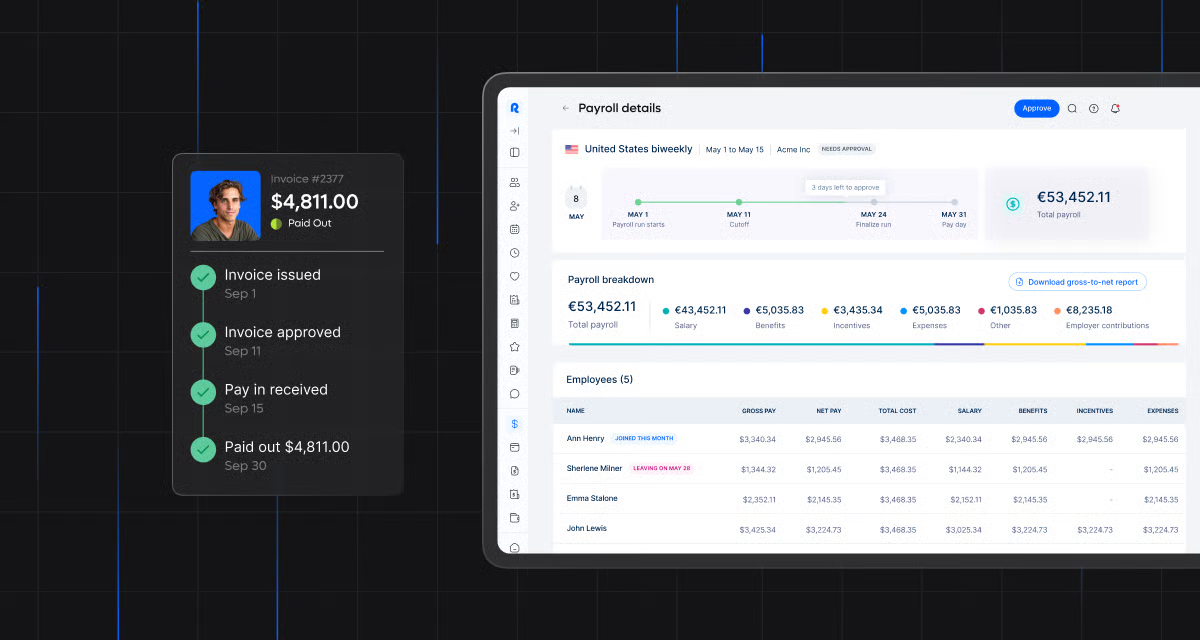
Now, Remote’s fees and exchange rates are a recurring topic in G2 reviews, particularly among contractors who rely on the platform as their primary payment channel. Users note that withdrawal fees and the gap between Remote’s conversion rate and the prevailing market rate can add up meaningfully over time, especially for those receiving USD or EUR and withdrawing in a local currency. Most reviewers acknowledge, however, that the platform’s compliance coverage and payment reliability offset much of this frustration for teams that need a dependable global payroll solution.
Getting support for straightforward queries through Remote is generally described as smooth, but some G2 reviewers note that reaching a live agent for more complex or country-specific issues can take longer than expected. Users mention having to navigate through multiple steps before connecting with someone who can address their specific situation. That said, most reviewers are clear that once they receive assistance, the quality of guidance they get is accurate and relevant to their needs.
Taken together, Remote delivers a compelling solution for companies that need to hire, pay, and stay compliant across borders without building out a dedicated international HR function.
What I like about Remote:
- Remote handles local employment laws, data protection rules, and labor regulations across jurisdictions automatically, giving globally distributed teams the compliance confidence to hire internationally without legal overhead.
- The onboarding process for international hires is smooth and well-guided, covering bank details, contracts, and country-specific documentation in a way that most reviewers describe as significantly less complex than alternatives.
What G2 users like about Remote:
“What I really appreciate about Remote is how much it simplifies managing a global team. Hiring and paying people across different countries used to feel overwhelming, but now it’s pretty straightforward. As an admin, it’s a huge relief knowing compliance is already built in. I’m not constantly second-guessing whether we’re aligned with local labor laws. On top of that, the platform is really easy to use, which saves me a lot of time in my day-to-day work. It lets me focus more on supporting our team instead of getting stuck in paperwork.”
– Remote review, Charvère N.
What I dislike about Remote
- Remote’s fees and exchange rates are a recurring topic in G2 reviews, with users noting that withdrawal fees and the gap between Remote’s conversion rate and the prevailing market rate can add up meaningfully over time, particularly for contractors withdrawing in a local currency.
- Getting support for straightforward queries is generally smooth, but some G2 reviewers note that reaching a live agent for complex or country-specific issues can take longer than expected, with multiple steps required before connecting with someone who can address their specific situation.
What G2 users dislike about Remote:
“I’m not satisfied with the currency conversion rates in the app. They seem less competitive compared to other payment platforms.”
– Remote review, Abdul Moiz.
7. Paylocity: Best for employee reimbursement and wage garnishment
Paylocity is a platform that grows with you. What starts as a payroll solution quickly reveals itself as a comprehensive HR and workforce management suite that mid-market teams tend to find hard to leave. I’ve noticed that G2 users often highlight Paylocity’s color-coded payroll dashboard, which makes it easy to automate payroll entries, manage benefits, adjust compensation, handle 401(k) reporting, and process employee requests all from a single interface. Direct deposit is rated at 95% and payroll entry at 92% by G2 reviewers, reflecting the day-to-day reliability that mid-market teams depend on.
Initially, I read some reviews expressing doubt about Paylocity’s capabilities beyond payroll. But I’ve seen those concerns ease as users discover its advanced integration support with accounting, bookkeeping, and project management tools to track performance data, costs, and time for every employee. Accounting integration is rated at 83% and API/integration at 84% by G2 reviewers, and for teams already running a broader tech stack, the ability to connect Paylocity cleanly into existing workflows is a recurring theme in positive reviews.
I’ve come across multiple mentions of Paylocity’s document management features, which let users customize reports for tax updates, attendance, and performance appraisals. Reporting and dashboards are rated at 88% by G2 reviewers, and the depth of detail available in these reports is frequently cited as one of the reasons mid-market HR teams find Paylocity worth the investment.
I’ve also seen strong praise for Paylocity’s employee self-service portal. Users appreciate being able to access pay stubs, update tax information, manage benefits elections, and submit expense reimbursements without needing to contact HR directly, which, for larger teams, meaningfully reduces the administrative burden on payroll staff.
I’ve read positive feedback about Paylocity’s implementation team quality, with users frequently naming specific team members who were responsive, thorough, and genuinely invested in getting the platform configured correctly from the start. For a platform with the depth of features Paylocity offers, having a strong implementation experience sets the tone for how confidently teams adopt it in the long term.
I’ve read positive feedback about customer support during the onboarding and implementation phase, with users describing the guidance they receive as prompt, detailed, and specific to their configuration needs. Performance and reliability are rated at 90% by G2 reviewers, and scalability at 90%, reflecting a platform that holds up well as organizational complexity grows.
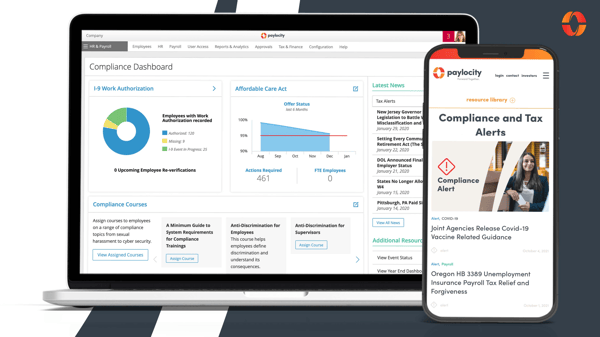
Where Paylocity genuinely shines is in its implementation experience, with users frequently praising the onboarding team for its thoroughness and hands-on approach. Some G2 reviewers note, however, that support responsiveness can taper off once the platform goes live, with post-implementation queries sometimes taking longer to resolve than expected. Most users are quick to add that, as they become more familiar with the platform, the frequency of support requests drops considerably.
Report customization is an area where G2 users see room for growth. For routine payroll and HR reporting, the standard templates hold up well, but teams dealing with complex tax deductions, arrears, or multi-tiered benefit structures occasionally find the built-in tools don’t stretch far enough. Experienced users tend to find workable solutions, and most agree that the core reporting remains dependable for everyday needs.
To conclude, Paylocity is a strong fit for mid-market teams that need a centralized platform for payroll, benefits, and HR reporting without juggling multiple systems.
What I like about Paylocity
- The color-coded payroll dashboard centralizes payroll entries, benefits management, compensation adjustments, and 401(k) reporting in one place, making it easy for HR teams to manage multiple workflows without switching between tools.
- The employee self-service portal gives employees direct access to pay stubs, tax information, benefits elections, and expense reimbursements, reducing the volume of routine queries that land on HR’s desk.
What G2 users like about Paylocity:
“I like Paylocity’s knowledge base within the portal; it is easy to search for things that I have questions about. I also like that I can call their customer service line and they are readily available to answer any questions. The self-service portal is very important because we value our employees’ experience. We like for them to be able to locate what they need without having to search for it. It’s all right in the self-service section. Additionally, Paylocity integrates with our 401K provider, which is convenient.”
– Paylocity review, Isa A.
What I dislike about Paylocity:
- Where Paylocity genuinely shines is in its implementation experience, but some G2 reviewers note that support responsiveness can taper off once the platform goes live, with post-implementation queries sometimes taking longer to resolve than expected.
- Report customization is an area where G2 users see room for growth, with teams dealing with complex tax deductions, arrears, or multi-tiered benefit structures occasionally finding that the built-in tools don’t stretch far enough for their needs.
What G2 users dislike about Paylocity:
“Creating ad hoc reports can sometimes be a little challenging. There aren’t a lot of user-friendly instructions on how to create an ad hoc report. Also, any type of updates in the system, Paylocity needs to be more proactive when it comes to communicating that information to clients. Any type of system issues or bugs that Paylocity runs into when it comes to the system needs to be reported or communicated to its clients. There is sometimes a delay in the results of changes on a report because the report does not update in real-time.”
– Paylocity review, Tiffany W.
Are you just starting out and looking for a simple, efficient, and cost-effective HR system to run payroll? Check out these free core HR solutions to ease your employee hassles.
Frequently asked questions about the best payroll software
In addition to sharing my experience, here are some frequently asked questions about payroll software that you should know
1. Which is the best payroll software for small businesses?
For small businesses, the best and most cost-effective payroll software is OnPay, Patriot Payroll, QuickBooks, and Gusto, which contain all required features like direct deposit, tax calculation, employee expense reimbursements, and so on.
2. Which is the best payroll software for employees?
The best payroll software for employees is Rippling, Remote, Gusto, and Sage Payroll. These programs offer a user-friendly and convenient employee portal to simplify and automate employee requests and operations.
3. Which payroll software has the highest reviews?
Based on G2 ratings, RUN Powered by ADP, Gusto, and Rippling are among the platforms with the highest reviews, thanks to their ease of use, integrations, and reliability in payroll processing.
4. What are the top-rated payroll solutions for tech startups?
Tech startups often prefer top-rated payroll solutions like Rippling and Deel. They integrate well with SaaS stacks, offer automation, and support global contractor payments.
5. What’s the best software for easy payroll processing?
If your team values simplicity, Gusto and ADP RUN are considered the best software for easy payroll processing. Both minimize manual data entry while ensuring compliance and accurate pay runs.
6. What’s reliable payroll software for efficient business management?
For HR and finance leaders managing larger teams, Paylocity and UKG Ready are often cited as reliable payroll software for efficient business management because they combine compliance, analytics, and payroll automation under one platform.
7. Are there recommendations for top help desk tools for SaaS companies?
While not payroll-specific, SaaS-focused companies often pair payroll with strong customer support solutions. According to G2, the top help desk tools for SaaS companies include Zendesk, Freshdesk, and Intercom—making them a solid complement to payroll platforms in the tech space.
8. Can a payroll software appoint and manage multiple contractors?
Yes, payroll software can manage the complete hire-to-retire process of contractors via the contract management platform. This platform outlines job expectations, hourly or day-based compensation, and currency conversion policies to regularize contractor pay cycles worldwide.
9. What integrations should I look for in the best payroll software?
The best payroll software integrates seamlessly with your existing tools. Common integrations include accounting platforms (like QuickBooks payroll, OnPay, or Zero), attendance and time-tracking systems, project management software, HRMS, and benefits administration software.
10. Which is the best payroll software for payslip generation?
The best payroll software for payslip generation includes QuickBooks, Sage Payroll, Keka HR, greytHR, and Paychex Flex. These software programs help you maintain accurate employee and payment records and upload monthly-due payslips.
Save the (pay) dates and embrace efficiency
After evaluating multiple payroll software solutions, I concluded that some features cannot be compromised in whichever solution you choose.
Given the sensitivity of payroll data, systems that offer robust data security, platform compatibility, and legal and compliance updates have great potential to scale your employee growth.
While experimenting with these payroll tools, keep in mind that different features suit different businesses. To know which payroll software suits you the best, do your own specific research, gather the necessary resources, and refer to this in-depth list to make the best call for your business.
Payroll tools can get pricey and tricky. This guide on payroll software cost unpacks what drives the cost and what most teams overlook when picking a payroll system.

💸 Earn Instantly With This Task
No fees, no waiting — your earnings could be 1 click away.
Start Earning
