


I know you are here because your performance cycle is probably broken.
Clunky review cycles. Disconnected feedback loops. Spreadsheets, forms, and PDFs that used to work, until they didn’t. And now? They’re dragging down employee performance.
You’ve outgrown the old tools. You’re here because you’re ready for the best performance management software to fix it, and I’ve seen firsthand how the right platform can turn things around.
But once you’ve decided to invest in a platform, the real question hits: Which one actually works for a team like yours? What works for a 10-person startup won’t cut it for a 150-person org. Fast-moving teams need real-time feedback, flexible review cycles, and clear goal alignment. And with AI now reshaping how performance is tracked and reviewed, teams are asking: does this tool actually help my managers give better feedback, or just automate the same broken process?
In my conversations with people across the org chart, the needs vary: software developers and technical teams tell me they want lightweight, intuitive platforms that don’t get in the way of deep work. HR leaders need structure and visibility. Managers want actionable insights, not bloated dashboards.
Whether you’re a startup formalizing reviews for the first time or a growing team trying to scale performance conversations, this list will help you find the right fit. I evaluated 20+ tools using G2 Data, real user feedback from early 2026, and insights from the folks doing this work every day, and narrowed it down to eight that consistently deliver: HiBob HRIS, BambooHR, Rippling, Lattice, HROne, Paylocity, Leapsome, and Performance Pro.
8 best performance management software for 2026: My top picks
- HiBob HRIS: Best for mid-sized teams running structured reviews
Brings reviews, goals, and feedback into one modern HRIS with flexible review cycles built in. - BambooHR: Best for small and growing businesses formalizing performance reviews
Makes it simple to launch review cycles and track completion without overcomplicating things for lean HR teams. - Rippling: Best for teams review status tracking and payroll sync
Connects performance ratings directly to compensation and payroll in one unified system. - Lattice: Best for teams that want AI-assisted performance conversations
An AI bot gives managers review suggestions grounded in year-round data from 1:1s and feedback. - HROne: Best for AI-powered performance automation and succession planning
Leads the category for AI text summarization and pairs it with a built-in 9-box matrix for succession planning. - Paylocity: Best for mid-sized teams managing performance and payroll together
A video journal feature lets managers and employees log reflections throughout the year, not just at review time. - Leapsome: Best for teams building a continuous feedback culture
Holds the highest 360 review rating in the category and surfaces peer feedback summaries via AI. - Performance Pro: Best for enterprise and finance teams that value simplicity
Purpose-built for banking and finance teams that need consistent, well-documented review cycles.
*These are the top-rated products in the performance management software category, according to the G2 Spring 2026 Grid Report. All the software mentioned above provide custom pricing on request.
8 best performance management software I recommend
From all the conversations I’ve had with HR leaders, team leads, and founders, one thing’s clear: performance management software means different things to different teams. But at its core, it’s any tool that helps people set goals, give feedback, track progress, and run review cycles, all in one place.
For some companies, that might mean quarterly reviews and lightweight check-ins. For others, it’s about real-time feedback, cascading company-wide goals, 360° reviews, engagement data, and calibration tools. The features vary, but the goal stays the same: help people grow, stay aligned, and do their best work.
And it pays off. According to McKinsey research that continues to hold true heading into 2026, companies that focus on their people’s performance are 4.2 times more likely to outperform their peers, with an average 30% higher revenue growth and attrition rates five percentage points lower. That kind of lift only happens when performance management is done intentionally and with the right tools in place.
I’d say the best performance management software is the one that meets your team where you are, whether you’re formalizing reviews for the first time for your 10-person organization or scaling performance workflows across departments.
How did I find and evaluate the best performance management software?
I started with G2’s Spring 2026 Grid® Reports for performance management software to shortlist both well-known platforms and emerging tools that teams are genuinely excited about.
Then, I analyzed hundreds of verified G2 reviews from HR professionals, team leads, and People Ops specialists from early 2026. I paid close attention to recurring themes, like ease of setting up review cycles, how well goal tracking works across teams, feedback quality, and whether users actually engage with the platform.
Given that most tools often provide just demos or self-guided tours, I reviewed insights from professionals with hands-on experience and validated their insights using verified G2 reviews.
The screenshots featured in this article may be a mix of those captured during research and ones obtained from the vendor’s G2 page.
What makes the best performance management software: My criteria
There are a few things I kept coming back to while comparing these performance management tools, especially the features and functionality that actually make a difference in how teams give feedback, align goals, and grow together. These were the key traits I looked for in each tool:
- Easy review cycle setup: I looked for platforms that make it simple to launch and manage performance reviews, whether that’s quarterly check-ins, annual reviews, or ad hoc cycles. The best tools let you customize timelines, questions, and participants without needing a manual workaround or IT help.
- Goal-setting that scales: I prioritized tools that support both individual and company-wide goal alignment. Platforms that offer OKRs, cascading goals, and visibility into progress stood out, especially those that let managers and employees track updates in real time.
- Built-in feedback and recognition: It’s not just about formal reviews. I looked for platforms that support real-time feedback, peer recognition, and manager notes to encourage more ongoing, meaningful performance conversations.
- Usability and adoption across roles: A tool is only as good as its adoption rate. I focused on platforms with clean, intuitive interfaces that work for HR admins, team leads, and employees alike. In-app guidance, mobile access, and smart reminders all help boost engagement.
- AI and automation features: In 2026, I also evaluated how well these tools use AI, whether for summarizing feedback, generating review language, automating review triggers for new hires, or surfacing performance insights. This is increasingly where differentiation happens.
- Customization and flexibility: I looked for tools that can adapt to different workflows. Whether it’s adjusting review templates, creating custom rating scales, or modifying feedback cycles, the most flexible platforms give you room to evolve as your team grows.
- Integration with HRIS and collaboration tools: Performance management doesn’t live in a vacuum. I checked whether the platforms integrate with popular HRIS tools and communication tools like Slack or Teams, to keep everything connected and reduce context-switching.
- Reporting and calibration tools: I evaluated how well these tools surface performance trends. Features like score distribution reports, calibration dashboards, and manager rating analytics help ensure fairness and data-backed decision-making.
- Support and onboarding experience: Since I wasn’t hands-on with each tool, I relied on user feedback to understand how well vendors support new customers. I preferred platforms that offer onboarding support, training resources, and responsive customer success teams.
Now here’s the thing: after evaluating 20+ tools, I found that the top performers may not do everything, but they really shine in the areas that move the needle: goal alignment, reviews, and feedback. The right choice depends on what your team needs most right now.
The list below contains genuine user reviews from the Performance Management Software category. To be included in this category, a solution must:
- Facilitate the employee performance review process
- Enable 360-degree feedback among managers, employees, and peers
- Track individual employees’ goals
- Allow users to evaluate employee performance benchmarked against overarching company goals
- Generate in-depth dashboards or reports based on performance data
*This data was pulled from G2 in 2026. Some reviews may have been edited for clarity.
1. HiBob HRIS: Best for mid-sized teams running structured reviews
HiBob HRIS stood out to me right away for how seamlessly it blends performance management into the broader HR experience, without making it feel like an afterthought. Goals, feedback, time off, comp, and reviews all live in one place, and that context is powerful when you’re trying to drive real conversations around growth and performance.
According to G2 Data, HiBob is especially popular with mid-market organizations, with 83% of users in that segment. It’s the kind of platform that grows with you without dragging you into enterprise-level complexity.
HiBob takes a flexible approach to performance reviews. Instead of rigid quarterly or annual reviews, it supports multiple review types, including 360-degree reviews, peer feedback, self-assessments, and manager reviews. Companies can tailor these to fit their cadence and culture, which is useful if you’re running fast and need agile, lightweight feedback loops.
The user interface is another big plus. Teams loved how modern and intuitive it is to navigate, and how simple it is to launch review cycles. According to G2 Data, HiBob scores 91% for ease of use and 85% for ease of setup, proof that teams not only adopt it quickly but actually enjoy using it.
What also stood out is how HiBob connects performance to the full employee record. Because time off, org structure, compensation, and goals all sit in the same system, managers walk into review conversations with meaningful context, not just a ratings form. That integration is something teams with standalone performance tools consistently say they miss.
That said, reporting has emerged as a recurring friction point. Multiple G2 reviewers in early 2026 noted that while the reporting tools work, export options can be limited and generating complex data views sometimes requires manual structuring. HiBob’s active roadmap and responsiveness to feedback make this an area worth watching, and it’s not a dealbreaker for most teams.
If you’re a mid-sized company looking to level up how you run reviews without taking on yet another point solution, HiBob is a smart, modern choice. It’s built for People Ops teams who want performance management to feel connected to the bigger picture, not a quarterly scramble.
What I like about HiBob HRIS:
- I love how configurable it is. Review types, timelines, forms, and participants can all be adapted to fit different teams and cadences, which is rare at this price point.
- The platform centralizes performance history, time off, org structure, and goals in one place. That context makes review conversations more grounded and less reliant on gut feel.
What G2 users like about HiBob HRIS:
“HiBob continues to evolve in ways that make day‑to‑day HR operations smoother. The recent enhancements to workflows and automation have been especially valuable. It’s now easier to build multi‑step processes that adapt to different employee groups or locations. I also appreciate the improvements to reporting and dashboards; the added customization options make it much simpler to surface insights for executives and department leaders. Overall, HiBob is becoming more intuitive, more configurable, and better aligned with how modern HR teams operate.”
– HiBob HRIS Review, Lindsey P.
What I dislike about HiBob HRIS:
- Some G2 reviewers noted that reporting exports can be limited. Getting specific data views sometimes requires manual structuring, which adds steps for teams that rely on custom analytics. HiBob’s active roadmap and responsiveness to feedback make this an area worth watching as the platform continues to grow.
- A few users flagged that the AI features, while promising, are still maturing. Teams expecting out-of-the-box AI-powered HR insights may find the current capabilities are a starting point rather than a finished product.
What G2 users dislike about HiBob HRIS:
“I would like an improvement in the reporting features—specifically, the ability to generate reports from a snapshot date rather than just seeing changes from an ‘effective date.’ This would help capture everyone’s salary accurately on a particular date. Additionally, the navigation of time off rules across different regions could be made easier. I also find the current lack of subfolders within a folder in the document section to be limiting.”
– HiBob HRIS Review, Sinead D.
How long does it take to see ROI from performance management software?
According to G2 Data, performance management software delivers an estimated ROI within just 12 months on average.
Dig deeper into implementation effort, deployment timelines, contract terms, and other buyer insights on the G2 Grid® for Performance Management Software before making your purchase decision.
2. BambooHR: Best for small and growing businesses formalizing performance reviews
BambooHR has been around long enough that most HR folks have either used it or at least heard of it. It’s especially popular with small and mid-sized companies, which together make up 65% of its user base on G2. It’s earned that reach by focusing on the fundamentals and doing them really well.
The performance management module feels like a natural extension of that philosophy. G2 users consistently say it’s easy to launch a cycle, track who’s completed their reviews, and follow up without nagging people. That simplicity is what makes it so appealing for leaner People Ops teams or companies formalizing their process for the first time.
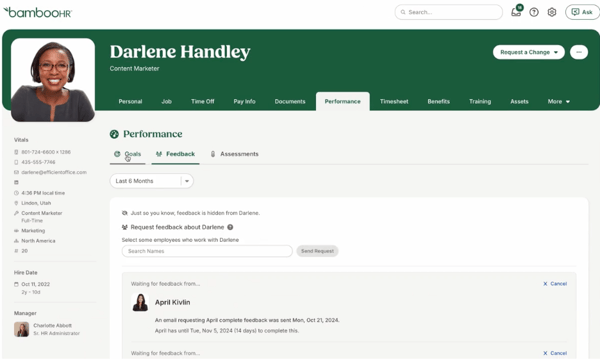
It’s especially popular in industries like IT, software, nonprofits, construction, and marketing, where HR teams are often lean and need performance tools that don’t overcomplicate things.
One thing that stood out consistently in G2 reviews is how strong the onboarding workflows are. The process is structured end to end, automated reminders keep things on track, and new hires move through it without needing IT involvement or hand-holding from HR. For teams formalizing their process for the first time, that kind of reliability at the start of the employee lifecycle builds confidence in the rest of the platform.
I saw a lot of love for the performance management dashboards that show visibility on goals, feedback, and upcoming assessments. That kind of visibility goes a long way when you’re prepping for compensation conversations or trying to spot performance patterns across a team. Along with performance dashboards, review status tracking and historical data also stood out as the most appreciated and highest-rated features on G2.
However, a few users noted that while BambooHR handles the basics well, they ran into limits when trying to customize review templates, tailor feedback questions, or set up more advanced evaluation flows. It’s a deliberate trade-off for simplicity, and for most small to mid-sized teams it’s absolutely the right call. Teams that need highly custom review frameworks may want to explore more configurable alternatives.
If you’re searching for the best performance management software for small tech startups or IT services firms, BambooHR is one of the most consistently recommended options on G2.
What I like about BambooHR:
- I really appreciate how the onboarding workflows are one of the strongest parts of the platform. Teams land in BambooHR already familiar with how it works, which makes performance cycles easier to run from day one.
- The dashboards make it genuinely easy to track review status, surface past feedback, and walk into comp or promotion conversations with the right context already in hand.
What G2 users like about BambooHR:
“What I like most is how everything I need is visible the moment I log in. I usually just check the dashboard to see who’s out, any pending time-off requests, and general team updates. It saves me from asking around or checking multiple tools. It feels simple, but it actually makes daily HR-related checks much smoother.”
– BambooHR Review, Verified User
What I dislike about BambooHR:
- BambooHR covers the essentials well, but the customization options for review templates and feedback formats are fairly lightweight. For most small to mid-sized teams formalizing their process for the first time, that’s exactly what makes it so easy to get started.
- The AI assistant is still finding its feet — a few reviewers noted it struggled to respond accurately to even basic prompts. BambooHR is actively expanding its AI capabilities though, and the core platform more than makes up for it in reliability and ease of use.
What G2 users dislike about BambooHR:
“The platform makes it easy to manage employee information, track time off, and handle HR tasks all in one place without feeling overwhelmed. I especially appreciate how streamlined the interface is. It really helps simplify day-to-day HR processes and keeps everything organised, which saves a lot of time and reduces stress.”
– BambooHR Review, Verified User
Looking beyond reviews and goal tracking? See the best employee experience software to compare platforms that combine performance, feedback, recognition, and communication in one employee-centric system.
3. Rippling: Best for review status tracking and payroll sync
I know Rippling as a modern HRIS and payroll platform. It’s one of the best-known names in the space, especially for fast-scaling companies that want to manage everything from onboarding to global EOR from a single system.
But what impressed me when looking at performance management specifically is how capable and deeply integrated it’s become. You can set up performance cycles in minutes and run them the way you want, without needing workarounds. You can assign goals and OKRs, align them with departments, teams, or specific groups, and track progress in real time, all inside the same system you’re using for onboarding, payroll, and compliance.
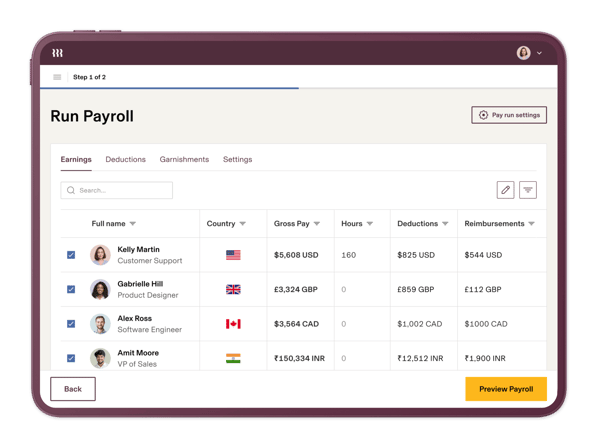
Where Rippling really differentiates is in how performance connects to compensation. You can calibrate ratings, assign merit increases, and push remuneration changes directly to payroll. For teams that manage comp cycles at scale, this removes a lot of the manual work and human error that comes with jumping between spreadsheets and systems.
Rippling also launched its AI module in early 2026, and the early reception from G2 reviewers has been strong. The AI assistant lets teams build custom reports through natural language prompts rather than having to configure them manually, which is a real time-saver for HR admins who need specific data cuts without relying on analytics support.
According to the G2 Grid Report, Rippling the category for review status tracking at 94%, alongside strong scores for customizable forms (93%) and 360 reviews (93%). Its feedback features are equally strong, with continuous feedback at 92% and 1-on-1 meetings at 90%, well above the category average.
One thing that surfaced consistently in recent G2 reviews is Rippling’s pricing model. While the platform is powerful, it uses a modular add-on approach, and the actual cost depends heavily on which modules you enable. For teams with straightforward needs, this can mean paying for features they don’t use. For organizations already using Rippling across HR, IT, and payroll, unlocking performance adds meaningful value without requiring a new vendor relationship.
If you’re already using Rippling for HR or payroll, enabling performance is a natural next step. And if you’re evaluating tools that can scale with your team, it’s one of the few platforms that truly connects performance, compensation, and operational workflows in a way that’s both powerful and easy to manage.
What I like about Rippling:
- I really like how Rippling connects performance reviews to compensation workflows. The ability to sync ratings, merit increases, and payroll updates in one place is a genuine time-saver that I haven’t seen executed this cleanly elsewhere.
- The breadth of what lives in one system is unmatched. Onboarding, device management, payroll, performance, and compliance all sharing the same employee record means context never gets lost between tools.
What G2 users like about Rippling:
“Rippling makes a lot of day-to-day work easier by keeping everything in one place. I really like how smooth the platform feels for managing HR, payroll, and employee information without switching between multiple tools. The automation features save a lot of manual effort, and the UI is clean and simple to understand even for new users. It also helps a lot with onboarding and managing employees quickly and efficiently.”
– Rippling Review, Jagdish D.
What I dislike about Rippling:
- Rippling’s modular pricing means costs can add up quickly depending on which features you enable, but for teams already using Rippling across HR, IT, and payroll, the value you unlock makes it a worthwhile investment.
- With so many features living in one system, new users can find the platform overwhelming at first. That said, most reviewers say it becomes second nature quickly, and Rippling’s implementation team is consistently praised for walking teams through the setup step by step.
What G2 users dislike about Rippling:
“Sometimes Rippling feels a little confusing because there are too many options and settings inside the platform. Few things take time to understand properly in the beginning. Also, support response can be slow at times when there is an urgent issue. Apart from that, pricing feels a bit expensive if you are using multiple features together.”
– Rippling Review, Jagdish D.
4. Lattice: Best for feedback-driven teams wanting AI-powered performance insights
Lattice is one of the few performance platforms that was built from the ground up around feedback, goals, and people development rather than bolted on to an existing HRIS. It’s known in HR circles for helping companies turn performance management into something more consistent and people-first, not just a once-a-year formality.
Based on G2 Data, Lattice is well-suited for mid-market and enterprise teams, which make up 87% of its user base. It’s widely used across software, IT services, marketing, and financial services, with 4,063 reviews and a 4.7 out of 5 rating.
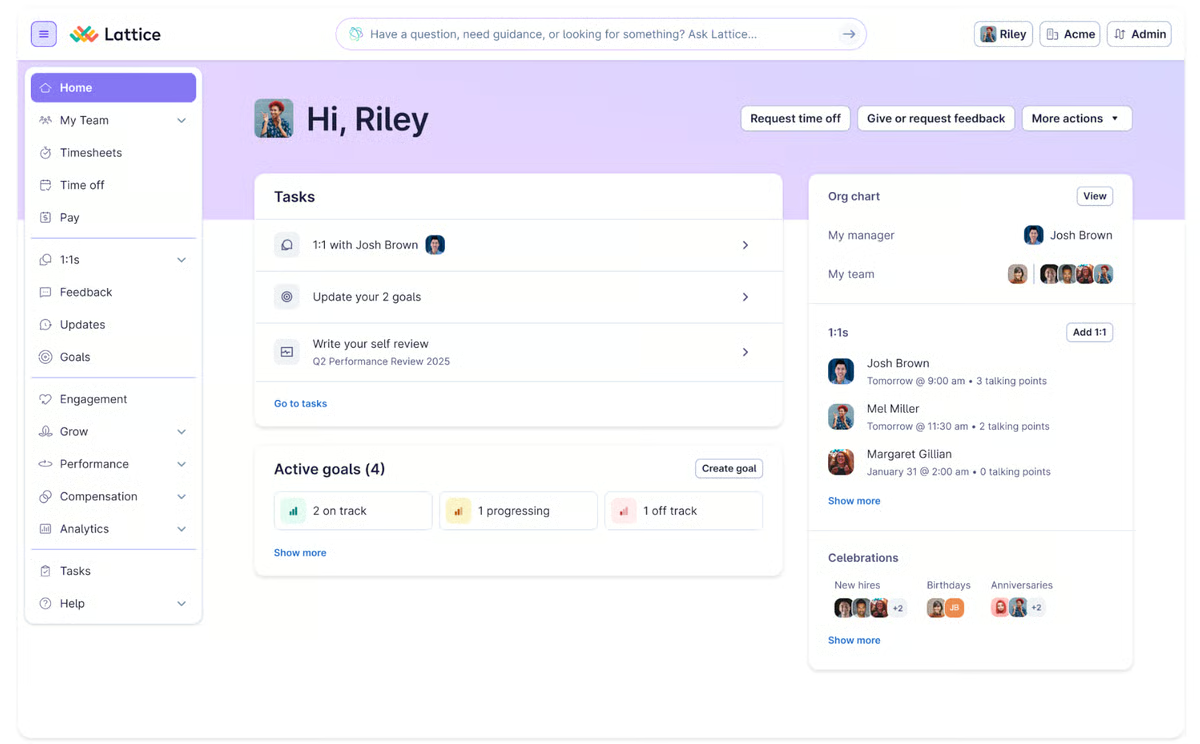
What makes Lattice stand out is how it has embedded AI into the actual flow of performance work. The Lattice AI bot gives managers prescriptive suggestions for review conversations based on data collected throughout the year from 1:1s, feedback, and goals. Managers consistently said it helped them come into reviews more prepared and less reliant on gut feel.
The 1:1 meeting experience is one of Lattice’s most celebrated features, with a 95% satisfaction rating, the highest in the category for this feature. Managers can log notes, track action items, and connect those insights directly to goals or feedback. Continuous feedback (94%) and requesting feedback (94%) round out a feedback stack that actually encourages ongoing conversations rather than annual catch-ups.
Lattice also supports cascading goals, which helps companies drive alignment from company-level OKRs down to individual contributors without needing complex workarounds. For global teams, the platform supports broad localization, making it viable for companies running reviews across multiple regions.
The one thing I consistently saw in G2 reviews, particularly from teams in Microsoft-heavy environments, is that Lattice’s 1:1 meeting sync with Outlook can be inconsistent. It works seamlessly with Google Calendar, but users who rely on Outlook for scheduling sometimes find the integration doesn’t behave as expected, adding a small but noticeable layer of friction to an otherwise smooth experience. For Google Workspace teams this won’t surface at all, and for Microsoft teams it’s a small friction point in an otherwise strong experience that Lattice continues to improve on.
If you’re part of a fast-growing company that wants a more dynamic, people-first approach to performance, Lattice is worth serious consideration. It’s one of the few platforms where AI, feedback, OKRs, and 1:1s genuinely work together rather than sitting in separate modules that never quite talk to each other.
What I like about Lattice:
- I love how the AI bot brings real utility to review prep. Instead of managers showing up with just a ratings form, they have a data-informed starting point based on everything captured in 1:1s, feedback, and goals across the year.
- The way Lattice connects OKRs, continuous feedback, and 1:1 meetings into a single flow is powerful. Performance doesn’t feel like a separate event; it becomes part of how the team operates week to week.
What G2 users like about Lattice:
“I use Lattice to track OKRs across the company and for 1:1 and performance reviews. As a manager, it gives me a collaborative place to share thoughts with the team and hold each other accountable to goals. It allows us to pace results and helps us understand how other departments are performing. I like the ease of use and the solid performance of the Lattice AI bot. When it comes to performance review writing or actions, it provides prescriptive ideas based on data throughout the year, which helps me focus conversations without having to do all the digging. The initial setup from an end user’s perspective was pretty good.”
– Lattice Review, Bryan S.
What I dislike about Lattice:
- Syncing 1:1 meetings with Outlook can be inconsistent, which adds friction for teams in Microsoft-heavy environments. It works seamlessly with Google Calendar, so this is mostly relevant if your organization runs on Microsoft 365.
- With so many modules available, navigating to the right section can take more clicks than expected, especially for users who only access certain parts of the platform. It’s a product of Lattice’s depth rather than a design flaw, and most users say it becomes second nature over time.
What G2 users dislike about Lattice:
“Something about Lattice that could be improved is the user interface. While I appreciate that everything is all in one place, I sometimes have to click around for a while to find previous notes/reports. It doesn’t seem straightforward as there are so many functions and I only really use it for direct reporting of skill development. Initial setup was okay, it just seemed like a longer learning process to figure out which buttons or pages would give which results. I still struggle with finding where everything is, but there is nothing inherently wrong with the setup.”
– Lattice Review, Annika G.
5. HROne: Best for AI-powered performance automation and succession planning
I’d heard of HROne as a broader HR and HCM platform before, but looking at the performance management side really showed me how much the product has evolved, particularly in AI.
It’s especially popular with mid-market (59%) and enterprise (33%) teams, and it’s widely used in industries like manufacturing, IT services, and financial services where accountability, structure, and detailed reporting matter a lot.
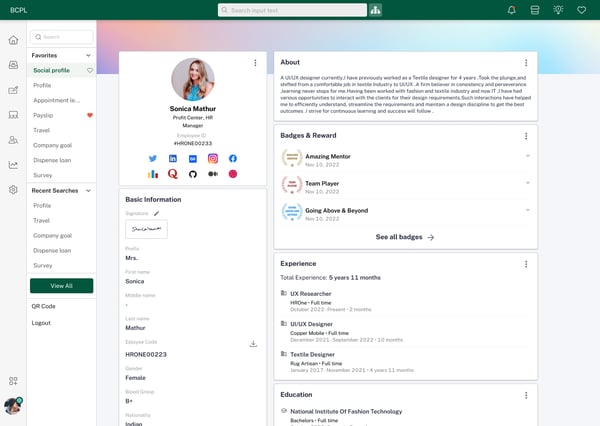
From what I’ve seen, it works best for teams that want clarity. It handles the essentials like OKRs, continuous feedback, 360s, and status tracking, and ties them together with automation that helps the process stay on track. You can automatically trigger goal cycles for new hires, use predefined templates to simplify setup, and align OKRs by department, team, or even role. I liked that the platform offers real-time feedback based on initiative completion and supports structured 1:1s with a built-in Plan, Progress, Problem model to guide conversations.
One thing I haven’t seen commonly in the other tools is that HROne includes a built-in 9-Box Matrix for mapping performance and potential. It’s a smart addition if you’re thinking about succession planning or trying to identify future leaders, not just manage reviews.
Something that came up repeatedly in reviews is HROne’s InboxforHR feature, a Gmail-inspired inbox that centralizes every pending HR task in one place. Reviewers described it as a meaningful time-saver, particularly for HR admins managing high volumes of requests across attendance, performance, and compliance workflows simultaneously.
That said, some users mentioned that the platform can slow down during peak hours, especially when pulling reports or running analytics after an update. It’s not a dealbreaker, but worth factoring in if your team relies on real-time data during busy review periods. HROne’s support team is responsive when these issues arise, and most users said things return to normal quickly.
If you’re looking for a system that brings structure, automation, AI-powered summarization, and succession planning into one workflow, HROne is absolutely worth exploring.
What I like about HROne:
- The built-in 9-Box Matrix is something I wish more platforms included by default. Being able to map performance and potential in the same place where reviews happen makes succession planning feel like a natural part of the process rather than a separate exercise.
- I like how it simplifies the performance workflow with helpful automation. You can auto-trigger cycles for new hires, use predefined templates, and track progress across teams without much manual setup.
What G2 users like about HROne:
“What I like most about HROne is how it blends smart HR technology with a genuine human touch. It doesn’t simply automate processes like payroll, attendance, and compliance; it makes them easier to handle and more approachable for both HR teams and employees. The interface feels intuitive, the support is responsive, and the employee-friendly features help people feel supported rather than just managed. That combination is what truly sets HROne apart.”
– HROne Review, Nijanthan R.
What I dislike about HROne:
- Some users mentioned the platform can slow down during peak usage or after updates, especially when running reports. It’s not a dealbreaker for most teams, but those who rely on real-time analytics during busy review periods should factor it in. HROne’s support team is generally quick to respond when these issues come up.
- Integrations with certain third-party tools like Google Meet or some hiring portals can behave inconsistently, which is worth testing upfront if your team relies on tight calendar or ATS workflows. The core platform is robust, and the team is actively expanding its integration ecosystem.
What G2 users dislike about HROne:
“Sometimes I face issues with third-party tool integrations. For example, Google Meet and the calendar don’t work properly at times, and some hiring portals also don’t function as expected.”
– HROne Review, Abhishek K.
Not sure how to structure your performance management process before picking a tool? Our guide to performance management covers the frameworks, cycles, and best practices worth knowing first.
6. Paylocity: Best for mid-sized teams that want performance and payroll in one place
For a platform known for payroll, Paylocity’s performance tools are surprisingly collaborative. According to G2 Data, the platform has strong traction with mid-market teams, who make up 81% of its user base, and it’s commonly used across industries like healthcare, nonprofits, manufacturing, and HR services.
Goals, feedback, reviews, and recognition are all part of the package. Paylocity lets managers and employees collaborate on goals, track progress, recognize employees, and carry that context into review cycles.
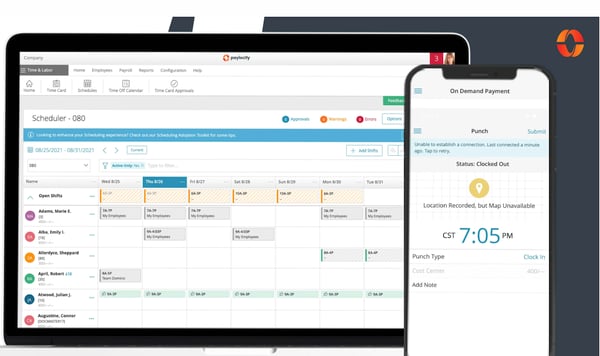
What stood out to me, though, is the journal feature. Employees and managers can log reflections, wins, or updates using text or even video, which makes career conversations feel more human and less transactional.
It also provides tools like sentiment analysis for reviewers to help them understand their tone better, along with market compensation benchmarks, helping to ground conversations in both data and context.
The on-demand pay feature is another genuine differentiator. Several reviewers highlighted it as something that sets Paylocity apart, particularly for frontline and hourly workers who benefit from more flexibility around when they access their earnings.
That said, a few reviewers mentioned that support response times can be slower than expected, with some needing to follow up more than once to get a resolution. Once the platform is up and running though, Paylocity delivers reliably, and most teams say the overall experience is well worth it.
If you’re looking for a tool that brings performance, payroll, and HR into one ecosystem with genuinely differentiated features like video journals and on-demand pay, Paylocity is a strong option for mid-sized teams.
What I like about Paylocity:
- I really liked the journal feature. Being able to log updates or reflections, even with video, adds a layer of personalization to performance conversations that genuinely sets Paylocity apart.
- From what I saw in reviews, users appreciated how seamlessly Paylocity connects timesheets, payroll, performance, and peer recognition. It all works together in one system, which makes daily operations meaningfully easier to manage.
What G2 users like about Paylocity:
“We love the on demand pay for our team members to have access that feature and has been used a decent amount since going live. The app is very user friendly and gets updates regularly where our previous HRIS the app defects rarely got fixed or took a very long time. Rewards and Recognition is great and learning more about it. The missed punch feature is a game changer for us, previously team member had to fill out a form and now it all can be done through the system. Lastly we utilize the comp tool and our previous HRIS we couldn’t use the comp tool, we just finished merit and our VP of IT commented on how user friendly and easy the tool was to use. Lastly I love the knowledge base.”
– Paylocity Review, Emily W.
What I dislike about Paylocity:
- A few reviewers said support can be slow or inconsistent, with some needing to follow up more than once to get a resolution. That said, most teams say once the platform is running smoothly, day-to-day use is reliable and the product more than makes up for it.
- Some teams wished for more flexibility when it came to customizing reports or tweaking workflows to better match internal processes. It works well with standard templates, but those needing highly tailored reporting may find themselves working around the defaults.
What G2 users dislike about Paylocity:
“The biggest downside was that the custom reporting tools could sometimes feel clunky& difficult to navigate when we needed to pull specific data. The user interface was occasionally overwhelming for new employees to learn at first, & getting quick resolutions from customer support could be slow during busy seasons.”
– Paylocity Review, Jaser H.
Performance and engagement are more connected than most teams realize. If you’re evaluating both together, see G2’s picks for the best employee engagement software to find tools that complement your performance stack.
7. Leapsome: Best for continuous feedback, OKRs, and 360-degree review cycles
Leapsome is an AI-powered people platform that combines performance management, employee engagement, learning, and compensation in one flexible system. It’s known for being modular, meaning teams can start with what they need and expand as their people programs mature.
Based on G2 Data, Leapsome is well-suited for mid-market and enterprise teams, which make up 86% of its user base. It’s used across IT services, software, financial services, and healthcare, with a 4.8 out of 5 rating.
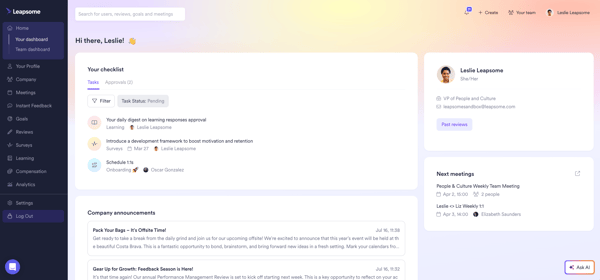
What makes Leapsome stand out is how well it operationalizes continuous feedback. Requesting feedback (94%), continuous feedback (95%), and 360 reviews (95%), one of the highest rating in the category, are all where Leapsome excels. It’s not just that the features exist; users describe feedback as feeling embedded in the daily workflow rather than a separate task that gets deprioritized.
The AI layer is genuinely useful. An AI bot summarizes peer feedback into coherent themes, helping employees make sense of what they’re hearing and surface it for self-reflection during review cycles.
Slack integration is another high-value feature. Praise messages can be configured to post automatically to Slack channels, giving the whole team visibility without requiring anyone to open the dashboard. The 1:1 meeting experience is also structured and persistent, with notes and action items carrying forward between sessions so context doesn’t get lost.
Leapsome does not currently have a native mobile app for iOS or Android, which several reviewers flagged. The platform is accessible via browser on mobile, and you can add a shortcut to your home screen for quicker access, but for teams that want employees engaging with feedback, recognition, or 1:1 notes on the go, a dedicated app experience would make day-to-day adoption even smoother. Given how fast the rest of the platform has evolved, it’s a gap that feels like a natural next step on their roadmap.
If you’re building or scaling a feedback culture and want a platform that genuinely connects reviews, OKRs, engagement, and learning in one place, Leapsome is one of the best options in the category right now.
What I like about Leapsome:
- I love how praise, feedback, and reviews all connect to the same employee record. The Slack integration for praise is a particularly clever touch; recognition happens in the flow of work, which is where it actually sticks.
- The AI feedback summary feature is genuinely useful for employees going into review cycles. Instead of manually synthesizing feedback from multiple peers, they get a structured starting point that makes self-reflection more actionable.
What G2 users like about Leapsome:
“I like using Leapsome for feedback sharing and peer-to-peer reviews. The AI bot is a standout feature for me as it helps write good summaries of the feedback shared by others and my manager, aiding in my personal self-reflection. The integration with Slack is also great, allowing me to easily write reviews directly from Slack, and having them pasted directly to the user’s profile. This integration provides clarity to the company as well, as it ensures that reviews are added to user profiles seamlessly.”
– Leapsome Review, Aasheesh P.
What I dislike about Leapsome:
- Leapsome doesn’t have a native mobile app yet, so employees on the go rely on the browser version instead. It works well enough for most tasks, and given how fast the rest of the platform has evolved, a dedicated app feels like a natural next step.
- Setting up more complex workflows, performance cycles, and templates takes time to get right, particularly for admins and managers who don’t use the platform daily. Once the initial configuration is done though, most teams find the day-to-day experience smooth and well worth the upfront effort.
What G2 users dislike about Leapsome:
“Some users report that setting up and customizing Leapsome can be somewhat time-consuming, particularly during the initial implementation phase. The platform’s extensive range of features may also make navigation feel a bit overwhelming for newcomers. Furthermore, configuring certain advanced analytics and integrations might require additional setup or support.”
– Leapsome Review, Mohammed N.
8. Performance Pro: Best for enterprise and finance teams who want simplicity
I went into Performance Pro expecting a more traditional performance management tool, and honestly, that’s exactly what it delivers. It’s not flashy, but it’s focused. For teams that want a reliable, structured system for running performance reviews, setting goals, and managing employee development, it checks a lot of boxes.
What stood out to me in the G2 reviews is how many users highlighted the simplicity and clarity of the platform. People found it easy to get started, navigate, and actually complete reviews without a steep learning curve.
It’s also popular in highly regulated industries like banking, finance, and nonprofit, where documentation and consistency matter. According to G2 Data, it’s used most by enterprise teams (40%) and mid-market orgs (34%), which makes sense given how much structure it brings to the process.
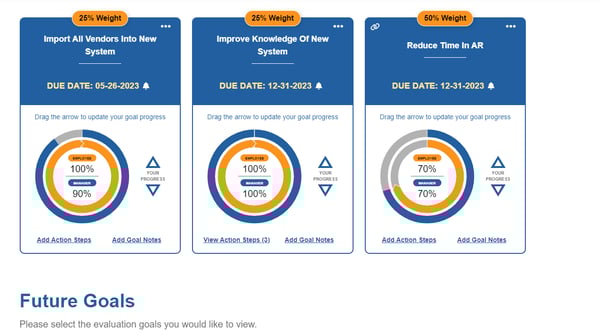
Performance Pro scores high where it counts. Company Goals and OKRs (90%) and goal-setting (90%) are its highest-rated features. Dashboards and reports (88%) are also strong. These are exactly the areas that matter most in structured review environments, and the platform delivers.
One genuine recent improvement worth noting: Performance Pro now auto-saves qualitative text entries. Several reviewers specifically called this out as a welcome fix, since losing work mid-evaluation had been a frustration in earlier versions. It’s the kind of change that shows the team is paying attention to real user pain points.
Something that came up consistently in recent reviews is how well the platform ties individual performance to company values. Reviewers described being able to quantify progress against values that everyone in the organization is held to, and document achievements in a way that supports real accountability during review cycles. For enterprise and finance teams where that kind of consistency and auditability matters, it’s genuinely useful.
That said, the goal-setting experience came up as a recurring theme in reviews. The tools are there, but some users said the process felt more rigid than helpful, things like not being able to edit goals after marking a review ready, or not seeing past goals while entering new ones. A bit more flexibility would go a long way, and for most structured review workflows, it works well as-is.
If you’re looking for a no-nonsense performance management platform built to keep reviews on track, especially in financial or regulated environments, Performance Pro is a solid pick.
What I like about Performance Pro:
- I liked how consistently reviewers described the platform as straightforward and easy to use. It doesn’t overwhelm you with too many bells and whistles, which is great for teams that just want to stay on track.
- Something that stood out is how well it ties performance to company values. Reviewers appreciated being able to hold everyone to the same standard and document that accountability in one place, which is especially useful in regulated environments.
What G2 users like about Performance Pro:
“Performance Pro allows me to clearly track goals, document achievements, and organize my self-evaluation in a structured way. I appreciate how it provides a centralized platform to reflect on accomplishments, progress, and areas for development, making the review process more transparent and efficient.”
– Performance Pro Review, Verified User
What I dislike about Performance Pro:
- The goal-setting process can feel rigid at times. Things like not being able to edit goals after marking a review ready, or not having past goals visible while entering new ones, add friction that a bit more flexibility would fix. For most standard review cycles though, it works reliably and keeps things consistent across the organization.
- The interface feels a bit dated compared to newer entrants in the category, and navigating to historical evaluations can take more clicks than expected. The functionality underneath is solid, and for teams in regulated environments who value consistency over aesthetics, that’s an easy trade-off to make.
What G2 users dislike about Performance Pro:
“The only flaw would be the user interface. It could also allow users more granularity in evaluating goals and factors. At times it would be beneficial to get more specific than scoring in half number increments.”
– Performance Pro Review, Verified User
Other performance management software to check out
If none of the platforms above feel like the right fit, here are a few other performance management tools worth exploring, especially if you’re comparing based on company size, industry, or how your teams prefer to work.
- Culture Amp: Best for mid-sized and enterprise teams running continuous feedback cycles. Strong on 360-degree reviews, engagement surveys, and cascading goals.
- Workhuman Social Recognition: Best for large enterprises focused on recognition and peer feedback. Recognition-first at its core with performance features built in.
- PerformYard: Best for HR teams that need control and customization. If you’re running complex review cycles or want tailored templates, this one’s worth a look.
- ADP Workforce Now: Best for larger companies already using ADP for payroll. The performance tools are integrated, which helps keep everything in one place.
- Paycom: Best for businesses that want performance tightly tied to payroll and HR processes, all within a unified system.
- Keka: Best for India-based teams looking for performance tools inside a broader HR and payroll suite. It’s especially popular with mid-sized businesses.
Whether you’re after the best performance review tools for software developers, the leading systems for mid-sized IT teams, or even award-winning platforms that scale across departments, there’s a growing set of performance management solutions designed for exactly that.
Frequently asked questions (FAQ) on performance management software
Have more questions? G2 has the answers!
Q1. What is the best performance management software in 2026?
The best performance management software depends on company size, industry, and goals. For small to mid-sized teams, BambooHR and HiBob HRIS offer ease of use with solid review functionality. For teams that want AI-driven insights, Lattice and Leapsome lead the category. For full HRIS integration with performance and payroll, Rippling and Paylocity are top picks. For regulated industries that need structured simplicity, Performance Pro is consistently recommended.
Q2. What is the best performance management software for small businesses?
BambooHR and HiBob HRIS are ideal for small to mid-sized businesses. Both simplify review setup, enable goal tracking, and require minimal admin overhead, making them well-suited as performance review software for small companies and tech teams. BambooHR is especially strong for teams formalizing their process for the first time.
Q3. What is the best enterprise performance management software?
Rippling, Lattice, Leapsome, and Performance Pro are strong enterprise options. Rippling offers deep payroll and compensation integration. Lattice and Leapsome lead on feedback culture and AI-assisted reviews. Performance Pro is a dependable choice for highly regulated industries like banking and finance that prioritize structure and compliance.
Q4. What is the best performance management software for small tech startups and SaaS businesses?
BambooHR, Lattice, and Leapsome are widely used by tech startups and SaaS teams for real-time feedback, lightweight reviews, and a strong user experience. HiBob is also popular with fast-growing product teams that want HRIS and performance in one platform. For app developers specifically, lightweight tools like BambooHR and Rippling tend to get high marks for not getting in the way of deep work.
Q5. Which performance management software works best for continuous feedback?
Leapsome and Lattice lead the category for continuous feedback. Leapsome scores 95% for this feature in the Spring 2026 Grid Report, and its Slack integration makes real-time feedback a natural part of daily work. Lattice’s AI bot adds a layer of structure to ongoing feedback by surfacing insights from 1:1s and goal check-ins throughout the year.
Q6. Which performance management tools have the best AI features?
HROne leads the category for AI text summarization and generation. Lattice’s AI bot gives managers prescriptive review suggestions based on year-round data. Leapsome summarizes peer feedback automatically to support self-reflection. BambooHR has also introduced an AI Assistant for HR teams.
Q7. Which is the best performance management solution for a mid-sized IT firm?
For mid-sized IT firms, HiBob HRIS, Lattice, and Leapsome stand out. They offer a mix of customizable review cycles, IT-friendly integrations, and robust analytics, making them well-suited for growing technical teams that want performance built into everyday workflows. Culture Amp is also consistently recommended for IT services teams that want continuous feedback as a core part of their performance process.
Q8. What is the best performance management software for service-based companies?
Paylocity, BambooHR, and HiBob are strong picks for service-based businesses managing remote or hybrid teams. They offer robust goal tracking, automated review cycles, and engagement tools that keep performance conversations going between formal review periods.
Q9. Which performance management software do big tech firms use?
Large tech companies often build their own internal systems for performance management at scale. For those that use commercial platforms, Rippling, Lattice, and Leapsome are common choices, valued for their ability to handle complex org structures, continuous feedback, and compensation workflows in one place.
Q10. What are the top-rated performance review platforms for the software industry?
HiBob HRIS, Lattice, Leapsome, and BambooHR are consistently top-rated among software and IT companies on G2. They combine flexible review cycles, strong feedback tools, and integrations with the collaboration tools that technical teams already use, making adoption easier across engineering and product organizations.
Review and repeat
If there’s one thing that stood out across all these tools, it’s that performance management in 2026 isn’t just about annual reviews anymore. The best platforms are embedding feedback, goals, and recognition into everyday work. AI is increasingly doing the heavy lifting on summarizing feedback, suggesting review language, and surfacing performance patterns that managers would otherwise have to dig for themselves.
The tools that get used are the ones that feel integrated into existing workflows. Whether that’s recognition baked into Slack, goals tied to compensation, or review prep informed by year-round 1:1 notes, adoption happens when performance doesn’t feel like an extra step. It just fits.
If you’re looking to support your team beyond just performance, check out G2’s top-rated corporate wellness tools to help round out your people strategy.

💸 Earn Instantly With This Task
No fees, no waiting — your earnings could be 1 click away.
Start Earning
