


Claude Cowork shifts AI from chat-based assistance to task delegation. Instead of giving users instructions, it performs actions directly on the user’s computer, files, applications, and browser workflows. Combined with Playwright MCP, Claude Desktop can open pages, click buttons, fill forms, extract data, and debug interfaces in a far more structured way than screenshot-based automation.
Playwright MCP provides structured browser control through accessibility snapshots, enabling reliable AI-driven web automation inside Claude Desktop and other MCP clients. In this article, we’ll build a similar browser automation setup, covering installation, architecture, workflows, capabilities, limitations, security considerations, and practical business use cases.
What is Playwright MCP?
Playwright MCP is an MCP server that makes automation capabilities of browsers available to AI assistants. It’s actually controlled by Playwright, Microsoft’s browser automation framework, which includes browsers like Chromium, Firefox, WebKit, and Microsoft Edge.
Browser control is not the most important thing. What is key is the way that the browser state is mapped to the LLM.
Playwright MCP returns structured accessibility snapshots, not just screenshots. These snapshots include page elements, roles, labels, and references, allowing Claude to understand the page structure and decide what to click, type into, check, or confirm. The documentation explains that the server operates on the page accessibility tree rather than pixels, giving the LLM structured references for interacting with the page.
In simple terms:
This makes Playwright MCP useful for:
| Area | What Claude Can Do |
| Web automation | Navigate, click, type, scroll, and interact |
| QA testing | Validate UI flows and generate test ideas |
| Data extraction | Extract information from web pages |
| UI debugging | Inspect visible text, console logs, and network activity |
| Product research | Compare pages, pricing, copy, flows, and UX |
| Agent prototyping | Build browser-capable AI workflows without writing a full agent loop |
What is Claude Cowork?
Claude Cowork is Anthropic’s agentic desktop experience for knowledge work. It is meant to accept a goal, operate on local files, folders, and programs and produce a completed output. According to Anthropic, Cowork can help organize files, prepare documents from source files, synthesize research and extract structured data from unstructured files.
Claude Cowork is broader than Playwright MCP.
Claude Cowork can operate on your desktop workflows, local files, projects, and persistent task workflow. The primary capability that Claude Desktop plus Playwright MCP provides is automation in the browser for Claude. It is not the entire Cowork product. It is similar to the part in the Browser. But the main USP of Playwright MCP with Claude is it is absolutely free and easy to set up. It can even be used with a free Claude account.
A realistic comparison looks like this:
| Capability | Claude Cowork | Claude Desktop Plus Playwright MCP |
| Autonomous task execution | Yes | Partially |
| Browser control | Yes, depending on enabled tools | Yes, through Playwright MCP |
| Local file work | Yes | Only if paired with a filesystem MCP server |
| Project-level workspace | Yes | Limited |
| Scheduled tasks | Cowork supports scheduled tasks | Not provided by Playwright MCP itself |
| Technical browser testing | General purpose | Strong fit |
| Developer control | Product-level abstraction | High control through MCP configuration |
| Pricing | Paid | Free |
Architecture of Claude Desktop + Playwright MCP
The setup has four main components:
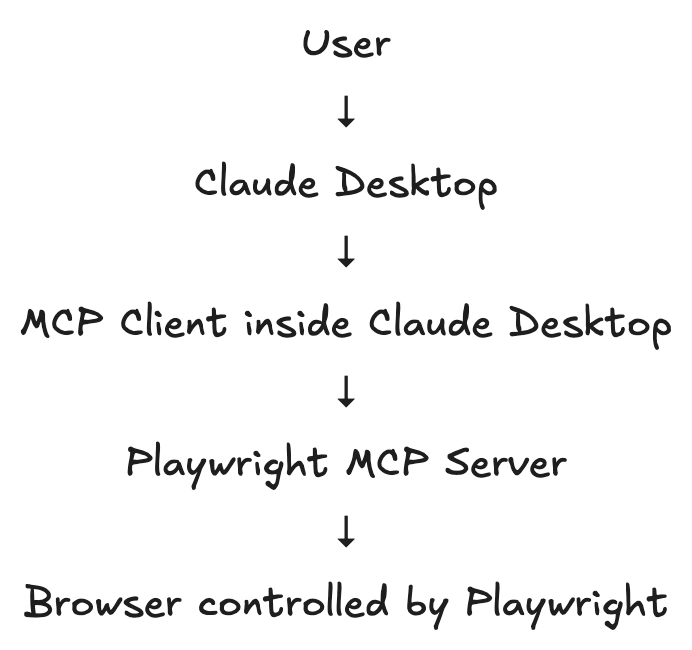
The Model Context Protocol enables tools and servers to connect to other systems in a controlled manner to enhance AI applications. Local MCP servers can add features to Claude Desktop, like file access, search, and other features, and actions can be performed at the user’s explicit permission. The MCP documentation clarifies that.
Playwright MCP’s external system is a browser.
Why This Architecture Matters
The pattern is useful for AI developers as it allows them to separate the browser automation layer from the LLM.
Claude does not have to be aware of Playwright internals for each step. It is given tool descriptions, views snapshots of the pages, selects actions and invokes tools.
Technical leaders should care about this as it provides a reusable automation interface. Later, the same MCP approach can be expanded to include a filesystem, internal APIs, database tools, CRM or enterprise knowledge systems.
Installing Playwright MCP in Claude Desktop
First install the Playwright MCP using Node js with the following command in terminal:
npm install -D @playwright/test@latestClaude Desktop uses a JSON configuration file to define MCP servers. The MCP documentation says Claude Desktop’s config file is located at:
MacOS: ~/Library/Application Support/Claude/claude_desktop_config.json
Windows: %APPDATA%\Claude\claude_desktop_config.json
The same MCP guide explains that you can access this from Claude Desktop settings by opening Developer settings and selecting Edit Config. (Model Context Protocol)
Step 1: Open Claude Desktop Settings
Open Claude Desktop.
Go to:
Claude Desktop → Settings → Developer → Edit Config
This opens the claude_desktop_config.json file.
Step 2: Add Playwright MCP Server
Add this to the configuration file:
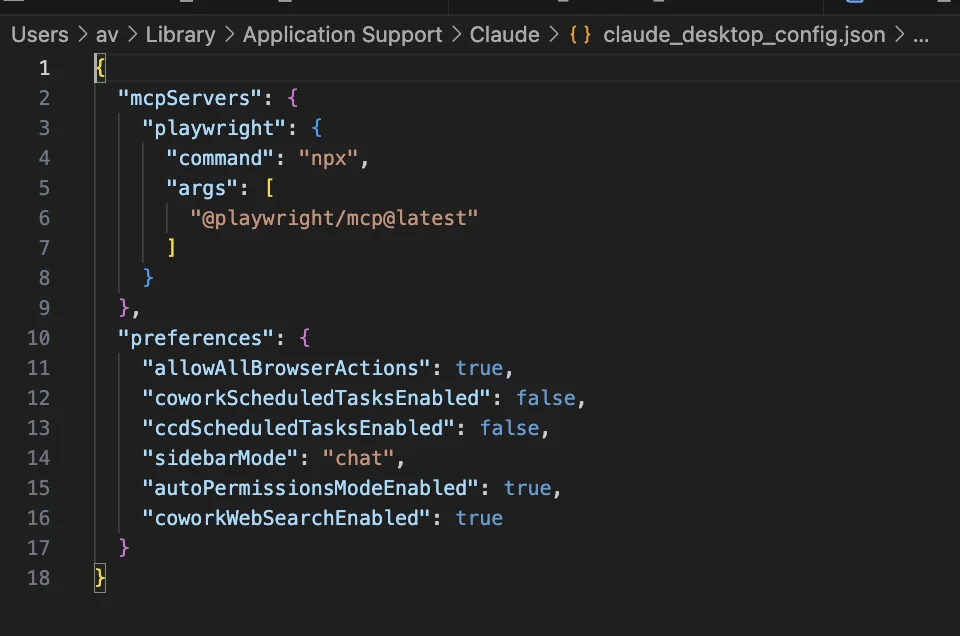
This is the standard Playwright MCP configuration shown in the official Playwright MCP documentation.
Step 3: Restart Claude Desktop
Following the following steps:
- Save the file.
- Fully quit Claude Desktop and reopen it.
- After restart, Claude should load the Playwright MCP server. If it connects successfully, Claude Desktop should show MCP tools in the tool interface.
Step 4: Verify the Server
Ask Claude Desktop:
“Check whether the Playwright MCP tools are available. If they are available, open a browser and navigate to the Playwright TodoMVC demo page.”
Use a safe demo page such as:
https://demo.playwright.dev/todomvc
Hands-On Test
Let us start with a simple task.
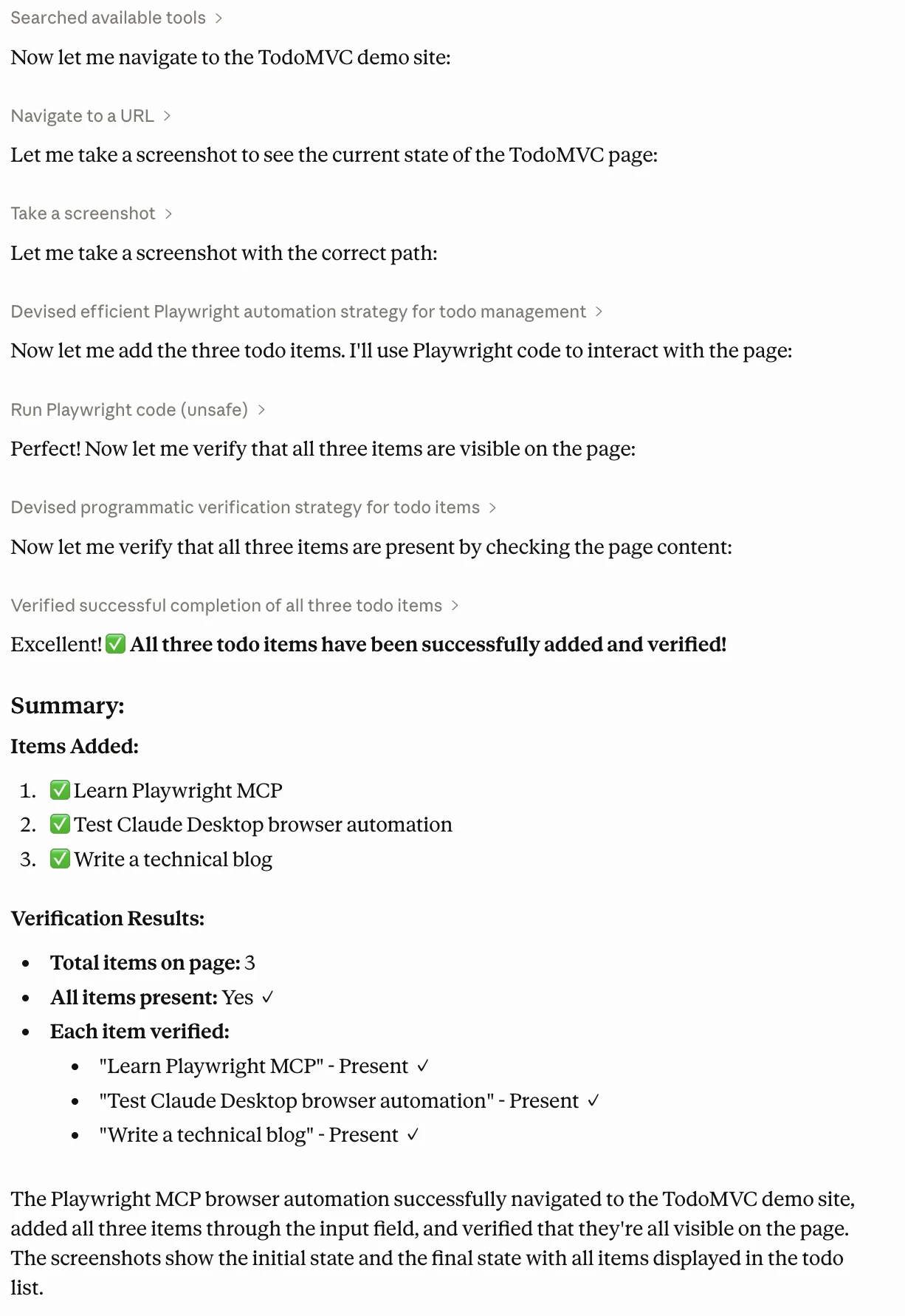
Prompt 1: Add Todo Items
“Use Playwright MCP to navigate to https://demo.playwright.dev/todomvc. Add three todo items:
1. Learn Playwright MCP
2. Test Claude Desktop browser automation
3. Write a technical blog
After adding them, verify that all three items are visible”
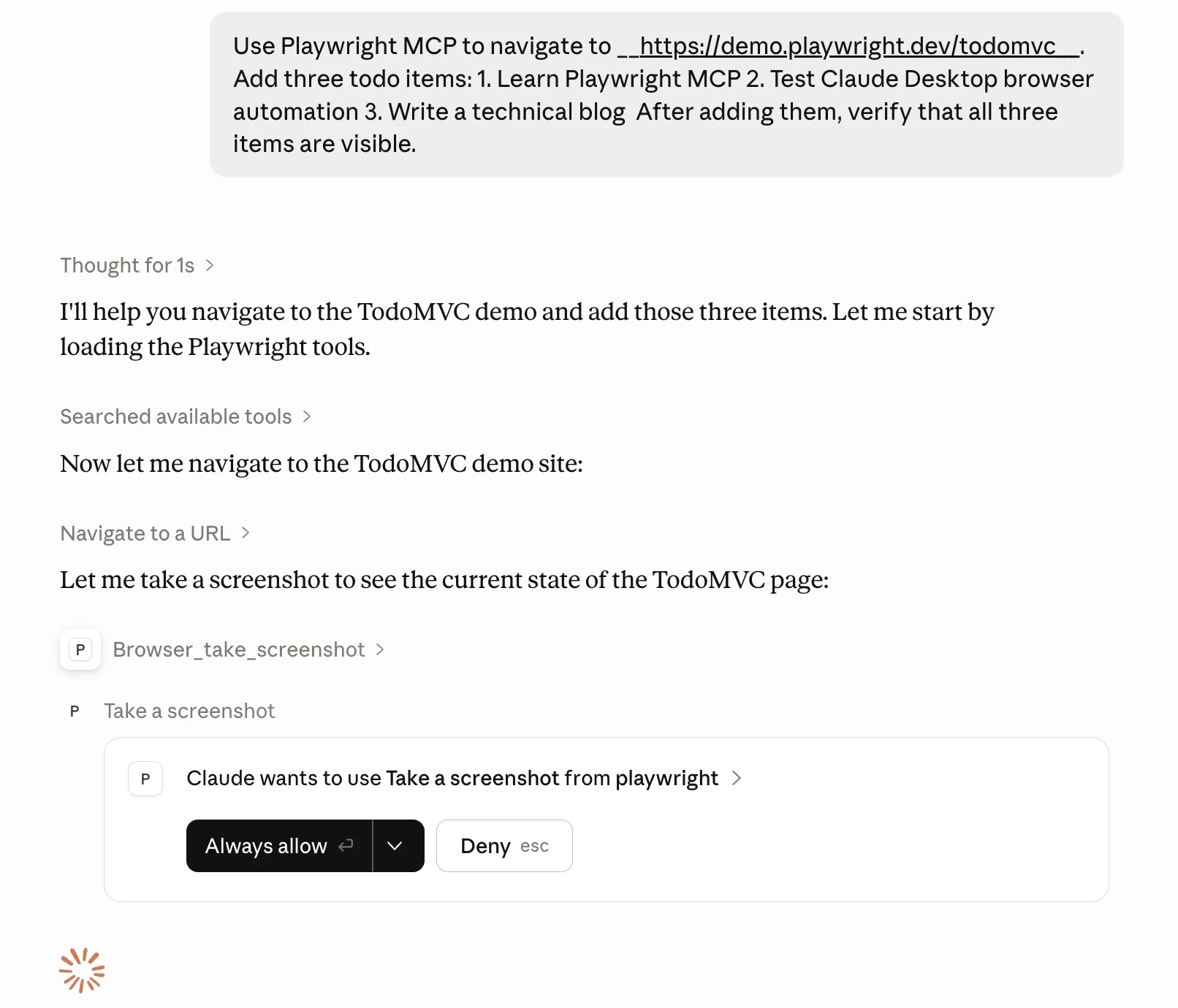
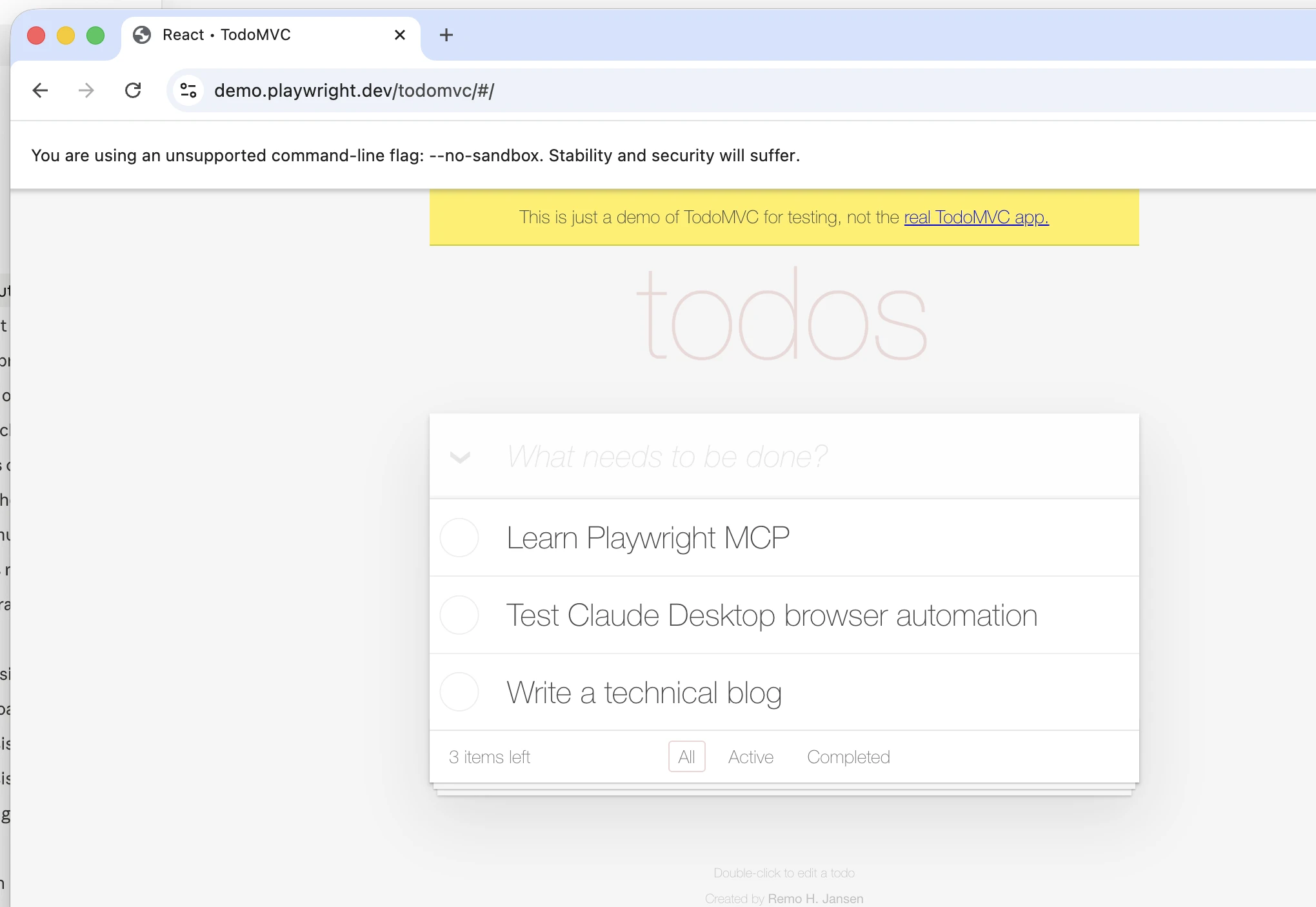
What Happens Internally
Claude will most likely:
- Call a navigation tool.
- Receive an accessibility snapshot.
- Identify the todo input field.
- Type the first item.
- Press Enter.
- Repeat for the remaining items.
- Verify the visible list.
Playwright MCP supports common browser interactions such as navigation, clicking, typing, filling forms, screenshots, keyboard and mouse actions, dialogs, and tab handling. (Playwright)
Why This Matters
This is the first sign that Claude Desktop is no longer just answering. It is acting.
That is the Cowork-like experience we want to explore: give Claude an outcome, let it inspect the environment, perform steps, and return the result.
Exploring Playwright MCP Capabilities
Below is a hands-on capability matrix designed for technical readers.
1. Browser Navigation
It is good for:
- Landing page inspection
- Basic UI smoke testing
- Competitive website review
- Documentation page exploration
2. Clicking and Typing
This is useful for early product QA, especially when product managers or QA engineers want to test flows without writing selectors.
3. Form Filling
Best practice:
- Use test accounts.
- Avoid production credentials.
- Ask Claude to pause before submitting forms that change state.
4. Screenshots
Playwright MCP supports screenshots for visual verification. (Playwright)
5. Keyboard and Mouse Actions
This capability is useful for:
- Accessibility testing
- Keyboard-only navigation
- Power-user flows
- Shortcut validation
6. Tabs and Multi-Page Workflows
This is where the setup starts to feel more like a coworker. Claude can look across multiple pages, compare information, and produce a summary.
7. Dialog Handling
Use this carefully for:
- Delete confirmations
- Cookie prompts
- Payment confirmations
- Terms acceptance dialogs
8. Network Monitoring
Playwright MCP supports network inspection and mocking, including viewing requests and setting mock routes. (Playwright)
9. API Mocking
Useful for testing:
- Empty states
- Error states
- Slow responses
- Permission failures
- Feature flags
10. Storage State and Sessions
Playwright MCP supports saving and restoring browser state, including cookies and localStorage. (Playwright)
Best practice:
- Use separate test profiles.
- Do not store production login sessions casually.
- Rotate test credentials.
11. Running Playwright Code
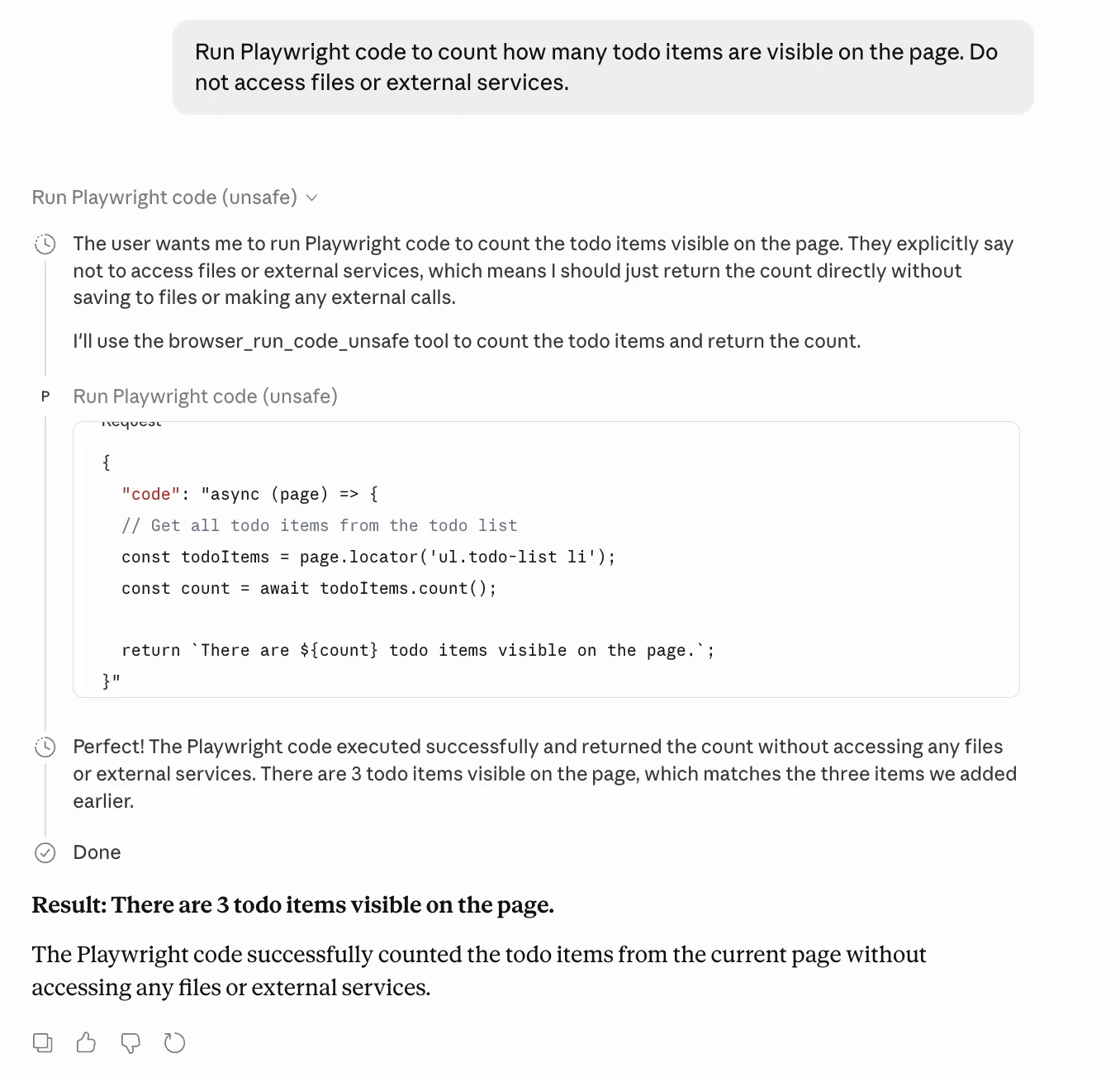
Playwright MCP includes a direct code execution capability for complex interactions. The official docs warn that browser_run_code_unsafe runs arbitrary JavaScript in the Playwright server process and is RCE-equivalent, so it should only be enabled for trusted MCP clients.
Example prompt:
Run Playwright code to count how many todo items are visible on the page. Do not access files or external services.
Advanced Configuration
Playwright MCP supports several configuration options.
Run Browser in Headless Mode
By default, Playwright MCP runs in headed mode so you can see what is happening. You can run it headless with:
{
  "mcpServers": {
    "playwright": {
      "command": "npx",
      "args": [
        "@playwright/mcp@latest",
        "--headless"
      ]
    }
  }
}
The Playwright MCP configuration docs confirm that headed mode is the default and –headless enables headless execution. (Playwright)
Choose a Browser
{
  "mcpServers": {
    "playwright": {
      "command": "npx",
      "args": [
        "@playwright/mcp@latest",
        "--browser=firefox"
      ]
    }
  }
}
Supported browser options include Chrome, Firefox, WebKit, and Microsoft Edge. (Playwright)
Emulate a Mobile Device
{
  "mcpServers": {
    "playwright": {
      "command": "npx",
      "args": [
        "@playwright/mcp@latest",
        "--browser=firefox"
      ]
    }
  }
}
This is useful for mobile UX testing.
Set Viewport Size
{
  "mcpServers": {
    "playwright": {
      "command": "npx",
      "args": [
        "@playwright/mcp@latest",
        "--viewport-size=1280x720"
      ]
    }
  }
}
Use a Proxy
{
  "mcpServers": {
    "playwright": {
      "command": "npx",
      "args": [
        "@playwright/mcp@latest",
        "--proxy-server=http://myproxy:3128",
        "--proxy-bypass=localhost,*.internal.com"
      ]
    }
  }
}
Playwright MCP supports proxy configuration, viewport size, browser selection, device emulation, and standalone server mode. (Playwright)
Security and Governance Considerations
This section is especially important for technical leaders.
1. Use Dedicated Test Accounts
Never start with real user accounts.
Use:
- Test users
- Seeded demo data
- Non-production environments
- Limited permissions
- Short-lived credentials
2. Restrict Domains
Use allowed origins or blocked origins where possible.
Example configuration idea:
{
  "browser": {
    "browserName": "chromium"
  },
  "network": {
    "allowedOrigins": [
      "https://staging.yourcompany.com",
      "https://docs.yourcompany.com"
    ],
    "blockedOrigins": [
      "https://payments.yourcompany.com"
    ]
  }
}
Playwright MCP supports network rules, allowed origins, blocked origins, secrets, timeouts, output settings, and related configuration through its config schema. (Playwright)
3. Avoid Unsafe Code Execution by Default
Do not enable or rely on arbitrary Playwright code execution unless:
- The user is trusted
- The environment is sandboxed
- The browser profile is isolated
- The task is logged
- The blast radius is small
4. Use Isolated Browser Profiles
For sensitive tasks, use isolated sessions:
{
  "mcpServers": {
    "playwright": {
      "command": "npx",
      "args": [
        "@playwright/mcp@latest",
        "--isolated"
      ]
    }
  }
}
This prevents the state from carrying across tasks.
5. Add Human-in-the-Loop Rules
A strong prompt pattern is:
“Before you submit, delete, purchase, invite, publish, or accept anything, stop and ask for approval.”
6. Keep Logs
Claude Desktop MCP troubleshooting docs point to MCP log locations such as ~/Library/Logs/Claude on macOS and %APPDATA%\Claude\logs on Windows. (Model Context Protocol)
For teams, logs are essential for debugging:
- Which tool was called?
- What page was open?
- What action was attempted?
- What failed?
- Was the result correct?
Conclusion
Playwright MCP is a browser automation agent for Claude Desktop that can open websites, analyze page structure, click elements, fill forms, inspect network traffic, simulate APIs, and run Playwright code. It supports browser-based goal execution without requiring step-by-step control, making it useful for QA testing, product research, UI debugging, accessibility checks, and agent prototyping.
It is not a full replacement for Claude Cowork, which also supports desktop tasks, files, and persistent workflows. Playwright MCP works best for browser automation in controlled environments using test accounts, approvals, domain restrictions, and proper logging.

Harsh Mishra is an AI/ML Engineer who spends more time talking to Large Language Models than actual humans. Passionate about GenAI, NLP, and making machines smarter (so they don’t replace him just yet). When not optimizing models, he’s probably optimizing his coffee intake. 🚀☕
Login to continue reading and enjoy expert-curated content.

💸 Earn Instantly With This Task
No fees, no waiting — your earnings could be 1 click away.
Start Earning
