


Choosing the wrong audit management software doesn’t just slow your team down, it creates compliance gaps that surface during regulatory reviews, client security assessments, and SOC 2 audits at the worst possible moment.
You already know your team needs a platform that standardizes audit workflows, automates evidence collection, and keeps every stakeholder aligned from planning through remediation. The hard part is finding the one that actually fits.
I evaluated 20+ tools, drawing on thousands of G2 reviews and satisfaction scores, to identify the six best audit management software solutions that deliver on workflow automation, evidence management, and audit-ready reporting. My top 6 picks are Workiva, Vanta, Optro, Sprinto, Secureframe, and TeamMate.
Whether you’re a compliance officer, an internal auditor, or a business leader looking for the best audit management software for small businesses or exploring the most recommended audit software for the service industry, this list has the options worth considering.
6 best audit management software for 2026: My top picks
- Workiva: Best for enterprise teams managing financial reporting and multi-framework compliance
Connects live data across reports, spreadsheets, and filings so updates flow automatically across every linked document. (Custom pricing) - Vanta: Best for startups and SaaS companies automating security compliance
Automates evidence collection across 300+ integrations to keep teams continuously audit-ready for SOC 2, ISO 27001, and more. (Custom pricing) - Optro (formerly AuditBoard): Best for large enterprises managing SOX, internal audit, and enterprise risk
Combines AI-powered GRC with a modular audit suite trusted by more than half of the Fortune 500. (Custom pricing) - Sprinto: Best for growing companies pursuing SOC 2 or ISO 27001
Automates control monitoring and evidence collection with guided workflows built around your specific compliance framework. (Custom pricing) - Secureframe: Best for teams new to compliance who need guided onboarding
Couples automated evidence collection with dedicated compliance manager support to move teams from setup to audit-ready fast. (Custom pricing) - TeamMate: Best for internal audit teams in financial services and the public sector
Manages the full audit lifecycle, from risk assessment and planning through execution, reporting, and issue tracking. (Custom pricing)
*These audit management software tools are top-rated in their category, according to the latest G2 Summer 2026 Grid Report. I’ve added their standout features for easy comparison. Pricing is available on request for all tools on this list.
6 best audit management software systems I recommend in 2026
The Internal Audit Management Software market is expected to grow from $1.414 billion in 2025 to $4.132 billion by 2035, exhibiting a compound annual growth rate (CAGR) of 11.32% during the forecast period 2025 – 2035. That growth reflects a broader shift toward digital, automated audit programs as organizations face increasingly complex regulatory requirements and compliance frameworks.
For buyers, this means modern audit management software is expected to do far more than digitize checklists. Beyond day-to-day workflow automations, many platforms are also incorporating AI to identify risks, surface anomalies, and reduce the manual work involved in audit preparation.
The six solutions below stand out for consistently delivering these capabilities while earning strong customer satisfaction scores and positive feedback from verified G2 reviewers.
How did I find and evaluate the best audit management software?
I used G2’s Summer 2026 Grid Report to build my shortlist, ranking platforms by user satisfaction scores and market presence across the audit management category.
I then used AI to analyze over 1,000 G2 reviews, looking for consistent patterns in workflow automation, ease of implementation, integration depth with existing compliance and risk tools, and the quality of post-sale support. This helped me identify which platforms consistently deliver value in practice and where teams tend to run into friction.
Since I haven’t used these platforms directly, I grounded my analysis in expert interviews with compliance officers and internal auditors, cross-validating their feedback against verified G2 reviews. The screenshots featured in this article come from G2 vendor listings and publicly available product documentation.
What makes the best audit management software worth it: My perspective
Here’s what I looked for when deciding whether an audit management platform is worth the time, money, and long-term commitment.
- Workflow automation: The best platforms don’t just support audit workflows; they drive them. I looked for software that automates recurring tasks such as audit step assignments, deadline reminders, and escalation of overdue items, and can be configured by audit type, department, or risk level. A platform that requires manual hand-holding at every stage adds overhead instead of eliminating it.
- Document and evidence management: Audit evidence arrives from every direction, including emails, shared drives, spreadsheets, and third-party systems. I prioritized platforms that offer a centralized repository for audit plans, checklists, evidence, and reports, with built-in version control, file tagging, and annotation. Without this, teams waste time hunting for the right file or, worse, working from outdated documentation.
- Risk assessment and scoring: I looked for platforms that support structured risk assessments with customizable scoring frameworks, not just the ability to log risks, but to rate, prioritize, and visualize them. Features like heat maps and pre-built regulatory frameworks make it significantly easier for audit teams to focus resources on what actually matters.
- Audit planning and scheduling: A well-structured audit lifecycle requires more than a task list. I evaluated how each platform handles multi-audit planning, resource allocation, deadline tracking, and timeline visualization. The strongest tools make it easy to see the full scope of an audit program at a glance without toggling between multiple systems.
- Reporting and dashboards: I looked beyond basic PDF exports. The platforms that earn their place here offer real-time visual dashboards, customizable report templates, and the ability to surface audit progress, open issues, and risk exposure in a format that works for both audit teams and executive stakeholders.
- Issue tracking and remediation: Logging a finding is only the first step. I evaluated how each platform handles the full remediation cycle, from assigning corrective actions and tracking progress to sending follow-up reminders and closing the loop with a documented resolution. This is where accountability lives, and where weaker platforms tend to fall short.
The list below contains genuine user reviews from the audit management software category. To be included in this category, a solution must:
- Plan and execute internal audits and audits that align with specific regulations and frameworks
- Capture complete information on who audits what, and when
- Align and collaborate with different internal and external stakeholders within a single platform
- Monitor auditing processes and recommend corrective actions
Report audit outcomes for internal or external audiences
*This data was pulled from G2 in 2026. Some reviews may have been edited for clarity.
1. Workiva: Best for enterprise teams managing financial reporting and multi-framework compliance
Workiva is built for organizations where reporting accuracy isn’t optional. With a G2 satisfaction score of 95, it’s the highest-rated platform in this category for enterprise use.
The first thing that stood out to me? Ease of use. For teams dealing with SEC filings, SOX compliance, and multi-team audit documentation that needs to stay in sync for all stakeholders, Workiva feels like one of the easiest-to-use audit management apps despite its enterprise-level depth.
One feature that invariably surfaced in G2 reviews I analyzed was the platform’s connected data architecture. A single edit in one spreadsheet or document automatically flows to every linked report, filing, and presentation across the entire workspace. For enterprise teams managing concurrent reports across departments, this eliminates the late-night manual reconciliation that defines audit season for most organizations.
Real-time multi-user collaboration is equally strong. Reviewers like how multiple team members and auditors can work inside the same document simultaneously — posting comments, resolving issues, and progressing through review cycles without version conflicts or overwritten changes. This is a valuable feature for control testing workflows where internal teams and external auditors need to work in parallel without stepping on each other.
Evidence and documentation management also holds up well. Risks, controls, and supporting files live in a single centralized workspace, with a full audit trail that tracks every change down to the timestamp. Several reviewers highlight the permissions management feature, which gives teams precise control over who can access sensitive files and enables role-based access controls.
Per G2 Data, Workiva scores 88% on likelihood to recommend and 88% on collaboration tools. Both scores reflect how deeply the platform embeds itself in enterprise reporting workflows once fully implemented.
Version control is another standout feature that came up often in G2 reviews. Users mentioned being able to pull previous document versions down to the exact minute. I can imagine this being helpful when someone asks, “Wait, what was in the doc last Tuesday?”
That said, some users mentioned that the platform can feel a bit too heavy for quick or simple tasks, where its depth may add unnecessary complexity. If the goal is just to build a basic document or make a fast update, the overall complexity might slow things down at times.
Some reviewers also expressed that Workiva has a noticeable learning curve, especially for first-time users unfamiliar with connected reporting. Yet, reviewers generally felt these drawbacks were outweighed by the time savings, collaboration features, and reporting accuracy once their teams became familiar with the platform.
The consensus is clear: once it’s up and running, it’s incredibly powerful. With a 4.5/5 average rating on G2, the value this platform delivers clearly outweighs the learning curve and price tag for most users. In my view, Workiva is ideal for teams that manage complex, multi-stakeholder reporting cycles where a single data error has real regulatory consequences, and where the investment in setup pays back every audit season.
What I like about Workiva:
- I like how connected reporting automatically updates linked spreadsheets, reports, and filings in response to a single data change, significantly reducing manual reconciliation and version control issues.
- I also appreciate the real-time collaboration experience. Multiple stakeholders can review documents simultaneously, leave comments, and resolve audit findings without disrupting each other’s work.
What G2 users like about Workiva:
“If you make an edit to a single piece of information in a spreadsheet (that has Linked Data enabled) then that edit will automatically flow to ALL related reports or presentations. So I am no longer forced to find 5 different versions of the same report at 9 pm. The last thing I want to do after a long day is manually correct the same disclosure in 4 different areas.”
– Workiva review, Raymond W.
What I dislike about Workiva:
- Based on my research, setup can be a real hurdle, especially for teams without a dedicated Salesforce admin. But once it’s configured, many reviewers say it’s incredibly powerful and flexible.
- I saw some feedback about feature overload, particularly for smaller teams, though larger orgs tend to see that depth as a major advantage.
What G2 users dislike about Workiva:
“One downside of Workiva is that it can have a learning curve for new users, especially if they’re not familiar with reporting or compliance software. Some tasks that seem simple in spreadsheets may take time to learn in Workiva’s environment. It can also be relatively expensive for smaller organizations, and users may occasionally find certain customizations or advanced features less flexible than they would like. However, many organizations feel the benefits in accuracy, collaboration, and reporting efficiency outweigh these challenges.”
– Workiva review, Sathya I.
Looking to strengthen your audit process even further? Check out the best Quality Management Systems to maintain consistency and meet industry standards.
2. Vanta: Best for startups and SaaS companies automating security compliance
For a startup navigating its first SOC 2 audit or a SaaS company scaling up to ISO 27001, Vanta removes the single biggest obstacle: the manual evidence-collection grind that can take weeks to complete before each audit cycle. With a perfect G2 satisfaction score of 100, it’s the top-rated tool in this category for compliance automation.
What impressed me most is how effectively Vanta automates evidence collection. Instead of manually gathering documents before every audit, the platform continuously monitors your environment, collects evidence through native integrations, and notifies you only when action is needed. Several reviewers shared that this shift from reactive to continuous compliance significantly reduced audit preparation time and eliminated much of the stress associated with recurring assessments.
The platform’s continuous monitoring is also a defining feature. Vanta connects directly to cloud infrastructure, including AWS, GCP, Google Workspace, GitHub, JumpCloud, and 300+ other integrations, and pulls compliance evidence automatically in the background, keeping teams audit-ready at all times rather than scrambling before a deadline.
The single-pane dashboard gives compliance teams an immediate read on control health across the entire framework: which checks are passing, which have failed, and which need attention. Automated alerts fire when a control drifts out of compliance, so teams catch issues before they surface during an audit rather than scrambling to explain them afterward.

Beyond core audit readiness, Vanta covers vendor management, risk tracking, policy management, and employee security training on a single platform. For lean security teams that would otherwise stitch together multiple tools, this consolidation significantly reduces operational overhead. The access review workflows alone save meaningful time each quarter by automating what is typically a manual, CSV-heavy process.
Vanta also handles the trust-building side of compliance well. I read many reviewers stating that the Trust Center lets teams share a live, professional view of their security and compliance posture directly with customers and prospects, something that previously required a consulting firm to produce. Per G2 Data, Vanta scores 92% on industry compliance reporting and 91% on likelihood to recommend, both above the category average.
Ease of adoption is another area where Vanta earns praise. Many reviewers highlighted its intuitive interface, straightforward onboarding, and well-organized workflows, making it accessible even for teams implementing their first dedicated compliance platform. The latest G2 Data reinforces this experience, with 95% for Ease of Setup, 95% for Audit Trail, 94% for Planning and Scheduling, and 94% for Reporting and Dashboards.
The customization ceiling is a real limitation for more complex environments, though. Organizations with non-standard compliance requirements will find Vanta’s templated approach constraining, and some integrations require additional manual configuration to capture the right evidence rather than working out of the box. That said, for the vast majority of SaaS teams running standard frameworks like SOC 2 and ISO 27001, the out-of-the-box configuration covers everything they need without any manual intervention.
Some reviewers also note that pricing scales steeply as frameworks are added, and certain features, including questionnaire functionality, are locked behind higher subscription tiers than the entry price would suggest. Still, when measured against the cost of manual compliance processes or external consulting, most teams find Vanta’s total cost of ownership justifiable as their compliance program matures.
Even with those bumps, the overall feedback on Vanta is solid, with a 4.6/5 average rating on G2 and many reviewers emphasizing how its automation, integrations, and proactive monitoring save teams significant time compared to manual compliance processes.
What I like about Vanta:
- I like how Vanta continuously collects evidence and monitors security controls in the background, helping teams stay audit-ready year-round instead of scrambling before every audit.
- Its extensive integrations and centralized compliance workspace make it easy to manage policies, controls, evidence, and remediation activities without juggling multiple tools.
What G2 users like about Vanta:
“Vanta democratizes SOC 2, ISO, and other certification preparation and audits. It tells me exactly what to do, when to do it, and what I’m missing along the way. I could have hired a larger, expensive consulting firm to handle all of this work for me, but with Vanta I didn’t need to. That’s allowed me to repurpose those budget dollars to where they’re most needed: my security stack.”
– Vanta review, Gary P.
What I dislike about Vanta:
- Based on my analysis of G2 reviews, customization options fall short for organizations with unique or complex compliance requirements, and some integrations need manual configuration to capture evidence correctly. Though for standard SOC 2 and ISO 27001 workflows, the out-of-box configuration handles the heavy lifting well.
- Pricing scales steeply as frameworks are added, with key features gated behind higher subscription tiers than the entry price suggests. Most teams still find the cost justifiable when measured against manual compliance processes or external consulting fees.
What G2 users dislike about Vanta:
“While the automation is robust, there is a learning curve associated with setting up the initial mappings correctly across complex, multi-tool environments. I’ve also found that as we scale, managing third-party vendor risks can feel somewhat manual if the vendor isn’t already in the Vanta ecosystem. Additionally, while the dashboard is great for high-level monitoring, I would appreciate more advanced, customizable reporting options to tailor views for different internal stakeholders without needing to export data to external tools for further analysis.”
– Vanta review, Digvijay C.
Want to connect audit insights with broader business operations? Explore the top ERP systems for seamless data integration and smarter resource planning.
3. Optro (formerly AuditBoard): Best for large enterprises managing SOX, internal audit, and enterprise risk
Optro, rebranded from AuditBoard in March 2026, is built for enterprises where audit, risk, and compliance aren’t separate functions but interconnected programs that need to communicate with each other. With a G2 Score of 91 and a 96 Satisfaction Score, Optro remains a trusted choice for highly regulated organizations.
I like how well AuditBoard streamlines audit workflows. Reviewers highlighted how easy it is to assign audit tasks, track progress, manage review cycles, and monitor deadlines from a single dashboard. Instead of juggling spreadsheets, emails, and disconnected documentation, teams can collaborate within structured workflows that keep every stakeholder accountable throughout the audit lifecycle.
AI capabilities are a good addition for teams managing large volumes of evidence, with G2 Data showing 79% for AI text summarization. Optro’s GRC-trained AI assists with evidence analysis and risk recommendations, though it works best as a starting point for audit professionals to refine rather than as fully autonomous output.
When a risk finding surfaces in one module, it’s immediately visible across the relevant audit and compliance workflows, eliminating the siloed handoffs that slow down enterprise assurance programs. As I analyzed G2 reviews, this cross-module connectivity was the feature that resonated most with internal audit leaders managing complex, multi-stakeholder programs.

Workflow tracking and task management are equally strong. Teams can assign audit steps, set deadlines, track progress, and manage request lists without the constant email back-and-forth that defines manual audit coordination. For large audit departments where multiple engagements run simultaneously, the ability to see exactly where each audit stands at any given moment is a meaningful operational improvement.
Another standout capability is document management. Optro supports virtually every file format auditors work with, allowing teams to upload, edit, version, and reference supporting documentation without leaving the platform. Several reviewers described it as a true “one-stop shop” for audit teams because evidence, workpapers, review notes, and management action plans all remain connected to the audit record, making future audits much easier to manage.
Reporting and dashboards give audit leaders a real-time view of program health, open issues, and remediation status, accessible to stakeholders without requiring them to dig through individual workpapers. Per G2 Data, Optro scores 92% on likelihood to recommend and 85% on audit performance reporting, reflecting strong adoption among enterprise audit teams.
One trade-off reviewers mention is pricing. The modular structure means costs scale with additional capabilities, and for mid-sized organizations that don’t need the full enterprise suite, the cost-to-value equation requires careful evaluation before committing. That said, for large organizations running SOX, internal audit, and enterprise risk in parallel, the consolidation value of a single connected platform typically offsets the investment.
Similarly, dashboard configuration also requires upfront effort. Reviewers noted that some filters and custom fields must be fully populated before dashboards provide meaningful insights, adding administrative overhead during implementation. But, once configured, the visibility they provide is consistently cited as one of the platform’s strongest long-term payoffs.
Optro (formerly AuditBoard) maintains a 4.6/5 average rating on G2. Reviewers generally feel that its strengths in workflow automation, reporting, and compliance tracking consistently outweigh the drawbacks, especially for larger organizations that benefit from its full feature set.
What I like about Optro (formerly AuditBoard):
- I like how AuditBoard centralizes audit planning, documentation, evidence, and collaboration into a single workspace, making it much easier to manage complex audit programs without switching between multiple tools.
- I also appreciate its flexible reporting and customizable workflows, which allow teams to tailor audits to their existing processes while generating executive-ready reports with minimal manual effort.
What G2 users like about Optro (formerly AuditBoard):
“The way Optro surfaces relevant tools and integrations based on actual workflow context rather than generic category browsing has changed how our team approaches finding new solutions. Instead of spending hours evaluating options that turn out to be irrelevant we are landing on genuinely useful tools much faster than before. The curated quality of what gets surfaced has also meant that the tools we discover through Optro tend to be production ready rather than half finished products that look good in a screenshot.”
– Optro (formerly AuditBoard) review, Marta S.
What I dislike about Optro (formerly AuditBoard):
- Reviewers mention that the modular pricing structure means costs accumulate quickly as enterprise needs expand. But for organizations running multiple assurance programs on a single platform, the consolidation typically justifies the investment.
- Dashboard setup requires upfront configuration before delivering meaningful insights, adding implementation overhead. Once fully built out, however, the real-time program visibility is one of the platform’s most valued long-term capabilities.
What G2 users dislike about Optro (formerly AuditBoard):
“Pricing can feel endless once you start adding modules and extra features, even for a mid-size company.”
– Optro (formerly AuditBoard) review, Ed K.
4. Sprinto: Best for growing companies pursuing SOC 2 or ISO 27001 quickly
Sprinto is built for the compliance inflection point that most scaling companies hit: the moment when a prospect asks for a SOC 2 report, an ISO 27001 certificate, or a GDPR attestation, and the team realizes they have no structured program to produce one. With a G2 satisfaction score of 91, Sprinto ranks as the fastest path from compliance zero to audit-ready for growing organizations.
The platform’s automated evidence collection is where it earns that reputation. Sprinto connects directly to cloud infrastructure, HR systems, identity providers, and security tools, pulling compliance evidence continuously rather than requiring manual collection before each audit cycle. For teams that previously chased evidence across five or more systems, the consolidation into a single platform represents a significant reduction in pre-audit overhead. When I analyzed G2 reviews, this shift from reactive evidence gathering to continuous automated monitoring was the most cited reason teams chose Sprinto.
Multi-framework support is a differentiator for companies pursuing multiple certifications simultaneously. SOC 2, ISO 27001, GDPR, and HIPAA can run in parallel within the same platform, with controls mapped across frameworks to eliminate duplicative work. Per G2 Data, Sprinto scores 95% on industry compliance reporting and 93% on planning and scheduling, both among the highest in this category.
Sprinto also makes implementation refreshingly straightforward. Several reviewers highlighted how quickly they could connect cloud infrastructure, identity providers, HR systems, and other business applications via native integrations. Once connected, evidence flows automatically into Sprinto, reducing manual documentation and eliminating repetitive administrative work for lean compliance teams.
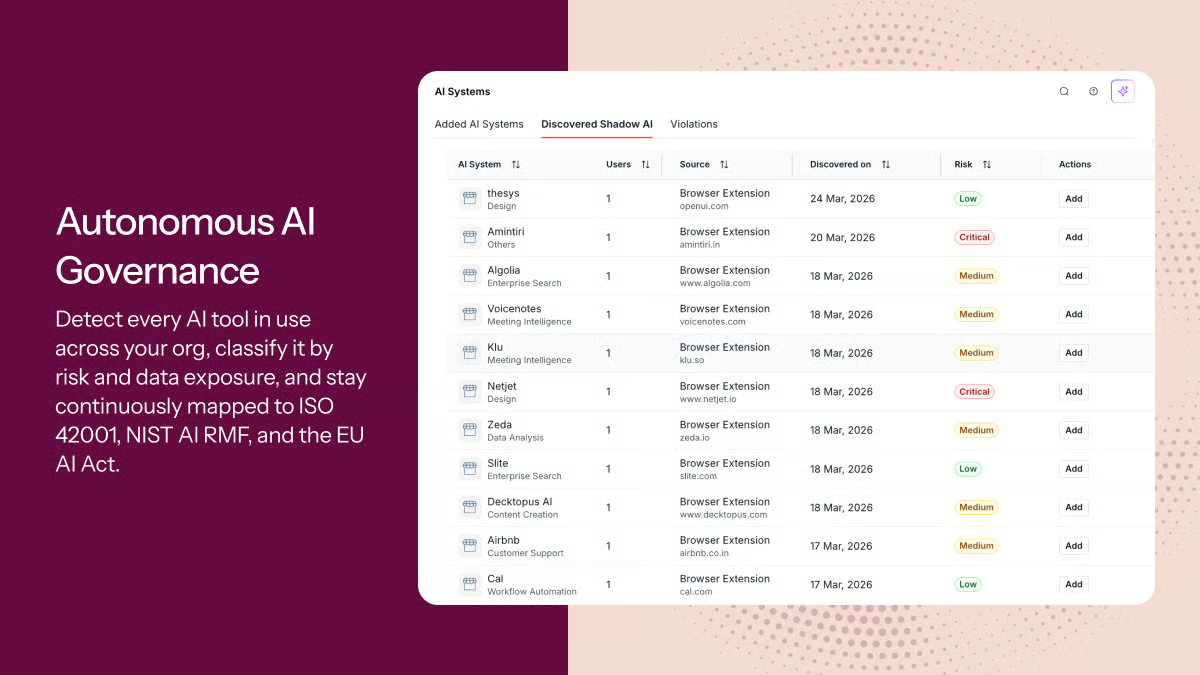
Another area where Sprinto performs well is compliance visibility. Interactive dashboards provide a clear view of control health, outstanding remediation tasks, policy status, and audit readiness, making it easier to prioritize work before small issues become larger compliance risks. The platform also helps organizations manage multiple compliance frameworks simultaneously without duplicating evidence across different audits.
The dedicated account manager model is a standout element of Sprinto’s support structure. Reviewers without in-house GRC expertise highlight the hands-on guidance from technical account managers as critical to getting through their first audit, particularly for navigating nuanced infrastructure requirements that the platform doesn’t always explain in context.
I also noticed that the reviewers were big on the dashboard design. It was often described as clear, comprehensive, and ideal for monitoring audit progress. The ability to share access with auditors was another plus. And while the policy templates weren’t exactly plug-and-play, they gave teams a functional baseline to build from, which helped speed things up.
On the flip side, workflow customization is the platform’s most cited limitation. Sprinto works exceptionally well for standard SOC 2 and ISO 27001 paths, but organizations with unique approval chains, non-standard controls, or highly specific process requirements will find the predefined workflows too rigid to accommodate them without workarounds. For teams whose compliance program fits the standard mold, this rarely surfaces as a problem.
A few reviewers also mention that some integrations require manual configuration to capture evidence correctly, particularly for Microsoft 365 and certain identity management tools. The core integrations with AWS, Google Workspace, and GitHub work reliably out of the box, which covers the majority of SaaS tech stacks without friction.
All in all, Sprinto has a 4.8/5 average rating on G2. This score reflects how consistently it delivers on its core promise: getting growing companies to their first SOC 2 or ISO 27001 certification faster and with less manual effort than any alternative at its price point.
What I like about Sprinto:
- I like how Sprinto continuously monitors compliance controls and automatically collects audit evidence, helping organizations stay audit-ready year-round rather than scrambling before assessments.
- I also appreciate how easy the platform is to implement. Its native integrations, intuitive interface, and responsive customer success team make it especially approachable for growing organizations building their compliance programs.
What G2 users like about Sprinto:
“We completed our SOC 2 Type 1 audit in a very short timeframe, and Sprinto made that possible. The platform is intuitive, comprehensive, and well-structured — it’s clear it was built by people who understand how compliance actually works in practice, not just in theory. But what really stood out was the support. Shruti guided us through the entire process with a level of dedication I rarely see in onboarding or post-sales. She was always available, proactive, and genuinely invested in helping us get to the finish line.”
– Sprinto review, Ignacio B.
What I dislike about Sprinto:
- Teams with unique approval chains or non-standard controls will need custom workarounds, though for the vast majority of SOC 2 and ISO 27001 programs, the predefined workflows cover everything needed.
- Some integrations require manual configuration to capture evidence correctly rather than working out of the box. Though the core integrations covering most SaaS stacks perform reliably once connected.
What G2 users dislike about Sprinto:
“A handful of UI quirks (one of the control forms was unresponsive for us at one point), and some controls are complex enough that you really do need TAM guidance to know what’s required vs. optional. The good news is Rushdan has been so responsive that this hasn’t slowed us down — but a slightly more contextual in-product walkthrough for non-obvious controls would be a nice addition.”
– Sprinto review, Grzegorz M.
5. Secureframe: Best for teams new to compliance who need guided onboarding
Secureframe is a good option for organizations that are serious about compliance but don’t yet have a dedicated GRC team to manage it. Where most platforms assume internal expertise, Secureframe builds it by pairing automated compliance tooling with hands-on human support that guides teams through their first certification without requiring them to figure out the process on their own. With a G2 satisfaction score of 83, it punches well above its review volume in user loyalty.
The platform’s structured, task-driven approach is its defining characteristic. Reviewers appreciate how it breaks down every framework requirement into a clear, ordered list of tasks (what needs to be done, what evidence is required, and what auditors expect to see), rather than presenting a blank compliance canvas. For teams going through SOC 2 or ISO 27001 for the first time, this removes the guesswork that typically adds weeks to the compliance timeline.
From what I found in G2 Data, Secureframe scores 89% on integrations and 87% on audit trail. Its automated evidence collection and continuous monitoring keep the compliance program active between audit cycles. Secureframe connects to cloud providers, HR platforms, and identity management tools, including native Azure integration that automatically alerts teams when deployed infrastructure violates a policy.
The real-time readiness dashboard gives teams and their auditors immediate visibility into compliance status: which controls are passing, which require remediation, and how close the overall program is to audit-ready. This single-pane view replaces the manual status tracking that otherwise consumes significant time in the weeks leading up to a review.
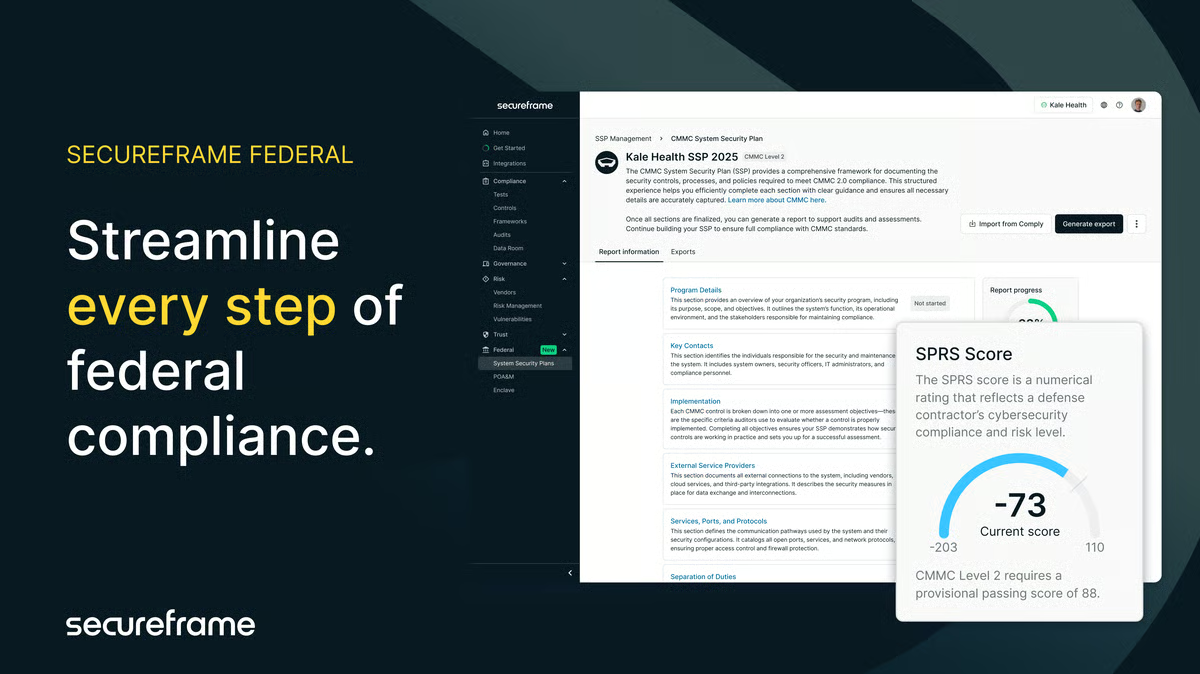
Vulnerability management is another area where Secureframe adds value beyond standard compliance tooling. What reviewers mostly like is how the platform surfaces clear explanations of each vulnerability, along with practical, step-by-step remediation guidance, particularly for AWS environments. This process helps non-security specialists understand the real impact of each issue and act on it without needing to interpret technical documentation independently.
Reviewers also discussed vendor management features built into the platform, as well as evidence collection. These features allow teams to track third-party risk as part of the same compliance workflow rather than managing it separately.
The dedicated compliance manager model is also a differentiator for teams without internal GRC expertise. Every account has a named compliance manager who guides onboarding, answers framework-specific questions, and remains engaged throughout the audit process. According to many reviewers, for early-stage companies without a security lead, this human layer prevents costly mistakes that typically derail first-time compliance programs.
The initial setup has a learning curve that catches some teams off guard. The dashboard and configuration steps can feel complex before the full picture comes together, and certain bulk operations require more clicks than they should. That said, the compliance manager support model exists precisely to smooth this out, and most teams report that the onboarding friction resolves quickly once they’re working through it with dedicated guidance.
Some reviews also note that the integration library, while solid for standard SaaS stacks, has gaps in training tools, vulnerability management, and background-check platforms. For teams with niche tooling in these areas, some manual evidence collection will be required. Yet the core cloud and identity integrations that cover most modern tech stacks work reliably out of the box.
Overall, the sentiment is clear: Secureframe remains a strong performer, with a 94% likelihood-to-recommend score and 4.7/5 average rating on G2. I see it as a well-suited platform for early-stage and growing companies that want compliance done right the first time, with enough hand-holding to avoid the costly mistakes that typically derail teams without dedicated GRC expertise.
What I like about Secureframe:
- The task-driven framework approach breaks compliance requirements into a clear, ordered checklist, giving first-time compliance teams a defined path to audit readiness without having to interpret the framework requirements from scratch.
- The dedicated compliance manager model provides named, hands-on human support through onboarding and the audit process.
What G2 users like about Secureframe:
“As a person who is assisting in getting our framework certifications using SecureFrame I really enjoy how SecureFrame includes templates and examples for specific fields auditors would want to see. This came in handy when uploading evidence for our SOC 2 framework. SecureFrame is pretty easy to navigate and pretty self explanitory.”
– Secureframe review, Lucy L.
What I dislike about Secureframe:
- Based on my analysis of G2 reviews, the initial setup and dashboard configuration have a steeper learning curve than the platform’s ease-of-use positioning suggests. But the dedicated compliance manager support model is specifically designed to guide teams through this period, and most find the friction resolves quickly.
- The integration library has gaps in training, vulnerability management, and background check tools, requiring manual evidence collection for niche platforms. However, the core cloud and identity integrations that cover most SaaS stacks perform reliably without manual intervention.
What G2 users dislike about Secureframe:
“The interface can be a little wonky, especially for bulk operations. Sensible defaults would help speed repetitive forms. For example, marking evidence out of scope requires a step to select the framework (like SOC2) and submit the form, even though we only have one framework. The test page supports view filters but doesn’t support dynamic fields such as ‘current user’, so filtering tests owned by me requires a lot of clicks every time.”
– Secureframe review, Guillaume M.
6. TeamMate: Best for internal audit teams in financial services and the public sector
TeamMate is purpose-built for internal audit teams that need to standardize planning, fieldwork, reporting, issue tracking, and follow-up across multiple audits. Rather than piecing together spreadsheets and shared drives, TeamMate provides a structured environment that keeps every stage of the audit lifecycle connected. With an 84% satisfaction score for likelihood to recommend, it’s the platform of choice for dedicated internal audit departments that need a structured, defensible audit program.
The first thing that stood out to me was how consistently reviewers praised TeamMate’s centralized audit documentation. Everything, from planning documents and workpapers to findings and supporting evidence, lives in one repository, making it much easier to organize engagements and maintain a complete audit trail. Several reviewers also appreciated the strong version control, saying it reduced confusion by ensuring everyone worked from the latest documentation.
End-to-end traceability was the feature many reviewers cited as irreplaceable. Every component of an audit engagement, including scope, objectives, risk assessments, working papers, findings, and sign-offs, lives within a single connected workflow. The structured linkage among risks, controls, testing procedures, and issues ensures that conclusions are traceable to evidence at every stage, which is exactly what audit leaders need when presenting results to executive stakeholders, audit committees, or external regulators.
Workflow management is another area where TeamMate excels. Managers can assign work, monitor project progress, review documentation, and track outstanding actions from a single platform. I noticed several reviewers mentioning how this visibility helps keep audit engagements on schedule while reducing the back-and-forth typically associated with managing large audit teams.
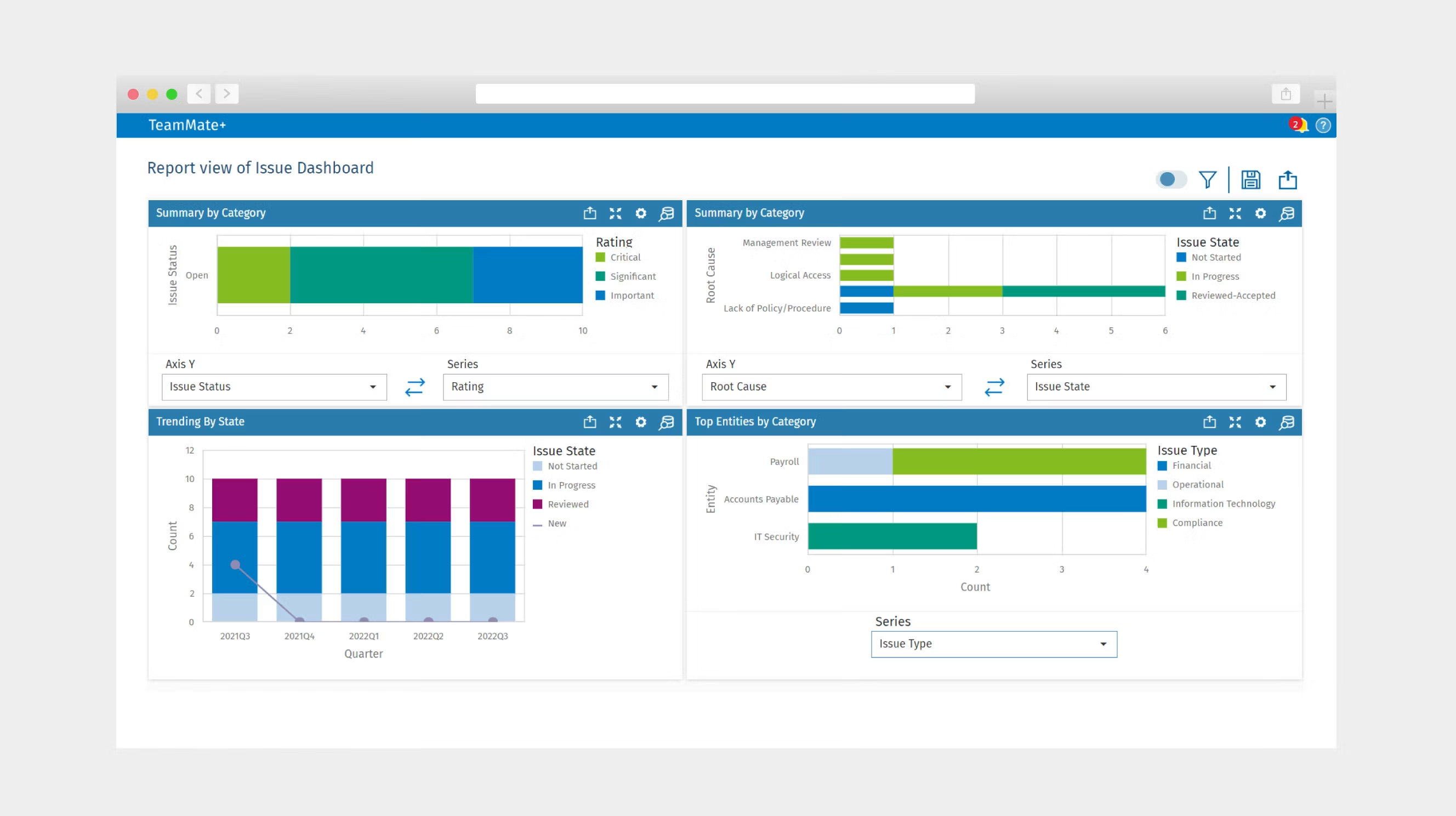
Another recurring strength is the platform’s structured audit methodology. TeamMate links risks, controls, testing procedures, findings, and remediation activities throughout the entire audit lifecycle, creating a logical flow from planning to closure. Reviewers felt that this standardized approach improved audit quality and helped maintain consistency across teams, especially in organizations that follow established internal audit methodologies.
I also liked how configurable the platform is for internal audit teams. Users highlighted the ability to customize templates, taxonomies, reporting fields, and workflows to reflect their organization’s audit methodology, rather than forcing teams into a one-size-fits-all process. Features like review comments, audit templates, reporting APIs, and Power BI connectivity further improve visibility for audit leaders managing multiple engagements.
Customer support and implementation guidance also received positive feedback. Several reviewers described the support team as responsive and knowledgeable, while others appreciated the straightforward technical documentation and relatively smooth upgrade process. Combined with its intuitive project hierarchy and search capabilities, these features make TeamMate a reliable platform for organizations looking to mature their internal audit function.
Like most enterprise audit platforms, TeamMate requires some investment to get the most from it. Several reviewers noted that advanced configuration, reporting, and workflow customization can take time to learn, particularly for new administrators. However, they also shared that once the platform is configured to align with their audit methodology, managing complex audit programs becomes significantly easier.
Some reviewers also felt certain workflows could be more intuitive, particularly when customizing reports, navigating between modules, or editing documents. A few mentioned occasional performance delays with larger engagements. Even so, reviewers generally agreed these challenges affected usability more than functionality, and the platform’s organization, governance, and audit lifecycle management continued to outweigh those limitations.
TeamMate has an average rating of 4.2/5 on G2. That score reflects a platform built for a specific buyer — dedicated internal audit departments in regulated industries that need end-to-end audit lifecycle management, a fully traceable working paper trail, and the institutional depth that only 30 years of purpose-built audit expertise can deliver.
What I like about TeamMate:
- I like how TeamMate centralizes the entire audit lifecycle, from planning and fieldwork to findings and remediation, making it much easier to keep audits organized and maintain a complete audit trail.
- I also appreciate its structured workflows, customizable templates, and collaboration features, which help audit teams standardize their methodology while improving visibility across every engagement.
What G2 users like about TeamMate:
“What I like best about TeamMate is that it makes audit work more organized and easier to track. It helps in managing tasks, documenting findings, and monitoring progress in one place. It also improves teamwork because everyone can see updates in real time. Overall, it saves time and makes the audit process more efficient.”
– TeamMate review, Anabelle A.
What I dislike about TeamMate:
- I found reviews mentioning that configuring advanced reports, workflows, and custom fields requires time and familiarity with the platform, although reviewers noted that the flexibility pays off once implementation is complete.
- Reviewers also point to the need for more intuitive navigation and report customization. While these usability issues occasionally slow users down, they don’t take away from TeamMate’s strong audit management capabilities.
What G2 users dislike about TeamMate:
“I find the time tracking to be of limited value since we do not bill clients for the hours spent, unlike external audit. We have a Power BI, but it is not linked or connected with TeamMate+.”
– TeamMate review, Daniel D.
Frequently asked questions about the best audit management software
Have more questions? Find more answers below.
Q: What are the most trusted audit management solutions for Operations Manager teams based on user reviews?
Based on G2 satisfaction scores and review volume, Workiva and Vanta top the trust rankings for operations teams. Workiva earns high marks for connected reporting and multi-stakeholder collaboration, while Vanta leads for compliance automation and continuous monitoring. For operations managers in regulated industries, TeamMate’s purpose-built audit lifecycle management makes it a reliable long-term choice.
Q: What is the highest-rated audit management software for mid-market technology companies focused on easy integration delivery?
Vanta and Sprinto are the strongest options for mid-market technology companies prioritizing ease of integration. Vanta connects to 300+ tools, including AWS, Google Workspace, and GitHub, out of the box, while Sprinto’s automated evidence collection pulls directly from cloud infrastructure and identity providers with minimal configuration. Both are built with SaaS tech stacks in mind.
Q: Which audit management software do teams actually keep using beyond rollout instead of reverting?
Workiva and TeamMate show the best long-term retention signals in G2 reviews. Workiva’s connected data architecture is deeply embedded in enterprise reporting workflows, making reversion impractical once teams are fully configured. TeamMate’s structured audit lifecycle management becomes more valuable over time as teams build out their working paper repositories and refine their audit taxonomy.
Q: What is the most reliable audit management software based on reviews from Operations Managers managing technology company operations?
Workiva and Optro are the strongest performers for operations managers in technology environments. Workiva’s linked data architecture ensures every report reflects live data with a full audit trail, while Optro’s connected GRC modules surface risk and compliance status in real time across enterprise-scale programs. Both maintain data integrity across concurrent multi-user sessions.
Q: Which audit management software supports real-time visibility without sacrificing system stability and overall data integrity?
Workiva and Optro lead on this front. Workiva’s connected data architecture keeps every linked document and report synchronized in real time, while Optro’s cross-module GRC platform surfaces risk and audit findings simultaneously without compromising data consistency.
Q: Which audit management software provides streamlined workflow without expensive implementation costs or outside consulting?
Sprinto and Secureframe are the standout options here. Sprinto’s guided compliance workflows get teams audit-ready without requiring external GRC consultants, while Secureframe’s dedicated compliance manager model provides the human support of a consulting engagement at a fraction of the cost. Both are designed to minimize implementation overhead for lean teams.
Q: Which audit management software has the simplest configuration and onboarding for non-technical teams in the mid-market?
Secureframe is a good option for non-technical teams. Its task-driven onboarding breaks compliance requirements into an ordered checklist, and every account includes a dedicated compliance manager who guides setup without requiring teams to interpret framework requirements independently. Vanta’s clean interface and guided setup also make it accessible for teams without dedicated security expertise.
Q: What are the top audit management platforms for technology companies seeking easy integration and minimal implementation complexity?
Vanta and Sprinto are the top choices for technology companies on both counts. Vanta’s 300+ native integrations cover the most common SaaS infrastructure tools with minimal manual configuration, while Sprinto connects directly to cloud providers, HR systems, and identity tools to automate evidence collection from day one.
Q: Which audit management solutions deliver streamlined workflow while maintaining strong user team adoption?
Sprinto and Secureframe show the best post-go-live adoption signals. Sprinto’s automated evidence collection reduces the manual burden that typically causes teams to disengage after initial setup, while Secureframe’s compliance manager support keeps teams engaged through the full certification cycle.
Q: What are the best audit management platforms for mid-market organizations that require real-time visibility effectively?
Vanta and Sprinto are the top choices for mid-market organizations. Vanta’s single-pane dashboard surfaces control health across all integrated systems in real time, while Sprinto’s continuous monitoring flags compliance drift before it becomes an audit issue. Both are priced and structured for organizations that have outgrown manual processes but aren’t yet running enterprise-scale GRC programs.
Don’t leave compliance to chance, or spreadsheets
The right audit management platform doesn’t just replace spreadsheets — it changes how your team operates. Whether you’re scaling toward your first SOC 2, managing a global internal audit program, or keeping a Fortune 500 risk framework synchronized across departments, the difference between the right tool and the wrong one shows up every audit cycle.
My advice is simple: shortlist two or three platforms, request product demos, and evaluate how each solution supports your audit workflows, reporting requirements, integrations, and compliance frameworks.
Investing a little more time in your evaluation today can save your team hundreds of hours of manual work and help build a more transparent, scalable audit program for years to come.
Still weighing your options? Browse real user reviews, compare satisfaction scores, and filter by your industry or company size on G2’s Governance, Risk & Compliance software category, and find the platform your audit team will actually stick with.

💸 Earn Instantly With This Task
No fees, no waiting — your earnings could be 1 click away.
Start Earning
