


Imagine an engineer writes this in the team channel during an outage: “checkout failing on some requests, digging into gateway logs, no ETA yet.” Your team wants every status update in the same shape: one line for the status, one for the impact and one for the next step. And it must never invent a cause or a time.
You can write that rule in a prompt. But if you want a small model that follows the habit by itself, on your own laptop, you can fine-tune it: you show the model examples, and it learns the pattern. Soup is an open-source tool that makes this shorter. You give it a dataset and one YAML recipe, run one command, and test the result. I ran every step on a MacBook with Apple Silicon (M5, 24 GB).
How Soup Works, in Plain Words
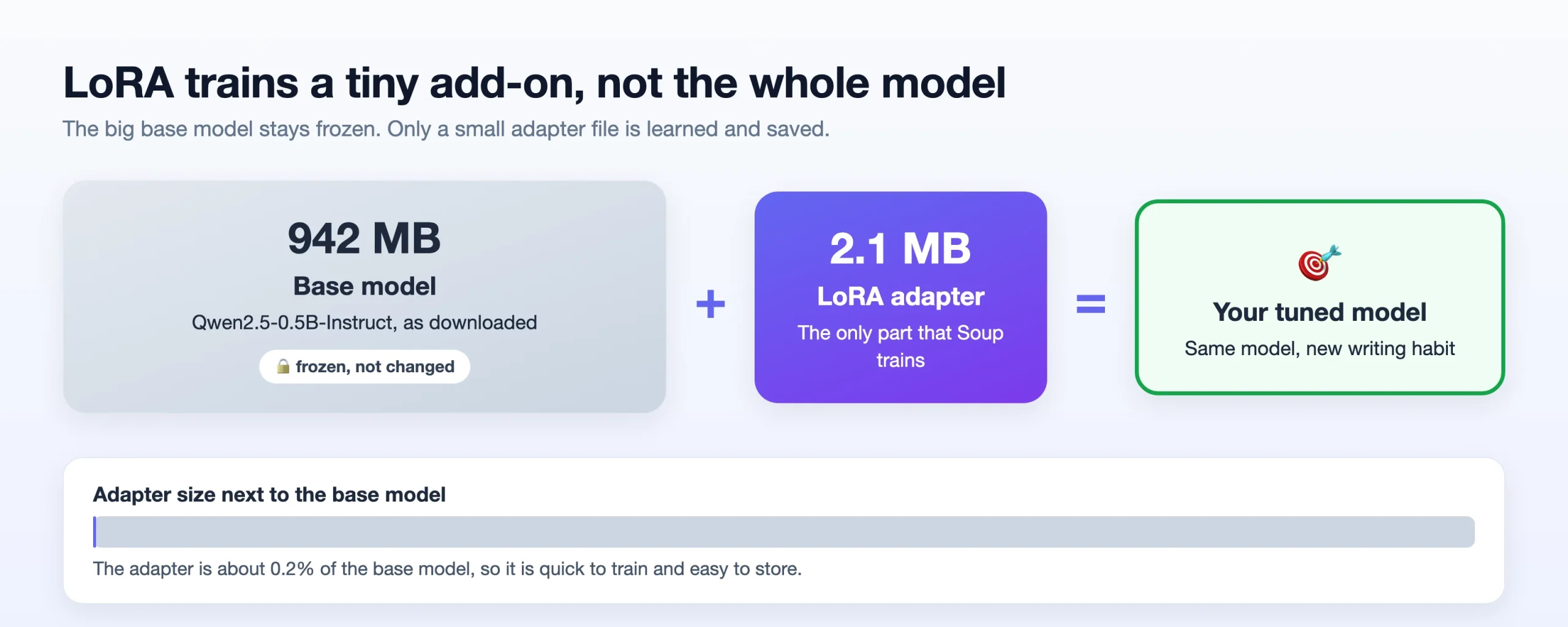
For this kind of training (supervised fine-tuning), Soup reads examples that pair a request with the answer you want. It loads a base model and trains it with a method called LoRA. Instead of changing the whole model, LoRA trains a tiny extra file, called an adapter, and keeps the base model frozen. LoRA comes from a 2021 research paper, not from Soup.
| Word | What it means here |
|---|---|
| Base model | A public model, Qwen2.5-0.5B-Instruct (Apache-2.0 licence). |
| Adapter | The small file of learned numbers. Mine is 2.1 MB. |
| Epoch | One full pass over the training examples. |
| Loss | A score for how wrong the model is. Lower is better. |
Soup is not the only tool of this kind. Axolotl, LLaMA-Factory and Unsloth also help with fine-tuning, each with its own strengths. Soup’s appeal is one simple command-line tool for the whole path. Which tool is best depends on your hardware and workflow.
Hands-on: Train an Incident Update Writer
Our goal is small: teach a model to turn a rough incident note into three lines (STATUS, IMPACT, NEXT) without inventing anything. The notes and labels are invented for this tutorial.
What you need: Python 3.11 to 3.13, about 2.5 GB of free disk, and internet for the first run. No API key. The base model is public, and Soup downloads it automatically the first time you train. You will see that in Part 3.
Mac or NVIDIA? Soup’s main path in its docs is for NVIDIA GPUs. My Mac has none, so I used Soup’s Apple Silicon (MLX) path, which is what you see below. For an NVIDIA GPU, install soup-cli[train] instead and delete the backend: mlx line from the recipe. I did not run the NVIDIA path.
Part 1: Install Soup
Create a Python environment, install Soup and check the version. I used uv, but python -m venv and pip also work. I pinned the version so that you get the same Soup as me.
$ uv venv --python 3.12 .venv
$ source .venv/bin/activate
$ uv pip install "soup-cli[mlx,train]==0.77.2"
$ soup --version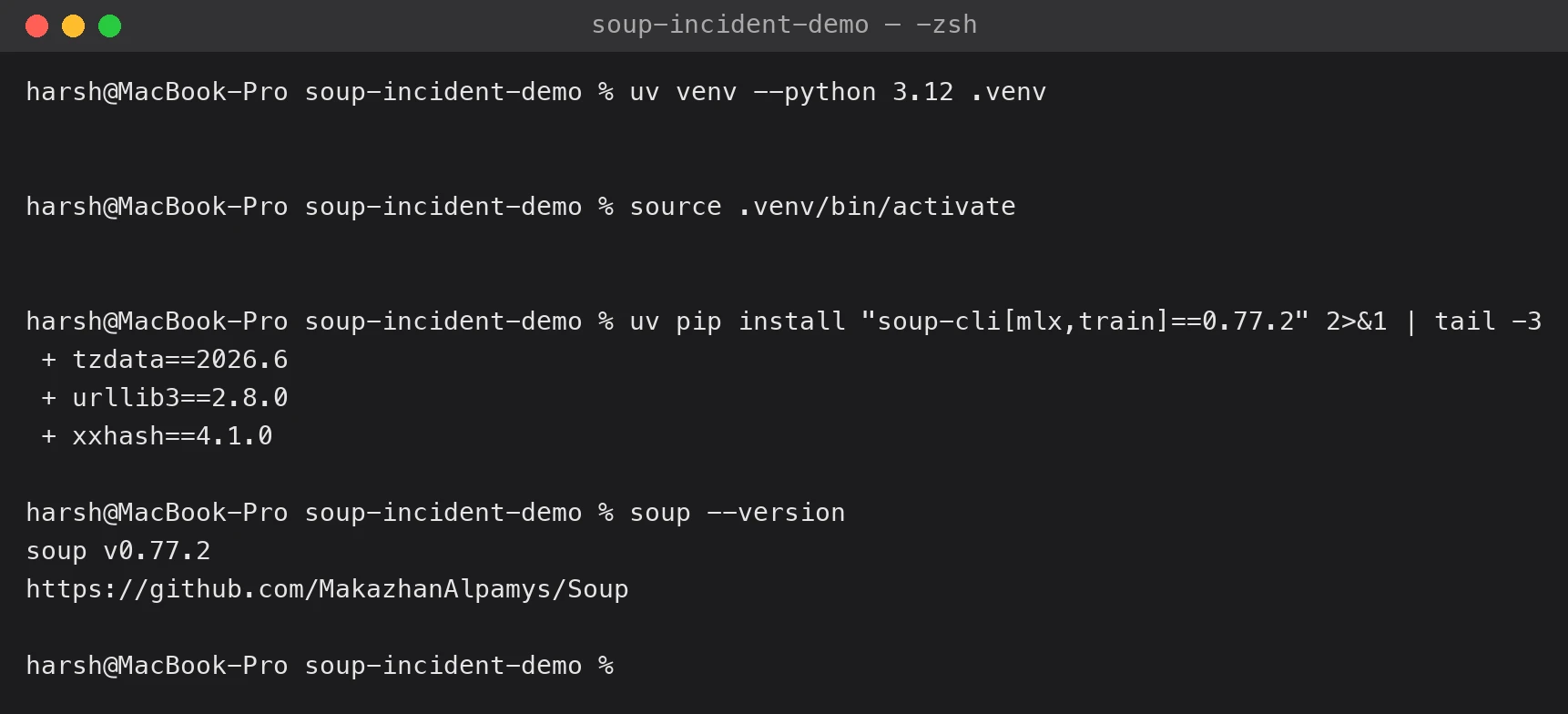
You are done with Part 1 when soup --version prints a version number.
Part 2: Create the training data
Make a project folder. Then create make_data.py. It writes 12 examples to a file. Each example has three fields: instruction (the task), input (a rough note) and output (the three-line update we want). This is called the Alpaca format, and Soup understands it.
$ mkdir soup-incident-demo
$ cd soup-incident-demo

File: make_data.py
# make_data.py - writes 12 original training examples to data/train.jsonl
import json
from pathlib import Path

instruction = ("Turn note into exactly three lines: STATUS, IMPACT, NEXT. "
               "Use only supplied facts. Never invent ETA or cause.")

# Each row: rough note | STATUS | IMPACT | NEXT
rows = """Checkout errors up; investigating; checking gateway logs.|Investigating|Checkout errors elevated|Check gateway logs
Login delays reported; investigating; checking auth traces.|Investigating|Login is delayed|Check auth traces
Search sometimes times out; investigating; sampling requests.|Investigating|Search requests time out|Sample failed requests
Payment retries high; investigating; inspect provider errors.|Investigating|Payment retries increased|Inspect provider errors
Checkout recovered; monitoring; watch error rates.|Monitoring|Checkout has recovered|Watch error rates
Search latency normal again; monitoring; track p95.|Monitoring|Search latency is normal|Track p95 latency
Login stable after fix; monitoring; watch sign-ins.|Monitoring|Login is stable after a fix|Watch sign-ins
Order backlog clearing; monitoring; inspect queue depth.|Monitoring|Order backlog is clearing|Inspect queue depth
API incident resolved; errors normal; close ticket.|Resolved|API errors are normal|Close incident ticket
Checkout incident resolved; payments healthy; publish recap.|Resolved|Payments are healthy|Publish incident recap
Login issue resolved; sign-ins normal; share summary.|Resolved|Sign-ins are normal|Share incident summary
Search issue resolved; timeouts gone; update timeline.|Resolved|Search timeouts are gone|Update incident timeline""".splitlines()

path = Path("data/train.jsonl")
path.parent.mkdir(parents=True, exist_ok=True)
with path.open("w", encoding="utf-8") as f:
    for line in rows:
        note, status, impact, next_step = line.split("|")
        example = {"instruction": instruction, "input": note,
                   "output": f"STATUS: {status}\nIMPACT: {impact}\nNEXT: {next_step}"}
        f.write(json.dumps(example, ensure_ascii=False) + "\n")
print(f"Saved {len(rows)} examples to {path}")
Run it, and ask Soup to check the file:
$ python make_data.py
$ soup data validate data/train.jsonl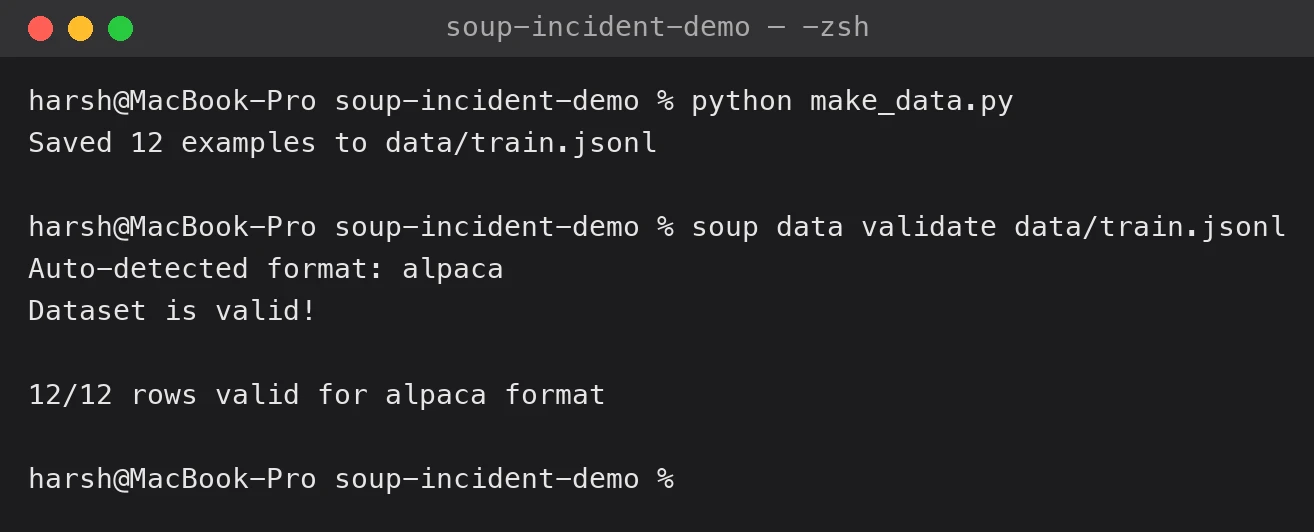
You are done with Part 2 when Soup reports that the rows are valid.
Part 3: Write the recipe and train
Create soup.yaml in the same folder. This one file is the whole recipe:
File: soup.yaml
base: Qwen/Qwen2.5-0.5B-Instruct
task: sft
backend: mlx          # Apple Silicon only. Remove this line on an NVIDIA GPU.
data:
  train: ./data/train.jsonl
  format: alpaca
  val_split: 0.2
  max_length: 256
training:
  epochs: 3
  lr: 0.0002
  batch_size: 1
  lora:
    r: 8
    alpha: 16
  quantization: none
output: ./output
You only need to understand four lines:
base: the model to start from. Soup will download it.val_split: 0.2: keeps 3 of the 12 examples aside, to measure the model on data it did not train on.epochs: 3: three passes over the data. A small toy value.backend: mlx: Apple Silicon only. Delete this line on an NVIDIA GPU.
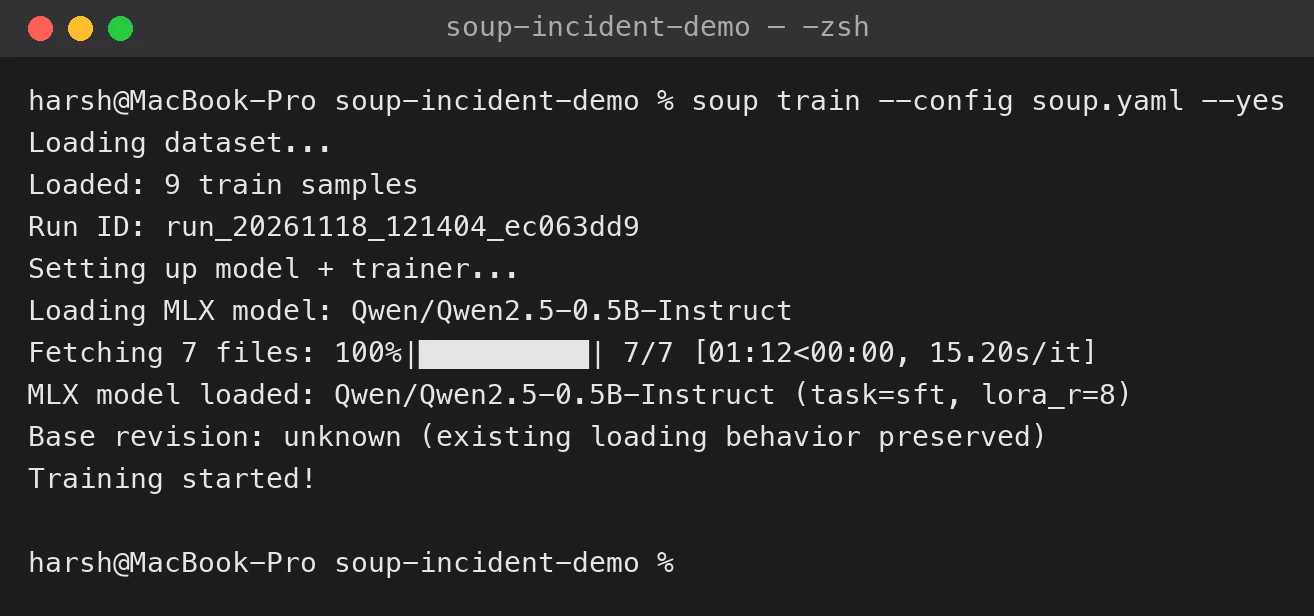
Now train. Soup shows a setup box and asks you to confirm. In a normal terminal, you can just answer the question. I added --yes so that it also works in scripts.
$ soup train --config soup.yaml --yesThe model download happens here, by itself. On my first run, Soup fetched 7 files (about 950 MB) from Hugging Face. It took 1 minute 12 seconds on my connection. Later runs reuse the saved copy, so they are much faster.
After that, training starts. This is the result of the run:
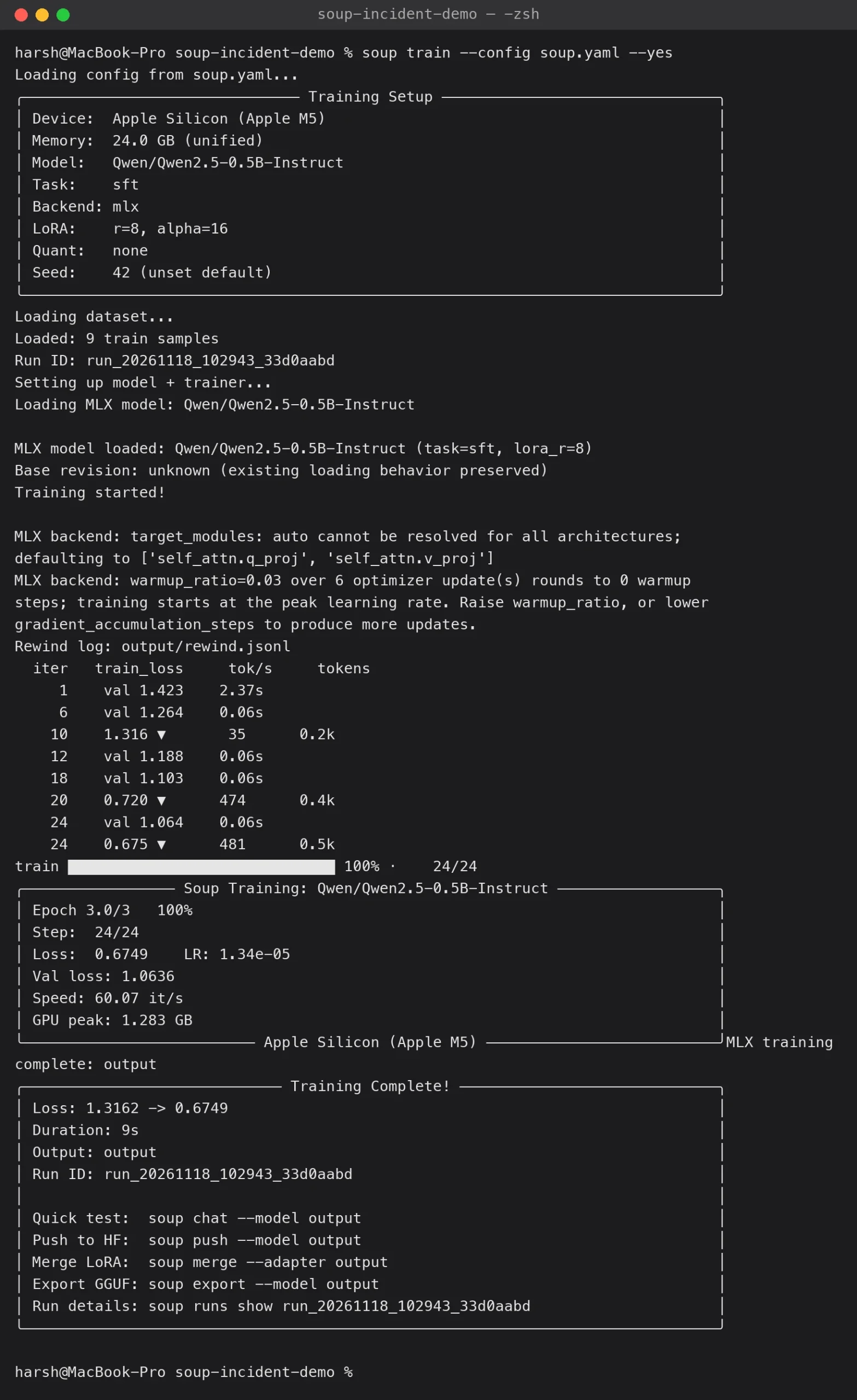
How to read this output:
- Loaded: 9 train samples. 12 rows minus the 3 kept for validation.
- Loss: 1.3162 → 0.6749. The loss went down, so the model fits the examples better.
- Val loss: 1.0636. The score on the 3 held-out rows. It is higher than the training loss, which is normal.
- Output: output. The folder now has the 2.1 MB adapter.
The two messages about target_modules and warmup are only notes. They are not errors.
You are done with Part 3 when you see “Training Complete!”.
Part 4: Test the model against the original
Training is not the result. The test is. We will give the same four notes to the original model and to our tuned model, and compare. One note comes from the story above, and three are new to the model. Create make_prompts.py:
File: make_prompts.py
# make_prompts.py - writes 4 test notes into prompts.jsonl
import json

INSTRUCTION = ("Turn note into exactly three lines: STATUS, IMPACT, NEXT. "
               "Use only supplied facts. Never invent ETA or cause.")

notes = [
    "Billing dashboard loads slowly for some users. Team is investigating. Checking database reads. No ETA has been confirmed.",
    "Search requests failing; investigating; logs under review.",
    "Upload service recovered; monitoring; watch queue size.",
    "No confirmed status for notifications; team checking delivery logs.",
]

with open("prompts.jsonl", "w", encoding="utf-8") as f:
    for note in notes:
        f.write(json.dumps({"prompt": INSTRUCTION + "\n\n" + note}) + "\n")

print(f"Saved {len(notes)} test prompts to prompts.jsonl")
Tip: Use the same instruction in your test prompt that you used in training. When I tested with only the note, the tuned model answered like the original model.
Run it, and then run the two models. The first command uses the original model, and the second uses our adapter. --temperature 0 makes the answers repeatable.
$ python make_prompts.py


$ soup infer --backend mlx --model Qwen/Qwen2.5-0.5B-Instruct --input prompts.jsonl --output out_base.jsonl --temperature 0 --max-tokens 80


$ soup infer --backend mlx --model ./output --base Qwen/Qwen2.5-0.5B-Instruct --input prompts.jsonl --output out_tuned.jsonl --temperature 0 --max-tokens 80
Each command writes its answers to a file. To read them side by side, create a tiny script, show.py:
File: show.py
# show.py - prints the base answer and the tuned answer for each note
import json

base = [json.loads(line) for line in open("out_base.jsonl", encoding="utf-8")]
tuned = [json.loads(line) for line in open("out_tuned.jsonl", encoding="utf-8")]

for i in range(len(base)):
    note = base[i]["prompt"].split("\n\n")[-1]
    print(f"--- Note {i + 1}: {note[:60]}")
    print("[BASE MODEL]")
    print(base[i]["response"].strip()[:160])
    print("[TUNED MODEL]")
    print(tuned[i]["response"].strip())
    print()


$ python show.py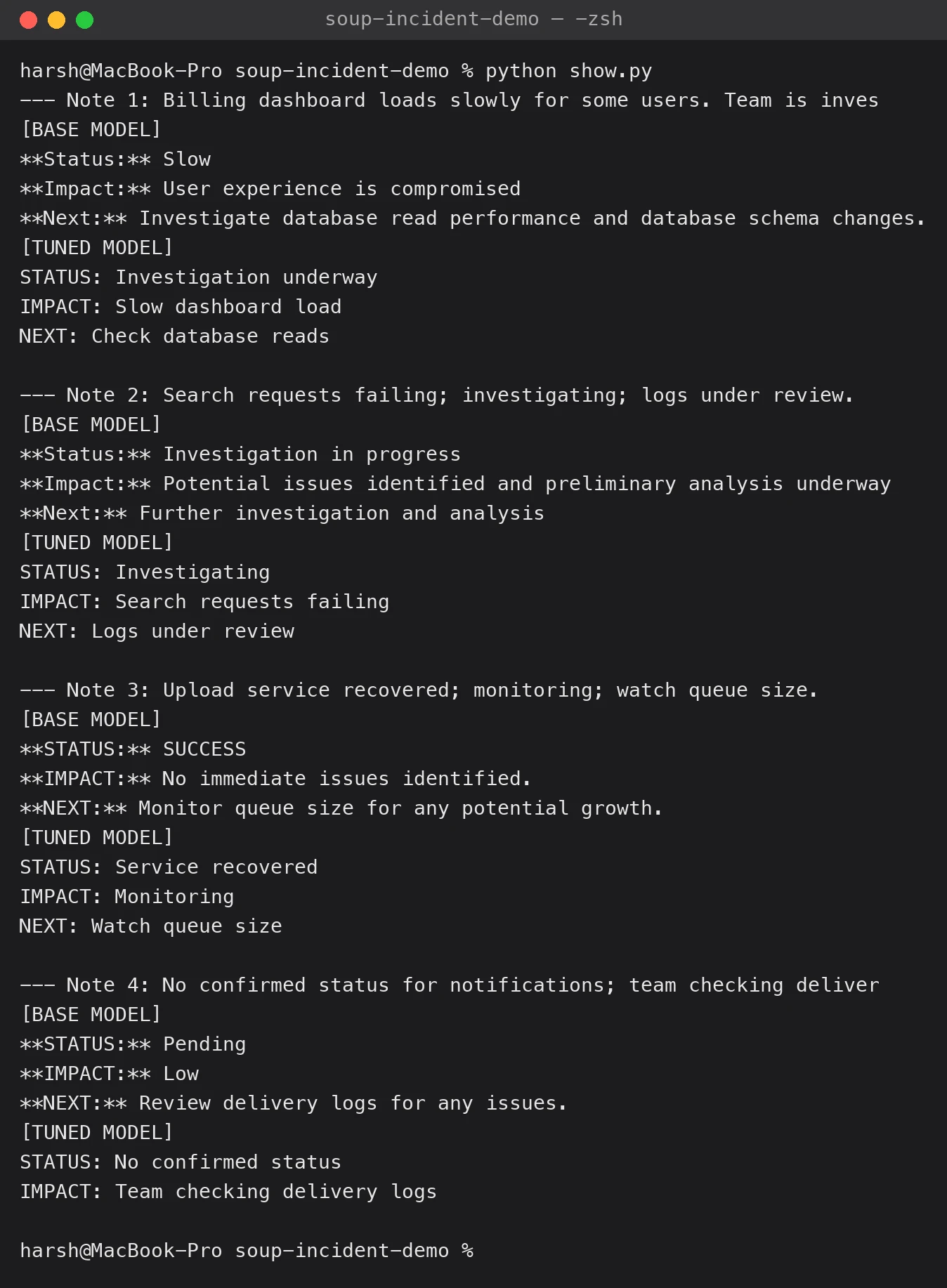
How to read this:
- Base model: it writes
**Status:**in markdown style, and it makes things up. For “Upload service recovered; monitoring” it wroteSTATUS: SUCCESS. For the notifications note it wroteSTATUS: PendingandIMPACT: Low. None of that is in the notes. - Tuned model: three plain lines in 3 of 4 answers, using the words of the note. So it learned the format.
- But it is not reliable. In note 3, it wrote
STATUS: Service recoveredandIMPACT: Monitoring, with the labels mixed up. In note 4, the NEXT line is missing.
Here is the comparison in one small table. I read all 4 answers from each model and counted:
| What we checked (out of 4 notes) | Original model | Tuned model |
|---|---|---|
| Answer is exactly three plain lines (STATUS, IMPACT, NEXT) | 0 of 4 | 3 of 4 |
| Status word is one we wanted (Investigating, Monitoring or Resolved) | 0 of 4 | 1 of 4 |
| Adds facts that are not in the note | 3 of 4 | 0 of 4 |
These counts come from my own reading of this one small test. They are not a formal benchmark.
What this means in simple words:
- Format improved the most. The original model wrote long markdown answers. The tuned model wrote the plain three-line shape that we taught it.
- Made-up details went away. The original model added things like “SUCCESS” and “Impact: Low” that no note said. The tuned model stayed close to the note.
- Exact labels are still weak. Only 1 of 4 status words was one we wanted, and one answer lost its NEXT line. The model learned the habit, not yet the details.
You are done with Part 4 when you can see both models’ answers for the same notes. That is the whole loop: data, recipe, train, compare.
Want Better Results? Train Longer
The easiest thing to try is more epochs. I changed only epochs: 3 to epochs: 10 (and the output folder) and trained again in 4 seconds. The training loss fell to 0.10, and on my four notes all 4 answers had three plain lines and 3 of 4 had a valid status word. But the validation loss stayed near 0.97, and the gap warns that the model may be memorizing. With 3 validation rows and 4 test notes, these numbers are noisy. Treat them as a hint, and test on more notes before you trust it.
What This Lab Does and Does Not Prove
- It ran: data check, training on Apple Silicon, and a real comparison with the base model. All outputs are from my machine.
- It did not run: the NVIDIA (CUDA) path,
soup chat,soup export, and Soup’s optional “layer streaming” beta for big models on small GPUs. The maintainers describe that feature in the README; I did not test it. - The test is tiny: 12 training rows, 4 test notes, one run. Results can change with another Soup version, computer or random seed. Incident messages are sensitive, so a human should approve anything the model drafts.
Conclusion
Soup shortens the distance between “I have some examples” and “I can test a tuned model”. With one dataset, one YAML file and four small parts, we trained a model in 9 seconds and got an adapter of only 2.1 MB. No API key, no paid service and no manual model download were needed.
The side-by-side test is the most useful part of the experiment. The original model wrote long, markdown-style answers and invented details such as “SUCCESS” and “Impact: Low”. The tuned model wrote plain three-line updates in 3 of 4 cases and mostly stayed with the facts in the note. That is a real change, from only 12 examples.
But the same test also showed the limits. The tuned model mixed up labels once and dropped a line once, and it needed the same instruction at test time that it saw in training. Training for 10 epochs improved the results on our four notes, but it also raised a memorizing warning. Twelve examples teach a style, not reliability.
So what should you do next? Keep the same four parts and improve the inputs. Write more and varied training examples, including strange cases such as a note with a missing status. Keep a separate set of test notes that the model never trains on. Always compare the tuned model with the original, and read the answers yourself. The mechanics are easier now, while good data and honest testing are still the real work.
Read more: Web Scraping with Python For Your Data Science project!
Frequently Asked Questions
A. No. Soup downloads Qwen2.5-0.5B-Instruct from Hugging Face on your first training run, about 950 MB, and keeps it for later.
A. Not for this tutorial. The model is public and the training runs on your own machine. Private or gated models may need a login.
A. Yes, through Soup’s MLX path. Training and soup infer –backend mlx worked for me. soup chat and soup merge did not work for the MLX adapter in version 0.77.2.
A. Check the prompt first. If your training examples had an instruction, your test prompt needs the same instruction. When I tested with only the note, my tuned model answered like the original model.
A. Enough to see the pipeline work and to teach a simple format, but not enough for a dependable model. In my run the format was learned, while the labels and details were still wrong at times. Add more varied examples and test on notes the model has not seen.

Harsh Mishra is an AI/ML Engineer who spends more time talking to Large Language Models than actual humans. Passionate about GenAI, NLP, and making machines smarter (so they don’t replace him just yet). When not optimizing models, he’s probably optimizing his coffee intake. 🚀☕
Login to continue reading and enjoy expert-curated content.

💸 Earn Instantly With This Task
No fees, no waiting — your earnings could be 1 click away.
Start Earning