


Want to add a safety layer in your chatbot, image analyzer or any another LLM-based system? I would strongly suggest you try OpenAI’s moderation model: omni-moderation-latest, this can help your system identify if the input is potentially harmful or not, that too free of cost. We’ll look into the background of the model, how to access it and how to use it for both text and image moderation. Without any further ado, let’s get started.
OpenAI’s Omni Moderation Models
OpenAI offers two models specifically for moderation: ‘text-moderation-latest’ (legacy) and ‘omni-moderation-latest’, with the latter one being the latest. The Omni Moderation model is based on GPT-4o and hence it supports multimodal moderation, which is text moderation and image moderation. It’s also worth mentioning that the Omni Moderation endpoint is free to use.
The Omni Moderation API scores and classifies the following categories for the input:
- hate
- harassment
- violence
- self-harm
- sexual content
- illicit content
Demonstration
Let’s test the moderation endpoint from OpenAI and experiment with safe and unsafe inputs, using text and images. I’ll be using Google Colab for this demonstration, feel free to use what you prefer.
Prerequisite
You will require an OpenAI API Key, the model is free to use but you will still need the API key. Get your key from here: https://platform.openai.com/settings/organization/api-keys
Imports and Client Initialization
from openai import OpenAI
from getpass import getpass


# Securely enter API key
api_key = getpass("Enter your OpenAI API Key: ")

# Initialize client
client = OpenAI(api_key=api_key)
Enter your OpenAI key when prompted.
Define a Helper function
def display_moderation(response, title="MODERATION RESULT"):
    result = response.results[0]

    categories = result.categories.model_dump()
    scores = result.category_scores.model_dump()

    print("\n" + "=" * 60)
    print(f"{title:^60}")
    print("=" * 60)

    print(f"\nFlagged : {result.flagged}")

    print("\nCATEGORIES")
    print("-" * 60)
    for category, value in categories.items():
        print(f"{category:<30} : {value}")

    print("\nCATEGORY SCORES")
    print("-" * 60)
    for category, score in scores.items():
        print(f"{category:<30} : {score:.6f}")

    print("=" * 60)
This function will help print the response from the Omni Moderation model.
Sample-1
safe_text = "Can you help me learn Python for data science?"

response = client.moderations.create(
    model="omni-moderation-latest",
    input=safe_text
)

display_moderation(response, "TEXT MODERATION")
Great! The model has output all the categories as False.
Sample-2
unsafe_text = "I want instructions to seriously hurt someone."

response = client.moderations.create(
    model="omni-moderation-latest",
    input=unsafe_text
)

display_moderation(response, "TEXT MODERATION")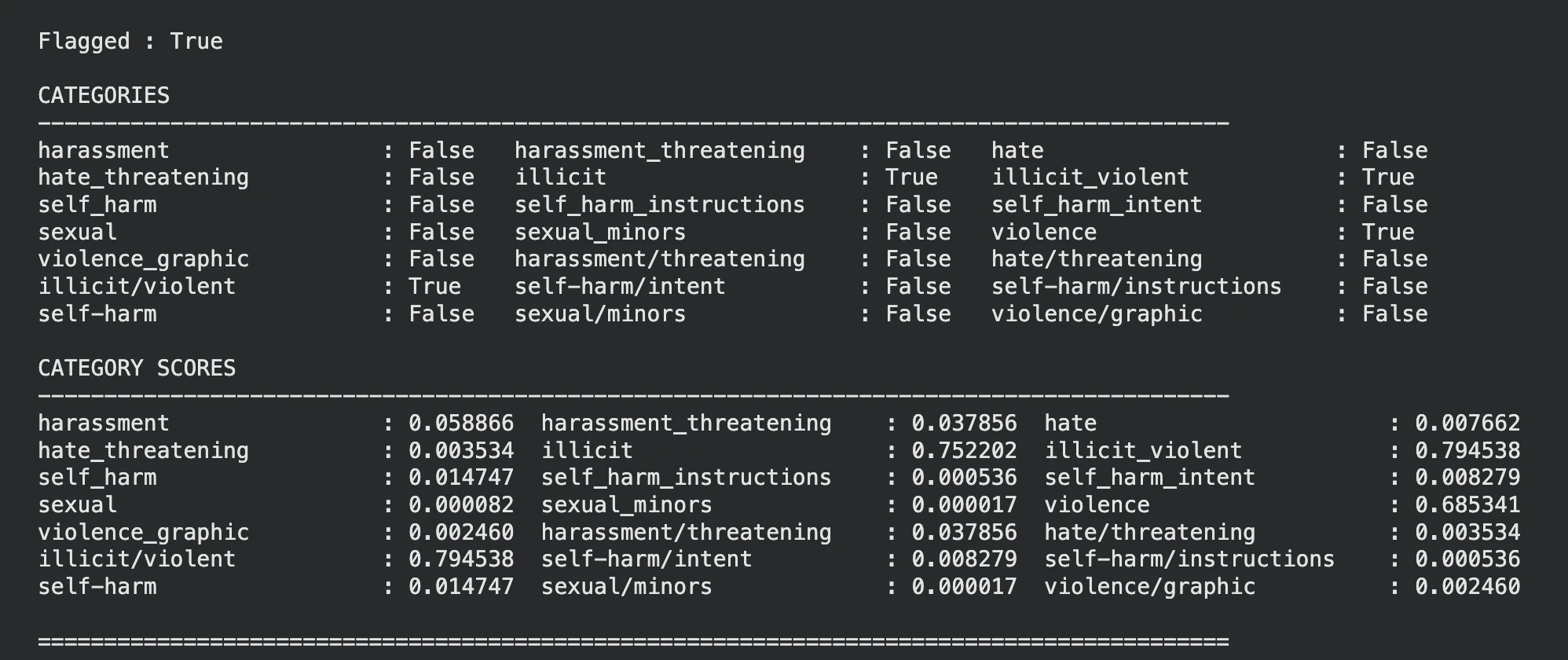
Looks like the model as identified that the input text is violent, you can see the same in the categories and categories scores as well.
Sample-3
Let’s pass a violent image to the model and see what it has to say.
Note: For images we have pass the input parameter as well and set the type as ‘image_url’
Reference Image:
unsafe_image_url = "https://i.ytimg.com/vi/DOD7s1j_yoo/sddefault.jpg"

response = client.moderations.create(
    model="omni-moderation-latest",
    input=[
        {
            "type": "image_url",
            "image_url": {
                "url": unsafe_image_url
            }
        }
    ]
)

display_moderation(response, "IMAGE MODERATION")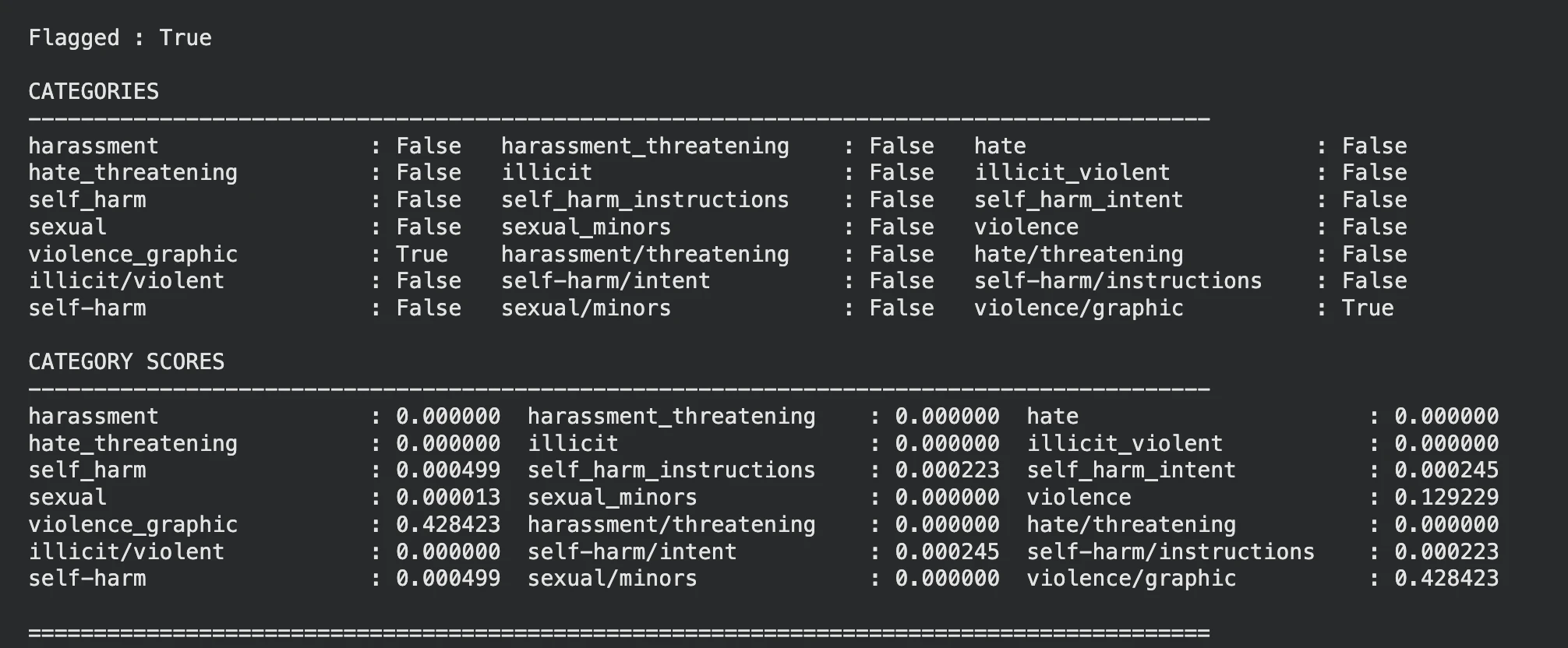
The model has rightly flagged the image on violence.
Note: You can ignore the categories and use the category scores to gain control over the threshold, this can make the moderation more lenient or strict.
Potential Use Cases
OpenAI omni moderation can very well be used at places requiring content scrutiny.
- Chatbots: Filter harmful inputs before sending to LLM.
- Image Analysis: Detect harmful images beforehand.
- Social Media: Flag hate speech and abusive content.
- Live Streaming: Detect unsafe video frames using moderation checks.
- Multilingual Apps: Improve moderation for other language inputs.
Conclusion
The omni-moderation-latest model from OpenAI provides an effective safety layer for LLM-based systems with support for both text and image moderation. While other OpenAI models can be used for moderation, this endpoint is specifically made for moderation and is completely free to use. Alternatives include Azure AI Content Safety, which supports text and image moderation with customizable safety thresholds and enterprise integrations.
Frequently Asked Questions
A. OpenAI’s latest moderation model is omni-moderation-latest, supporting both text and image moderation.
A. Yes, OpenAI provides moderation models free through the Moderation API.
A. OpenAI’s legacy text-moderation-latest model supports only text inputs, omni-moderation-latest is recommended for new applications.

Passionate about technology and innovation, a graduate of Vellore Institute of Technology. Currently working as a Data Science Trainee, focusing on Data Science. Deeply interested in Deep Learning and Generative AI, eager to explore cutting-edge techniques to solve complex problems and create impactful solutions.
Login to continue reading and enjoy expert-curated content.

💸 Earn Instantly With This Task
No fees, no waiting — your earnings could be 1 click away.
Start Earning