


You’ve probably looked at a few board management platforms already. The common pattern? Most tools promise secure document storage and smooth meeting workflows. Still, the reality is more complicated — agenda builders that aren’t intuitive, mobile experiences that fall short for admins on the go, and permission settings that take longer to configure than they should.
To help you compare your options, I evaluated 20+ board management platforms on G2, analyzing features, G2 ratings, and verified reviews from board administrators, company secretaries, and governance professionals. I focused on the capabilities buyers consistently value most, including meeting preparation, document management, voting and approval workflows, collaboration, and security.
My top picks for the best board management software are Nasdaq Boardvantage, Diligent Boards, OnBoard Board Management Software, BoardEffect, Board Intelligence, Convene, and Boardable.
If you’re a board administrator, executive assistant, or governance professional looking to move your board operations off email and onto a purpose-built platform, this guide will help you compare the top options, understand where each tool excels, and identify the best fit for your organization.
7 best board management software for 2026: My top picks
- Nasdaq Boardvantage: Best for audit-ready enterprise board governance
Delivers an intuitive agenda builder and secure document distribution backed by SharePoint integration and AI presentation summaries. (Custom pricing) - Diligent Boards: Best for AI-powered meeting summaries and security
Combines real-time document collaboration with AI-driven meeting summaries and enterprise-grade security for sensitive governance environments. (Custom pricing) - OnBoard Board Management Software: Best for intuitive design and time-saving workflows
Centralizes meeting materials, agendas, and documents in a single hub, with AI-generated minutes and a meeting link copy function for recurring sessions. (Custom pricing) - BoardEffect: Best for nonprofits and community organizations
Simplifies board book creation and document sharing with quick onboarding and 24/7 library access for trustees and staff. (Custom pricing) - Board Intelligence: Best for automating board pack production
Automates board pack assembly with drag-and-drop agenda building, committee-level folder organization, and annotation tools for collaborative review. (Custom pricing) - Convene: Best for comprehensive board collaboration
Supports real-time document collaboration, frictionless in-meeting voting, and secure board communications within a single governance platform. (Custom pricing) - Boardable: Best for nonprofits needing task management
Pairs meeting management with built-in task assignment, digital signatures, and document annotation for accountability-focused boards. ($20.00 per user, per month)
*These board management software tools are top-rated in their category, according to the latest G2 Summer 2026 Grid Report. I’ve added their standout features for easy comparison where ever available.
7 best board management software platforms I recommend in 2026
As boardrooms evolve, governance tools are no longer optional — they’re becoming essential. The market for board management software is projected to grow from $2.55 billion in 2025 to $5.56 billion by 2034.
The best board management software helps organizations centralize documents, automate meeting scheduling, and improve decision-making. After evaluating G2 user reviews across these tools, I found that the platforms that stand out are the ones that make meeting preparation faster, document access more secure, and board collaboration more structured.
And it’s not just about usability. There’s measurable value. G2 Data shows that organizations achieve ROI from board management software in about 14 months on average, underscoring its impact as both a governance and financial investment.
How did I find and evaluate the best board management software?
I began by reviewing the G2 Summer 2026 Grid® Report for Board Management Software and the corresponding G2 Scores as of June 2026. This helped me identify category leaders and high-performing products based on verified customer satisfaction, market presence, and other G2 Data.
Next, I reviewed hundreds of verified G2 reviews from board administrators, company secretaries, and governance professionals with hands-on experience. I synthesized recurring feedback to understand how each platform performs across the areas buyers care about most, including meeting preparation, document management, voting workflows, collaboration, and security.
Based on this evaluation, I selected the highest-performing solutions featured in this guide to help you compare your options and choose the best board management software for your organization’s governance needs.
All product screenshots featured in this article come from official vendor G2 pages and publicly available materials.
What makes the best board management software worth it: My selection criteria
I considered the following factors when evaluating the best board management software options.
- Document management and collaboration: A board management system should serve as a centralized hub for documents, agendas, and meeting minutes. I evaluated how easily users could upload, organize, and securely share documents, including the ability to categorize files by meeting date and document type (e.g., financial reports and strategic plans) and to assign appropriate access permissions. Searchability was equally important, so I looked at whether users could quickly find documents using filters such as date, title, or keywords. I also considered whether the platform supported in-app commenting, annotations, and document collaboration.
- Meeting scheduling and agenda management: I evaluated whether the software allowed users to schedule meetings, build agendas, and send automated reminders. Calendar integrations with Google Calendar and Microsoft Outlook were an advantage for organizations managing multiple board cycles. I also looked at whether boards could create customizable agendas and attach supporting documents directly to agenda items, keeping meeting preparation centralized.
- Real-time voting and decision-making: I assessed whether the platform supported real-time voting during meetings, including anonymous voting, quorum tracking, and automatic vote tallying. I also considered how easily voting results could be captured and shared within the platform to simplify decision tracking and support governance compliance.
- Role-based access control (RBAC): Security was a non-negotiable evaluation criterion because board materials often contain highly sensitive information. I assessed whether the software supported role-based access control, ensuring only authorized users could access specific documents, discussions, and settings based on their responsibilities. I also considered whether audit logs were available to track user activity and strengthen accountability.
- Board member engagement and communication: I evaluated whether the software supported secure in-platform messaging or discussion spaces to keep board communication off email. I also considered the quality of notification and reminder capabilities to ensure board members received timely updates on upcoming meetings, pending approvals, and document changes without relying on manual follow-ups.
- Intended for use by board or committee members, or similarly ranking directors
- Enable the creation and storage of material such as agendas, meeting minutes, team notes, and more
- Allow for communication and engagement between members
- Enable features to collect group feedback
This data was pulled from G2 in 2026. Some reviews have been edited for clarity.
1. Nasdaq Boardvantage: Best for audit-ready enterprise board governance
Nasdaq Boardvantage is a board portal built for enterprise organizations that need a secure, scalable platform for managing board books, governance documents, and committee meetings across complex organizational structures.
G2 Data shows Nasdaq Boardvantage holds the highest market presence score (99) in this category, reflecting its widespread adoption across large enterprises and regulated industries.
The capability I saw mentioned most often was board book and agenda management. G2 reviewers highlight that the Edit and Link functionality has dramatically reduced the time required to assemble board books. Users report that a 750-page board book that previously took hours to compile now takes roughly ten minutes, with last-minute document swaps handled automatically through the agenda editor and drag-and-drop interface.
While AI adoption is still developing across the reviews I analyzed, I also noticed positive early feedback around the platform’s new AI capabilities. Reviewers mention AI presentation summaries and AI-assisted minute drafting as standout additions that reduce post-meeting workload. Users also note that the platform continues to expand its AI capabilities, with teams just beginning to explore the full potential of these tools.
Microsoft and Google integrations are frequently highlighted in G2 reviews. The SharePoint integration, Microsoft Outlook sync, Google Drive connectivity, and the MS Office plug-in for the Edit and Link function make Boardvantage a natural fit for enterprises already operating in Microsoft or Google environments, reducing the friction of switching between tools.
Secure document distribution is another area where G2 reviewers note clear value. The platform supports role-based access control, permission groups, folder-level security, two-factor authentication, SSO for internal users, MFA for external users, and watermarking on printed materials, a combination that G2 reviewers in banking, financial services, and regulated industries cite as a primary reason for choosing the platform.
The member activity tracking feature draws consistent praise from administrators. G2 reviewers highlight the ability to monitor which board members have accessed documents, track approvals, and manage checks and balances across the board — all from a single admin view.
Rounding out the platform’s strengths is its 24/7 customer support. Across the reviews I evaluated, support quality is the single most frequently mentioned differentiator. Reviewers describe response times as near-instant, with dedicated Customer Success Managers providing custom training, handling company rebrands, and proactively flagging new features.
That said, I did notice recurring feedback around permissions management. Some reviewers note that configuring document permissions, print rights, or access across multiple team spaces can be more complex than expected. The tradeoff is the granular security controls that many enterprise organizations require when handling highly confidential board information.
I also came across reviews noting occasional workflow limitations around meeting ownership, Office 365-linked agendas, and email formatting. While these can introduce extra administrative steps in specific scenarios, reviewers generally felt they were outweighed by the platform’s strong governance capabilities, responsive support, and secure document management.
With a 4.6/5 average rating on G2, Nasdaq Boardvantage proves itself as a strong choice for enterprise boards that prioritize security, compliance, and scalable governance workflows. Its AI capabilities, Edit and Link functionality, and exceptional customer support make it a reliable long-term platform for governance teams managing high-stakes board operations.
What I like about Nasdaq Boardvantage:
- I like how it centralizes board books, agendas, meeting documents, and governance records in a single secure workspace, making board preparation significantly easier.
- The combination of intuitive navigation, strong SharePoint integration, responsive customer support, AI enhancements, and enterprise-grade security makes it especially well-suited for organizations managing sensitive board operations.
What G2 users like about Nasdaq Boardvantage:
“I like that Nasdaq Boardvantage is user friendly and makes it easy for me to upload materials. It’s also easy for our board members to use, even for those who are older. I find it extremely easy to use, especially with the help from Nasdaq’s managed staff. I like that help is always only a phone call away and Nasdaq’s Boardvantage support staff are very knowledgeable. I really appreciate how quick, easy, secure, and confidential it is for our board to obtain their materials. Nasdaq Boardvantage is reliable and always performs well. It is competitively priced too.”
– Nasdaq Boardvantage review, Debbie S.
What I dislike about Nasdaq Boardvantage:
- Based on the G2 reviews I evaluated, permission management and administrative controls can require careful configuration, particularly for organizations managing multiple boards or complex access requirements. However, those same controls provide the level of governance and security many enterprise boards expect.
- I also found occasional reports of limitations around meeting ownership, Office 365-linked agenda workflows, and email formatting. These appear to affect specific administrative scenarios rather than everyday board use, and reviewers consistently praise the support team for helping resolve issues quickly.
What G2 users dislike about Nasdaq Boardvantage:
“The only downside I have seen so far with Boardvantage is the complexity of the privacy/sharing folders. I also think somewhere when building the agenda and adding documents, it should say “Meeting Book” since that is what it becomes.”
– Nasdaq Boardvantage review, Brielle H.
2. Diligent Boards: Best for AI-powered meeting summaries and security
For organizations that need a reliable platform to manage board documents efficiently, Diligent Boards combines secure document storage, real-time collaboration, and AI-powered meeting summaries into a single governance-focused platform. This is also reflected in the G2 Satisfaction Score of 75 and a strong presence in the enterprise market.
One capability that immediately caught my attention was Diligent AI. Several reviewers mention using the platform’s AI-powered meeting summaries to quickly capture discussions, decisions, and action items without relying entirely on manual note-taking. For busy board administrators, this helps reduce post-meeting administrative work while making it easier for directors to revisit key decisions.
Board material preparation is another area where Diligent Boards delivers. G2 reviewers find that assembling and updating board books is quick, with the ability to export directly to PDF and deliver materials to board members in a single step. The platform also supports offline viewing and mobile access, which G2 reviewers cite as important for directors reviewing materials on the go.
I also noticed recurring praise for the platform’s collaboration capabilities. Users frequently mention annotating documents, adding comments, and sharing feedback directly within board materials, keeping discussions connected to the documents under review rather than moving across multiple communication channels.
Another strength that surfaced is the platform’s governance and security controls. Reviewers appreciate the granular permission settings, audit trails, and secure storage that help organizations protect sensitive board information while maintaining compliance with governance requirements. For regulated industries and enterprise boards, these controls provide an added layer of confidence when handling confidential materials.
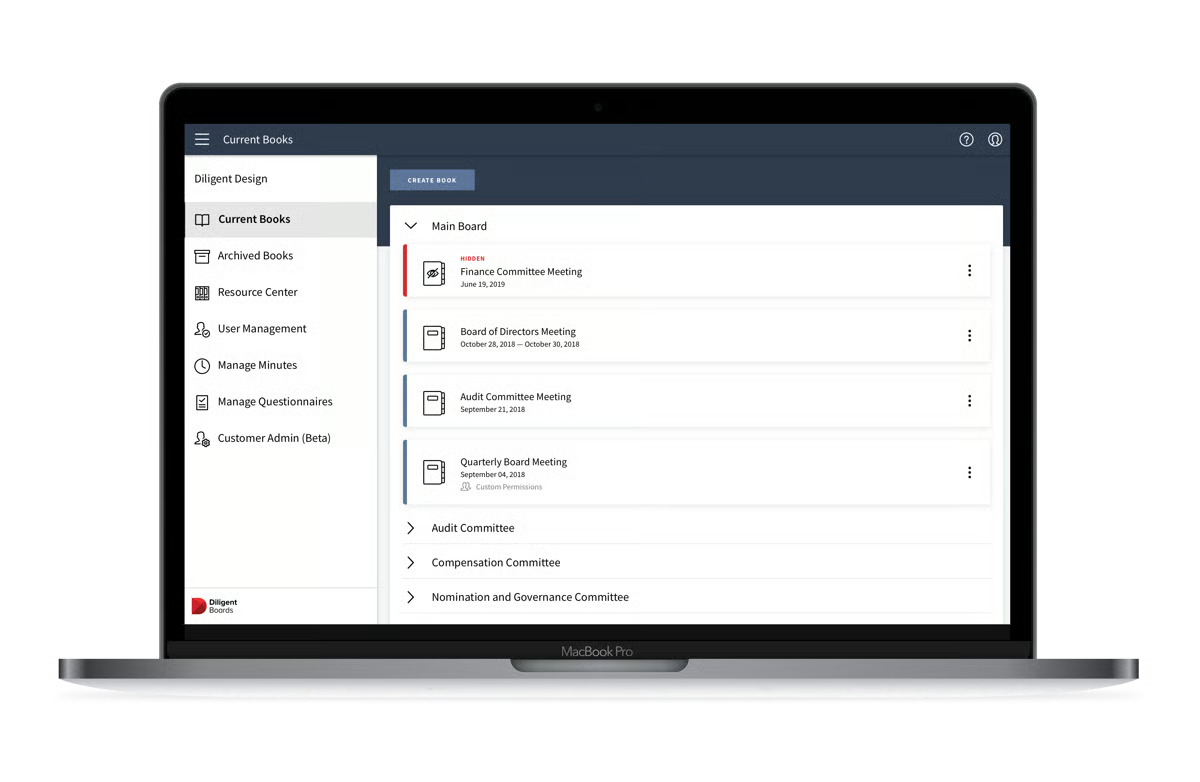
Questionnaires and reporting tools are standout features for governance teams conducting board evaluations and director assessments. G2 reviewers appreciate the ability to revise questionnaires easily, compile all director responses into a single document, and generate reports from completed responses — making it a practical tool for annual governance reviews, beyond just meeting management.
The calendar and reference center round out the platform’s governance toolkit. G2 reviewers highlight the calendar as a central location where multiple users can view and make scheduling changes. At the same time, the reference center provides a dedicated repository for governance documents and standing reference materials separate from meeting-specific books.
That said, I did notice reviewers mentioning that document editing workflows could be more seamless. Since documents often need to be edited outside the platform before being uploaded again, administrators handling last-minute revisions may need to take additional steps. However, most reviewers felt the tradeoff was worthwhile given the platform’s security and version control.
I also found recurring feedback around the search experience and file synchronization. Some users mention that locating specific documents or waiting for files to sync across devices can occasionally take longer than expected, particularly during busy meeting cycles. Even so, reviewers consistently describe these issues as relatively minor compared to the platform’s overall governance capabilities.
Overall, with a 4.5/5 G2 rating, Diligent Boards’ security controls, collaboration tools, and material preparation workflows make it a dependable choice for boards that handle sensitive governance documents at scale.
What I like about Diligent Boards:
- The real-time document collaboration and markup tools remove a meaningful bottleneck from the board preparation process; the ability to comment and annotate without leaving the platform keeps review cycles faster and more contained.
- The questionnaire, reporting, and reference center features extend the platform’s value well beyond meeting management, making it a more complete governance toolkit for boards that run annual director assessments and maintain standing governance documents.
What G2 users like about Diligent Boards:
“I appreciate how easy it is to share read-ahead materials for our quarterly virtual meetings with Diligent Boards. I find it secure to share documents with board members, and the offline viewing capability is quite handy. I also like the ease of reading documents on my phone, which enhances accessibility.”
– Diligent Boards review, Bhavik G.
What I dislike about Diligent Boards:
- Based on the G2 reviews I evaluated, document editing still requires external changes before files are uploaded again, which can slow down last-minute revisions. The benefit is stronger document integrity and version control throughout the review process.
- I also came across reviewers mentioning occasional limitations with search, dashboard customization, and file synchronization across devices. While these can affect day-to-day convenience, reviewers consistently felt the platform’s security, governance capabilities, and support outweighed these drawbacks.
What G2 users dislike about Diligent Boards:
“When I upload a document to a meeting in the portal, I just want it to upload when I drag and drop, I don’t want to hit a ‘confirm’ button. Too much clicking like this is a time-waster and seems like it could be removed. Also, the electronic signature upload shouldn’t have such extremely specific size requirements. This takes extra time and hassle to prep the signature to the requirements. It would be helpful if the system would automatically reformat an as-is uploaded signature.”
– Diligent Boards review, Carrie D.
3. OnBoard Board Management Software: Best for intuitive design and time-saving workflows
If you are searching for the best app for organizing board meetings, OnBoard’s centralized meeting hub and intuitive workflows are standouts.
G2 Data shows that OnBoard has the highest satisfaction score (97) among the seven tools on this list, reflecting positive experiences among board administrators and governance teams.
I noticed several reviewers highlighting OnBoard’s ability to bring documents, agendas, slides, and messaging into a single secure location, eliminating the need to distribute multiple versions of files over email. G2 reviewers highlight that board members always have access to the most current information and that the automatic compilation of board books once a meeting is set up removes a significant manual step from the preparation process.
The agenda and minutes builder draws strong praise from reviewers, particularly for its ability to use a finalized agenda as the direct template for meeting minutes. The drag-and-drop agenda builder makes it easy to reorder items, attach documents to specific agenda points, and export a compiled PDF directly from the platform, eliminating the need for external formatting.
Next up, AI-powered minutes are an emerging favorite among G2 reviewers. Users who have adopted the AI minutes integration report that it meaningfully reduces the time spent drafting and formatting minutes after meetings, making it one of the platform’s most valuable recent additions for governance teams that manage multiple committees.
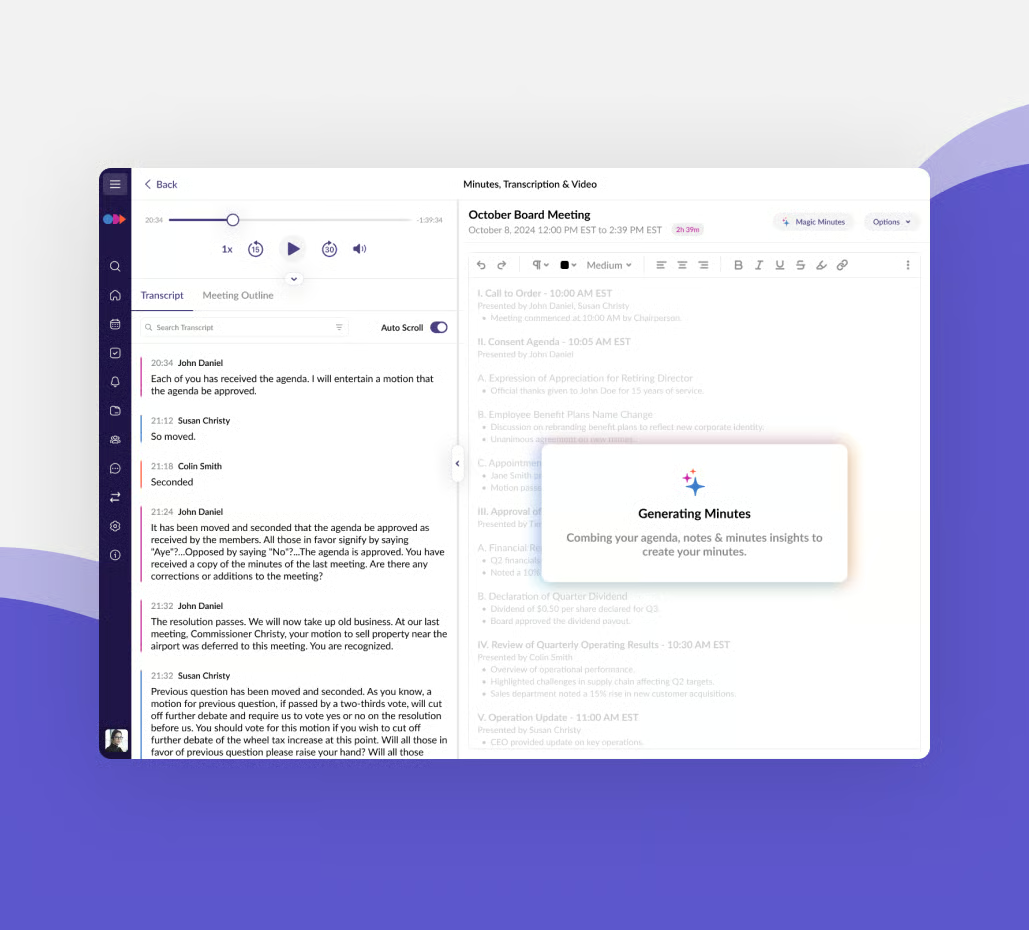
Meeting duplication is a practical time-saver that reviewers often flag. The ability to duplicate a previous meeting, reusing the same structure, agenda format, and materials, is particularly valued by organizations whose meeting cadence stays consistent year over year, reducing repetitive setup work across annual cycles.
Another capability reviewers frequently mention is the Resources library. Organizations use dedicated folders to organize policies, meeting minutes, committee documents, and governance materials, creating a searchable repository that extends beyond individual board meetings and reduces the time spent locating important records.
Board engagement and communication tools extend OnBoard’s value beyond meeting preparation. G2 reviewers highlight the Announcements section, which simultaneously posts updates to the platform and sends them directly to board members’ email inboxes, as well as the Messenger feature for secure threaded communication before, during, and after meetings. Users also note that virtual voting and survey tools have made hybrid governance more manageable.
OnBoard is a well-rounded platform, though reviewers note that the e-signature functionality has reliability issues. Users report inconsistent behavior, open support tickets for ongoing bugs, and note limitations in the minutes approval workflow, which currently requires admins to send compiled minutes externally for approval rather than managing the process within the platform. That said, reviewers emphasize that OnBoard’s core meeting management, agenda building, and collaboration features remain highly reliable.
A few reviewers also flag that the mobile experience and messaging module have room for improvement. Admins note limitations when working with large board packets on mobile devices, and the Messenger is described as chronologically organized without subject threading, making it harder to follow specific conversations across active boards. For organizations whose primary use is desktop-based meeting preparation, these gaps are unlikely to significantly affect day-to-day workflows.
With a 4.7/5 average rating on G2, OnBoard earns its place among the highest-rated board management platforms in this category. Its time-saving agenda and minutes workflows, AI minutes integration, and consistently praised customer support make it a compelling choice for boards looking to reduce administrative overhead across every meeting cycle.
What I like about OnBoard Board Management Software:
- I like how OnBoard centralizes agendas, board books, supporting documents, and meeting resources in a single workspace, making board preparation far more organized and efficient.
- I also appreciate the intuitive interface, reusable meeting workflows, responsive customer support, and agenda management tools that help administrators spend less time coordinating meetings and more time supporting board decisions.
What G2 users like about OnBoard Board Management Software:
“OnBoard is very easy to navigate, and it’s simple to move between features. The onboarding process was smooth; I was able to complete OnBoard Academy and set up our Board Management System exactly the way I wanted. The help and feedback section is fantastic. Whenever I have a question, I can click the Help Center to find multiple videos and articles on the topic. I haven’t used the Calendar or Microsoft integrations yet, so I can’t offer an opinion on those at this time.”
– OnBoard Board Management Software review, Jennifer S.
What I dislike about OnBoard Board Management Software:
- Based on the G2 reviews I evaluated, configuring permissions across multiple committees and document libraries can require additional administrative effort. The benefit is greater control over who can access sensitive governance information.
- I also came across reviewers who would like a more streamlined experience for managing archived meetings and performing certain administrative tasks from the mobile app. While these workflows could be improved, reviewers praise the platform’s overall usability and meeting management capabilities.
What G2 users dislike about OnBoard Board Management Software:
“I would love to see nonprofit discounts available for the more advanced features such as AI, the advanced minutes builder, and real-time voting. Amazingly, we have only had one technical bug in four years of using OnBoard, and that was resolved within about an hour.”
– OnBoard Board Management Software review, Luke M.
4. BoardEffect: Best for nonprofits and community organizations
From the G2 reviews I evaluated, BoardEffect stood out as a platform built specifically for nonprofit organizations, educational institutions, and community-focused entities that need a secure, centralized system for managing governance workflows without heavy IT overhead.
The feature reviewers mention most often is board book creation. I found numerous administrators who described how easy it is to build, organize, and distribute board books without juggling multiple versions of documents. Having agendas, supporting materials, and meeting documents in one place reduces the administrative work required before every board meeting.
Another recurring strength is the platform’s centralized document library. Reviewers frequently describe using dedicated workspaces to organize policies, committee materials, governance documents, and historical meeting records, giving trustees secure, 24/7 access regardless of location. For distributed boards, this means directors always have the latest information without relying on email attachments.
Agenda building and meeting setup draw strong marks from G2 reviewers, particularly the ability to copy agendas from previous meetings and reuse structures across recurring sessions. Users note that agenda creation is faster and more predictable than manual methods, and that attaching supporting documents directly to agenda items keeps preparation organized and self-contained.
Ease of adoption also came up throughout the reviews. Many users mention that both staff members and trustees learn the platform quickly, allowing organizations to transition from previous board portals with minimal disruption. That shorter learning curve makes implementation less intimidating for boards with varying levels of technical experience.
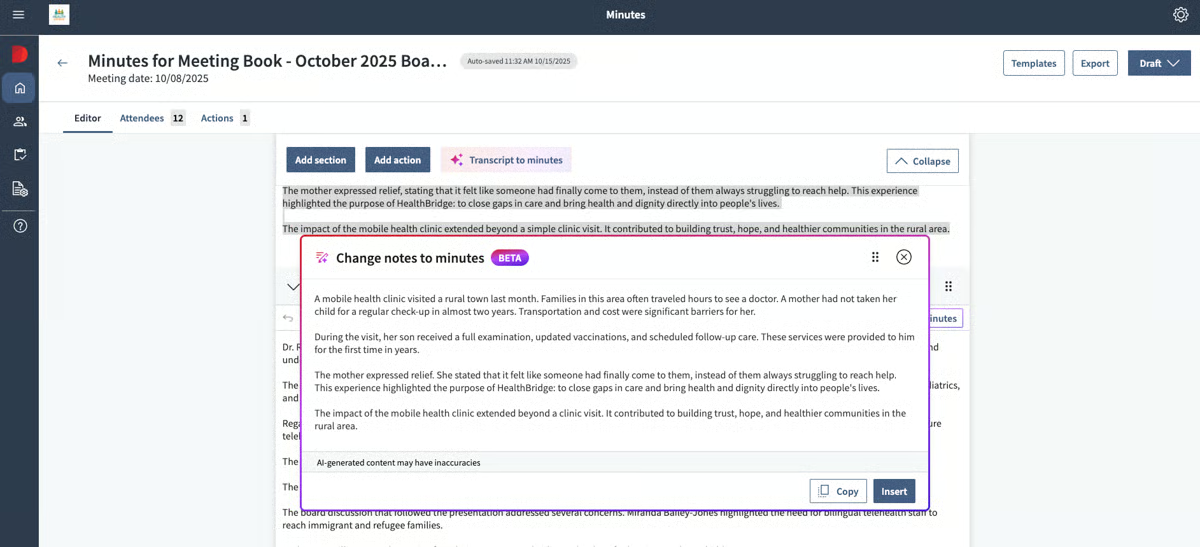
Customer support is another capability that reviewers consistently praise. I came across multiple users highlighting responsive support representatives who provide timely assistance during onboarding and ongoing administration. Several reviewers also noted that issues are resolved quickly, contributing to a smoother governance experience.
Committee and workroom management is another area where BoardEffect performs well. Reviewers appreciate being able to organize different committees within dedicated workspaces while maintaining clear access controls and structured governance processes. For nonprofits managing multiple boards or committees, this organization reduces confusion and centralizes governance activities.
That said, I did notice reviewers wanting more collaborative document editing. Some users mention that creating working spreadsheets or shared documents can be challenging, particularly when board members don’t use Microsoft accounts. While this introduces additional steps for collaborative editing, reviewers generally remain satisfied with the platform’s document management capabilities.
Another recurring theme involved notification and workflow customization. A few reviewers would like more flexibility in how event notifications and board book updates are communicated to members. Even so, these requests are generally framed as enhancements rather than barriers to using the platform effectively.
In a nutshell, I think BoardEffect is an excellent choice for nonprofits, associations, and community organizations looking for an intuitive governance platform. With a 4.5/5 G2 rating, its combination of easy onboarding, centralized board books, responsive customer support, and straightforward governance workflows makes it especially well suited for organizations that want to improve board operations without overwhelming administrators.
What I like about BoardEffect:
- I like how BoardEffect simplifies board book creation, document organization, and committee management while keeping governance materials centralized in one secure location.
- I also appreciate how quickly staff and trustees can adopt the platform, supported by responsive customer service and intuitive meeting management workflows.
What G2 users like about BoardEffect:
“Incredible platform that is excellent in agenda creation and organizing Board materials and it has made it easier to share meeting schedules and the meeting materials with all the Directors. The support team has been very helpful when it comes to trainings and general assistance.”
– BoardEffect review, Kaitlin R.
What I dislike about BoardEffect:
- Based on the G2 reviews I evaluated, collaborative document editing could be more flexible, particularly for organizations that need multiple board members to work on shared documents without relying on Microsoft accounts. The tradeoff is maintaining a secure and structured governance environment.
- I also found reviewers requesting more customizable notification workflows for new events and board books. While these improvements would reduce manual communication, reviewers consistently describe the platform’s overall governance experience as dependable and easy to manage.
What G2 users dislike about BoardEffect:
“Some of the tasks are a bit clunky and require extra clicks.”
– BoardEffect review, Chelsea E.
5. Board Intelligence: Best for automating board pack production
Board Intelligence is a UK-based board management platform that combines board pack production, agenda management, and governance advisory expertise, drawing on over 20 years of research in board effectiveness to shape how the product is built and positioned.
According to many G2 reviews, Board Intelligence replaces manual pack creation, which was previously handled through Word, PowerPoint, and email, with a structured, centralized workflow. Reviewers highlight how drag-and-drop document uploads, automatic agenda renumbering, and the ability to replace documents with updated versions without losing context make pack production significantly faster.
Agenda creation and cloning draw strong praise, particularly the ability to clone previous agendas and reuse structures across recurring sessions. The built-in timing tool helps administrators check that agenda items are allocated correctly within the meeting timeframe. This is a practical feature that reviewers in company secretarial roles highlight as useful for complex multi-committee governance calendars.
Committee-level folder organization and access controls are a standout for organizations managing multiple boards and committees. G2 reviewers appreciate the ability to organize packs by committee, assign members only to folders relevant to their role, and control document visibility at the shelf and pack levels. The platform’s permission structure supports both internal and external users with clear access boundaries.
Users also highlight the AI function as a practical time-saver for generating a first draft of minutes, reducing the post-meeting workload for governance teams. G2 reviewers note that the platform continues to develop its AI capabilities, with expectations that accuracy and functionality will improve, and highlight an action tracker tool as a new addition that reviewers are beginning to adopt.
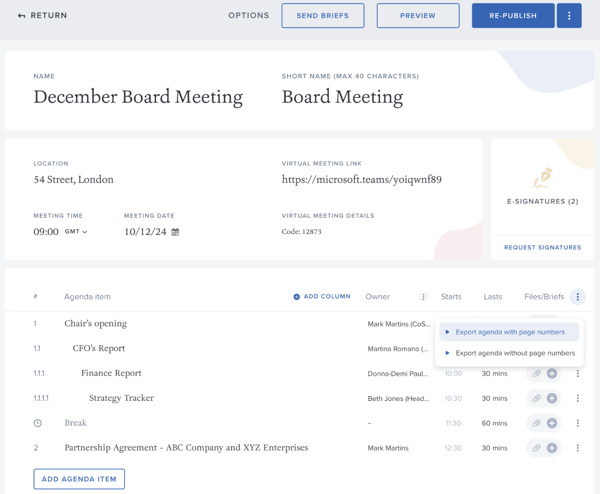
Annotation tools and version retention are praised by reviewers who use the platform for reading and reviewing. Board members can annotate packs, bookmark sections, and navigate directly to agenda items. When an administrator updates a document, annotations from the previous version are retained, a feature G2 reviewers identify as a meaningful quality-of-life improvement during live meetings.
I also noticed many reviewers describe response times as near-instant, with human agents, not chatbots, resolving issues quickly and in clear, accessible language. Multiple reviewers note that the support team proactively highlights new features and follows up to confirm issues are resolved. The platform’s 10-year retention rate among some customers is cited as a direct reflection of the quality of that support.
Nonetheless, I did notice reviewers wanting more efficient board pack navigation, particularly when cross-referencing documents or viewing multiple pages side by side. While these scenarios primarily affect administrators building larger board packs, reviewers generally felt the time savings gained elsewhere outweighed these occasional usability challenges.
I also found recurring feedback around agenda preparation and pack creation workflows. Some reviewers would like additional shortcuts and automation when assembling agendas or organizing supporting materials. Even so, most users describe the platform as significantly faster than traditional PDF-based board preparation once their workflows are established.
From what I observed in the reviews and product feature ratings, Board Intelligence is an excellent fit for governance teams focused on reducing manual work in board administration. With a 4.6/5 G2 rating, its combination of automated board pack production, responsive customer support, and streamlined governance workflows makes it particularly valuable for organizations managing frequent board meetings and complex documentation.
What I like about Board Intelligence:
- I like how Board Intelligence automates board pack production while keeping documents, agendas, and governance materials organized in one secure workspace, significantly reducing meeting preparation time.
- I also appreciate the platform’s responsive customer support, structured onboarding, and centralized document management, which make it easier for governance teams transitioning from manual board processes to adopt.
What G2 users like about Board Intelligence:
“Board Intelligence proved to be the best possible choice for our organisation. Its intuitiveness and ease of use are a big plus which contributed to a seamless integration with our systems, but I also have to point out that the level of support from their Support Team is second to none. In addition, I would also like to point out that the produce is highly versatile and from our perspective, we could easily apply it to our internal group structure but also on the client side as a CSP. Given to its ease of use, its performance is excellent and we have encountered very few issues and where we have, they have easily been solved by their excellent support. I’ve recently been invited to review a couple of similar products in the market just as a point of interest and I have to point out that for our specific needs, the pricing is highly competitive. On the AI front, it is clear that they have made great strides though we are not availing of this particular service given that we have our own internal systems which serve their purpose at this moment in time.”
– Board Intelligence review, Terence G.
What I dislike about Board Intelligence:
- Based on the G2 reviews I analyzed, navigating large board packs and cross-referencing supporting documents could be more intuitive, particularly for administrators working with complex meeting materials. The tradeoff is having comprehensive governance information centralized in a single platform.
- I also came across reviewers requesting additional shortcuts when preparing agendas and assembling board packs. While these enhancements could further improve administrator efficiency, reviewers describe the platform as a major improvement over manual, PDF-based board preparation.
What G2 users dislike about Board Intelligence:
“Some parts of the platform aren’t as intuitive as they could be; for example, highlighting to delete words moves the entire line of an agenda, so quick updates can take longer than expected.”
– Board Intelligence review, Abbie S.
6. Convene: Best for comprehensive board collaboration
Convene stands out for helping organizations manage board meetings without sacrificing collaboration or security. Reviewers describe it as a platform that simplifies meeting preparation, centralizes governance materials, and keeps board members connected throughout the decision-making process.
One capability that surfaced repeatedly was real-time collaboration. I found numerous reviewers highlighting how board members can review documents, provide feedback, and collaborate within the platform instead of relying on lengthy email threads or disconnected file-sharing tools. Keeping discussions and updates in one place helps governance teams prepare for meetings more efficiently.
Voting and approvals are standout features that reviewers cite as key differentiators. The platform supports real-time in-meeting voting, anonymous voting, remote voting, and resolution approval, all within the platform. G2 reviewers note that the frictionless voting experience increases board member participation in decision-making and that the ability to store and retrieve voting records makes audit preparation significantly easier.
Minutes creation draws strong praise from reviewers, particularly for the ability to generate minutes directly from a finalized agenda. The platform includes formatting tools within the minutes builder, a review room for approvals, and the ability to lock minutes once approved, preventing future edits. Reviewers in company secretarial roles highlight this as one of the most practical features for maintaining governance consistency across committees.
One thing I found really interesting was how reviewers are increasingly flagging the new AI-powered meeting documentation feature as valuable. The AI-powered automated meeting documentation feature reduces manual effort in capturing decisions and action items, and G2 reviewers note that Convene has also introduced enhancements to its anonymous voting and polling tools, alongside continued investment in security features — reflecting active product development in 2025 and 2026.
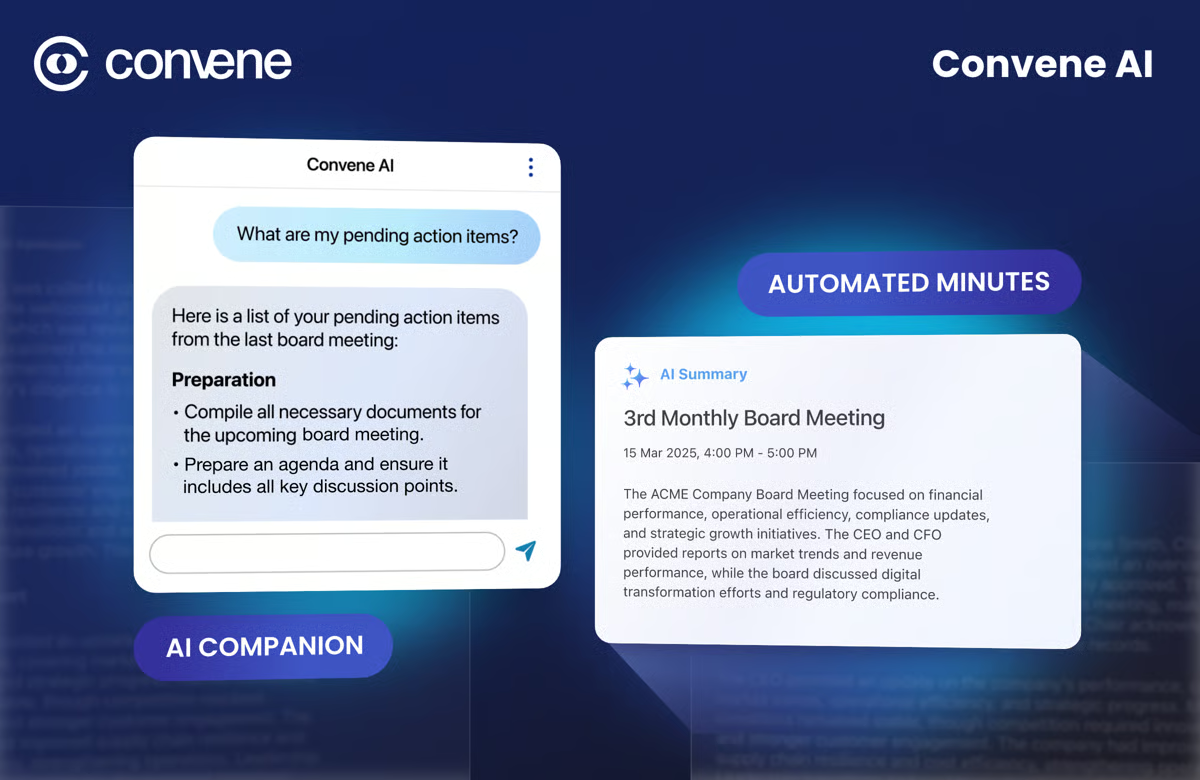
The resources section and document repository provide a dedicated library for frequently referenced governance documents, historical board books, and committee materials. G2 reviewers appreciate that the Resources section is separate from meeting-specific content, giving directors easy access to standing documents without having to navigate through individual meeting archives.
Customer support also stood out across the reviews I analyzed. Users frequently mention responsive support representatives who quickly answer questions and help resolve issues, contributing to a smoother day-to-day experience after implementation.
That said, I did notice reviewers mentioning that the interface could take some time to get used to for new users. While core meeting management is generally easy to adopt, some administrators report needing additional time to become comfortable with more advanced functionality. Most reviewers felt the additional capabilities ultimately justified the learning investment.
Based on the G2 reviews I evaluated, teams that want greater flexibility in how meeting templates and reports are structured may find Convene’s current customization options somewhat standardized. Reviewers note that while the platform covers core governance workflows well, the ability to tailor templates and reporting outputs to specific organizational needs is an area they’d like to see expanded. The tradeoff is a platform that stays clean and consistent, which most reviewers feel supports rather than restricts their day-to-day work
Convene works best for organizations that want to improve collaboration without compromising governance or security. With a 4.8/5 rating on G2, its combination of intuitive meeting workflows, centralized document management, responsive customer support, and enterprise-grade security makes it a strong fit for boards looking to modernize how they prepare for and conduct meetings.
What I like about Convene:
- I like how Convene centralizes board materials, meeting workflows, and real-time collaboration on a single secure platform, making board preparation significantly more efficient.
- I also appreciate its intuitive interface, responsive onboarding and support, and strong security controls, which help organizations adopt the platform quickly while protecting confidential governance information.
What G2 users like about Convene:
“Convene has been a reliable tool for organizing board meetings and keeping everything easy to access, and I really value its document sharing features, and I like how straightforward it is to put together meeting packs without a complicated process. Board members can locate the materials they need, which helps reduce confusion and saves time in the run-up to meetings.”
– Convene review, Jacob K.
What I dislike about Convene:
- Based on the G2 reviews I analyzed, administrators may need additional time to become familiar with some of the platform’s more advanced capabilities. The tradeoff is access to a comprehensive governance solution that supports a wide range of board management workflows.
- I also found reviewers mentioning that the options to customize for specific organizational needs can feel standardized. Even so, reviewers consistently say that the platform that stays clean and consistent, and works well for day-to-day needs.
What G2 users dislike about Convene:
“Convene works well overall, but some things like time zone or venue details still need to be entered manually. It would be better if a few of these fields were more automated or if the tool offered smarter suggestions when setting up meetings.”
– Convene review, Marcin M.
7. Boardable: Best for nonprofits needing task management
Boardable is another considerable option for nonprofit organizations, designed to centralize meeting management, document sharing, task tracking, and board communications in a single governance hub.
One pattern I noticed across reviews is that administrators rate meeting preparation and document organization highly. The one-click packet builder automatically numbers pages and generates a table of contents from uploaded documents, removing hours of manual formatting. Admins can also track which board members have opened the meeting packet before a session starts through the meeting engagement dashboard, allowing timely reminders that reduce time wasted at the start of meetings.
What stands out most in G2 feedback is the task assignment and accountability tracking functionality. Admins can assign action items directly from the agenda during a meeting, set deadlines, and monitor task completion across board members. A recurring theme in the reviews I went through is how meaningfully this feature has improved follow-through on board decisions, reducing the back-and-forth that typically happens over email between meetings.
Reading through the reviews, I found digital signatures flagged repeatedly as a practical time-saver for governance workflows. Admins can upload a document, tag signature fields for specific board members, and track sign-off status in real time, with reviewers noting that approvals that previously took weeks now complete within a day, a meaningful efficiency gain for nonprofits managing budget approvals, minutes sign-offs, and resolutions.
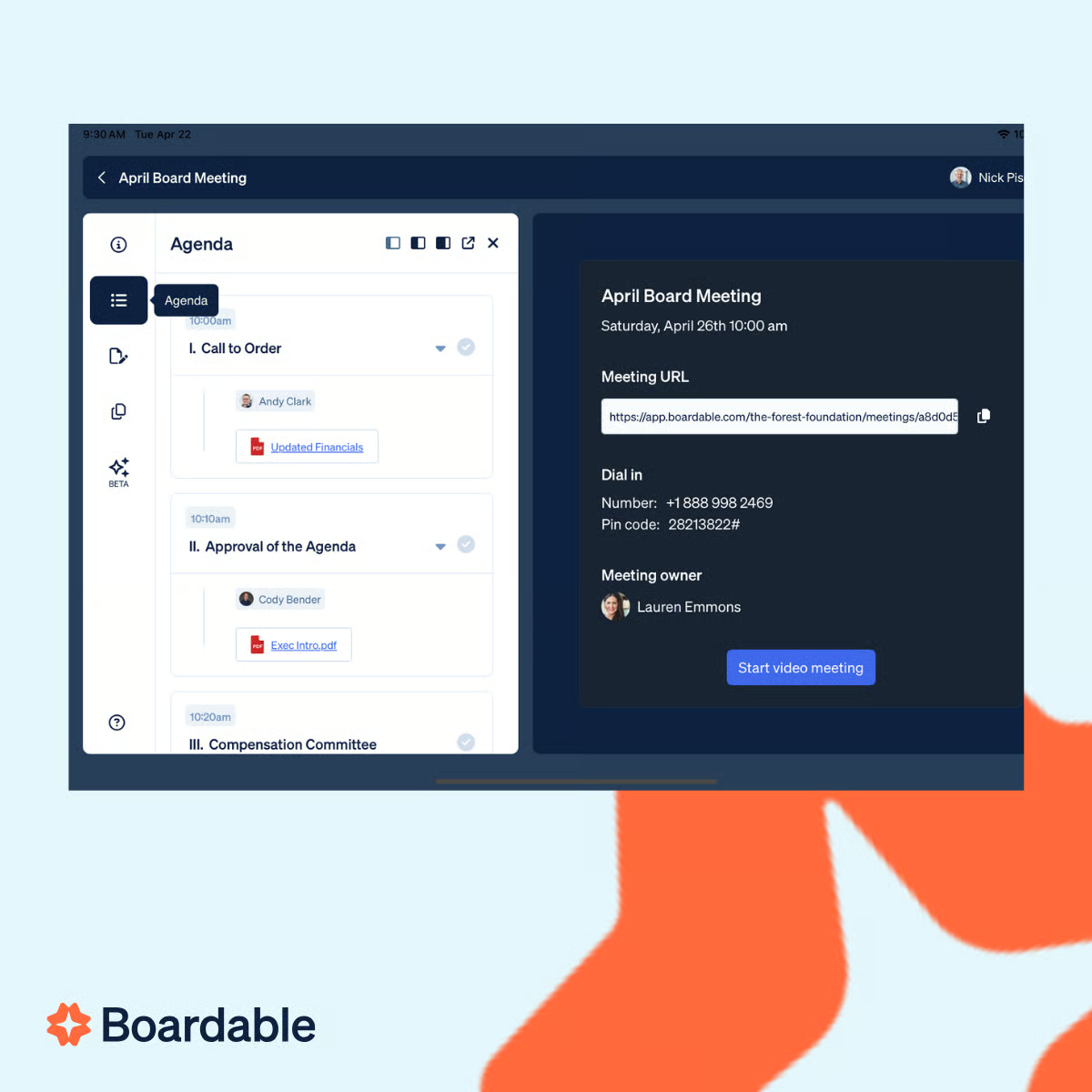
Based on the feedback I reviewed, board members particularly value document annotation tools when reviewing materials on tablets ahead of meetings. The ability to draw notes, highlight text, and drop comments directly onto documents within the platform eliminates the need for external PDF editors. It keeps all pre-meeting annotations centralized and accessible during the session.
A consistent thread across reviews points to transparency and governance continuity as core strengths. Boardable archives decisions, discussions, resolutions, and governance documents across meeting cycles, and reviewers note that the platform’s historical record makes it easy for leadership teams to trace how decisions were made.
Google Workspace and calendar integrations extend Boardable’s utility for teams already operating in Google environments. The Google Drive sync, Google Calendar integration, and Outlook calendar compatibility reduce scheduling friction and ensure board members are always working with the most current version of shared documents.
Boardable is a capable nonprofit governance platform, though one area where reviews align is around video conferencing performance. The native video feature can be resource-intensive, and reviewers report occasional latency and lag in hybrid meetings with larger participant counts, leading some teams to use Zoom or other dedicated video tools alongside Boardable for document management. For nonprofits whose meetings are primarily in person or that use external video tools, this is unlikely to affect the platform’s core governance value.
I also found that workflow complexity and navigation can slow down administrators during busy periods. Certain actions, including formatting documents in the agenda builder, setting up multi-step approval processes, and searching through large volumes of historical records, require more steps than expected. That said, once roles and workflows are configured, reviewers consistently note that the platform becomes significantly easier to navigate, and the customer support team responds quickly to workflow questions.
With a 4.5/5 average rating on G2, Boardable is a good option for nonprofit organizations looking for a purpose-built governance platform that goes beyond meeting management. Its task tracking, digital signatures, document annotation tools, and Google Workspace integrations make it a practical fit for lean nonprofit teams that need structure, accountability, and transparency across every board cycle.
What I like about Boardable:
- The combination of task assignment directly from the agenda, real-time signature tracking, and the meeting engagement dashboard creates a governance loop that most board management platforms don’t close, from meeting preparation through to decision follow-up, without leaving the platform.
- The document annotation tools and one-click packet builder are particularly well-suited to nonprofit boards where members often review materials on personal devices. The platform removes the need for any external formatting or PDF tools, reducing the preparation burden on lean admin teams.
What G2 users like about Boardable:
“I love this platform for its all-in-one board management and tools. The platform is simple, with a good, user-friendly interface. The platform’s simplicity enables users to use it comfortably with fewer hurdles. Its ability to capture meeting minutes is a key, much-needed feature present on this platform. Its feature to handle large documents is really commendable. The communication on this platform is reliable. I love the overall performance of this platform and its reliable security. The onboarding process was also very easy while using this platform. The moderate pricing also makes this platform more attractive.
– Boardable review, Konjengbam M.
What I dislike about Boardable:
- G2 reviewers note that the native video conferencing feature can be resource-heavy, with occasional lag in hybrid meetings leading some teams to use dedicated video tools alongside the platform. For nonprofits primarily using Boardable for document management and governance workflows, the core feature set remains fully reliable.
- G2 reviewers flag that certain workflows, particularly formatting documents in the agenda builder, setting up complex approval processes, and searching large historical archives, require more steps than expected. Once initial configuration is complete, the platform becomes considerably easier to navigate with consistent use.
What G2 users dislike about Boardable:
“I really need them to improve the template features for recurring meetings. The messaging features inside the platform are fairly basic. Most of our boards still default to email for everything that needs a real conversation. The video conferencing can also be heavier on bandwidth than expected, and a couple of our older board members with slower home connections have choppy video during meetings, which is frustrating.”
– Boardable review, Aslam H.
Frequently asked questions about the best board management software platforms
Have more questions? Find more answers below.
Q: What is the best board management software for executive teams managing board meetings and governance?
Nasdaq Boardvantage, Diligent Boards, and Convene are good choices for executive teams. Nasdaq Boardvantage leads in market presence and enterprise-grade security. Diligent Boards offers AI-powered meeting summaries and real-time document collaboration. Convene provides a comprehensive governance environment with voting, minutes, and board communications on a single platform.
Q: Which board management platforms ensure smooth collaboration without compatibility issues or delays?
OnBoard and Convene consistently receive high marks for collaboration without compatibility friction. OnBoard integrates with Google Calendar and Microsoft Outlook and supports real-time document access across devices. Convene allows multiple file types to be uploaded without converting everything to PDF, reducing formatting delays.
Q: Which board management software offers audit trails and compliance reporting for public companies?
Nasdaq Boardvantage and Diligent Boards are the best options for public companies with compliance requirements. Nasdaq Boardvantage supports role-based access control, SSO, MFA, watermarking, and member activity tracking. Diligent Boards offers multi-layered security controls and permission management built for regulated industries.
Q: Which board management tools simplify board communication and reduce meeting prep time?
OnBoard, Convene, and Boardable are top picks for reducing meeting prep time. OnBoard’s agenda-to-minutes workflow and meeting duplication feature cut repetitive setup. Convene’s drag-and-drop board book builder and AI-powered minutes drafting reduce post-meeting workload. Boardable’s one-click packet builder automates page numbering and table of contents generation.
Q: What is the highest-rated board management software for executive assistants organizing corporate governance securely and efficiently?
OnBoard Board Management Software is an excellent fit for executive assistants because of its intuitive interface, centralized meeting management, and reusable workflows. For larger enterprise boards, Nasdaq Boardvantage also helps administrators manage governance securely and efficiently.
Q: What is the most reliable board management software based on reviews from companies handling sensitive governance data?
Nasdaq Boardvantage and Diligent Boards consistently receive positive feedback for their management of confidential board materials. Reviewers frequently highlight their security, governance controls, document management, and enterprise-focused capabilities.
Q: What is the most trusted board management software by company secretaries based on user reviews?
Company secretaries most frequently cite Board Intelligence and Convene in G2 reviews. Board Intelligence is praised for its board pack assembly, agenda cloning, and AI minutes drafting. Convene is highlighted for its minutes-from-agenda workflow, locked minutes approval, and voting and resolution tracking, features that company secretaries rely on for governance consistency.
Q: What are the best board management platforms with secure document sharing and collaboration?
Nasdaq Boardvantage supports folder-level permissions, watermarking, and two-factor authentication. Diligent Boards offers real-time document markup within a permission-controlled environment. Convene provides secure document distribution with role-based access and instant updates pushed to all board members simultaneously.
Q: Which board management platforms ensure board member accountability with automated task tracking?
Boardable is the best option for automated task tracking and board member accountability. Admins can assign action items directly from the agenda, set deadlines, and monitor completion status in real time. OnBoard also supports task follow-up through its meeting engagement tools and approval workflows.
Q: Which board management systems make it easy to share materials and manage versions?
OnBoard and Convene are top picks for material sharing and version management. OnBoard ensures board members always have access to the most up-to-date document version, with automatic board book compilation once a meeting is scheduled. Convene pushes real-time updates to all board members simultaneously, eliminating the risk of multiple versions circulating across a board.
Better board meetings start before anyone enters the room
Board governance is evolving faster than most organizations are ready for. AI-assisted minutes, automated board pack assembly, and real-time voting tools are no longer differentiators — they’re becoming baseline expectations for boards that want to operate efficiently and stay audit-ready.
The right board management platform depends less on feature lists and more on your governance context — the size of your board, the sensitivity of your materials, and how much administrative overhead your team can realistically absorb. Start by identifying where your current process breaks down most, and let that drive your evaluation.
As AI capabilities become standard across this category, the platforms that invest in security, integrations, and support quality will be the ones that hold long-term value for governance teams.
Take the hassle out of document signing by integrating a secure e-signature solution into your board management system

💸 Earn Instantly With This Task
No fees, no waiting — your earnings could be 1 click away.
Start Earning
