


Every morning, I open my inbox and feel behind before I’ve even had my coffee. Between emails and messages I keep meaning to answer, my inbox can easily feel like a second job I never applied for. Before long, unread emails can pile up into the thousands.
I’ve tried lots of tools that promise to make handling emails easier. So when I came across Fyxer (an AI assistant that claims to organize your inbox, write replies in your voice, take meeting notes, and handle follow-ups) I was curious to see how it compared to the other AI tools I’ve tested.
Rather than just running through its features, I connected Fyxer to my own inbox and used it. I wanted to see how well it handled the kind of messy, everyday email workload I actually deal with, and whether it could actually save me time.
In this Fyxer review, I’ll walk you through my experience. That includes what impressed me, what didn’t work as well, and whether I think it’s worth using. I’ll also compare it with three alternatives: SaneBox, Shortwave, and Superhuman Mail.
Verdict
Overall, Fyxer is a useful AI assistant for anyone drowning in email, sorting your inbox, drafting replies in your voice, and summarizing meetings without much setup. However, it doesn’t have a free plan (only a free trial), and you’ll need to get comfortable handing over some control. But for busy professionals dealing with a constant stream of emails and meetings, Fyxer can save a lot of time and make staying on top of everything much easier.
Pros and Cons
- Learns your personal writing style and drafts replies that sound like you, right inside Gmail or Outlook.
- Automatically sorts and prioritizes your inbox with labels, filtering out about half of the typical noise.
- Generates meeting notes and summaries automatically during calls, so you’re not scrambling to write recaps afterward.
- Creates draft follow-up emails for threads you haven’t closed out, so nothing slips through the cracks.
- Single-click setup connects to Gmail or Outlook in about 30 seconds with no complicated migration.
- HubSpot CRM integration (on the Professional plan) keeps client notes and activity synced automatically.
- Built-in AI chat lets you ask questions about your inbox or day without digging through email threads yourself.
- Strong security standards, including SOC 2, HIPAA, ISO 27001, and GDPR compliance.
- Scheduling assistance helps coordinate meeting times without the usual back-and-forth email chain.
- Backed by serious funding ($40 million).
- No free plan, only a 7-day trial before you’re billed.
- Pricing can add up quickly for solo users or small teams.
- Advanced features like custom security controls are locked behind Enterprise pricing.
- You give up some control since the AI decides how to sort and draft on your behalf.
- Only works with Gmail and Outlook, so it’s not an option if you use a different email provider.
- Meeting note-taking requires granting Fyxer access to your calendar and calls, which some may be cautious about.
What is Fyxer AI?
Fyxer is an AI email manager built to act less like a plugin and more like a personal assistant. Instead of just filtering spam or adding folders, it handles the parts of your workday that eat up the most time without adding much value: sorting your inbox, drafting replies, taking meeting notes, and following up on things you’d otherwise forget.
The company sums up its mission as helping professionals organize your inbox, draft replies in your voice, and prepare follow-ups, all before your first coffee. That’s a bold promise, but it aligns with what Fyxer actually tries to do.
Company Background
Fyxer is a London-based startup led by CEO Richard Hollingsworth. It’s raised $40 million in total funding, including a $10 million Series A in March 2025 and a $30 million Series B in September 2025, led by Madrona with participation from Lakestar. Earlier backers include 20VC’s Harry Stebbing and Salesforce founder Marc Benioff.
That funding isn’t just a vanity metric. Fyxer reportedly grew from $1 million to $17 million in annual recurring revenue in about eight months, and now serves more than 100,000 users with a 90% three month retention rate.
How Fyxer Works
The setup is simple: you connect Gmail or Outlook in about 30 seconds, and Fyxer immediately starts studying your writing patterns. From there, it gets to work prioritizing your inbox, filtering out roughly half of what it considers noise, and generating draft replies in your voice that are ready and waiting when you open your inbox.
Beyond email, Fyxer also functions as a meeting assistant. It can join your calls, take notes, and generate summaries afterward, which is a step further than most AI inbox tools go. It also offers scheduling assistance and an integrated AI chat feature you can use to ask questions about your day or specific threads.
Fyxer vs. Traditional Inbox Tools
Most email productivity tools (like folders, filters, or snooze buttons) still require you to do the work of reading and responding. Fyxer’s pitch is different: it tries to do a meaningful chunk of that work for you, then hands you a shorter list of decisions to make.
The tool also requires a lot more trust than a simple email filtering tool. You’re not just letting Fyxer organize your inbox, you’re letting it speak in your voice and represent you in follow-ups. Whether that tradeoff is worth it depends a lot on how many emails you deal with and how comfortable you are reviewing drafted messages generated with AI before they go out.
Security & Compliance
Since Fyxer needs access to your inbox and calendar to work, security is worth taking seriously. It maintains SOC 2, HIPAA, ISO 27001, and GDPR compliance, showing that it takes security seriously and is built for businesses that handle sensitive information (not just casual email use).
Who is Fyxer AI Best For?
Here’s who Fyxer is best for:
- Consultants can use Fyxer to keep replies fast and consistent without living in their inbox all day.
- Executives and founders can use Fyxer to reclaim hours each week by letting it sort through emails, draft, and summarize instead of doing all of it themselves.
- Sales and account teams can use Fyxer’s HubSpot integration to keep CRM notes and activity updated automatically after every call.
- Real estate agents and accountants juggling high email volume can use Fyxer to cut through the noise and respond to clients faster.
- Remote and hybrid teams can use Fyxer’s meeting notetaker to keep everyone aligned without someone manually writing up recaps.
- Busy professionals who struggle to keep up with follow-ups can use Fyxer to make sure nothing important slips through the cracks.
- Teams that already rely on Gmail or Outlook can use Fyxer without switching to an entirely new email client.
- IT and businesses that take security seriously can use Fyxer’s SOC 2, HIPAA, and GDPR compliance to justify rolling it out across their company.
Fyxer AI Key Features
Here are Fyxer’s key features:
- Smart Inbox Sorting: Categorizes incoming messages into priority buckets and filters out around half of typical inbox noise automatically.
- Personalized Reply Drafts: Learns your writing style from past emails and drafts responses that sound like you that are ready to review and send.
- Automatic Follow-Up Creation: Drafts follow-up messages for threads you haven’t closed out so nothing falls through the cracks.
- AI Meeting Notetaker: Joins your calls, takes notes in real time, and generates a summary once the meeting wraps up.
- Meeting Summaries & Action Items: Breaks calls down into key takeaways and next steps you can scan in seconds instead of rewatching a recording.
- Scheduling Assistance: Helps coordinate meeting times without the usual back-and-forth email chain.
- HubSpot CRM Sync: Automatically logs email and meeting activity to your CRM so client notes stay current (available on the Professional plan).
- AI Chat: An integrated assistant you can ask questions about your inbox, your day, or a specific thread.
- One-Click Gmail & Outlook Setup: Connects to your existing inbox in about 30 seconds with no migration required.
- Continuous Learning: Keeps refining its understanding of your tone and priorities the longer you use it.
- Multiple Inbox Connections: Manage more than one email account from a single Fyxer setup (available on the Professional plan).
- Enterprise Security & Compliance: SOC 2, HIPAA, ISO 27001, and GDPR certifications for handling sensitive inboxes.
- Personalized Onboarding: Professional and Enterprise plans include guided setup tailored to your workflow.
How to Use Fyxer AI
Here’s how I set up and used Fyxer to manage my inbox:
- Sign Up for Fyxer AI
- Connect Your Gmail or Outlook Account
- Grant Calendar & Meeting Permissions
- Choose What Stays in Your Inbox
- Summarize Meetings
- Access the Dashboard
- Review Your Sorted Inbox
- Check Your Draft Replies
- Join a Meeting With Fyxer’s Notetaker
- Customize Settings & Try the AI Chat
- Try the AI Chat
Step 1: Sign Up for Fyxer AI
I started by going to fyxer.com and signing up with my work email. Fyxer comes with a 7-day free trial.
Step 2: Connect Your Gmail or Outlook Account

Next, I connected my inbox. Fyxer supports both Gmail and Outlook, and the connection process took less than a minute since there was no manual migration involved.
Step 3: Grant Calendar & Meeting Permissions

To unlock the meeting notetaker and scheduling assistance, I also granted Fyxer access to my calendar. This step is optional if you only want the email features.
Step 4: Choose What Stays in Your Inbox

Next, Fyxer asked me how I wanted to organize my inbox using labels.
There were three options:
- Only see what needs my attention (keep important emails in the inbox and move the rest into labeled folders).
- See all emails except marketing (keep everything in the inbox except marketing emails).
- Keep my inbox as is (don’t label or move any emails out of the inbox).
I selected the first option (only see what needs my attention) and selected “Start labelling my emails.”
Step 5: Summarize Meetings

Next, Fyxer asked if I wanted it to summarize my meetings.
It explained that Fyxer would join my meetings, take notes, and create actionable notes in my inbox. It would also prepare a follow-up email after each meeting.
I kept the toggle on and selected “Continue.”
Step 6: Access the Dashboard
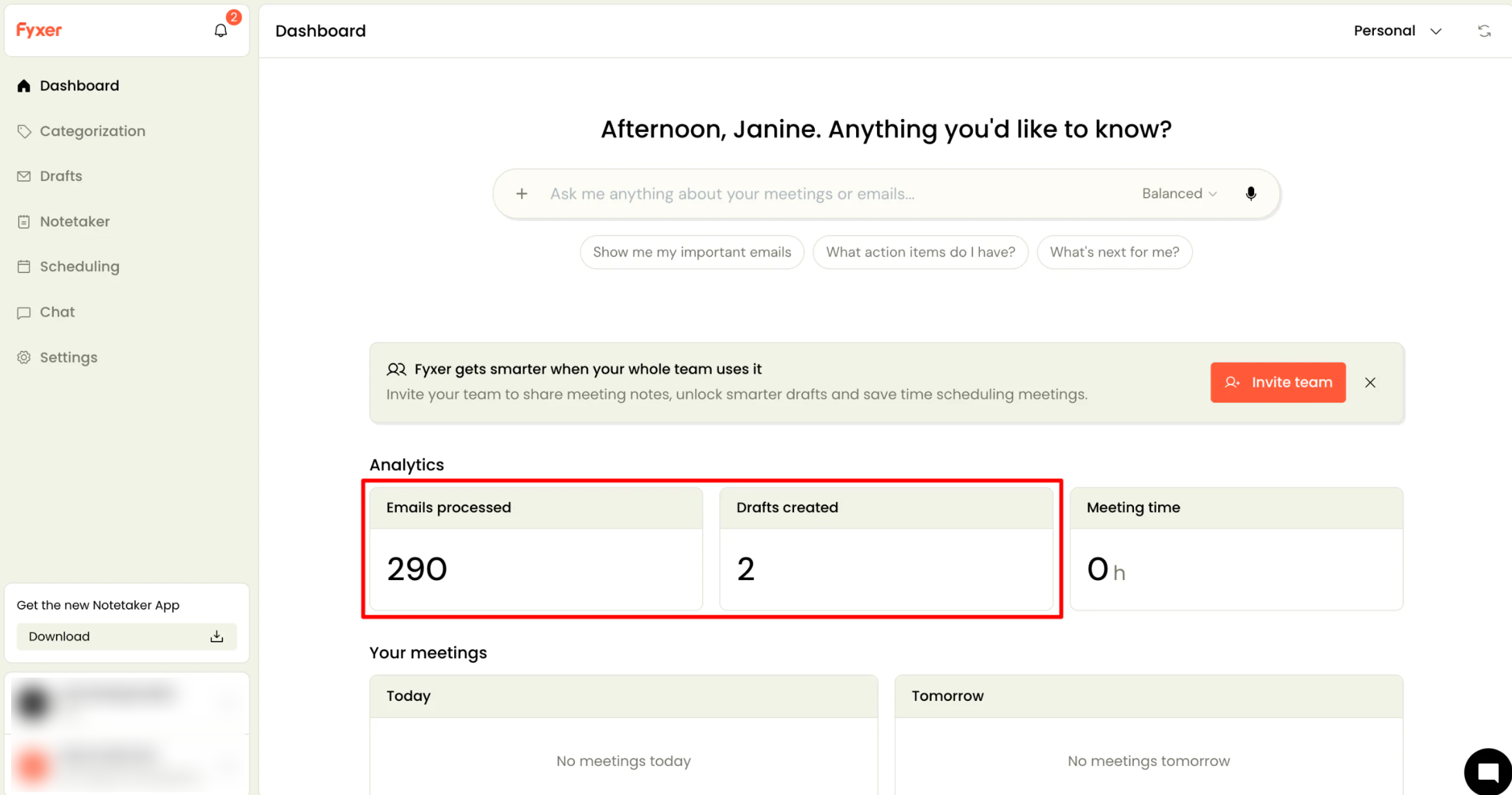
Once I arrived on my dashboard, Fyxer told me 290 emails had been processed and 2 email drafts had been written. It took no time for Fyxer to process my emails.
Step 7: Review Your Sorted Inbox
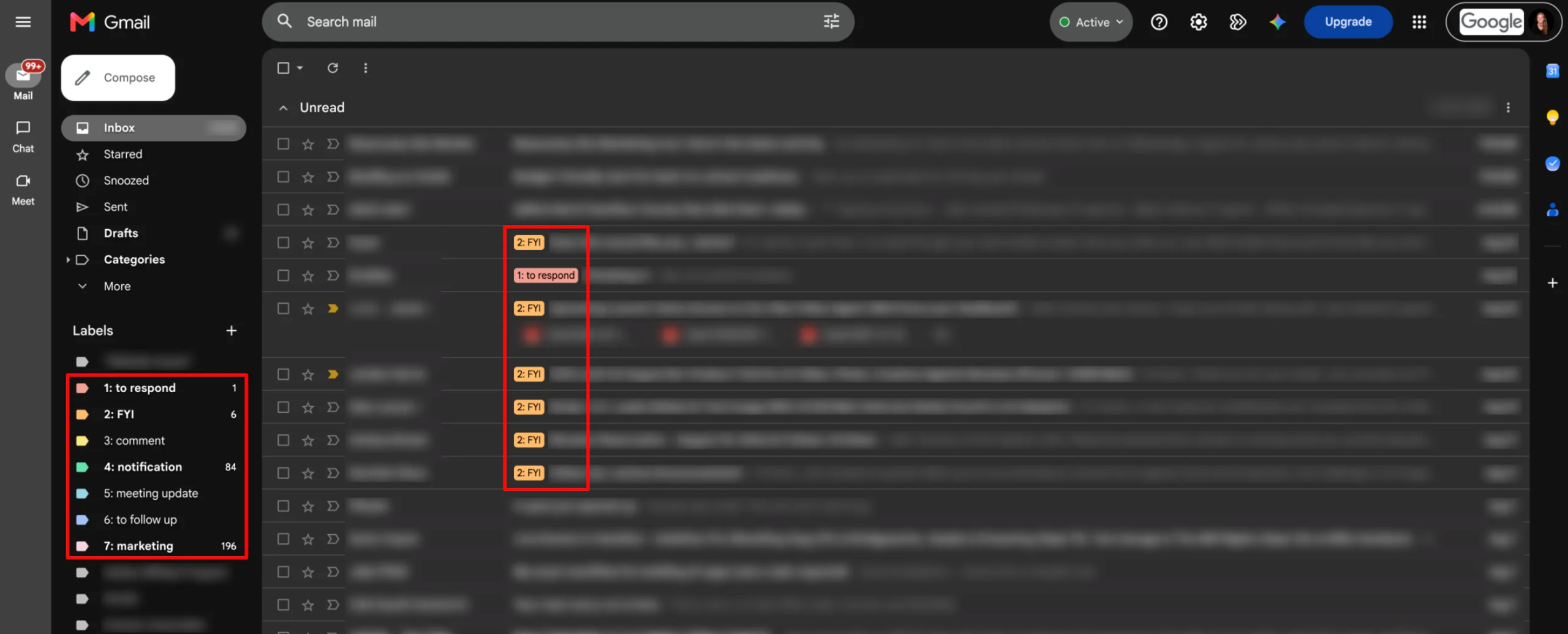
Within my actual email inbox, Fyxer had sorted my emails into priority categories with labels:
- To respond
- FYI
- Comment
- Notification
- Meeting update
- To follow up
- Marketing
It separated what actually needed my attention from newsletters, notifications, and other lower-priority noise.
Step 8: Check Your Draft Replies

For emails that needed a response, Fyxer had already generated draft replies waiting in my inbox. The drafts genuinely sounded like me. I reviewed each one, made small edits where needed, and sent them off.
Step 9: Join a Meeting With Fyxer’s Notetaker

Back on my account, I went to the Notetaker to get Fyxer to explore how to capture my conversations.
There were two notetaking options:
- Record in-person meetings: Use my device’s microphone to record a meeting for up to two hours. Fyxer then generates a transcript and summary.
- Join video calls: Add Fyxer’s Notetaker to an online meeting to record it and generate a transcript and summary.
Once the meeting ends, Fyxer will generate a summary with key takeaways and action items. I could scan these in under a minute instead of digging through a full transcript. Fyxer will even draft follow-up messages to review, tweak, and send based on the meeting.
Step 10: Customize Settings & Try the AI Chat

Next, I explored Fyxer’s settings.
While the “Settings” tab itself is where I could adjust my organization details, team member permissions, billing, and integrations, the “Categorization” and “Drafts” tab is where I could adjust how aggressively Fyxer sorted my inbox.
Step 11: Try the AI Chat

Finally, I tried asking Fyxer’s AI chat feature a few questions about my day to see how it handled general requests.

Its answer was brief and useful. It checked my calendar and recent emails, highlighted a few messages worth looking at, and gave me a quick overview of what actually needed my attention. It also offered to pull out emails that need a response or create a priority list, which made it easy to dig deeper if needed.
Overall, Fyxer made managing my inbox much easier by automatically sorting emails, drafting replies, and separating important messages from the noise. I also liked having meeting notes, follow-ups, and an AI chat feature in one place. Ultimately, it saved me time and made it easier to stay on top of my day.
Top 3 Fyxer AI Alternatives
Here are the best Fyxer alternatives I’ve tried that I’d recommend.
SaneBox
The first Fyxer alternative I’d recommend is SaneBox. Compared to Fyxer, it takes a simpler approach by using AI to automatically sort your existing inbox into folders, send you a daily digest of non-urgent messages, and let you snooze or put off emails until you actually want to deal with them.
Both tools use AI to cut down on inbox noise, but Fyxer is more comprehensive.
On the one hand, Fyxer positions itself as a full AI assistant that drafts email replies in your tone, summarizes meetings, and manages follow-ups. On the other hand, while SaneBox can automatically create suggested reply drafts in your tone and style with Reply Draft (SaneDrafts), it stays more focused on automated inbox organization, filtering, and summarization.
For an AI assistant that automatically organizes your emails, takes meeting notes and handles follow-ups, choose Fyxer. Otherwise, if you mostly just want your inbox decluttered and organized, choose SaneBox.
Read my SaneBox review or visit SaneBox!
Shortwave
The next Fyxer alternative I’d recommend is Shortwave. It’s an AI email app built around Gmail that helps you organize your inbox, search through emails, and draft replies in your unique voice. It also lets you automate tasks through more than 3,000 app integrations.
Both tools use AI to sort through your inbox and draft replies in your writing style. The main difference is that Shortwave replaces your existing email client and adds features like search tools for finding specific messages across your emails, while Fyxer works with your existing Gmail or Outlook inbox and adds things like meeting notes and scheduling.
If you want to completely change the way you manage email and want more powerful tools for finding and organizing messages, choose Shortwave. Otherwise, if you want to keep using Gmail or Outlook while having an AI assistant handle sorting, drafting, and meeting notes in the background, choose Fyxer.
Superhuman Mail
The final Fyxer alternative I’d recommend is Superhuman Mail. It’s a premium email app built around speed, with features like Split Inbox, automatic labels, AI writing tools, and keyboard shortcuts that make it easy to move through your inbox quickly.
On the one hand, Superhuman stands out for its speed. Its AI can also help you shorten, expand, or simplify emails. Meanwhile, Fyxer takes more of the work off your plate by writing full replies in your voice, taking meeting notes, and preparing follow-up emails.
For a fast email app that works through your inbox more efficiently, choose Superhuman Mail. If you’d rather have an AI assistant handle more of the actual work, including drafting replies, taking meeting notes, and preparing follow-ups, choose Fyxer.
Fyxer AI Review: The Right Tool For You?
After using Fyxer to manage my inbox and explore its meeting and AI features, I was impressed by how much of the everyday email busywork it can handle. My favorite part was how it automatically sorted my inbox, drafted replies for emails that needed a response, and turned meeting conversations into summaries and follow-ups.
However, Fyxer isn’t for everyone. It takes a lot of control over your inbox, so you need to be comfortable letting AI decide how your emails should be organized and how your replies should be written. It also only comes with a free trial, not a dedicated free plan.
If you deal with a cluttered inbox and frequent meetings with an AI assistant when you need it, Fyxer might be worth considering. But if Fyxer doesn’t sound like what you’re looking for, here are three alternatives to consider:
- SaneBox is best for anyone who wants a simpler way to declutter their existing inbox without having AI write replies for them.
- Shortwave is best for people who want to switch to a new email app with powerful search, organization, and automation features.
- Superhuman Mail is best for people who want a fast, clean email app with AI tools that help them work through their inbox more efficiently.
Thanks for reading my Fyxer review! I hope you found it helpful. Try Fyxer’s 7-day free trial and see whether or not it’s right for you.
Frequently Asked Questions
Does Fyxer actually work?
Yes, Fyxer works. It handles email sorting and prepares replies for you, but you’ll still need to review each draft before sending it.
How safe is Fyxer AI?
Fyxer AI is generally considered safe, with security certifications including SOC 2 Type II, ISO 27001, and GDPR compliance.

💸 Earn Instantly With This Task
No fees, no waiting — your earnings could be 1 click away.
Start Earning
