


I know how challenging it can be to monitor a network on a tight budget. Many network administrators and IT professionals in small businesses are tasked with managing increasingly complex environments while keeping costs under control.
From what I’ve seen, free network monitoring tools can make a real difference. They offer essential capabilities, such as real-time performance monitoring, network topology mapping, and alert notifications, helping teams keep systems running smoothly without straining their resources.
In this list, I highlight the best free network monitoring software based on authentic user feedback. I cover detailed reviews, key features, pros and cons, and pricing options for those who may consider upgrading to a paid plan in the future.
Best free network monitoring software for 2026
- Atera: Best for small IT teams and MSPs needing all-in-one network monitoring
Combines network monitoring, RMM, ticketing, and automation into a single platform with technician-based pricing that scales predictably. - Auvik: Best for automated network discovery and topology mapping
Automatically discovers devices and builds real-time network maps, making it easy to visualize, document, and troubleshoot complex networks. - Datadog: Best for cloud-native infrastructure and network observability
Provides customizable metrics, dashboards, and integrations across cloud services, applications, and networks for end-to-end visibility. - Dynatrace: Best for AI-driven root cause analysis in complex environments
Uses AI-powered automation to detect performance issues and pinpoint root causes across infrastructure, networks, and applications. - LogicMonitor: Best for scalable cloud-based network monitoring for enterprises
Offers auto-discovery, intelligent alerting, and customizable dashboards to monitor large, distributed networks from a single cloud console. - NinjaOne: Best for easy-to-use network monitoring with strong IT support tools
Delivers intuitive SNMP-based device monitoring alongside patch management and remote management in a single, user-friendly platform. - Progress WhatsUp Gold: Best for on-premises network visibility and performance tracking
Provides real-time network mapping, performance baselining, and alerts to help teams quickly identify and resolve network issues. - SolarWinds Hybrid Cloud Observability: Best for monitoring hybrid and multi-vendor IT environments
Combines network traffic analysis, advanced alerting, and AI-driven insights to monitor performance across on-prem and cloud infrastructure. - TeamViewer: Best for remote access and lightweight network device monitoring
Enables secure remote access and device monitoring, making it easy to troubleshoot network issues across distributed and remote systems.
*The software list is arranged alphabetically. These tools offer free trials, free forever options, or freemium models.
Comparison of the best free network monitoring software
Feeling overwhelmed with all the details? Check out this comparison table for free network monitoring software to explore the key points.
|
Best free network monitoring software |
G2 Rating |
Free plan |
Paid plan |
|
Atera |
4.6/5 ⭐️ |
30-day free trial available |
Starting at $129 per month |
|
Auvik |
4.5/5 ⭐️ |
Free trial available |
Available upon request |
|
Datadog |
4.4/5 ⭐️ |
Yes, limited features |
Starting at $15 per host per month |
|
Dynatrace |
4.5/5 ⭐️ |
Free trial available |
Starting at $0.04 per hour for any size host |
|
LogicMonitor |
4.5/5 ⭐️ |
Free trial available |
Starting at $22 per resource per month |
|
NinjaOne |
4.7/5 ⭐️ |
Free trial available |
Available upon request |
|
LogicMonitor |
4.5/5 ⭐️ |
14-day free trial |
Starting at $16 per resource per month |
|
Progress WhatsUp Gold |
4.4/5 ⭐️ |
Yes, limited features |
Available upon request |
|
SolarWinds Hybrid Cloud Observability |
4.3/5 ⭐️ |
Free trial available |
Available upon request |
|
TeamViewer |
4.5/5 ⭐️ |
14-day free trial |
Starts from $24.90 |
*All pricing details mentioned in the article are based on publicly available data at the time of publication and are subject to change.
9 best free network monitoring software I recommend
The need for reliable network monitoring software continues to grow as organizations manage increasingly complex IT environments, distributed infrastructures, and remote workforces. With uptime, performance, and security all depending on network stability, manual monitoring is no longer practical for most teams.
Network monitoring tools help track device health, detect outages, monitor traffic, and identify performance issues before they escalate. This rising demand is reflected in market growth, with the global network monitoring market projected to grow from $4.13 billion in 2025 to $8.24 billion by 2032, at a CAGR of 10.4%.
From my experience, you don’t need a paid solution to start monitoring your network effectively. I’ve come across several free network monitoring tools that offer dependable core features, such as real-time alerts, basic performance metrics, and device monitoring, without requiring an upfront investment.
That’s why I’ve curated this list of the free network monitoring software I recommend for 2026. These tools are well-suited for small IT teams, startups, and anyone looking to evaluate monitoring workflows and identify the right solution before deciding whether a paid upgrade is necessary.
How did I select and evaluate the best network monitoring software?
To build this list, I started with G2 data, shortlisting top-rated tools based on their G2 scores and consistent performance in the network monitoring software category.
From there, I reviewed product capabilities and recent, verified user feedback to confirm that these tools deliver real-world value and to understand where each one excels, whether that’s real-time network visibility, alerting and incident response, scalability, or ease of deployment across complex environments.
The goal was simple: to see whether these network monitoring solutions live up to their claims, what each one is best suited for, and whether there’s a free version or free trial you can evaluate with minimal risk. Since cost and flexibility often influence monitoring decisions, I paid close attention to trial availability, core feature access during evaluation periods, and any limitations that might impact long-term usability or prompt an upgrade.
The screenshots featured in this article may be a mix of those taken from the vendor’s G2 page or from publicly available materials.
Network monitoring software continuously watches out for potential issues, such as slowdowns, outages, or security breaches on your network. To maintain your network’s health, it offers features like real-time monitoring, performance analysis, network mapping, and detailed reporting.
The free-edition list of network monitoring software below includes real user reviews. Please note that in the context of this list, software that requires payment after a free trial is considered free.
To be included in this category, a solution must:
- Continuously monitor the entire computer network’s performance
- Establish a baseline for performance metrics
- Alert administrators of crashes or deviations
- Recommend solutions to performance issues
- Provide network performance visualizations
This data was pulled from G2 in 2025. Some reviews may have been edited for clarity.
1. Atera: Best for small IT teams and MSPs needing all-in-one network monitoring
Atera delivers an all-in-one IT management platform that combines network monitoring, remote management, and help desk functionalities. To make life easier for the IT department, they can rely on features like automated patch management, ticketing and customer support, cybersecurity, AI integration, and remote access technology. According to G2 Data, it ranks as the 1st easiest-to-use software.
|
Pros of Atera |
Cons of Atera |
|
Proactive issue detection with continuous network monitoring for reduced downtime |
Lack of visibility into product development |
|
Flexible pricing plans |
Basic reporting capabilities |
|
24/7 support with super-fast responses |
Additional cost for Macintosh (MAC) agents |
What G2 users like about Atera:
“Atera is much more than just an RMM. It provides additional functionality such as a knowledge base, script library, and numerous application programming interfaces (APIs) to software like Acronis. Through its feature board, all users can make suggestions for new features, and Atera is consistently implementing and improving its offerings. The customer support is unparalleled compared to any company I have dealt with before, providing immediate and helpful responses over chat.”
– Atera Review, Dominique R.
What G2 users dislike about Atera:
“Atera’s platform falls short in offering comprehensive control over networking hardware like routers, switches, and printers. This is a significant drawback for organizations that require detailed management of their network infrastructure.
Additionally, networking, scanning, and deployment features are not included in the base subscription; instead, they require an additional subscription that applies to all technician seats, increasing costs.
The platform’s permission system is also not as refined as it could be – technicians need admin-level access for tasks that should ideally require lower permission levels. This poses a security risk and limits the granularity of access control.”
– Atera Review, Nigel N.
2. Auvik: Best for automated network discovery and topology mapping
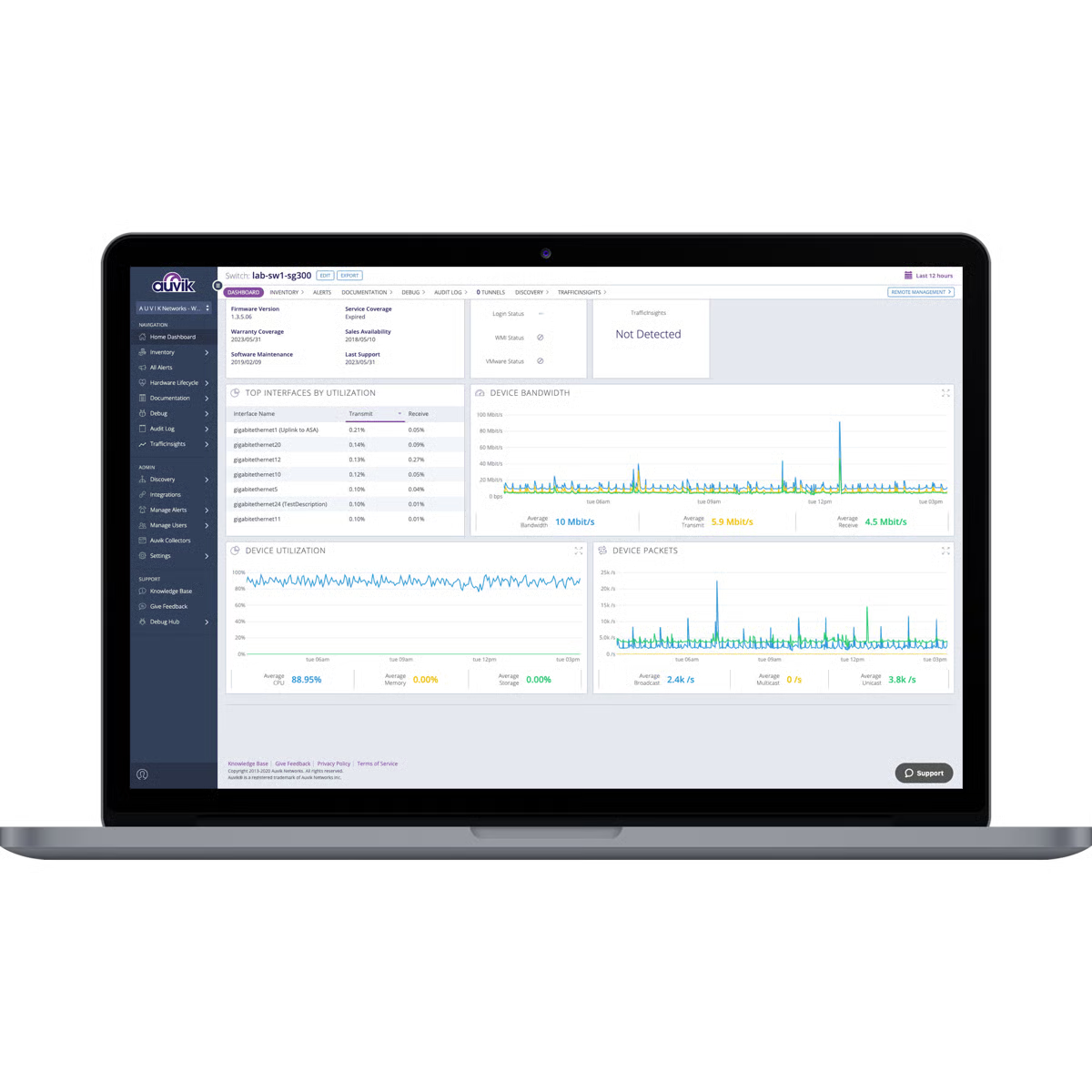
Auvik shows you everything you need to know about network performance in real time. This online network management solution lets you onboard clients faster, centralize network documentation, easily find and fix issues, and integrate with multiple third-party applications.
|
Pros of Auvik |
Cons of Auvik |
|
Easy deployment and usage |
Cumbersome setup and configuration |
|
Automates network tasks, including backups and firmware updates
|
Doesn’t support all network devices |
|
A full range of alarms to identify issues across devices |
Hard to read topology map |
What G2 users like about Auvik:
“Auvik’s strongest aspect is its network management. It provides clear outlines for our network configuration and makes it easy to supervise devices, traffic, and performance in a control panel. Additionally, it seamlessly integrates with other applications, including ticketing platforms and monitoring tools.”
– Auvik Review, Vitou C.
What G2 users dislike about Auvik:
“It has limited capabilities for monitoring system resources, such as CPU usage, temperature, and sensors. You will need to deploy a separate monitoring platform if you want full coverage of network and system resources.”
– Auvik Review, Marvimar C.
3. Datadog: Best for cloud-native infrastructure and network observability
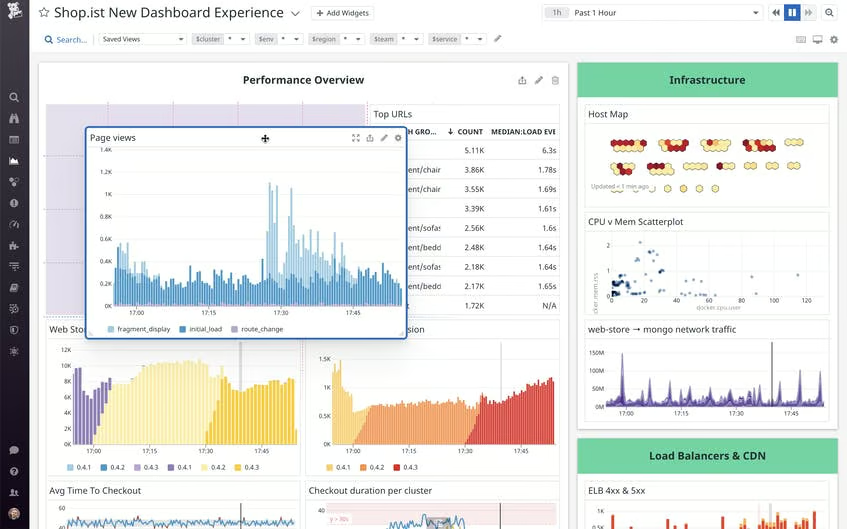
Datadog is a cloud-based monitoring, security, and analytics platform that provides insights into the performance of applications, infrastructure, and services. Use it to better understand the health of your systems, identify potential issues, and refine operations.
|
Pros of Datadog |
Cons of Datadog |
|
Easy to create custom metrics |
Upgraded pricing not for everyone |
|
Connects to a wide variety of languages and operating systems |
Long turnaround for enhancement requests |
|
Personalizable dashboard |
Complex to use initially |
What G2 users like about Datadog:
“Datadog has a multitude of useful features and integrations for our applications, from metrics and monitoring to dashboards and cost optimization. The dedicated support team is readily available to assist us in the adoption of any new features and tools for our applications. Many of the monitoring and observability tools offered by the platform are easily integrated into our applications, especially those migrated to Kubernetes.”
– Datadog Review, Taylor S.
What G2 users dislike about Datadog:
“I find the documentation for setting things up a bit difficult to understand. Sometimes, we realize that we need an upgrade to use the next feature, but the docs don’t explicitly mention that. There are a lot of changes from one version to the next, so it would be helpful to have a guide.”
– Datadog Review, Grace K.
4. Dynatrace: Best for AI-driven root cause analysis in complex environments
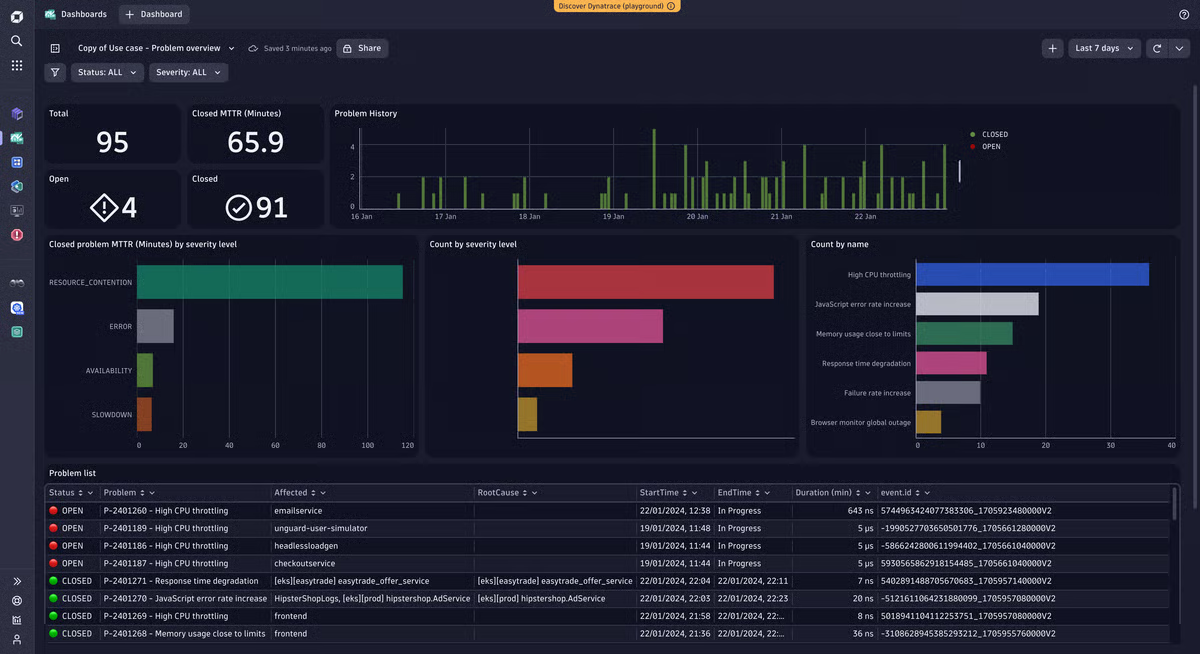
Dynatrace uses artificial intelligence (AI) to give visibility into process-to-process network communications. It offers automatic discovery and mapping, end-to-end visibility for infrastructure to applications, and root cause analysis.
|
Pros of Dynatrace |
Cons of Dynatrace |
|
AI-powered visibility into hybrid environments |
Poor user interface, can be confusing to operate |
|
Full-stack monitoring for easier overall management |
Complex to use with multiple options and configurations |
|
Efficient debugging |
Occasional false alarms |
What G2 users like about Dynatrace:
“My team isn’t really big on using logs, so being able to log values in real-time is great. While I usually work on the frontend side of things, having the ability to debug the backend live helps me navigate through contexts I usually lack.”
– Dynatrace Review, Alon N.
What G2 users dislike about Dynatrace:
“One thing I don’t like is the alert monitoring threshold it provides, since we have gotten multiple false signals when testing the application. The synthetic monitoring is beneficial, but smaller organizations cannot use it owing to encryption. Dynatrace, with its range of features, is like an ocean that a novice or newbie would find impossible to navigate. The initial phase requires an experienced user.”
– Dynatrace Review, Eleanora M.
5. LogicMonitor: Best for scalable cloud-based network monitoring for enterprises
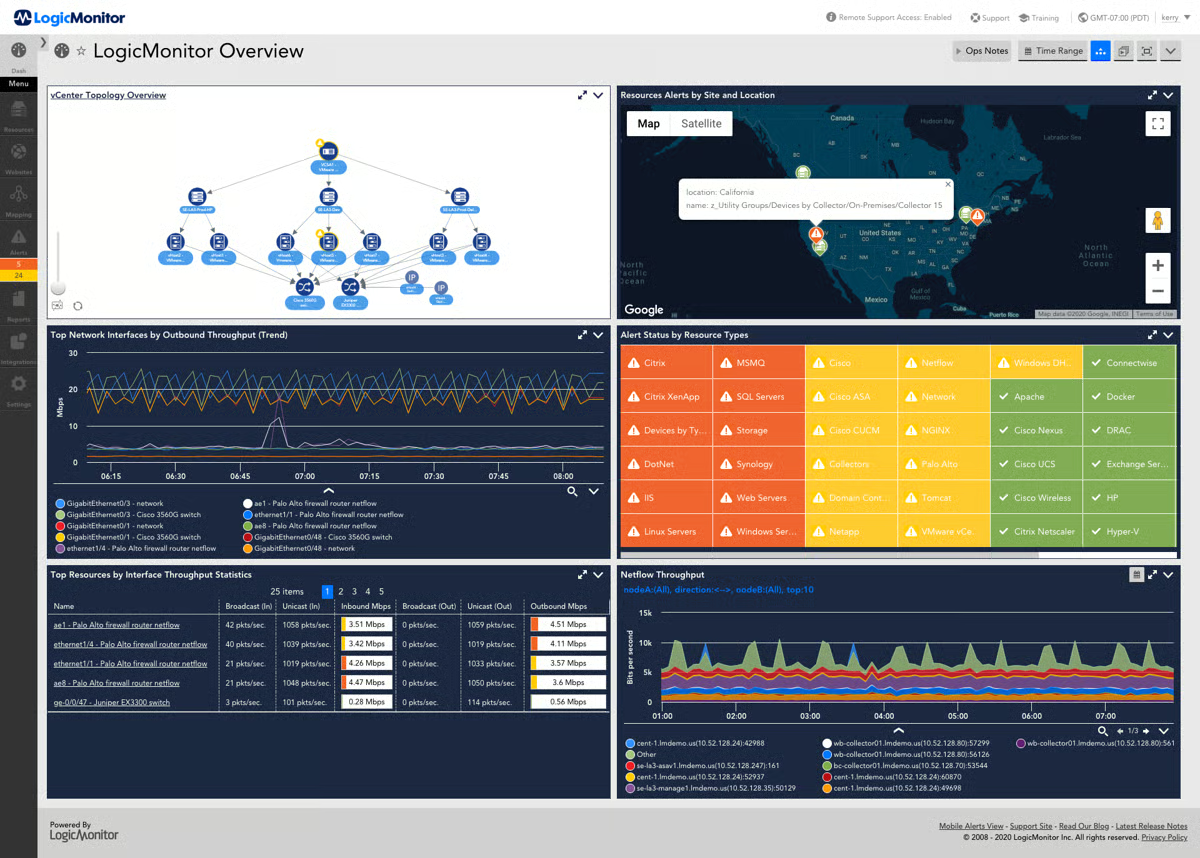
LogicMonitor is a cloud-based tool with solutions for managed services providers (MSPs) and enterprise IT. Focused on optimizing IT operations, it offers auto-discovery of network devices, auto-generation of topology maps, troubleshooting for network issues, intelligent alerting, and log-based anomaly detection.
|
Pros of LogicMonitor |
Cons of LogicMonitor |
|
Offers real-time monitoring |
Challenging learning process due to user interface change |
|
Ability to activate custom alerts |
Untuned alerts that cause noise and alert fatigue |
|
Ample customization opportunities |
Lack of access to the backend database |
What G2 users like about LogicMonitor:
“The first plus point for the LogicMonitor software is that it’s fully cloud-based. The user interface is convenient and useful, and the installation process is much simpler compared to other hybrid programs. The installer is fully automated, and the software is easily hosted on the Linux operating system, making it versatile. While dashboards can be complex to configure on other cloud platforms, I found this one to be very simple after installation. I also want to emphasize the powerful options for alerts and reports within the platform. You can run HTTP requests, send emails, or SMS for alerts.”
– LogicMonitor Review, Shravan K.
What G2 users dislike about LogicMonitor:
“It’s a fairly advanced tool, so the learning curve is quite steep – not the best for newbies. Also, for tracking multiple resources, a consolidated report is not possible.”
– LogicMonitor Review, Wesley C.
6. NinjaOne: Best for easy-to-use network monitoring with strong IT support tools
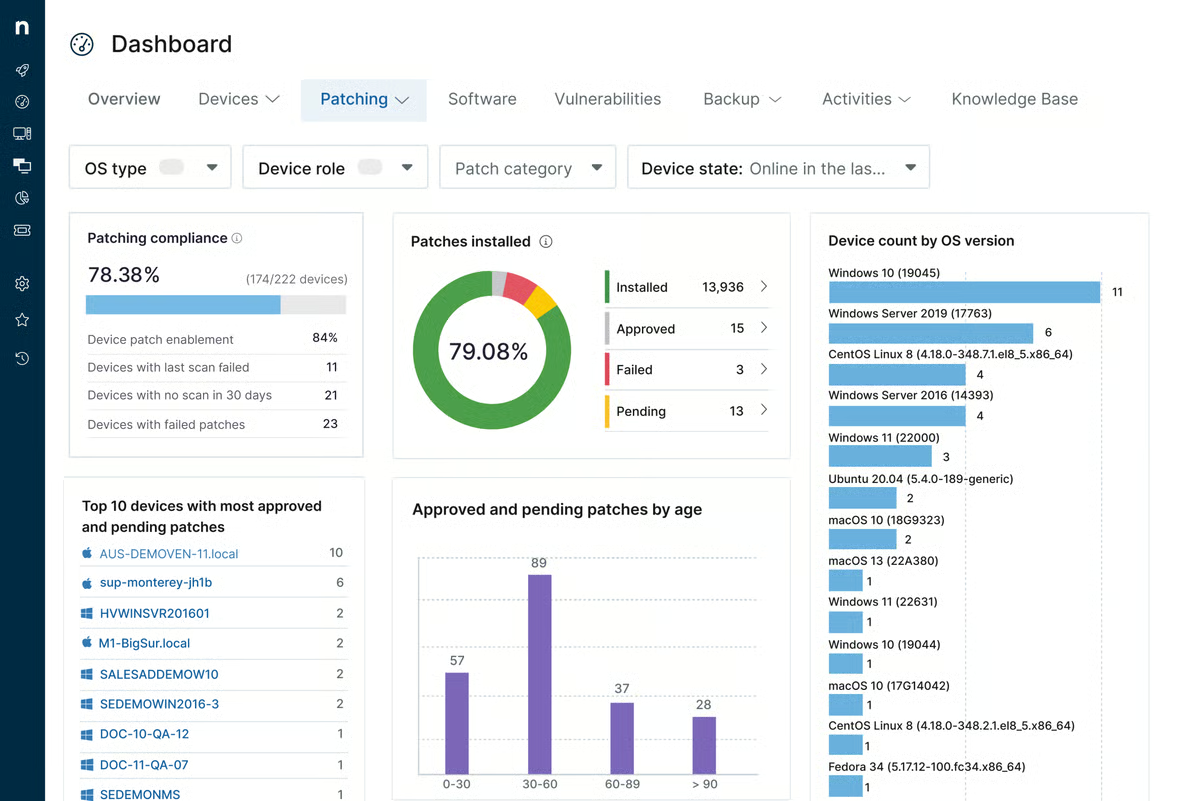
NinjaOne, custom-built into a remote monitoring and management (RMM) system, supplies you with a centralized view of all your simple network management protocol (SNMP) devices. Some features of NinjaOne include real-time network device monitoring, hardware performance data, alert customization, and detailed traffic reporting. According to G2 Data, it ranks as the 2nd easiest-to-use software.
|
Pros of NinjaOne |
Cons of NinjaOne |
|
Expert customer support for smooth onboarding |
Less comprehensive than specialized tools |
|
Intuitive interface for simplified IT management |
|
|
Excellent patch management |
Occasional issues with software updates |
What G2 users like about NinjaOne:
“My favorite thing is definitely the ease of use. It’s very intuitive, with very good patch management and the ability to monitor devices such as switches, firewalls, and printers. On top of that, the price is really interesting considering all the features included.”
– NinjaOne Review, Luca R.
What G2 users dislike about NinjaOne:
“Would like the ability to set multiple patch maintenance windows for servers without having to create a bunch of new policies. ”
– NinjaOne Review, Ryan A.
7. Progress WhatsUp Gold: Best for on-premises network visibility and performance tracking
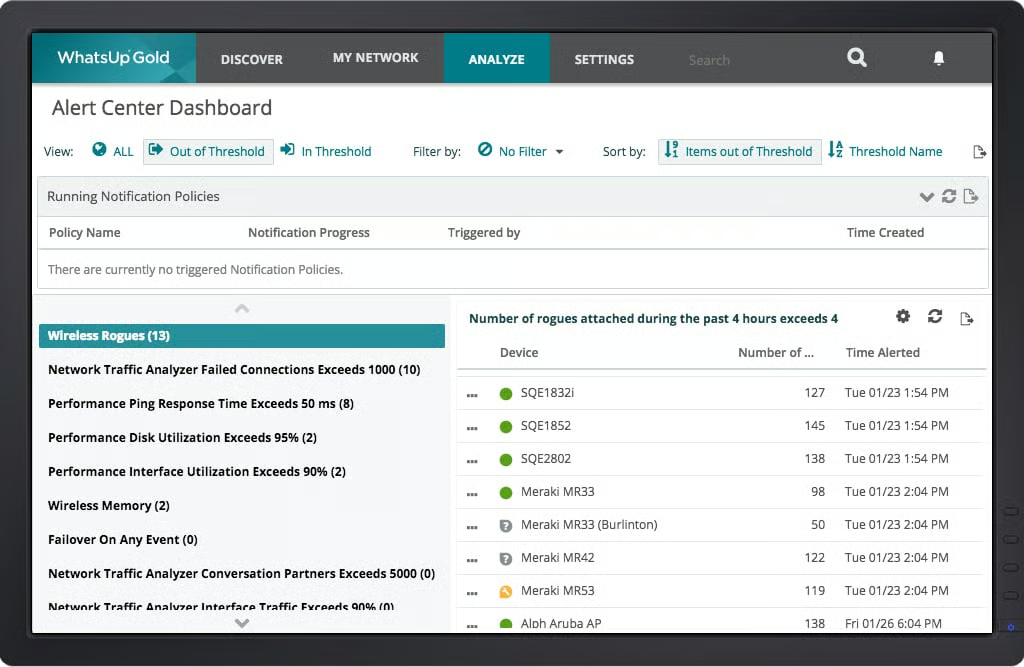
Progress WhatsUp Gold allows you to check the status and performance of applications, network devices, and servers, whether they are in the cloud or on-premises. It offers network mapping, performance assessment, real-time alerts, intuitive workflows, and log management capabilities.
|
Pros of Progress WhatsUp Gold |
Cons of Progress WhatsUp Gold |
|
User-friendly interface and simple implementation |
Restricted customization for data export |
|
Unified monitoring |
Viewing multiple devices simultaneously can be challenging |
|
Pre-built integration with a range of network devices and apps |
No integrated mobile device management |
What G2 users like about Progress WhatsUp Gold:
“It has a user-friendly and intuitive interface that makes it easy to determine and scan performance at a glance. Its quick and timely alerts let users identify and fix network problems before end users realize there’s an issue. It also facilitates decision-making by offering suggestions for improvement. WhatsUp Gold is a comprehensive performance monitor with data visualization, performance baseline, and other elements that help understand the general status of a network.”
– Progress WhatsUp Gold Review, Natasha B.
What G2 users dislike about Progress WhatsUp Gold:
“WhatsUp Gold has a licensing fee compared to open-source monitoring tools, which is a consideration for companies with tight budgets. Also, scaling it up for extremely large and complicated networks calls for more hardware or resources, which raises the total cost of ownership.”
– Progress WhatsUp Gold Review, Aashu K.
8. SolarWinds Hybrid Cloud Observability: Best for monitoring hybrid and multi-vendor IT environments
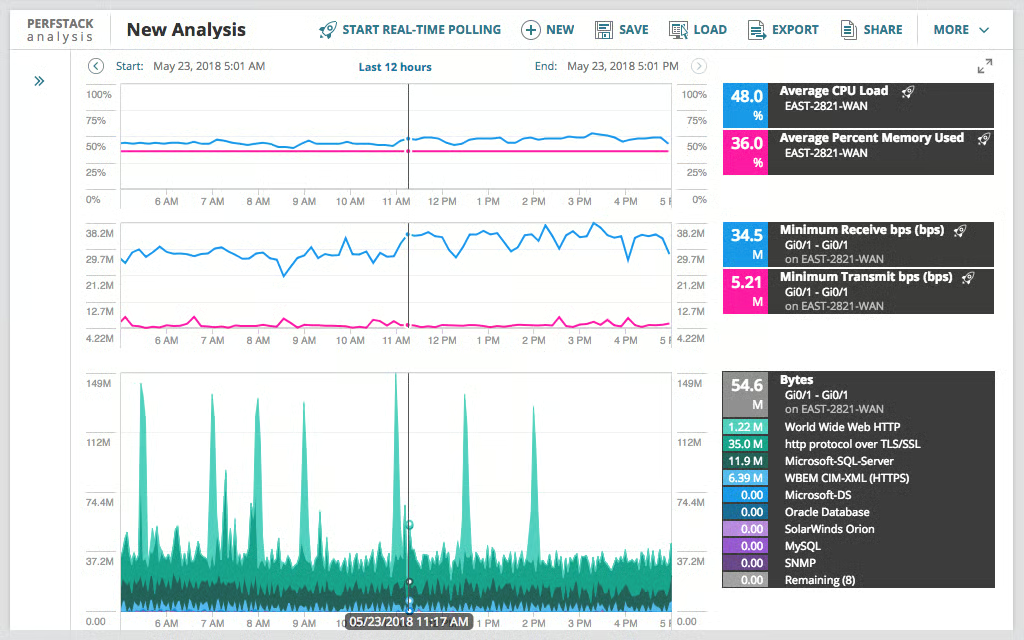
SolarWinds Hybrid Cloud Observability makes it easy for you to manage a complex hybrid IT environment. Powered by AI and machine learning, it optimizes distributed networks and reduces downtime with features like self-hosted observability, multi-vendor network monitoring, advanced alerting, and network traffic analysis.
|
Pros of SolarWinds Hybrid Cloud Observability |
Cons of SolarWinds Hybrid Cloud Observability |
|
In-depth visibility into network traffic patterns with NetFlow Traffic Analyzer (NTA) |
Slow performance is reported at times |
|
Automated IP address tracking |
Complicated initial setup and configuration |
|
Comprehensive reporting features |
Potential scalability issues with larger deployments |
What G2 users like about SolarWinds Hybrid Cloud Observability:
“I like the ability to automate tasks and responses to alerts. It allows the configuration of custom actions to resolve issues without the need for human intervention. The system’s ability to integrate with other SolarWinds and third-party tools is a standout feature, furthering the expansion of monitoring capabilities. Moreover, it offers a wide range of reporting and analytical functions, allowing for performance evaluation over time, trend identification, and informed decision-making.”
– SolarWinds Hybrid Cloud Observability Review, Nestor Azael O.
What G2 users dislike about SolarWinds Hybrid Cloud Observability:
“The initial stage of network discovery and node addition takes longer than expected. The one-time license cost is very high. Additionally, the tool generates numerous false positive alerts, and it would be beneficial to have additional features to identify and eliminate them.”
– SolarWinds Hybrid Cloud Observability Review, Sanjay B.
9. TeamViewer: Best for remote access and lightweight network device monitoring
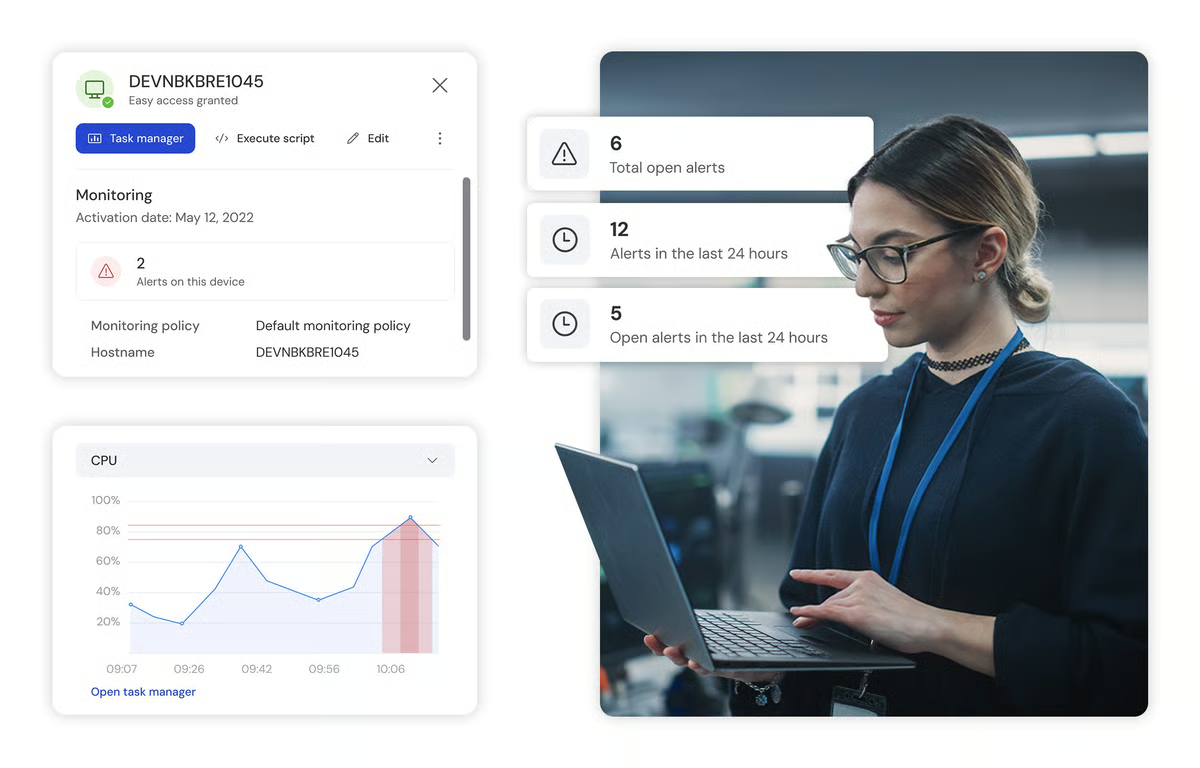
TeamViewer is a remote connectivity platform that enables individuals and businesses to securely access, manage, and support devices from anywhere. It offers solutions for both small teams and large enterprises, allowing remote access to computers, mobile devices, and embedded systems across locations.
TeamViewer supports remote support, device management, and secure collaboration, with enterprise-grade options like TeamViewer Tensor and a free version for personal use. With integrations across major platforms and ongoing innovation in areas such as augmented reality and IoT, TeamViewer helps organizations improve efficiency and manage distributed environments at scale.
Pros and cons of TeamViewer: What stood out to me
| Pros of TeamViewer | Cons of TeamViewer |
| Easy-to-use interface for quick remote connections | Connection and stability issues can occur |
| Fast, lag-free remote access in most cases | File sharing can feel limited at times |
| Improves productivity with instant remote access | Permission requirements can delay remote access |
What G2 users like about TeamViewer:
“Pretty damn good for global-totting users like me who move across the globe severally.I love it for stalwart connections and remote support to get support from the IT team when I encounter computer problems. As a marketing Manager am not stuck to the office but always on the move to look for clients and with screen share capabilities am not left behind with trainings. Great for military grade security for sharing of sensitive files with peace of mind”.
– TeamViewer Reviews, Shane P.
What G2 users like about TeamViewer:
“The only thing I don’t like about TeamViewer is that its connection sometimes lags and does not provide a stable connection”.
– TeamViewer Reviews, Khushi.

Frequently asked questions about free network monitoring software
Q1. What features are typically included in the free version of network monitoring software?
Common features of free network monitoring tools include fundamental network performance monitoring, bandwidth usage analysis, device discovery, alert notifications, limited customization, and basic reporting.
Q2. What are the key factors to think about when choosing free network monitoring software?
Consider your network size, complexity, specific monitoring needs, desired features, and the level of support required.
Q3. How do I ensure data privacy and security when using free network monitoring software?
Research the software provider’s security practices, data handling policies, and customer reviews.
Q4. Can free network monitoring software handle large-scale networks?
Some free tools can handle medium-sized networks, but larger environments might require paid network monitoring software.
Secure your network
As network failures and security threats continue to increase, I believe maintaining a secure and efficient network requires the right tools in place. Free network monitoring software can provide powerful capabilities to keep IT systems running smoothly without stretching your budget.
I hope this list of the best free network monitoring software helps you find the tool that fits your needs.
Looking to track a particular application’s performance? Check out application performance monitoring (APM) tools.
This article was originally published in 2024. It has been updated with new information.

💸 Earn Instantly With This Task
No fees, no waiting — your earnings could be 1 click away.
Start Earning
