


When you work in marketing, you’re constantly making decisions that could go either way. Should that CTA say “Get Started” or “Try It Free”? Should the landing page headline focus on value or urgency? I’ve lost count of how many times I thought I knew what would convert better, only to be proven wrong by the data.
That’s exactly why the best A/B testing tools have become essential, not optional. These platforms go beyond simple split testing, helping teams run structured experiments, validate ideas, and improve conversion rates with confidence instead of guesswork. Whether you’re optimizing a single element or rethinking entire user journeys, A/B testing software plays a critical role in modern growth and experimentation strategies.
And if you’re anything like me, you’re balancing traffic goals, conversion targets, campaign deadlines, and maybe a bit of self-doubt when results don’t go as planned. The right tool doesn’t just help you test faster; it helps you make better decisions.
For this guide, I’m evaluated some of the most widely used A/B testing tools based on real user feedback from G2, including Statsig, VWO Testing, AB Tasty, LaunchDarkly, Bloomreach, Netcore Customer Engagement Platform, and Webflow. Each of these platforms approaches experimentation differently, some focus on product and feature testing, others on marketing optimization or customer engagement, but all are built to help teams experiment smarter and reduce decision-making risk.
7 best A/B testing tools for 2026: My top picks
-
Statsig: Best known for product-level experimentation with built-in analytics
Connects feature flags, A/B tests, and product metrics in a single platform so teams can measure the real impact of every release. (free plan available, Pro from $150/mo) -
VWO Testing: Best for no-code web A/B testing with behavioral insights
Combines a no-code visual editor with heatmaps, session recordings, and scroll maps to help CRO teams test and understand user behavior in one place. (Pricing available on request) -
AB Tasty: Best for web experiments without dev support
Let’s non-technical teams launch A/B tests, personalization, and feature experiments fast using a visual editor and pre-built widgets, backed by G2’s highest-rated support in this category. (Pricing available on request) -
LaunchDarkly: Best known for feature flagging and safe production rollouts
Gives engineering and product teams precise control over who sees what in production, with real-time toggling, targeted rollouts, and rollback without redeploying code. (Starting from $12/user/mo) -
Bloomreach: Best for AI-powered e-commerce testing and personalization
Unifies product discovery, content personalization, and cross-channel experimentation with Loomi AI, built specifically for e-commerce brands, optimizing the full customer journey. (Pricing available on request) -
Netcore Customer Engagement Platform: Best for multichannel journey testing at scale
Embeds A/B testing directly into the journey builder across email, SMS, WhatsApp, push, and in-app, so teams can experiment with messaging, timing, and channels from a single platform. (Pricing available on request) -
Webflow: Best known for design-first website optimization without code
Gives marketing and design teams full creative control to build, test, and optimize websites visually, with built-in Optimize and Analyze tools that eliminate the need for separate A/B testing platforms. (Starting from $18/month)
*These are the top-rated products in the A/B testing tool category, according to G2’s Spring 2026 Grid Reports. Some also offer a free plan. I’ve also added the starting price of their paid pricing to make comparisons easier for you.
7 best A/B testing tools I recommend for better optimization
A/B testing tools have evolved into a core part of how modern teams approach growth, experimentation, and decision-making. What started as simple split testing has expanded into full experimentation platforms that support everything from conversion rate optimization to feature rollouts and personalization. That shift is also reflected in market growth. The A/B testing software market is projected to reach $1.67 billion in 2026, and is expected to grow to $4.82 billion by 2036, expanding at a CAGR of 11.2%.
What stood out to me while analyzing this category is how high buyer expectations already are. A/B testing isn’t just about running experiments anymore, teams expect statistical reliability, seamless integrations, scalability, and ease of use, all in one platform. Based on G2 data, top A/B testing tools consistently score high on usability, support quality, and likelihood to recommend, which tells me buyers are prioritizing tools that can fit into real workflows without slowing teams down.
After evaluating 20+ tools, the seven A/B testing platforms below are the ones I’d recommend for 2026. Each one stands out for a different reason, whether it’s product experimentation, marketing optimization, feature flagging, or customer engagement, but all of them are built to help teams test smarter, reduce risk, and make more confident decisions.
How did I find and evaluate the best A/B testing tools?
To build this list, I started with G2’s latest Grid Reports for A/B testing and experimentation platforms, using market presence, satisfaction scores, and category relevance to create a focused shortlist. This helped me narrow down tools that are not only widely adopted but also actively used by marketing, product, and growth teams.
From there, I evaluated each platform based on how effectively it supports core experimentation capabilities like split testing, multivariate testing, statistical analysis, feature flagging, personalization, integrations, and reporting. I also looked at how well each tool fits into real-world workflows, whether that’s optimizing landing pages, running product experiments, or scaling experimentation programs across teams.
I also used AI to analyze verified G2 reviews, focusing on recurring themes in what users value most, the limitations they call out, and how each tool performs in day-to-day experimentation scenarios.
The screenshots featured in this article come from G2 vendor listings, Grid® Reports, and publicly available product documentation.
My criteria for the best A/B testing tools
There’s no one-size-fits-all when it comes to A/B testing platforms. Here’s what I looked for to find tools that actually support real-world experimentation across teams.
- Ease of use with flexible setup: A tool only works if your team can actually use it. I looked for platforms with intuitive interfaces that work for marketers, designers, and product folks, while still offering flexibility for developers when needed.
- Targeting and segmentation capabilities: Not every test should go to every user. I prioritized tools that allow targeting by behavior, device type, traffic source, geography, or other custom rules to keep tests relevant and accurate.
- Statistical reliability and transparent reporting: Clean reporting matters. I looked for tools with built-in statistical significance thresholds, clear confidence levels, and reports that make sense to marketers, product teams, and analysts alike.
- Integrations with existing tools: Testing in isolation doesn’t help anyone. I favored platforms that integrate with tools teams already use, like Google Analytics, HubSpot, Segment, Mixpanel, or internal data pipelines.
- Server-side and multivariate testing support: While simple A/B tests are great, I wanted tools that could also handle deeper product experiments. Server-side testing and multivariate capabilities are key for teams running complex or logic-based tests.
- Collaboration and experiment management: A/B testing usually involves more than one team. I looked for features that support shared access, comments, permissions, or experiment history so teams can collaborate without chaos.
- Cost and scalability: Budgets vary. I paid attention to tools that offer transparent pricing, flexible plans, and the ability to scale up as traffic, test complexity, or team size grows.
After evaluating more than 20+ A/B testing tools, I narrowed the list down to seven that truly stood out. These tools offer a strong mix of functionality, efficiency, and reliability.
While none of them are perfect, each one brings something worthwhile to the table, whether it’s ease of use, advanced features, or the ability to scale with different team needs.
According to G2 Data, the average user adoption rate for A/B testing tools is 66%, with users realizing ROI within 9 months. These tools are most used by small businesses (43%), followed by mid-market companies (38%) and enterprises (19%).
The list below contains genuine user reviews from the best A/B testing tools. To be included in this category, a solution must:
- Conduct split-traffic experiments with defined, trackable goals to determine the best-performing web content.
- Deploy multiple versions of any web content in real time.
- Perform split-URL experiments.
- Adjust and manage traffic volume to experiment with variations.
- Provide tools for both technical and non-technical users to perform tests.
*This data was pulled from G2 in 2026. Some reviews may have been edited for clarity.
1. Statsig: Best known for product-level experimentation with built-in analytics
Statsig is a modern experimentation and feature management platform that’s built to help product and engineering teams run A/B tests, manage feature flags, and measure impact at scale. Based on my evaluation of G2 reviews and the platform’s capabilities, it’s easy to see why Statsig has earned strong satisfaction scores, with a 94% likelihood to recommend and 96% ease of doing business rating on G2.
What sets Statsig apart, in my view, is how tightly it connects experimentation with product analytics. This isn’t just a tool for flipping feature switches; it’s designed so that every release comes with built-in measurement. Teams can set up an experiment, define custom metrics, and get automated statistical analysis without needing a dedicated data science team to crunch the numbers. On G2, users rate its multivariate testing capabilities at 91% and concurrent testing at 92%, which are the highest among the tools on this list.
Based on my analysis of user reviews, one of the most consistently praised aspects of Statsig is how fast and intuitive it is to set up experiments. Multiple reviewers describe being able to spin up a feature gate or an A/B test in minutes, with real-time diagnostics that help spot issues early. The platform’s approach to simplifying complex statistical concepts, like significance levels and confidence intervals, into clear, visual dashboards makes experimentation accessible beyond just the engineering team.
Another area where Statsig stands out is the depth of its analytics. Unlike lightweight tools that track surface-level interactions, Statsig provides product intelligence that ties feature performance to actual business outcomes like retention, engagement, and conversion. Reviewers note that the platform goes beyond tracking events; it helps teams understand which actions correlate with long-term value. According to G2, its reporting and analytics score sits at 90%, and its AI/machine learning capabilities are rated at 72%.
The platform’s support for custom metrics and custom user dimensions is another strong differentiator. Based on the reviews I analyzed, users appreciate being able to define tailored metrics for each experiment and break down results across different user segments. This flexibility is critical for teams that want to go beyond one-size-fits-all analysis and run experiments grounded in their specific product and business context.
Statsig also earns consistent praise for the quality of its customer support and documentation. Reviewers describe the support team as responsive and available, with some users mentioning dedicated Slack channels and same-day issue resolution. The SDKs are described as modern, well-documented, and straightforward to integrate, with specific praise for the Next.js and mobile SDK guides. For teams switching from other experimentation platforms, the transition process appears to be smooth.
When it comes to feature flagging, Statsig delivers a well-rounded experience. Users describe the feature gate functionality as collaborative and easy for cross-functional teams to work with. The ability to roll features forward and backward, set up overrides for testing, and manage targeted rollouts gives teams precise control over who sees what and when, which matters when you’re shipping to production at scale.
Based on G2 reviews, teams that want deep, exploratory data analysis beyond what Statsig’s standard dashboards provide may find the analysis workflows somewhat opinionated. A few reviewers mentioned that advanced use cases still require engineering involvement, and that the UI can feel dense when you’re first getting started. For teams with specialized analytical needs, it’s worth planning for some additional configuration to get the most out of the platform’s depth.
I also noticed that a few reviewers pointed out that the documentation, while generally strong, can feel thin in certain areas, particularly around advanced experiment configurations and deep-dive result analysis. Teams newer to the platform may need to spend some time exploring the interface and supplementing with direct support conversations to fully understand all of Statsig’s capabilities.
For product and engineering teams that want experimentation tightly woven into their release workflow, Statsig checks a lot of boxes. With a 65% user adoption rate and an estimated ROI payback of just 6 months, the fastest among the tools on this list, it delivers value quickly. If you care about rigorous statistical analysis, fast experiment setup, and connecting feature performance to real product outcomes, Statsig deserves a close look. Its customer base skews toward mid-market (50%) and enterprise (29%) companies, which reflects the platform’s depth and scale.
What I like about Statsig:
- The speed of experiment setup is genuinely impressive here. G2 reviewers describe spinning up feature gates and A/B tests in minutes, and the automated statistical analysis means teams don’t need a dedicated data scientist to interpret results.
- What also stands out is the depth of product analytics. Statsig ties feature performance to business outcomes like retention and conversion, giving teams strategic clarity rather than just surface-level event tracking.
What G2 users like about Statsig:
“Statsig makes experimentation genuinely easy to adopt and operate at scale. The experiment setup is simple and intuitive, lowering the barrier to quickly running experiments. It’s easy to verify that exposures work as expected using overrides and by checking the Diagnostics tab. Custom metrics are easy to define, which is critical for tailoring experiments to real product and business outcomes. A major strength is the ability to define custom user dimensions for each exposure, enabling much more effective and flexible analysis of experimental data. The analysis experience is strong, especially when breaking down metrics across different user dimensions.
– Statsig review, Zelal G.
What I dislike about Statsig:
- Teams that need deep, exploratory analysis beyond the standard dashboards may find the analysis workflows somewhat structured, and a few G2 reviewers noted that advanced use cases can still need engineering involvement, so it’s worth planning for that flexibility upfront.
- The documentation, while solid for common use cases, can feel thin around advanced experiment configurations. Newer users may need to supplement with direct support conversations to fully unlock the platform’s depth.
What G2 users dislike about Statsig:
“The UI and analysis workflows can feel opinionated and less flexible for deep, exploratory analysis, and advanced use cases still require engineering involvement.”
– Statsig review, Shubham S.
2. VWO Testing: Best known for visual A/B testing paired with behavioral insights
VWO Testing is one of the most well-known A/B testing platforms in the optimization space, and it remains one of the top-rated A/B testing tools on G2. Based on my evaluation of the platform and analysis of recent G2 reviews, it continues to deliver a strong combination of visual testing, behavioral insights, and conversion rate optimization features under one roof.
The platform makes it easy for marketing and CRO teams to create and launch A/B tests without heavy developer involvement. The visual editor is one of its most praised features; reviewers consistently describe it as intuitive and fast, allowing teams to make changes to live pages and preview them before launching. Setting up split URL tests, adding goals, and managing traffic allocation all feel straightforward, and several users mention being able to run 20 or more experiments within just a few months of getting started.
VWO’s reporting and analytics capabilities are another area where the platform performs well. On G2, its reporting and analytics score is 85%, and users frequently praise the clarity of the results dashboards. The reporting highlights the winning variation with metrics like conversion uplift, probability of outperforming the baseline, and segmented visitor data. Reviewers also note that VWO integrates well with analytics tools like GA4 and BigQuery, which makes cross-referencing test results with broader site data seamless.
Where VWO really differentiates itself is in combining A/B testing with a full suite of behavioral insight tools, including heatmaps, session recordings, and scroll maps, all within the same platform. This means teams can go from spotting a UX issue through behavioral data to testing a fix without switching tools. On G2, VWO’s heatmap capabilities are rated at 80%, the highest among the traditional A/B testing tools on this list. Reviewers appreciate being able to connect the dots between what users do and why tests produce certain results.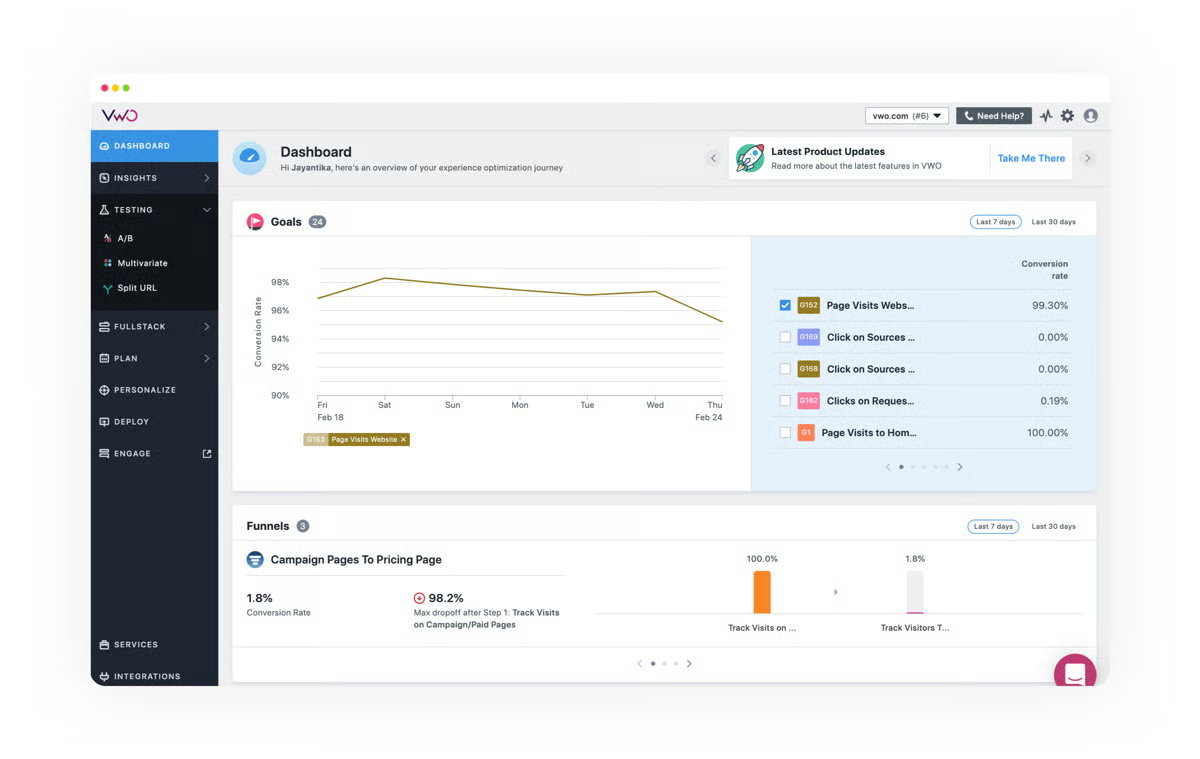
The platform’s targeting and segmentation capabilities also stand out. Based on the reviews I analyzed, users appreciate being able to build precise audience rules, targeting by device, behavior, traffic source, or custom attributes, which keeps tests relevant and accurate. The stats engine is described as simple to use and reliable, and the ability to run multiple experiments in parallel across different sites or properties helps teams scale their testing programs efficiently.
Another consistently praised aspect is VWO’s customer support. Multiple reviewers describe the support team as more of a testing partner than a typical vendor relationship. Users mention dedicated CSM meetings, proactive ideation support, and responsive technical help via Slack and direct channels. For teams building out their experimentation culture, this kind of hands-on guidance can make a meaningful difference.
VWO has also been investing in AI-powered features that help teams identify testing opportunities and generate variant ideas more quickly. Several recent reviewers mention using AI-generated suggestions to speed up their testing pipeline and to surface optimization opportunities they might have missed. Combined with the platform’s existing personalization capabilities, this positions VWO well for teams that want to move from isolated tests to a more continuous optimization program.
Based on G2 reviews, teams new to the platform should expect some time to get familiar with where everything lives in the interface. VWO is feature-rich, and reviewers note that while basic tests are quick to launch, navigating more advanced configurations, like custom code, multi-page experiments, or detailed audience modeling, takes a bit longer to get comfortable with. This is a common adjustment period for platforms of this depth, and the support team helps bridge that gap.
I also noticed a few users mention that the visual editor, while generally reliable, can occasionally feel unstable when working with JavaScript-heavy or dynamic page elements. Additionally, the pricing structure means that some features, like separate device reporting, come at an additional cost, which is something budget-conscious teams will want to factor into their evaluation.
If you’re a marketing, CRO, or UX team at a mid-sized to enterprise company looking for a comprehensive optimization platform, VWO Testing is one of the first tools I’d recommend evaluating. With a 55% user adoption rate and an estimated 8-month ROI payback period, it delivers steady value. Its customer base is strongest in the mid-market segment (57%), with 26% small business and 18% enterprise adoption. For teams that want visual testing paired with behavioral insights and don’t want to juggle multiple point solutions, VWO brings everything together in one place.
What I like about VWO Testing:
- The visual editor genuinely lowers the barrier for non-technical teams to run meaningful A/B tests, and the reporting dashboards present results with enough clarity,conversion uplift, confidence levels, and segmented data that teams can act on them without second-guessing.
- Having heatmaps, session recordings, and scroll maps sitting right alongside the testing tools is a real advantage. It means you can see why users behave a certain way and test a fix in the same workflow, without bouncing between platforms.
What G2 users like about VWO Testing:
“Many useful features and time-saving elements with personalization.”
– VWO Testing review, Aaron M.
What I dislike about VWO Testing:
- VWO is feature-rich, so newer teams should budget time to get familiar with where everything lives. Advanced configurations like multi-page experiments or custom audience targeting have a bit of a ramp-up, though the support team is readily available to bridge that gap.
- A few users flagged that the visual editor can occasionally behave unexpectedly with JavaScript-heavy or dynamic pages. Some features, like separate device reporting, also come at an additional cost, which is worth factoring in during evaluation.
What G2 users dislike about VWO Testing:
“I would like Mobile testing in the free plan. We are not able to make updates on mobile and desktop separately in a free plan while setting split URL testing.”
– VWO Testing review, Sumit P.
3. AB Tasty: Best for web experiments without dev support
AB Tasty is an experience optimization platform that’s built to help marketing and product teams run experiments, personalize digital experiences, and validate ideas, often without needing developer support. Based on my evaluation of the platform and analysis of recent G2 reviews, it strikes a strong balance between accessibility and depth, which is why it remains one of the top-rated A/B testing tools in the category.
The first thing that stands out about AB Tasty is how accessible it is for non-technical teams. Reviewers consistently describe the visual editor as intuitive and easy to work with, making it possible for marketers to set up A/B tests, split URL experiments, and personalization campaigns without writing code. Several users mention that launching basic tests takes minutes, which helps teams move fast and iterate on ideas without bottlenecks. On G2, AB Tasty’s ease of use is rated at 87%, and ease of setup at 85%.
AB Tasty also brings together testing, personalization, and feature experimentation into a single platform. Rather than juggling multiple tools for different optimization needs, teams can manage A/B tests, multivariate experiments, feature flags, and audience personalization from one place. Several reviewers highlight this all-in-one approach as a key advantage, especially when trying to coordinate optimization efforts across marketing, product, and UX teams.
The platform’s targeting and segmentation capabilities are another area that reviewers praise. AB Tasty integrates with analytics tools like Google Analytics, Mixpanel, and Adobe Analytics, allowing teams to target specific cohorts based on behavioral data, traffic source, or custom attributes. One reviewer specifically mentioned the ability to set up experiments that target only B2B traffic on a mixed B2B/B2C site, the kind of flexibility that matters when you need precise control over who sees what.
Based on the reviews I analyzed, AB Tasty’s customer support team consistently earns strong praise. Reviewers describe the support as responsive, proactive, and genuinely helpful, with dedicated account managers who guide teams on strategy, troubleshoot technical issues, and suggest optimization ideas. On G2, AB Tasty’s quality of support is rated at 94%, the highest among all the tools on this list. For teams that value a hands-on partnership rather than just a software vendor, this is a real differentiator.
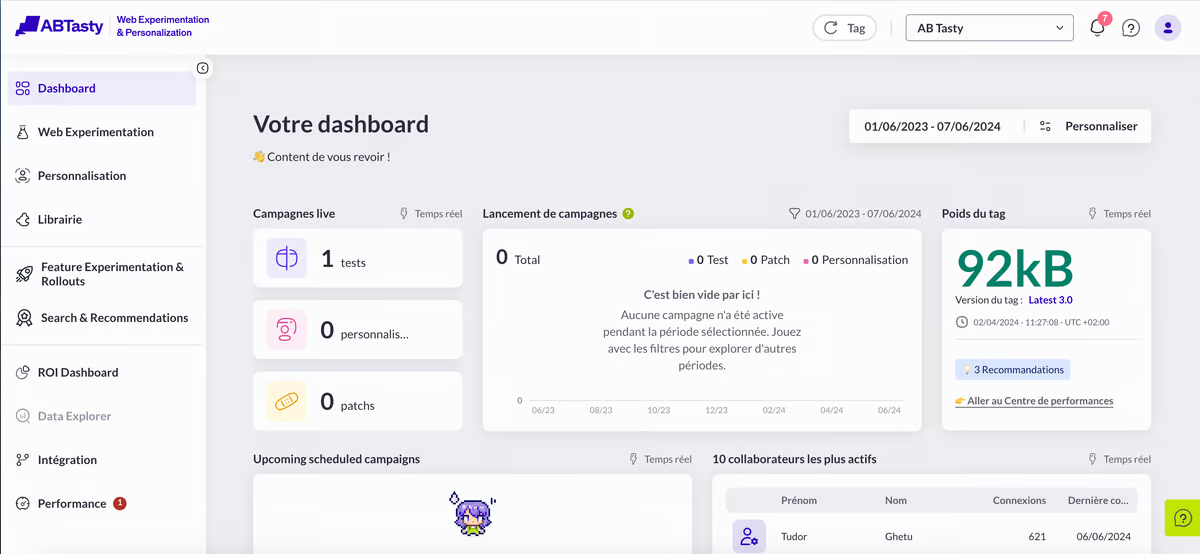
Another standout area is AB Tasty’s widget library and template options. Reviewers mention using pre-built widgets for banners, pop-ups, and tooltips that can be deployed quickly to enhance the user experience without custom development. Combined with the visual editor, this makes it easy for teams to run both quick wins and more strategic experiments. The platform also supports feature flagging and progressive rollouts, which extend its usefulness beyond traditional marketing tests into product experimentation.
AB Tasty has also been expanding its AI-powered features, including text variation suggestions and intelligent audience segmentation. Reviewers note that AI features help streamline ideation and testing workflows, thereby speeding up the overall process. The platform’s lightweight footprint is another benefit users call out; it doesn’t noticeably affect site performance, which is important when running multiple tests simultaneously.
Based on G2 reviews, teams looking to use AB Tasty’s more advanced features, such as complex personalization rules, advanced audience targeting, or feature experimentation, should plan for additional setup time. While basic tests are quick to launch, the deeper capabilities require more familiarity with the platform, and some reviewers note that mobile experimentation workflows aren’t as smooth as the desktop experience.
I also noticed a few reviewers mention that pricing can be a consideration, particularly for smaller teams or organizations that aren’t using the full feature set. AB Tasty is generally seen as a better fit for mid-sized to enterprise teams with an active testing program. Additionally, a few users noted that the visual editor can occasionally lag with complex or dynamic website structures, which is worth keeping in mind for sites with heavy JavaScript.
For marketing and CRO teams that want an accessible yet capable experimentation platform, AB Tasty hits a sweet spot. With a 63% user adoption rate and 9-month estimated ROI payback, it offers solid returns. Its customer base includes 18% small businesses, 51% mid-market, and 31% enterprise, reflecting its broad appeal across team sizes. If your priority is launching experiments quickly without dev bottlenecks and growing your testing maturity over time, AB Tasty makes that path feel natural.
What I like about AB Tasty:
- The combination of a clean visual editor and a ready-made widget library means marketing teams can go from idea to live experiment remarkably fast, no developer tickets, no waiting.
- Support quality is the other standout here. Reviewers across G2 describe the AB Tasty team as a genuine optimization partner, not just a help desk, with proactive strategy guidance and a fast turnaround on technical questions.
What G2 users like about AB Tasty:
“A big advantage of AB Tasty is that it’s an all-in-one platform. Instead of juggling multiple tools, AB Tasty brings together testing, personalization, feature experimentation, and user segmentation in one place.”
– AB Tasty review, Aliya S.
What I dislike about AB Tasty:
- The more advanced capabilities, complex personalization rules, feature experimentation, and deep audience targeting require more setup time and familiarity. A few reviewers also flagged that mobile experimentation workflows aren’t as polished as the desktop side yet.
- Pricing was considered for smaller teams or those not using the full feature set. Additionally, the visual editor can lag on sites with complex or JavaScript-heavy structures, which is something to test during evaluation.
What G2 users dislike about AB Tasty:
“Pricing could be better. Also, it has some performance spikes, nothing major.”
– AB Tasty review, Alberto A.
4. LaunchDarkly: Best for feature flagging and backend experimentation
LaunchDarkly is a feature management and experimentation platform that’s designed primarily for development and product teams who want to control feature releases, run backend experiments, and manage rollouts without redeploying code. Based on my evaluation and analysis of recent G2 reviews, it continues to be the go-to choice for teams that treat experimentation as part of the engineering release pipeline rather than as a standalone marketing function.
What stands out most about LaunchDarkly is the precision of its feature flag management. Reviewers consistently describe how easy it is to create flags, set up targeting rules, and roll out changes to specific users, organizations, or environments with just a few clicks. The ability to decouple deployment from release means code can go live without immediately exposing changes to all users, reducing risk and giving teams the confidence to ship faster. On G2, LaunchDarkly’s concurrent testing capabilities are rated at 87%, and its ease of setup at 88%.
The platform’s real-time feature toggling is another area where it excels. Multiple reviewers highlight how quickly flag changes propagate, describing near-instant updates across multiple sessions and environments. This is particularly valuable for teams that need to quickly roll back a feature if something goes wrong in production or want to gradually expand access during a phased rollout. Reviewers also praise the API, which enables integration with CI/CD pipelines and programmatic flag management.
LaunchDarkly also provides strong targeting and segmentation capabilities that go beyond simple on/off switches. Users can build granular rules targeting user attributes, geography, organization, or custom properties, and the platform supports complex multivariate flag variations, not just boolean toggles. Several reviewers specifically note that flags can serve as configuration management tools, support any data type, and power nuanced product experiences.
Based on the reviews I analyzed, the platform is widely praised for being intuitive and easy for engineers to adopt. Product managers also report being able to use it effectively to control feature access and manage beta programs without deep technical knowledge. The initial setup, adding the SDK and bootstrapping the provider in common frameworks like React, is described as straightforward, and the platform supports a wide range of SDKs across web, mobile, and server-side environments. On G2, LaunchDarkly’s ease of use is rated at 89%.
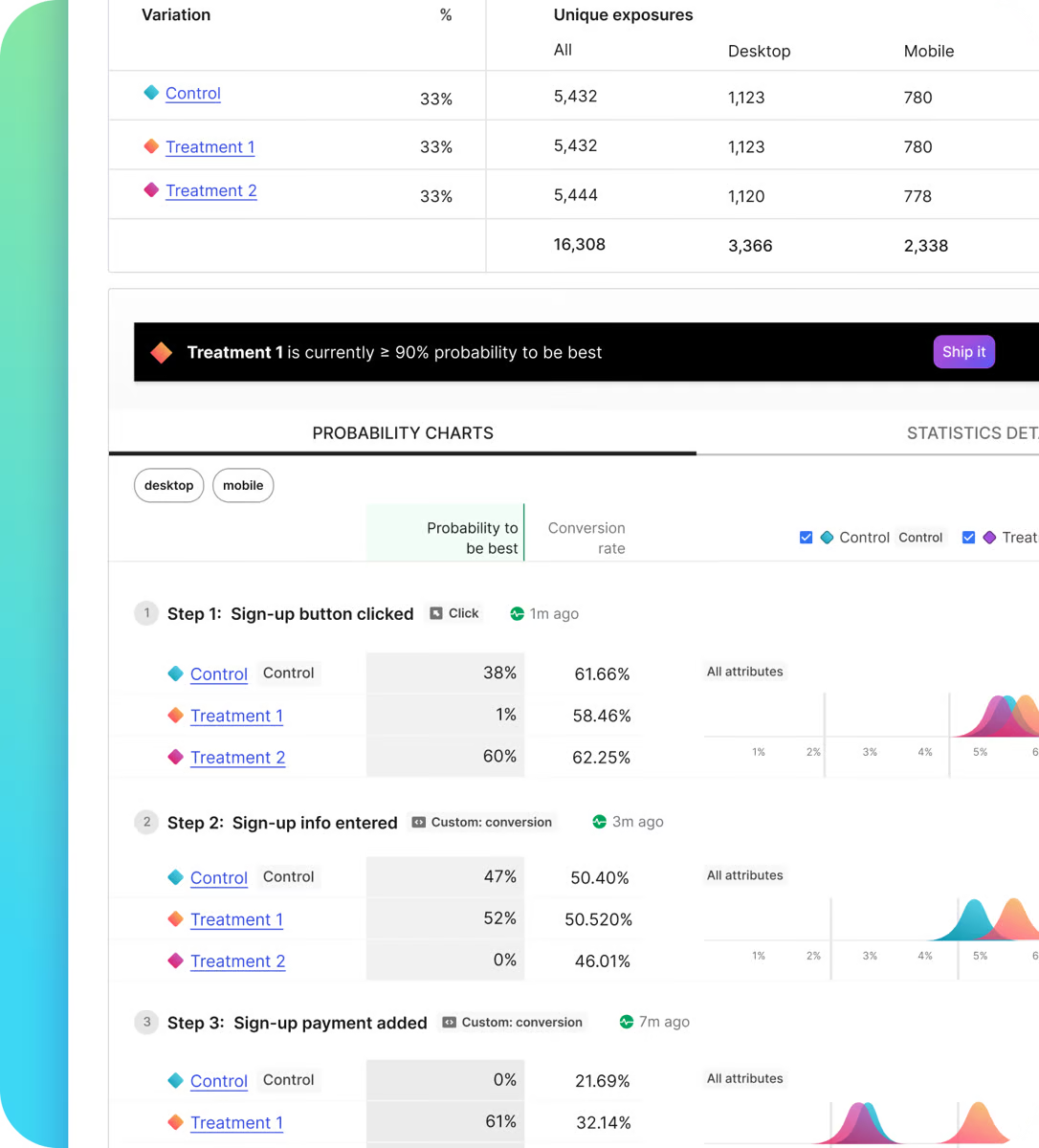
Another strength is LaunchDarkly’s support for collaboration among engineering, product, and operations teams. The platform provides controlled visibility into feature states across environments, making it easy for cross-functional teams to coordinate rollouts and communicate what’s live and where. Reviewers describe it as particularly useful for managing entitlements, running beta programs, and giving specific customer accounts early access to new functionality.
LaunchDarkly’s overall reliability and ecosystem maturity also earn consistent praise. Users describe it as a stable, dependable platform that “just works” for day-to-day feature management. Customer support is described as helpful and accessible, and the documentation, while extensive, provides solid guidance on common integration patterns. With a 69% user adoption rate and strong mid-market (48%) and enterprise (42%) presence, it’s clearly resonating with teams at scale.
Based on G2 reviews, teams managing a large number of feature flags across multiple projects and environments should plan for governance early. Several reviewers mention that without strict naming conventions and cleanup processes, the flag inventory can become difficult to navigate over time. The UI, while generally clean, can feel cluttered once the number of flags grows significantly, and bulk management operations are limited.
I also noticed that a few reviewers mentioned pricing as a consideration, particularly for smaller companies or teams that primarily need basic flagging functionality. Enterprise features like custom roles and approval workflows are available only in higher-tier plans, and some users reported experiencing inconsistencies during the pricing negotiation process. For teams evaluating LaunchDarkly, it’s worth clarifying plan tiers and feature access early in the conversation.
If your experimentation needs are closer to the codebase than to the landing page, LaunchDarkly is the platform I’d point you toward. With an estimated ROI payback of 10 months and customer segments heavily weighted toward mid-market (48%) and enterprise (42%), it’s built for teams with active release cycles and complex flag strategies. For engineering and product teams that want precise control over feature releases and the ability to experiment safely in production, it’s hard to find a more focused solution.
What I like about LaunchDarkly:
- The ability to decouple deployment from release is genuinely powerful. Feature flags let teams ship code to production and then decide when and to whom they expose changes, which is a massive confidence boost when you’re releasing multiple times a week.
- Flag changes propagate in near real time, and the platform is intuitive enough that both engineers and product managers can manage rollouts and beta programs without friction. That kind of cross-functional usability is rare in developer-focused tools.
What G2 users like about LaunchDarkly:
“It makes releasing software both safer and faster by using feature flags, and it lets our team decouple deployment from release. That way, code can go live without immediately exposing changes to users. This reduces risk and supports gradual rollouts, quick rollbacks, and easier experimentation. I also like how it strengthens collaboration between engineering, product, and operations by providing controlled visibility and rollout decisions, without needing a full redeploy every time.”
– LaunchDarkly review, Praveen N.
What I dislike about LaunchDarkly:
- Flag governance becomes a real concern at scale. Without strict naming conventions and cleanup processes, the inventory gets cluttered fast, and bulk management options are currently limited, so housekeeping takes manual effort.
- Enterprise features like custom roles and approval workflows are available only in higher-tier plans, and a few reviewers reported inconsistencies during the pricing negotiation process. Smaller teams should get clarity on plan tiers and feature access early.
What G2 users dislike about LaunchDarkly:
“Pricing is one of the big pain points; it gets quite expensive as we scale up the number of seats. The experimentation and metrics features are useful, but feel less mature than the core flagging product. Finally, the UI gets quite cluttered once there are a lot of flags, and cleaning up is quite manual.”
– LaunchDarkly review, Marc B.
5. Bloomreach: Best for AI-powered e-commerce testing and personalization
Bloomreach is an AI-powered commerce experience platform that brings together product discovery, content personalization, marketing automation, and experimentation into a single ecosystem. Based on my evaluation and analysis of recent G2 reviews, it’s a platform that goes well beyond basic A/B testing, offering deep experimentation capabilities tied to e-commerce outcomes like product ranking, search relevance, and customer journey optimization.
What surprised me most during my evaluation was how deeply A/B testing is integrated across the platform. Whether it’s email, SMS, in-app content, web layers, or even product search and merchandising rules, you can test almost anything within Bloomreach. This isn’t a standalone testing add-on; experimentation is woven into the way the platform handles content delivery and customer engagement. On G2, Bloomreach’s multivariate testing capabilities are rated at 85%, and its reporting and analytics score sits at 85%.
Bloomreach’s AI-powered personalization engine, Loomi AI, is one of its most distinctive features. Reviewers describe it as genuinely useful for understanding customer intent, automating product recommendations, and delivering personalized experiences in real time. The platform’s built-in customer data platform (CDP) connects browsing behavior with messaging across channels, which means personalization isn’t just based on rules; it’s driven by actual behavioral data. For e-commerce teams, this translates to smarter product discovery and more relevant customer interactions.
The platform’s journey builder and scenario automation tools are another area where Bloomreach excels. Based on the reviews I analyzed, users appreciate how easy it is to create complex, multi-step customer journeys that span email, push notifications, web layers, and SMS, all from a visual interface. Reviewers describe the automation capabilities as powerful and flexible, with the ability to trigger actions based on customer events, attributes, or behavioral patterns. This makes it particularly valuable for lifecycle marketing and CRM teams.
Based on G2 reviews, Bloomreach’s customer support team earns consistently strong praise. Reviewers describe the support chat function as responsive and helpful, with agents who go beyond scripted answers to assist with specific project challenges. The onboarding experience is also well-regarded; users mention helpful documentation, guided setup processes, and support teams that are available throughout implementation. On G2, Bloomreach’s quality of support is rated at 93%.
Another strength is the platform’s data flexibility and segmentation capabilities. Reviewers highlight how Bloomreach’s data model is more customizable than many competing platforms, allowing teams to create custom events, customer attributes, and aggregates without relying on engineering teams. Multiple reviewers mention that this flexibility was a key reason for choosing Bloomreach over alternatives, particularly for e-commerce brands with large product catalogs and complex customer data needs.
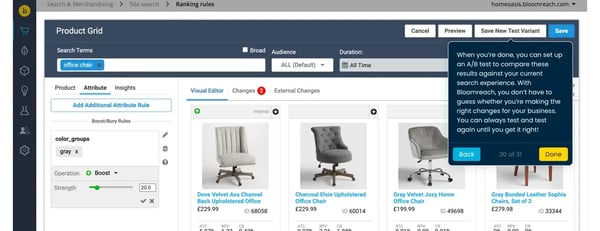
Bloomreach also earns praise for its cross-channel consistency. Users describe being able to maintain a unified marketing tone of voice across email, push, in-app messaging, and web layers, which is important for brands that want their customer experience to feel cohesive regardless of the touchpoint. The platform’s integration capabilities are extensive, with connections to tools like Salesforce Commerce Cloud, Shopify Plus, Google Ads, and Facebook Ads, making it a natural fit within larger martech stacks.
Based on G2 reviews, teams that are new to the platform should expect a meaningful ramp-up period. Bloomreach is a sophisticated enterprise platform with extensive capabilities, and several reviewers compare the initial experience to sitting in a cockpit; there’s a lot to take in. Users consistently recommend investing time in the Bloomreach Academy courses and leaning on the support team during onboarding to get up to speed faster.
I also noticed that a few reviewers pointed out that some aspects of the platform, particularly reporting dashboards and email design tools, could offer more customization and flexibility. While the platform is powerful for campaign execution, some users mentioned wanting deeper analytics options for tracking customer interactions over time, and the email builder is described as functional but somewhat rigid compared to dedicated email design tools.
Bloomreach rewards teams that invest in learning the platform deeply, and for e-commerce and digital marketing teams that want to go beyond surface-level A/B testing, the payoff is significant. If your priority is AI-driven personalization, product discovery optimization, and cross-channel experimentation for e-commerce, this is one of the most complete platforms you’ll find.
What I like about Bloomreach:
- Experimentation isn’t bolted on; it’s woven into how the platform handles content delivery, search, merchandising, and messaging.
- The AI-powered personalization engine (Loomi AI) and the data model’s flexibility are genuinely differentiated.
What G2 users like about Bloomreach:
“I like how Bloomreach offers detailed segmentation and personalized content for each customer. It’s great to have all forms of direct marketing in one place. I can easily segment by purchased products, order values, number of orders, genders, and cities. I also appreciate that Bloomreach is the best I’ve worked with, and it completes my customer data platform (CDP).”
– Bloomreach review, Jakub R.
What I dislike about Bloomreach:
- The ramp-up period is real. Bloomreach is a sophisticated platform with extensive capabilities, and multiple reviewers compare the initial experience to sitting in a cockpit. Investing time in the Bloomreach Academy and leaning on the support team during onboarding helps, but teams should plan for it.
- The reporting dashboards and email design tools could use more customization options. A few reviewers mentioned wanting deeper analytics for tracking customer interactions over time, and the email builder, while functional, feels rigid compared to dedicated email design tools.
What G2 users dislike about Bloomreach:
“There are a few bugs that pop up at times, and it is hard for support to replicate them. This usually ends with the case being closed and no solution to the problem. For instance, we had an issue where all our campaigns/assets were being moved to a single initiative. This was looked into for a while, and nothing was concluded. I often see small bugs that would be hard to replicate in a ticket, as an example, so I tend to leave them. That said, the platform is very complex, and things such as these can be expected.”
– Bloomreach review, Henry J.
6. Netcore Customer Engagement Platform: Best for multichannel journey testing at scale
Netcore Customer Engagement Platform is an omnichannel marketing and engagement platform that unifies email, SMS, WhatsApp, push notifications, and in-app messaging. Based on my evaluation and analysis of recent G2 reviews, it’s a strong contender for teams that want to run experiments across the full customer journey, not just on a single webpage.
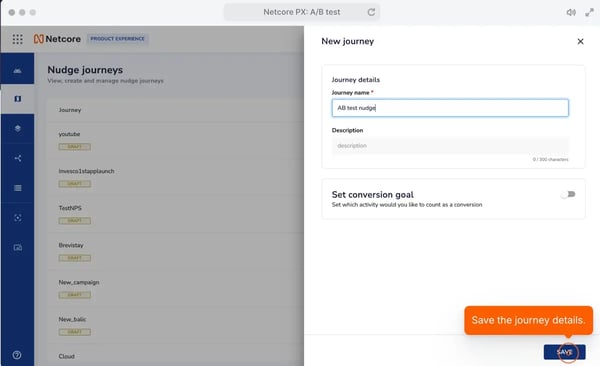
What stands out most about Netcore is how A/B testing is woven directly into its journey builder and campaign orchestration tools. Based on the reviews I analyzed and the interactive demo I explored, setting up test variants within a customer journey feels intuitive. You can experiment with different messaging, timing, and channel combinations without building separate campaigns for each variation. On G2, Netcore’s multivariate testing capabilities are rated at 87%, and its little-to-no-coding score sits at 87%, the highest among all the tools on this list.
The platform excels at multichannel reach. Reviewers consistently describe Netcore as a one-stop solution for reaching customers across email, SMS, WhatsApp, push notifications, RCS, and in-app messages. This breadth of channel support makes it particularly valuable for teams that need to orchestrate consistent messaging across touchpoints and want to test which channels and combinations drive the best engagement.
Netcore’s AI-driven personalization and segmentation capabilities are another area of strength. Based on the reviews I analyzed, users praise the platform’s ability to analyze customer behavior and deliver tailored messages based on preferences, lifecycle stage, and interaction history. The segmentation tools are described as powerful, enabling teams to create precise audience segments using a wide range of metrics, including email opens, clicks, push notification interactions, and custom attributes.
The platform’s customer support is another consistently praised element. Multiple reviewers describe working with dedicated account managers who provide hands-on guidance, from onboarding through campaign optimization. Users mention that the support team brings valuable experience and proactive ideas to the relationship, not just reactive troubleshooting. On G2, Netcore’s quality of support is rated at 92%, and its ease of doing business is at 95%.
Based on G2 reviews, Netcore’s AMP email capabilities stand out as a unique differentiator. Reviewers describe the platform’s AMP email implementation as unmatched, enabling interactive email experiences that significantly boost engagement. Additionally, the platform’s journey orchestration tools earn strong praise for their ability to track and automate the full customer lifecycle, helping teams identify the right moments to engage and encouraging behaviors that drive conversions and retention.
Netcore also provides strong automation capabilities that save teams significant time. Users describe being able to set up complex, automated marketing workflows that run autonomously, from welcome sequences to re-engagement campaigns, while the AI layer continuously optimizes targeting and content. For teams managing large customer bases across multiple channels, this automation translates directly into efficiency and scalable growth. According to G2 Data, Netcore scores a 97% “product going in the right direction” rating, the highest among all tools on this list.
Based on G2 reviews, teams newer to the platform should plan for a familiarization period. Netcore is a comprehensive platform, and several reviewers noted that the interface can feel complex when you’re first navigating deeper analytics or building more intricate journeys. A few users also mentioned that the reporting and BI integration capabilities, particularly API-based data export to external platforms, could be more mature.
I also noticed that a couple of reviewers pointed out occasional platform performance issues when working with large datasets or bulk data uploads. While these aren’t described as frequent, teams managing high-volume customer data should be prepared for occasional processing times. Additionally, some features, particularly on the product analytics (PX) side, currently live on a separate portal, which can feel disconnected from the core engagement platform.
For CRM, lifecycle marketing, and growth teams looking to run multichannel experiments at scale, Netcore is a platform that punches well above the level most standalone A/B testing tools deliver. If you need to test and optimize customer journeys across email, push, SMS, and WhatsApp from a single platform, Netcore belongs on your shortlist.
What I like about Netcore Customer Engagement Platform:
- A/B testing lives directly inside the journey builder, which means you can experiment with different messaging, timing, and channels within actual customer workflows.
- The omnichannel reach is impressive, including email, SMS, WhatsApp, push, RCS, and in-app, and the AI-driven personalization helps teams deliver relevant messages at scale without managing separate tools for each channel.
What G2 users like about Netcore Customer Engagement Platform:
“We can now make use of WhatsApp in our marketing strategy. Suraj was lovely to work with from the onboarding process to campaign management.”
– Netcore Customer Engagement Platform review, Meggan L.
What I dislike about Netcore Customer Engagement Platform:
- The interface can feel complex when you’re first navigating deeper analytics or building more intricate journeys. A few reviewers also noted that onboarding documentation could be more comprehensive, and that tutorial videos and self-serve guides would go a long way for newer users.
- Occasional performance lags came up in reviews, particularly when working with large datasets or bulk uploads. The reporting API could also be more mature for teams that want seamless integration with external BI platforms.
What G2 users dislike about Netcore Customer Engagement Platform:
“The reporting with Netcore is generally good; however, connecting to our existing BI platforms could be improved by providing APIs for data reporting. An API to automate the process of importing the data into our BI platform would help us review our business in one place.”
– Netcore Customer Engagement Platform review, James H.
7. Webflow: Best known for design-first website optimization without code
Webflow is a visual website building platform that combines design freedom, CMS capabilities, and, with its newer Optimize and Analyze features, A/B testing and conversion rate optimization tools in one place. Based on my evaluation of G2 reviews and the platform’s capabilities, Webflow approaches A/B testing from a different angle than most tools on this list: it’s built for teams that want to design, build, and optimize their websites without traditional developer bottlenecks.
What sets Webflow apart is the degree of design control it offers within a no-code environment. Reviewers consistently describe it as the most flexible visual builder available, producing clean, production-ready code while giving designers full control over layouts, animations, responsive behavior, and styling. On G2, Webflow has the highest ease of setup score on this list at 91% and the highest likelihood to recommend at 95%. For marketing and design teams, this translates to faster time-to-experiment because the same platform they build in is the one they optimize in.
The platform’s WYSIWYG capabilities are described as best-in-class by multiple reviewers. Unlike template-locked website builders, Webflow lets teams create fully custom designs from scratch or start with templates and deeply customize them. Users specifically praise the animation tools, responsive design controls, and the ability to insert custom code when needed.
Webflow’s CMS is another area of strength that’s relevant to A/B testing. The content management system supports dynamic pages, collections, and conditional visibility rules, enabling teams to serve different content variants to different audiences based on attributes or conditions. Reviewers describe the CMS as flexible and powerful for content-driven projects, including multi-language and multi-locale setups. For teams running content experiments across large sites, this is a significant advantage.
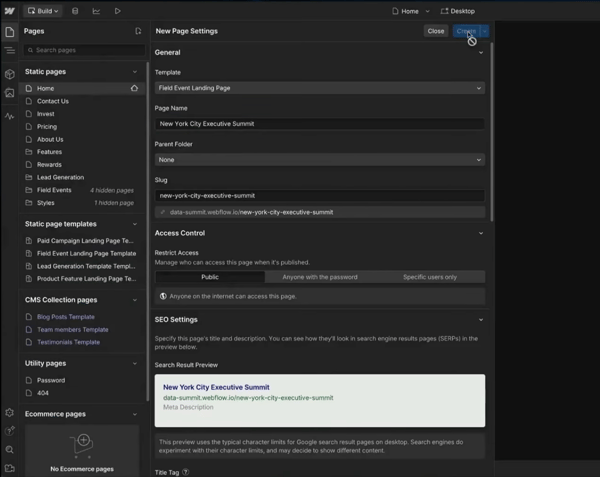
Based on the reviews I analyzed, Webflow’s recent introduction of built-in Optimize and Analyze tools has made it a more complete experimentation platform. Reviewers who’ve used these features describe them as a welcome addition that means they no longer need to bolt on separate third-party testing tools. The ability to run split tests, track visitor behavior, and measure conversions all within the same platform where the site is built streamlines the entire optimization workflow.
The platform’s integration ecosystem and community are also consistently praised. Webflow connects with a wide range of third-party services for analytics, CRM, marketing automation, and e-commerce, which makes it adaptable to different tech stacks. Beyond integrations, Webflow has one of the largest and most active communities in the no-code space, with templates, cloneables, forums, and tutorials that help teams solve problems and learn faster. Several reviewers specifically mention the quality of Webflow’s educational content as a standout.
Webflow is also investing in AI-powered features that help speed up design and optimization workflows. Recent reviewers mention new AI tools being rolled out that assist with content creation and design decisions, complementing the platform’s existing strengths. Combined with the platform’s clean code output and strong SEO foundations, this positions Webflow well for teams looking to translate their optimization efforts into real search and performance gains.
Based on G2 reviews, teams should plan for a meaningful learning period when adopting Webflow. While the platform is described as powerful and intuitive once mastered, the learning curve is the most frequently mentioned consideration across reviews. Webflow operates more like a design tool than a traditional drag-and-drop website builder, which means understanding CSS concepts like flexbox, grid, and responsive breakpoints is helpful. For teams without a design or front-end background, this initial investment may take longer.
I also noticed that a few reviewers mentioned pricing as a consideration, particularly around hosting costs, CMS tier limitations, and locale/multilingual features that add to the overall expense. While reviewers generally find the value justified given the level of control they get, teams should evaluate the full cost of their specific Webflow setup rather than just the base plan price.
Webflow is the pick for marketing and design teams that want to own the full website lifecycle, from design through optimization, without traditional developer dependencies. If you want a platform where you can build, test, and optimize all in one place, and you’re willing to invest in mastering a powerful design tool, Webflow delivers on that promise.
What I like about Webflow:
- The visual builder produces clean, production-ready code while giving teams full flexibility over layouts, animations, and responsive behavior, so the site you build is the same site you optimize.
- The built-in Optimize and Analyze tools mean teams no longer need to bolt on separate third-party testing platforms. Combined with Webflow’s active community and high-quality educational content, the path from learning to launching experiments feels well-supported.
What G2 users like about Webflow:
“What I like most about Webflow is that I can design my website by just clicking and moving things around, like playing with building blocks, no coding needed. And behind the scenes, it still creates clean code, so the website runs fast and looks neat and professional.”
– Webflow review, Abhishan M.
What I dislike about Webflow:
- G2 reviewers rave about the design control once proficient, but the learning curve is the most common consideration; teams without a CSS background should budget extra ramp-up time, though Webflow’s tutorials and community accelerate it.
- Users say the value justifies the investment, but a few G2 reviews noted costs add up with hosting, CMS tiers, and multilingual features; mapping out full pricing for your setup avoids surprises.
What G2 users dislike about Webflow:
“Certain workflows still require workarounds depending on what you are trying to build.”
– Webflow review, Elsworth L.
Frequently asked questions (FAQ) on A/B testing tools
Got more questions? Get your answers below!
Q1. What is A/B testing and why does it matter?
A/B testing is the process of comparing two or more variations of a message, layout, or experience to see which one performs better. It’s how you replace guesswork with real data, whether you’re optimizing a subject line, a product page, or a user journey. For marketers, product teams, and growth leads, it’s one of the most effective ways to learn what actually works.
Q2. Which A/B testing tool is the best?
There’s no single “best” tool. It really depends on your team, goals, and how technical you want to get. For example, VWO Testing and AB Tasty are great for marketers who want visual testing options without heavy dev involvement. LaunchDarkly and Statsig are better fits for product and engineering teams running feature-level experiments. Platforms like Bloomreach and Netcore shine when A/B testing is part of broader e-commerce personalization or multichannel engagement strategies. And Webflow is ideal if you want to design, build, and optimize your website all in one place.
Q3. Can I run A/B tests without a developer?
Yes, many tools offer no-code or low-code setups, especially those built for marketing or growth teams. Platforms like AB Tasty, VWO Testing, and Webflow make it possible to create and launch tests directly from their dashboards or visual editors. That said, some tools, especially those focused on backend or feature-level testing like LaunchDarkly and Statsig, may require developer involvement for setup and integration.
Q4. Are free A/B testing tools worth trying?
Yes, if you’re just getting started or working with a small team, free A/B testing tools can be a great way to dip your toes in. They often come with limitations, like caps on traffic volume or fewer targeting options, but they’re still useful for testing headlines, CTAs, or basic campaign flows. Just keep in mind that as your experimentation strategy matures, you’ll probably outgrow them pretty quickly.
Q5. How do I choose the right A/B testing tool?
Start with your use case. If you’re testing marketing messages or landing pages, tools like VWO Testing, AB Tasty, or Webflow might be ideal. For e-commerce personalization and product discovery experiments, Bloomreach is purpose-built. If you’re on the product or engineering side, LaunchDarkly and Statsig offer deeper control through feature flags and server-side experiments. For multichannel journey testing across email, SMS, and push, Netcore is a strong pick. Prioritize tools that fit how your team works, not just what looks shiny on the surface.
The right tool is the one that fits your goals without adding unnecessary complexity.
Q6. What’s the best A/B testing tool for SaaS businesses?
For SaaS companies, flexibility and scalability are key. Statsig and LaunchDarkly stand out here. Statsig connects experimentation tightly to product analytics, making it ideal for measuring how features impact retention, engagement, and conversion. LaunchDarkly helps SaaS product teams run feature-level experiments with safe rollouts, making it well-suited for testing subscription features, pricing tiers, or backend functionality. VWO Testing is also a solid option if you’re focused on optimizing landing pages, onboarding flows, and conversion funnels without heavy dev work.
Q7. What’s an easy-to-use A/B testing solution for digital agencies?
Agencies often need speed and ease of use to run multiple client experiments. AB Tasty is a strong fit here; it’s designed for marketers, with a visual editor and quick setup for web experiments. VWO Testing is another great option if an agency also wants built-in heatmaps and session replays to show clients not just results, but why those results happened. Webflow is also worth considering for agencies that build and optimize client websites on one platform.
Q8. What A/B testing tools are favored by marketing teams?
Marketing teams typically look for tools that minimize dev dependency. VWO Testing, AB Tasty, and Netcore Customer Engagement Platform are frequently favored. VWO and AB Tasty allow marketers to tweak web content directly through visual editors, while Netcore lets lifecycle marketers A/B test campaigns across email, push, SMS, and WhatsApp, all without relying on engineering. Bloomreach is also a strong choice for e-commerce marketing teams that want AI-driven personalization alongside testing.
Q9. What are highly rated A/B testing tools for product managers?
Product managers often need deeper control over experiments tied to user behavior or new feature rollouts. Statsig is highly rated for connecting experimentation with product analytics; it ties feature performance to business outcomes like retention and conversion. LaunchDarkly is the go-to for feature flagging and controlled rollouts in production. For web or funnel-focused PMs, VWO Testing is also a solid choice thanks to its robust reporting and behavioral insights.
Split tests made simple
If there’s one thing I’ve learned while evaluating into A/B testing tools, it’s that experimentation isn’t just a feature, it’s a mindset. Whether you’re optimizing landing pages, rolling out new features, or fine-tuning omnichannel campaigns, having the right testing platform in place gives you the power to validate what works before making it permanent. And that peace of mind? It’s invaluable.
Another big takeaway? Your choice of tool should reflect the team running the test. A great feature set doesn’t matter if it’s too complex for the people using it. If your marketers are hands-on, they’ll need clean UIs, drag-and-drop journeys, and fast reporting. If your engineers are doing the testing, they’ll care more about API access, flag control, and integration with CI/CD pipelines. Choosing the right tool means choosing the right workflow.
At the end of the day, A/B testing isn’t about proving who had the better idea. It’s about building better experiences with less risk. And when you pair the right tool with the right team, that’s when experimentation stops feeling like guesswork and starts driving real growth.
Need more help? Explore the best conversion rate optimization tools on G2 to find the right platform for your goals.

💸 Earn Instantly With This Task
No fees, no waiting — your earnings could be 1 click away.
Start Earning
