


If you are comparing for the best standard operating procedures software, process breakdowns have already started surfacing in daily operations.
Documentation sprawl, outdated instructions, and inconsistent training quietly slow execution and dilute accountability across teams. Operations leaders, compliance owners, and IT administrators usually reach this decision after manual coordination begins to strain quality and audit readiness.
Organizations that standardize processes can improve productivity by up to 6.5%, reinforcing why SOP tooling now sits closer to execution infrastructure than static documentation. At this stage, the wrong platform does more than frustrate users. It creates hidden operational drag that compounds into missed steps, slower onboarding, and reduced process confidence.
In this guide, I focus on the distinct problems teams are trying to solve before making a final decision. Across reviews, ClickUp tends to appear where teams want SOPs embedded directly into operational workflows. MaintainX surfaces frequently among maintenance-heavy environments prioritizing execution discipline. Scribe is commonly picked for rapid process capture and visual walkthroughs. IT Glue shows up in IT contexts that demand structured, searchable knowledge repositories.
The goal is straightforward: move beyond exploration and help you choose with confidence.
8 best standard operating procedures software for 2026: My chosen picks
- ClickUp: Best for flexible SOP management and cross-team workflow coordination
Combines documentation, checklists, and automation so teams can turn procedures into actionable tasks and repeatable workflows. (Free plan available; paid plans start at ~$10 Per user/month) - MaintainX: Best for mobile-first SOP execution in maintenance and operations
Mobile-first SOPs, work instructions, and checklists designed for technicians managing assets operational tasks on the floor. (Free Basic plan available; paid plans start at ~$20/user/month) - Scribe: Best for instant SOP capture and process documentation
Automatically records workflows and converts them into visual step-by-step guides, making process documentation easier to scale. (Free plan available; paid plans start at ~$17/USD seat month) - IT Glue: Best for centralized IT documentation and knowledge continuity
Centralized documentation, process mapping, and relationship-based knowledge storage suited for MSPs and IT teams. (Paid plans start at $29/user* 5 users minimum) - Trainual: Best for structured onboarding and role-based SOP training
Role-specific procedures, training pathways, and knowledge hubs designed for growing teams, formalizing operations and employee onboarding. (Pricing available on request; varies by plan) - Limble: Best for practical maintenance SOP tracking and preventive workflows
Combines CMMS functionality with process checklists and digital SOPs to support maintenance execution and compliance routines. (Pricing available on request; varies by plan) - Hudu: Best for flexible, customizable documentation management
Structured documentation, password management, and process libraries that help IT teams centralize SOPs. (Free trial available; Paid plans start at ~$30/user/month) - Whale: Best for simple SOP capture and knowledge centralization
Interactive SOPs, contextual prompts, and in-app guidance are designed to promote adherence and continuous training. (Free plan available; Paid plans start at ~$149/month)
*These standard operating procedures software products are top-rated in their category, based on G2’s Winter 2026 Grid Report.
10 best standard operating procedures software I recommend
Standard operating procedures software replaces informal know-how with structured guidance that teams can rely on when work needs to be done the same way every time. Instead of digging through shared drives or asking colleagues for the latest version, employees can access clear instructions that reflect how processes actually run today. The value shows up in fewer missed steps, faster onboarding, and less dependency on individual memory.
Stronger SOP platforms rarely behave like static document libraries. Review patterns work best when procedures live within the flow of work, not alongside it. Features such as contextual prompts, visual walkthroughs, and version tracking help teams follow instructions without breaking momentum. That shift matters because outdated or hard-to-find SOPs often lead to inconsistent output, duplicated effort, and uncertainty around accountability. When tools surface guidance at the right moment, execution tends to stay aligned even across distributed teams.
Usage is also broader than compliance-heavy industries. G2 Data reflects adoption across startups, formalizing processes, mid-market teams scaling operations, and enterprises standardizing complex workflows. Many teams choose SOP software precisely because it balances structure with usability, allowing procedures to evolve without becoming rigid.
In practice, effective platforms give organizations confidence that work can be repeated accurately, knowledge remains accessible, and operational stability does not rely solely on individual expertise.
How did I find and evaluate the best standard operating procedures software?
I started with G2’s Grid Report to shortlist leading SOP platforms using verified satisfaction scores and market presence across small teams, growing companies, and enterprise environments. This created a baseline view of which tools consistently surface in real evaluations rather than isolated recommendations.
I then analyzed recurring feedback patterns across large volumes of G2 reviews to understand what matters in day-to-day operations. Because I have not used every platform directly, I validated these insights against perspectives from operations, compliance, IT, and frontline teams who rely on SOP software in active workflows.
Product visuals and feature references included in this article come from G2 vendor listings and publicly available documentation.
This approach helped ground the evaluation in real usage patterns while maintaining a consistent framework for comparing how each platform supports process clarity and operational alignment. Screenshots included are vendor-provided G2 images or publicly available UI visuals and do not imply direct hands-on testing.
What makes the best standard operating procedures software worth it: My criteria
While reviewing large volumes of G2 feedback and examining how teams document and execute processes in real environments, consistent themes started to emerge. Conversations with operations leaders, compliance specialists, and training teams also highlighted what separates usable SOP platforms from documentation that rarely gets followed.
These patterns shaped the criteria I focused on when identifying the most dependable standard operating procedures software.
- Ease of SOP creation and updates: If creating or editing procedures feels heavy, documentation quickly becomes outdated. Strong platforms reduce friction through intuitive editors, visual capture, and reusable templates so teams can maintain accuracy without dedicating excessive time to process upkeep.
- Version control and governance: Process changes are inevitable, but unmanaged updates introduce confusion and compliance risk. Effective tools provide clear version history, approval workflows, and visibility into what changed, ensuring teams follow current procedures rather than relying on outdated guidance.
- Workflow integration and contextual guidance: SOPs that live outside daily workflows tend to be ignored. The best platforms surface instructions within task execution, offering prompts or embedded guidance that reinforce adherence without forcing employees to leave their working environment.
- Searchability and knowledge accessibility: Even well-documented processes lose value if they are difficult to find. Review patterns consistently highlight structured libraries, tagging, and intelligent search as critical for helping employees retrieve relevant SOPs quickly, especially in distributed or fast-moving teams.
- Adoption and employee engagement: Documentation only works when people use it. Platforms that incorporate interactive elements, role-based guidance, and learning pathways tend to see higher adoption because they position SOPs as practical tools rather than static reference material.
- Audit readiness and compliance visibility: In regulated environments, SOP software often doubles as an accountability layer. Tools that track acknowledgments, completion, and procedural adherence give teams confidence during audits and reduce the effort required to demonstrate process compliance.
- Scalability across teams and processes: As organizations grow, SOP complexity increases. The most dependable platforms support hierarchical process structures, role-based permissions, and cross-functional documentation so teams can expand without fragmenting their knowledge base.
- Automation and process reinforcement: Automation capabilities help prevent procedural drift by triggering reminders, updates, or follow-up actions when processes change. This reinforcement ensures SOPs remain active components of operations rather than passive documentation that gradually loses relevance.
Using these criteria, I refined the shortlist to standard operating procedures software that consistently improves process clarity, supports knowledge sharing across teams, and scales as documentation grows. Not every platform is built around the same priorities, so the right fit depends on how your organization manages processes today, whether the focus is rapid documentation, structured governance, employee training, or workflow-driven execution.
Below, you’ll find authentic user feedback from the Standard Operating Procedures Software category. To be included in this category, a platform must:
- Platforms must support structured SOP creation and ongoing maintenance
- Tools should enable process accessibility across teams or roles
- Solutions must provide governance features such as version control or approvals
- Software should reinforce execution through guidance, tracking, or workflow integration
This data was pulled from aggregated user reviews in 2026. Some reviews may have been edited slightly for clarity.
1. ClickUp: Best for flexible SOP management and cross-team workflow coordination
ClickUp is a work management platform that extends to SOP documentation, task standardization, and process coordination within a unified workspace. The platform brings together procedures, tasks, and collaboration across multiple tools through lists, docs, dashboards, and automations. This positioning makes ClickUp relevant for organizations building structured SOP environments alongside daily execution.
Workflow adaptability is consistently highlighted in review data, where teams configure spaces, lists, and custom fields to reflect internal processes. This flexibility allows SOP structures to evolve alongside operational changes without requiring rigid templates. Review feedback indicates that teams across functions, from recruiting to compliance, use this configurability to align procedures with real working patterns.
Collaboration features play a significant role in SOP coordination, with commenting capabilities rated at 95% in G2 or higher against category benchmarks. Reviews describe how task-level discussions and contextual feedback help clarify procedural steps without shifting to external communication tools. This approach keeps updates close to execution and preserves process context.
Visibility across tasks and subtasks is frequently associated with stronger process oversight. G2 Reviews highlights dashboards and hierarchical views that help teams monitor progress across standardized workflows. This centralized perspective enables tracking dependencies and identifying execution gaps without navigating multiple systems.
Daily accessibility is supported by the desktop application, which holds a 93% rating relative to category norms. Feedback suggests the desktop environment contributes to stable workflow engagement, particularly for teams managing continuous operational cycles. Access to tasks, documentation, and dashboards within a dedicated interface supports uninterrupted process management.
Automation and dashboards are often referenced as mechanisms for improving process transparency and coordination. It shows teams creating dashboards to monitor individual workloads and procedural adherence across departments. Automation reduces manual follow-ups tied to recurring tasks, allowing SOP execution to follow predefined triggers.
Tool consolidation emerges as a recurring theme in reviews, with organizations centralizing tasks, documentation, reminders, and workflows within one platform. Feedback suggests teams value having procedural knowledge and execution data in the same environment, enabling smoother handoffs and more consistent process governance.
That said, there are a few areas where ClickUp could improve. According to G2 reviewers, its broad configuration options mean teams without a defined workspace structure can end up with disorganized spaces, lists, and hierarchies that are difficult to untangle later. Once the structure is planned and in place, however, the platform’s flexibility supports SOP environments that adapt well to changing operational needs.
The range of views, features, and settings available means new contributors take longer to find their footing compared to more focused SOP tools. Teams managing diverse stakeholders or rotating staff will notice this most during onboarding phases. Although, day-to-day navigation becomes more intuitive once contributors settle into the workflows most relevant to their role, as G2 reviewers note.
Overall, ClickUp remains highly relevant for teams building structured SOP environments without separating documentation from execution. Its flexibility, centralized visibility, and depth of collaboration position it well for fast-moving industries such as SaaS, agencies, and operations-driven teams that rely on repeatable workflows.
What I like about ClickUp:
- It centralizes tasks, docs, reminders, and workflows in one workspace, giving teams a clear overview of projects and procedural steps without switching tools.
- Flexible customization through spaces, lists, and custom fields allows teams to structure workflows in ways that match their processes and collaboration style.
What G2 users like about ClickUp:
“What I find most helpful about ClickUp is its ability to centralize project information while supporting strong collaboration and reporting. The platform offers excellent dashboards, flexible customization through custom fields and templates, and solid documentation and knowledge‑management features, which make daily project oversight more efficient. It also integrates well with Azure DevOps and includes generous AI and automation credits that simplify several project‑management tasks.
It stands out for collaboration, dashboards, reporting, and capacity planning, and it provides optimized capabilities for documentation and knowledge management.
Additionally, the quality and responsiveness of customer support contribute positively to the overall experience, helping to resolve issues quickly and ensuring the platform remains reliable in a fast‑paced environment.”
– ClickUp review, Renato R.
What I dislike about ClickUp:
- Without a planned workspace structure from the start, spaces and hierarchies can become disorganized quickly, though the flexibility rewards teams that invest in upfront planning.
- The range of views and settings means new contributors take longer to get comfortable compared to simpler SOP tools, though navigation becomes more intuitive once workflows are established.
What G2 users dislike about ClickUp:
“One of the downsides is that you really need to have your structure and workflow down before setting things up in ClickUp. If you don’t, things can get really muddy. There are many ways to organize your workspace, so you need to really think that through first. We struggled at the beginning because we didn’t fully understand how to use ClickUp; for that reason, we set up our spaces and lists in a way that didn’t really make sense. I also struggle with the Documents – sometimes I like to write my SOPs in ClickUp, but then need to transfer them to Word, for the company format does NOT translate nicely!
– ClickUp review, Kristin A.
If your priority is audit readiness, traceability, and compliance reporting, explore the best audit management software to complement your SOP workflows.
2. MaintainX: Best for mobile-first SOP execution in maintenance and operations
Across G2 reviews, MaintainX is positioned as a procedure-driven platform supporting SOP execution, asset tracking, and maintenance workflows within a unified environment. The platform combines work order management, checklist automation, and equipment tracking to help teams standardize operational processes in maintenance-heavy environments. With an overall G2 Score of 90, the data signals a balanced combination of usability and adoption, reflecting buyer confidence in its operational workflow capabilities.
Ease of adoption is frequently reflected in review insights, where teams describe straightforward onboarding and minimal friction during implementation. This accessibility allows SOP workflows to be introduced without extensive configuration cycles. Frontline staff engage with procedures directly inside the platform, improving adherence to standardized steps. The usability signal aligns with MaintainX’s high G2 Satisfaction Score of 92 in G2, indicating reliable day-to-day workflow execution.
Mobile functionality is a defining strength, supported by a 95% rating that exceeds category averages. G2 reviews indicate technicians and field teams rely on the mobile app to complete tasks, update checklists, and access asset history at the point of work. This mobility supports real-time SOP execution and reduces delays associated with manual reporting.
The desktop application, rated at 97%, complements mobile usage by supporting planning, scheduling, and oversight activities. Review commentary suggests that supervisors and managers use the desktop interface to coordinate maintenance programs tied to documented procedures. The high rating reflects consistent performance across both operational and administrative workflows.
Asset visibility is often associated with QR code tagging and linked maintenance histories, enabling procedures to connect directly with physical equipment. The reviews highlight that scanning assets provides immediate access to work orders, SOPs, and historical records. This linkage supports faster troubleshooting and strengthens procedural continuity during service activities.
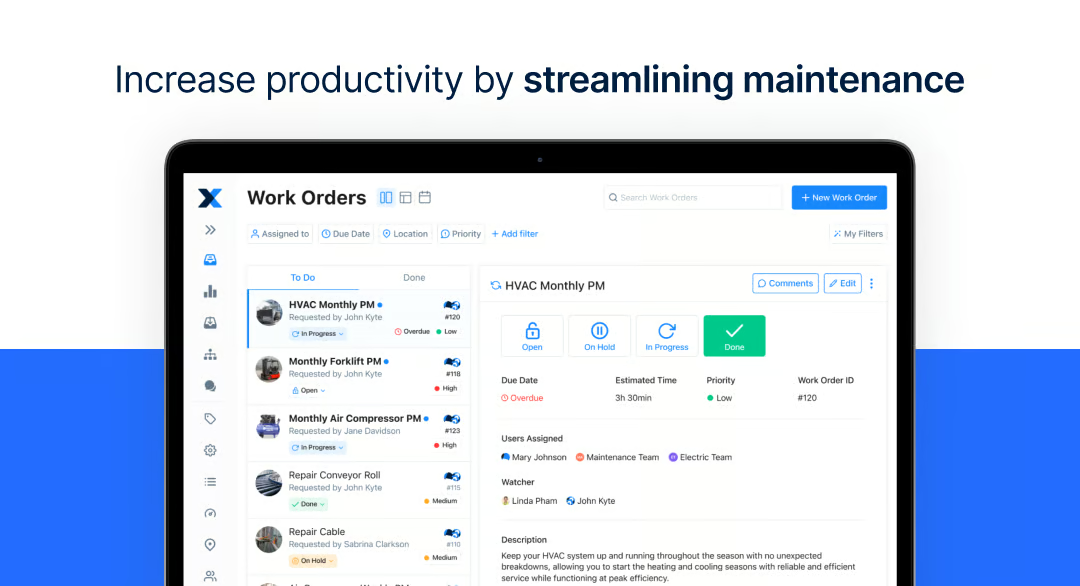
Collaboration features, including comments rated at 95% (according to G2 Data), support coordination within maintenance workflows. Feedback suggests teams use contextual discussions to clarify procedural steps, assign responsibilities, and document updates without leaving the task environment. This structure helps preserve communication history alongside execution data. The integrated collaboration layer reinforces visibility across multi-step operational processes.
Automation and scheduling capabilities are frequently connected to improved maintenance planning and reduced administrative overhead. Automated job sheet generation and recurring task scheduling help ensure SOP-driven routines are consistently followed. These capabilities support predictable service cycles and reduce reliance on manual reminders.
According to G2 reviewers, connecting MaintainX with complex operational ecosystems can involve additional setup time, particularly where multiple system dependencies require careful configuration. The range of available integrations, however, provides genuine flexibility once connections are established, supporting continuity across maintenance and operational workflows.
Parts libraries and custom forms do not enforce uniform structures by default, meaning multi-site teams can develop naming and data inconsistencies without clear internal governance. Once standardization practices are established, however, the flexible structure supports tailored asset tracking that reflects real operational needs.
Taken together, MaintainX shows strong mid-market traction, with 51% of users from mid-sized organizations, followed by 42% small businesses and 7% enterprise teams. With a G2 Market Presence of 89, this adoption pattern reflects buyer confidence in scaling operational environments and supports its fit for manufacturing, facilities, and field service teams managing asset-driven SOPs and mobile maintenance workflows.
What I like about MaintainX:
- MaintainX is easy to adopt, with work orders, asset tracking, and QR-based history access helping teams manage maintenance workflows with minimal ramp-up.
- Mobile functionality stands out, allowing technicians to complete tasks, update checklists, and access procedures directly in the field for faster SOP execution.
What G2 users like about MaintainX:
“MaintainX is a modern product that delivers something much closer to a viable experience than anything else on the market for a CMMS at the moment. They are also actively working to improve the platform and push frequent updates without causing much contention. However, like many companies of this size, they do struggle with internal communication. For example, customer service reps are often surprised to see updates in real time to end users on a call, and the enhancement and feedback cycle is often ad hoc.
Implementation is simple, and they provide excellent support/flexibility through the process. Integrations are also readily available, but can be time-consuming/expensive to maintain.”
– MaintainX review, Reid B.
What I dislike about MaintainX:
- Integrations with complex tool ecosystems require meaningful setup effort, though the range of connections supports strong workflow continuity once established.
- Parts libraries and custom forms don’t enforce consistency by default, creating data gaps across locations without internal governance, though the flexibility rewards teams with clear standardization practices.
What G2 users dislike about MaintainX:
“I don’t have much to add, but having more options to customize work orders would make this better. Also, the ability to create sub-locations within a location in the inventory tab would be a big help.”
– MaintainX review, Jim F.
3. Scribe: Best for instant SOP capture and process documentation
One of the defining characteristics of Scribe is its balance between ease of use and the ability to capture detailed workflows without interrupting daily tasks. The platform focuses on automatically recording on-screen actions and converting them into structured, shareable SOP guides that support training, onboarding, and process standardization.
Workflow capture automation is consistently associated with reduced manual effort when documenting procedures. G2 feedback suggests teams rely on Scribe to record real-time processes and generate structured guides without interrupting work. This capability supports maintaining accurate SOPs in environments where workflows change frequently.
Ease of use appears closely tied to Scribe’s high Satisfaction rating, reflecting reliable workflow fit across varied roles. The interface supports quick recording and editing, allowing documentation to be created and refined within minutes. This accessibility encourages broader adoption beyond technical teams, supporting operations, customer support, and administrative workflows.
Link sharing functionality, rated 94% at G2, contributes to streamlined knowledge distribution across teams. Guides can be shared instantly, supporting remote onboarding and asynchronous training scenarios. This sharing model helps centralize procedural knowledge without relying on static documents or lengthy manuals.
Visibility controls, including public versus private settings rated at 92%, provide flexibility around documentation access. Teams can manage sensitive workflows while still enabling broader collaboration where appropriate. The access control layer strengthens Scribe’s adaptability across diverse documentation needs.
According to G2 Data, desktop application capabilities (92%) support consistent workflow capture within a dedicated environment. Documentation can be recorded directly alongside daily work without switching platforms, reinforcing process continuity. The desktop experience supports reliable documentation in multi-application workflows.
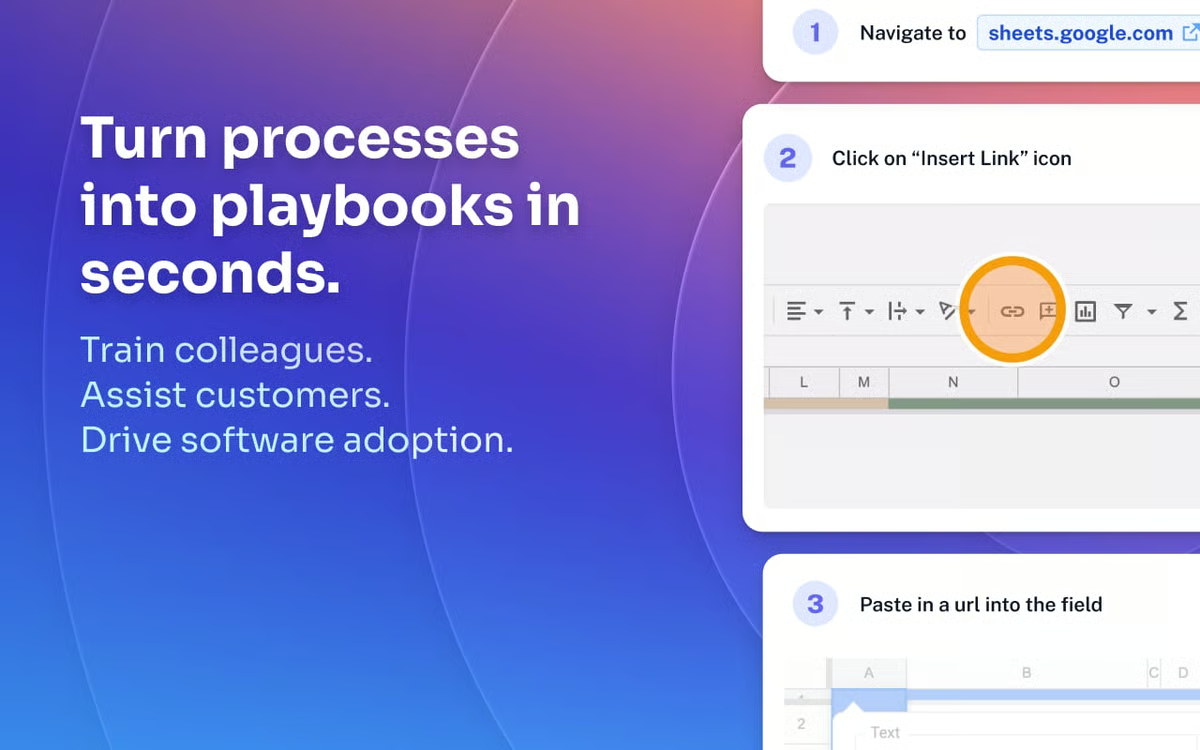
Training and onboarding efficiency frequently emerge as key outcomes associated with Scribe usage. Visual step-by-step guides provide clear references that reduce repetitive explanations and accelerate new hire productivity. This approach supports standardized knowledge transfer and helps maintain process consistency across teams.
There are some things to note, too. Automatically captured guides often require manual cleanup before sharing, as recorded steps can include redundant actions or formatting inconsistencies. Teams expecting fully finished documentation from capture alone will spend more editing time than anticipated, according to G2 reviewers. The editing interface, however, keeps refinement effort manageable.
Scribe does not support full workflow capture on mobile, meaning teams that document processes away from a desktop environment cannot record procedures directly from a mobile device. Core access and reference functionality, however, remains available on mobile, keeping published SOPs accessible to teams in the field.
Overall, Scribe remains well-suited for teams focused on capturing workflows quickly and turning them into clear, shareable documentation. Its automated step recording and highly rated link-sharing support efficient onboarding and consistent knowledge transfer across distributed teams. This combination reinforces its role as a practical option for organizations prioritizing fast SOP creation and visual process visibility without adding documentation overhead.
What I like about Scribe:
- It automatically captures on-screen workflows and converts them into step-by-step guides, making SOP creation faster and reducing manual documentation effort.
- Link sharing and privacy controls make it easy to distribute guides while managing visibility, supporting onboarding, and knowledge transfer across teams.
What G2 users like about Scribe:
“I find Scribe incredibly beneficial for writing SOPs and playbooks, as it helps keep our systems clear and consistent. I really like using Scribe for onboarding and sharing processes with our contractors, ensuring they understand everything. It’s also great for holding my internal executive team accountable to consistency in our systems. I also love how it saves me a ton of time compared to taking a lot of screenshots and making guides manually. The Pro version’s ability to blur parts of the screen is really great when making processes, especially when I need to redact client data quickly. I appreciate how easy it is to use and how fast it is, as it just saves me time overall.”
– Scribe review, Sammi O.
What I dislike about Scribe:
- Captured guides often need manual cleanup before sharing, as recorded steps can include redundant actions or formatting issues, though the editing interface keeps refinement effort straightforward.
- Mobile workflow capture is not supported, limiting documentation for field-based teams, though published SOPs remain accessible and referenceable on mobile devices.
What G2 users dislike about Scribe:
“The only thing I would say is that when creating documents, it would be nice if I could add a Scribe step in there where it can automatically take screenshots, versus me having to link a Scribe within the document. But I don’t have any complaints.
– Scribe review, Cristian M.
4. IT Glue: Best for centralized IT documentation and knowledge continuity
IT Glue serves as a centralized workspace where SOPs, credentials, configurations, and asset records are connected into a structured documentation system. The platform is commonly referenced in managed service and internal IT environments where structured documentation supports troubleshooting and onboarding.
Centralized documentation enables teams to store procedures, passwords, and asset data in a single repository rather than across multiple tools. This consolidation enables faster information access and reduces the time spent searching during troubleshooting. This workflow consistency aligns with its G2 Satisfaction Score of 77, reflecting steady usability for documentation-heavy environments.
Contextual linking between assets, credentials, and SOPs supports deeper knowledge relationships across workflows. G2 Reviews indicate technicians can move between related documentation elements without losing context, improving efficiency during support tasks. The relational model reinforces IT Glue’s positioning as an operational knowledge hub rather than a static document store.
Verification functionality, rated at 90% (according to G2 Data), contributes to documentation reliability by enabling teams to confirm SOP accuracy over time. This capability supports governance-focused environments where maintaining up-to-date procedures is essential. The emphasis on trusted documentation aligns with its overall G2 Score of 85, reflecting a balanced signal between adoption scale and experience quality.
Permission controls, also rated at 90%, support secure documentation access across teams and roles. Organizations can manage visibility of sensitive credentials while still enabling collaboration around operational procedures. The permission framework contributes to controlled yet accessible knowledge sharing.
Upload capabilities, rated at 90%, allow organizations to consolidate documentation from varied formats into a single environment. This flexibility supports migration from legacy systems while preserving historical records alongside new SOPs. User feedback suggests this capability helps maintain continuity during tool transitions.
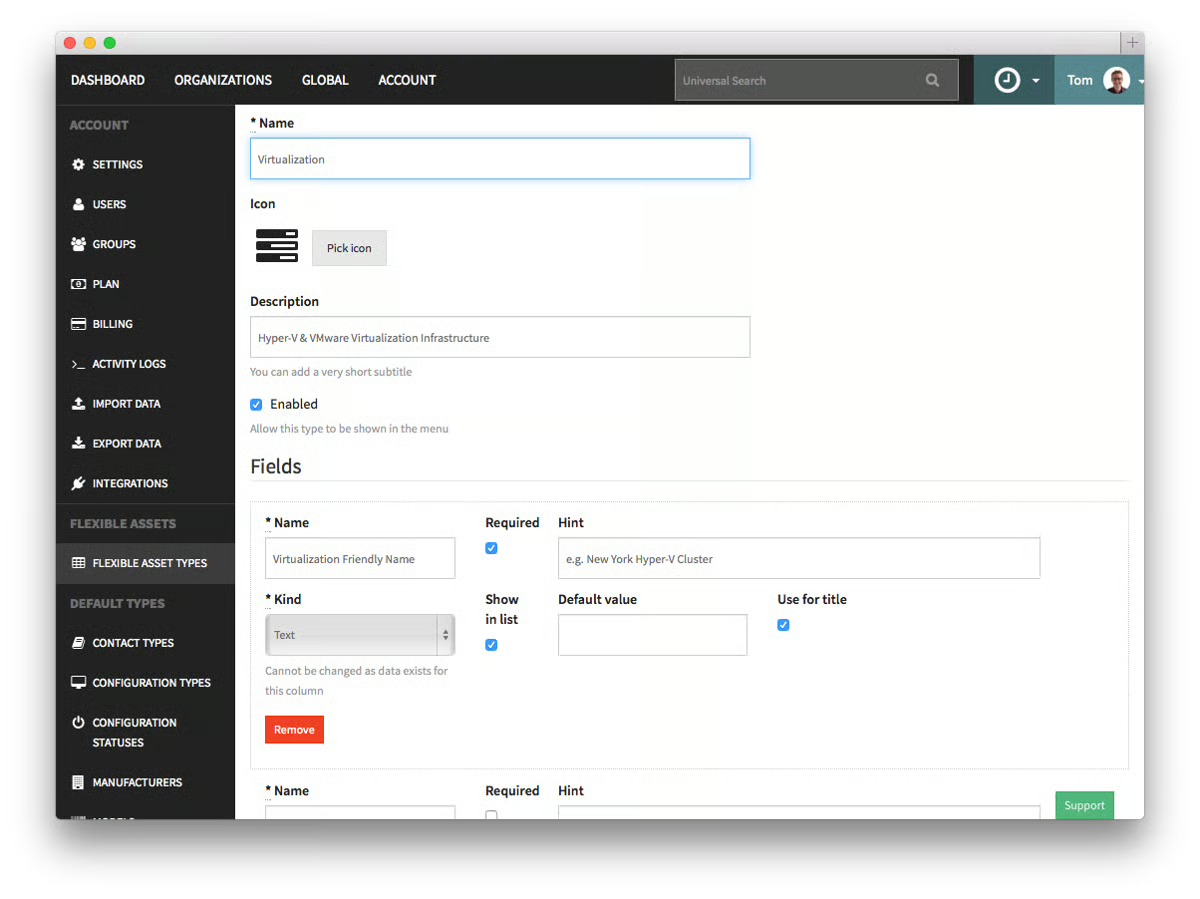
Integration with PSA and RMM tools is frequently associated with improved workflow continuity and reduced manual updates. Asset synchronization and credential management help maintain consistent documentation across service platforms.
While IT Glue excels in keeping documentation centralized , there are a couple of practical considerations to keep in mind. Search accuracy in IT Glue depends heavily on consistent tagging practices, meaning poorly tagged or unstructured documentation becomes difficult to retrieve quickly. Teams without enforced naming conventions will find search results less reliable as the documentation library grows. Environments that maintain disciplined tagging, however, benefit from fast and precise retrieval across credentials, SOPs, and asset records.
According to G2 reviewers, IT Glue does not support full documentation authoring on mobile, limiting teams that need to create or update records from a desktop environment. Field technicians who need to build or edit documentation on-site will find the mobile experience insufficient for that purpose. Core reference and retrieval functionality, however, remains accessible on mobile, keeping critical documentation available during active support tasks.
IT Glue remains a practical choice for IT service environments where documentation, credentials, and asset data need to stay connected and accessible. Its permission controls and verification features, both highly rated, support trusted knowledge sharing while maintaining security across teams. This combination highlights IT Glue’s value as a documentation backbone for managed service providers and internal IT teams that rely on consistent, well-governed operational knowledge.
What I like about IT Glue:
- IT Glue centralizes SOPs, credentials, and asset data in one workspace, helping teams access documentation quickly during troubleshooting and onboarding.
- Contextual linking between assets, passwords, and procedures keeps technical knowledge connected, improving continuity across support workflows.
What G2 users like about IT Glue:
“I appreciate how IT Glue allows us to easily create all the client documentation, which is especially valuable when our techs need help finding steps to resolve tickets. The shortcut to bring up documentation by pressing the letter ‘q’ in any web browser makes the experience smooth. The Datto RMM and AutoTask integrations are really helpful as they allow assets to be created automatically and passwords to be injected without the techs needing to see them. I find the IT Glue smart SOP generator handy for creating documentation efficiently. The support team was helpful during the initial setup, providing assistance in several sessions, which made getting started easier.”
– IT Glue review, Denuka R.
What I dislike about IT Glue:
- Search reliability depends on consistent tagging, meaning unstructured documentation becomes harder to retrieve as libraries grow, though disciplined tagging delivers fast and precise results.
- Mobile supports reference and retrieval but not full documentation authoring, limiting field-based editing, though critical records remain accessible during active support tasks.
What G2 users dislike about IT Glue:
“Sometimes the interface feels a bit slow when loading large client data sets, and the permissions model can be tricky to fine-tune for different roles. The password manager works well, but the browser extension could be smoother. Small things, but overall nothing that stops it from being one of the most useful tools in our MSP stack.”
– IT Glue review, Arman B.
5. Trainual: Best for structured onboarding and role-based SOP training
Trainual functions as a training-focused SOP platform that organizes company knowledge into guided learning paths, helping teams standardize onboarding and internal processes. Market segment distribution shows strong small-business representation at 66%, followed by 33% mid-market and 1% enterprise usage, indicating adoption among growing organizations formalizing knowledge transfer. This mix reflects alignment with teams building repeatable training frameworks while maintaining flexibility during growth.
Structured training paths are frequently associated with consistent onboarding experiences and clearer process adoption. User insights suggest that sequencing content by role helps ensure employees receive information in a logical progression. The guided learning model reinforces standardized SOP execution from the start of employment.
Role-based permission functionality, rated at 93% in G2, supports targeted knowledge distribution across departments and job functions. Organizations can align SOP visibility with responsibilities, helping maintain clarity while protecting sensitive information. This capability contributes to governance without restricting collaboration around shared processes. The permission model supports scalable training environments with diverse role requirements.
Content creation flexibility is often connected to Trainual’s visual interface and multimedia support. Teams can embed videos, documents, and images within SOPs, enabling more engaging and context-rich training materials. This approach helps address varied learning preferences while maintaining structured documentation.
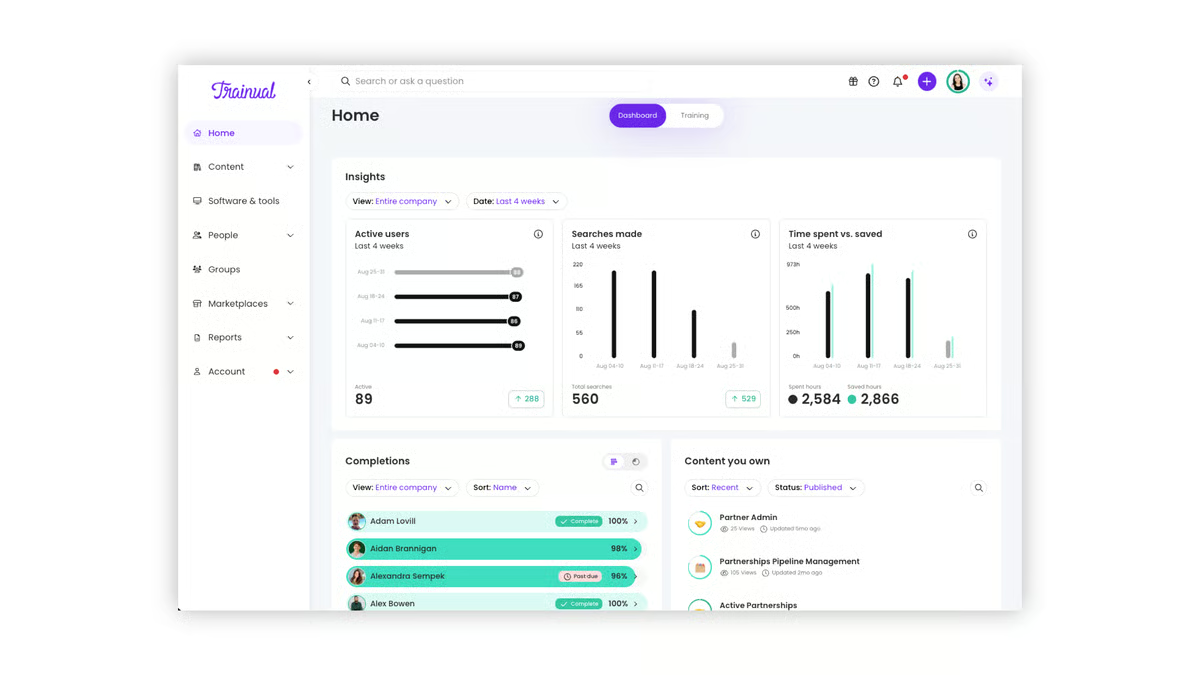
Desktop functionality, rated at 92% (according to G2 Data), supports centralized content management and reliable access to training resources. Teams can assign learning paths, track progress, and update SOPs within a consistent workspace. This accessibility encourages regular interaction with training content and supports ongoing process reinforcement.
Link sharing capabilities, also rated at 92%, enable efficient distribution of SOPs and learning resources across teams and locations. Content updates can be communicated quickly, helping employees reference the latest procedures without delays. The feature contributes to continuity in knowledge dissemination.
AI-assisted content development is often associated with faster SOP creation and reduced manual effort. Features such as automated summaries and knowledge checks support scalable documentation as organizations expand. User observations indicate these tools help maintain updated training libraries without extensive authoring overhead. The automation layer contributes to sustained knowledge growth and adaptability.
There are a few areas of improvement, as per G2 reviews. Processes that span multiple departments do not fit neatly into Trainual’s role-based content structure, requiring additional hierarchy planning to avoid overlapping or duplicated documentation. Once categorization is established, however, the structured approach keeps role-specific training content clear and easy to navigate.
The collaboration and integration capabilities are built around training workflows and do not extend deeply into cross-platform process coordination. Teams expecting real-time co-authoring or broad tool ecosystem connectivity will find the integration layer more limited than dedicated collaboration platforms. Core training and SOP workflows, however, remain well-supported within the platform’s focused environment.
Taken together, Trainual continues to support organizations prioritizing structured onboarding and consistent knowledge sharing across teams. This highlights Trainual’s relevance for businesses aiming to preserve institutional knowledge and enable scalable employee readiness through organized learning paths.
What I like about Trainual:
- Many users highlight how Trainual brings structure to onboarding by organizing SOPs and training content into guided learning paths that employees can follow at their own pace.
- Role-based content assignment stands out, allowing teams to deliver targeted training while keeping knowledge accessible and aligned with job responsibilities.
What G2 users like about Trainual:
“Trainual helps new hires be successful right off the bat, improve time to productivity, and boost engagement. This impacts overall team success. The shared documentation is easy to access, and there’s so much flexibility with the ability to embed files, videos, hyperlinks, and more. It’s also very easy to share changes and updates as things evolve. Without Trainual, my team and I would not be as successful in our work. The UI is great—simple to use and genuinely effective.”
– Trainual review, Brenda T.
What I dislike about Trainual:
- Cross-department SOPs require additional hierarchy planning to avoid duplication, though once categorization is established, role-specific content stays clear and easy to navigate.
- Collaboration and integrations are training-focused and don’t extend to deep cross-platform coordination, though core SOP and training workflows remain well-supported within the platform.
What G2 users dislike about Trainual:
“Trainual shines with linear processes, but when you’re dealing with multi‑path workflows — like CRM scenarios, permitting exceptions, or role‑specific variations — it can feel a bit boxed in.”
– Trainual review, Ashelley W.
6. Limble: Best for practical maintenance SOP tracking and preventive workflows
What stands out about Limble is its focus on bringing maintenance execution, asset tracking, and SOP workflows into a single operational workspace. The platform centers on helping teams manage preventive schedules, work requests, and equipment records without relying on scattered tools or manual logs. Its structure supports technicians and planners who need quick visibility into ongoing maintenance activities and documented procedures
Ease of adoption is frequently associated with Limble, as onboarding and navigation remain straightforward for technicians managing daily maintenance activities. The desktop application (95%) supports consistent interaction with work orders and asset records. This usability orientation helps teams maintain workflow continuity without significant system overhead.
Preventive maintenance planning represents a central capability, allowing organizations to move from reactive repairs toward scheduled servicing. Comments functionality, scoring 94% in G2, supports coordination between technicians and planners by keeping contextual updates attached to each work order.
Asset and parts management capabilities allow equipment history, inventory usage, and service records to exist within one workspace. Teams typically reference quicker preparation for maintenance tasks due to centralized information access. The import feature at 94% rating, as per G2 Data, further supports migration from spreadsheets or legacy tracking systems.
Photo capture and visual documentation help technicians record breakdown details directly within work orders. These contextual records strengthen traceability and support knowledge sharing across maintenance teams. The structured documentation approach also assists environments in maintaining compliance-focused maintenance histories.
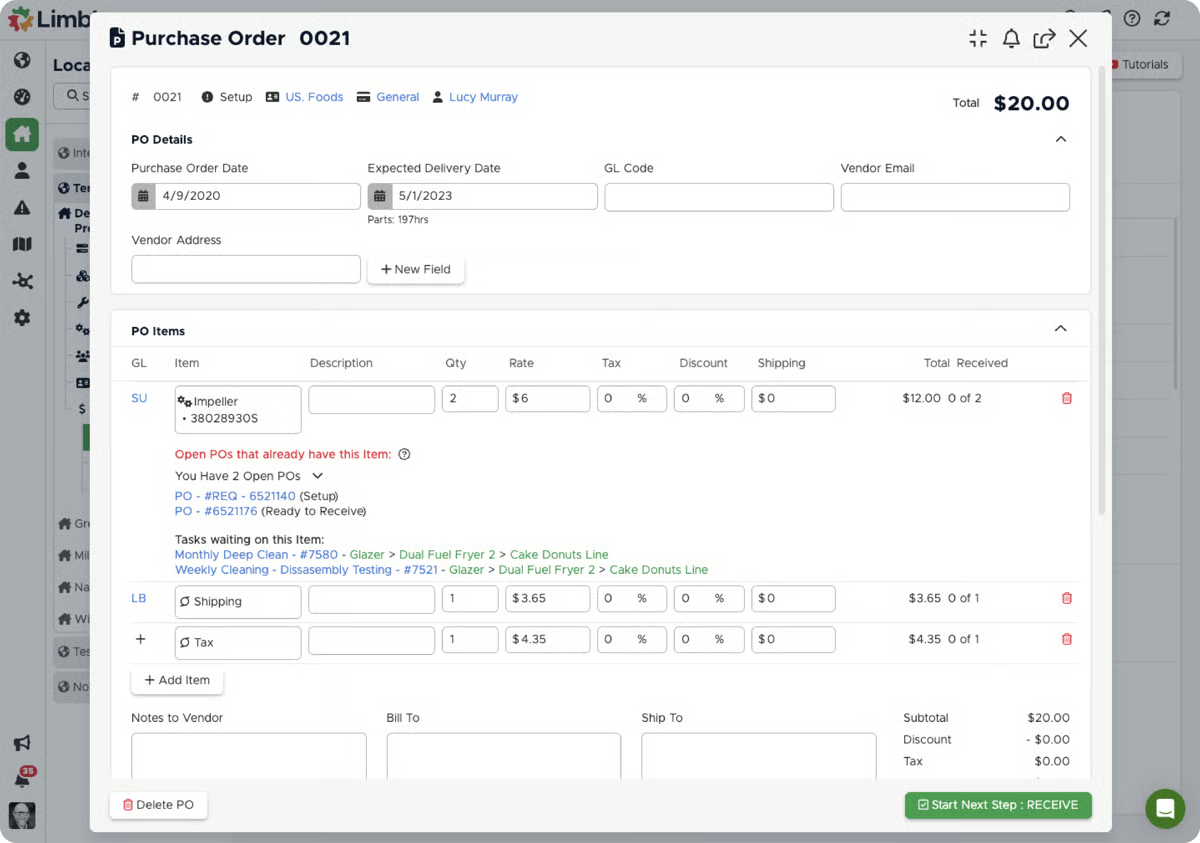
Support and onboarding assistance are often associated with smoother rollout experiences, particularly for teams implementing their first CMMS. Guided setup and responsive support channels contribute to faster workflow alignment. This structured introduction supports quicker adoption cycles.
Dashboards and reporting provide visibility into maintenance workload, asset performance, and service completion trends. While primarily execution-focused, these insights help supervisors monitor operational activity without relying on complex analytics tools. The consolidated view supports incremental improvements in planning and resource allocation.
Some G2 reviewers note that navigating detailed asset lifecycle records in Limble requires additional clicks when equipment histories are extensive, slowing retrieval for teams managing complex maintenance documentation. Technicians tracking granular lifecycle data across large asset inventories will feel this most during active troubleshooting. The centralized asset structure, however, keeps core equipment records and service histories organized and consistently accessible.
Procurement communication and vendor attachment handling are not built for high-volume purchasing workflows, discussed in G2 reviews forum. This means teams managing extensive vendor correspondence or complex POs will find the feature set falls short. For straightforward procurement needs, however, the available tools cover basic purchasing visibility without requiring a separate platform.
Overall, Limble supports organizations seeking a straightforward path to structured maintenance execution, where work orders, preventive schedules, and asset records remain visible in a single operational layer. With strong desktop usability reflected in its highest-rated feature performance, Limble continues to stand out as a practical choice for operations prioritizing dependable preventive maintenance and day-to-day execution clarity.
What I like about Limble:
- Many users highlight how preventive maintenance, work orders, and asset records live in one workspace, making daily maintenance coordination easier to manage.
- Ease of adoption stands out, with intuitive navigation, responsive support, and visual documentation helping technicians stay productive throughout routine maintenance tasks.
What G2 users like about Limble:
“I enjoy the organization that my team and I get to utilize with our products. Having the right information for us, all on one page for each part, has helped us with reordering, locating, and using the various parts we have in our system. Along with the organization and data of our parts, we also utilize detailed and necessary information for the various machines we use on a day-to-day basis. All of us use it every shift; it has become an essential and useful tool for our operations. Shout-out to Alex Doney for assisting us when needed!”
– Limble review, Quinn C.
What I dislike about Limble:
- Detailed asset lifecycle navigation requires additional clicks for complex histories, slowing retrieval during active troubleshooting, though core equipment records remain organized and accessible.
- Procurement and vendor attachment handling lack depth for high-volume purchasing workflows, though teams with straightforward procurement needs will find the basics well covered.
What G2 users dislike about Limble:
“While e-mailing POs to vendors, it would be nice if we could add additional attachments. It does not work well with negative numbers as far as inventory.”
– Limble review, TINA G.
7. Hudu: Best for flexible, customizable documentation management
Hudu is designed as a documentation platform that brings SOPs, credentials, asset records, and client knowledge into a single repository. With a G2 Satisfaction score of 72, a G2 Market Presence of 42, and an overall G2 Score of 57, it reflects steady usability alongside a more niche adoption footprint. The platform is frequently associated with smaller IT teams seeking flexible documentation without enterprise-level complexity.
Centralized documentation stands out as a defining capability, helping teams store processes, passwords, and client information in one workspace. This consolidation supports quicker troubleshooting and smoother onboarding by preserving historical knowledge. The structured repository reduces reliance on scattered files or informal documentation practices.
Customization flexibility appears across feedback patterns, with teams typically configuring layouts, asset structures, and documentation hierarchies to match internal workflows. This adaptability allows organizations to tailor knowledge architecture without rigid templates. As a result, documentation environments can evolve alongside operational requirements.
Search functionality, rated 91%, supports quick retrieval of stored documentation and linked assets. This capability helps technicians locate procedures or credentials without navigating multiple folders or tools. Efficient search contributes to improved day-to-day workflow continuity across documentation tasks.
Link sharing and contextual documentation relationships help connect related information across SOPs, assets, and credentials. The Link Sharing feature (90%) supports collaboration by enabling teams to quickly share knowledge with internal stakeholders. This relational structure strengthens knowledge visibility within distributed environments.
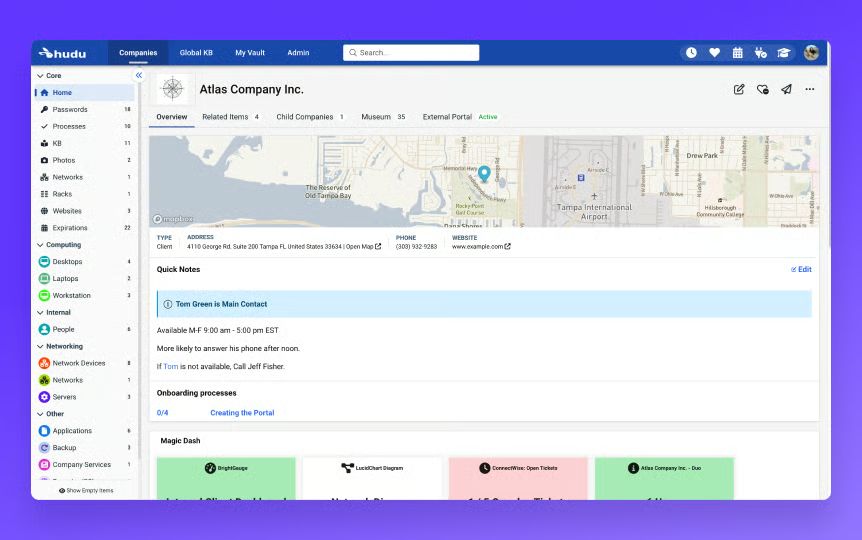
Role-based permissions, scoring 88%, provide governance over documentation access while maintaining knowledge availability where needed. Teams can define visibility levels across technicians or departments, supporting secure documentation practices. This control layer aligns with environments managing sensitive operational or client information.
Ease of setup and ongoing product evolution are frequently associated with Hudu’s experience, particularly for teams implementing documentation platforms for the first time. Responsive support and regular updates contribute to gradual feature expansion without disrupting workflows. This iterative development supports continued platform relevance.
That said, there are a couple of fit considerations worth keeping in mind. Hudu does not enforce formatting standards across documentation entries, meaning teams without internal conventions will accumulate inconsistently structured records over time, according to G2 reviewers. Teams that establish clear formatting guidelines early, however, benefit from the platform’s flexibility to structure knowledge exactly as needed.
Export capabilities and advanced template options in Hudu remain more limited than dedicated documentation platforms, restricting teams that need highly structured or formatted document outputs. The platform’s core documentation and search capabilities, however, remain strong for everyday knowledge management tasks.
Adoption patterns show a strong small-business concentration at 86%, followed by 11% in mid-market and 3% in enterprise, indicating traction among lean IT environments that prioritize flexible documentation. This distribution highlights buyer confidence within smaller operational settings while reflecting a more focused scale footprint.
Hudu delivers a flexible documentation workspace that supports everyday knowledge management with searchable records, contextual linking, and customizable structures. Its adaptability allows teams to shape documentation around evolving operational needs while maintaining visibility across assets and procedures. With strong, searchable functionality as a standout feature, Hudu continues to serve smaller IT teams seeking a practical, customizable foundation for organized documentation.
What I like about Hudu:
- Hudu centralizes client passwords, processes, and asset records, making critical information quick to locate during support tasks.
- Highly searchable and customizable layouts let teams tailor documentation structures without rigid templates, supporting evolving workflows.
What G2 users like about Hudu:
“Hudu is an excellent platform that offers both cloud hosting and self-hosting options. It allows you to easily create knowledge base articles, manage assets, track operations, and securely store passwords. The team is consistently introducing new features and, more importantly, is always striving to improve the product.”
– Hudu review, Nicholas B.
What I dislike about Hudu:
- Hudu does not enforce formatting standards, so without internal conventions, documentation consistency breaks down as content scales, though clear guidelines early on unlock the platform’s full flexibility.
- Export and advanced template options are more limited than dedicated documentation platforms, restricting complex output needs, though core documentation and search capabilities remain strong for everyday use.
What G2 users dislike about Hudu:
“We’d like to see vendors that support integration with Hudu be more flexible and offer more options from inside their products to access information in Hudu. Not all PSA and RMMs offer this flexibility.
– Hudu review, Bill M.
8. Whale: Best for simple SOP capture and knowledge centralization
Whale serves as a documentation and SOP platform focused on helping teams capture processes, onboarding guides, and operational knowledge within a structured workspace. The platform emphasizes accessible libraries, playbooks, and tagged content that allow employees to locate procedures without navigating fragmented knowledge sources. This orientation reflects environments prioritizing lightweight knowledge organization and training consistency.
Usability remains a defining characteristic, with documentation organized through libraries and playbooks that are straightforward to navigate. Teams typically describe locating policies or SOP steps without extensive training requirements. This accessibility contributes to consistent knowledge usage across departments.
Search functionality stands out as a core strength, with the Searchable feature rated at 95%, supporting fast retrieval of documentation through keyword tagging. Structured tagging reduces time spent locating policies or procedures while maintaining organized knowledge repositories. This reinforces everyday workflow efficiency when documentation volumes increase.
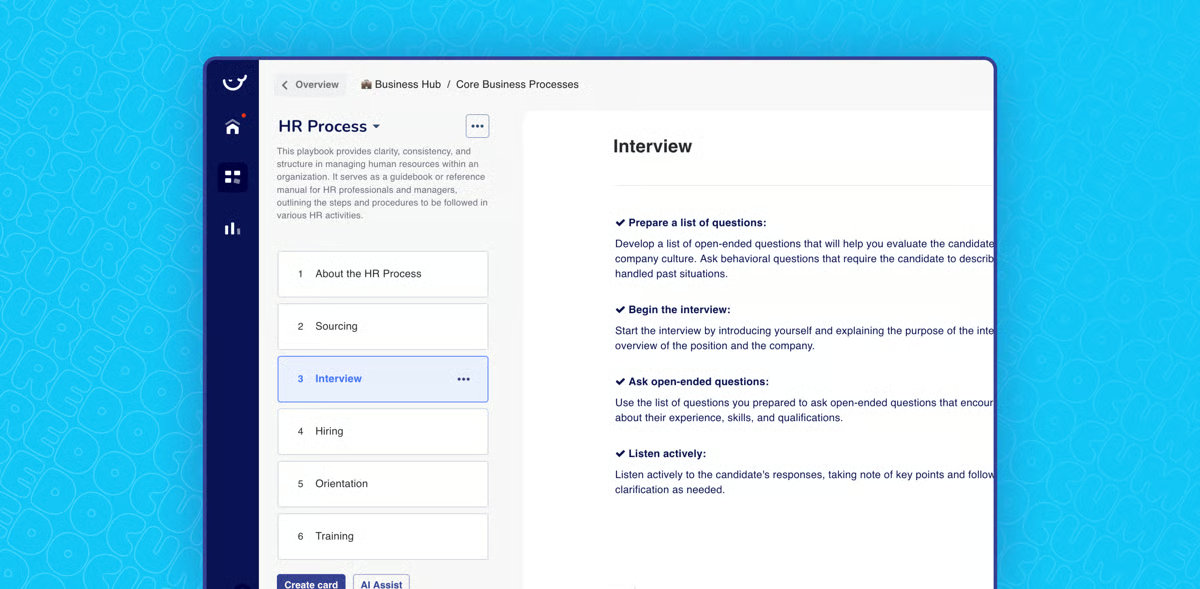
Screen recording and workflow capture help convert processes into step-by-step guides, supporting documentation without disrupting operational tasks. Teams often associate this capability with improved consistency when recording recurring workflows. The documentation flow supports gradual SOP expansion across teams.
Centralized knowledge storage allows organizations to consolidate onboarding materials, policies, and process documentation in one repository. This consolidation supports knowledge continuity and a smoother onboarding when roles change. The library structure also enables departmental segmentation without rigid documentation hierarchies.
AI-assisted content generation supports baseline SOP creation and procedural guidance, helping teams accelerate documentation while maintaining flexibility for customization. This capability encourages standardization across contributors without enforcing strict templates. AI assistance further supports incremental knowledge refinement.
Collaboration through contextual feedback supports iterative documentation improvement, with Comments rated at 93%, enabling teams to refine processes collectively. This interaction layer keeps documentation current while preserving shared context around procedures. The collaborative approach contributes to ongoing knowledge accuracy.
Although Whale excels at centralized knowledge storage, itdoes not provide detailed training progress tracking or compliance-grade record keeping, according to G2 users. Teams with audit requirements or structured learning accountability needs might find the current capabilities insufficient. The platform’s lightweight documentation approach, however, remains well-suited for teams prioritizing accessible SOP capture and everyday knowledge visibility.
The integration depth and automation capabilities don’t extend to complex system ecosystems, limiting its role as a central orchestration layer for organizations managing multiple interconnected tools. For straightforward documentation environments, however, the available connections support consistent SOP workflows without added complexity.
As a whole, Whale supports organizations seeking straightforward SOP capture and centralized knowledge visibility within a structured yet accessible environment. Adoption distribution consists of 66% small businesses and 33% mid-market usage, which reflects traction among growing teams formalizing documentation while preserving flexibility. With searchable content as a standout capability, Whale continues to provide a practical foundation for organized knowledge management and everyday process clarity.
What I like about Whale:
- Whale centralizes SOPs, training content, and process documentation in one searchable workspace, helping teams locate guidance quickly without switching tools.
- Screen recording and AI-assisted playbooks simplify SOP creation, enabling teams to document workflows alongside daily tasks while maintaining consistent onboarding materials.
What G2 users like about Whale:
“I like that Whale is very user-friendly and super easy to use. It’s not complicated at all, which makes uploading and finding things straightforward. The tagging system is fantastic; when I upload something to a library or playbook, I can tag it with keywords, and later on, I just type a keyword to find everything related to it. I also appreciate how the interface makes onboarding simple, with libraries and playbooks clearly laid out. I can create libraries for specific departments and then playbooks and cards within those libraries without any hassle. It doesn’t force me to use features I don’t need, which is great. Overall, it’s just super easy and fits well with the vocabulary and keywords we already use in our company.”
– Whale review, Gabriela G.
What I dislike about Whale:
- Training progress tracking lacks compliance-grade depth, falling short for regulated or formal accountability needs, though the platform handles lightweight SOP capture and knowledge visibility well.
- Integration and automation depth are limited for complex tool ecosystems, though available connections support straightforward documentation workflows without added complexity.
What G2 users dislike about Whale:
“ The ability to generate individual training records – documenting an individual’s completed assignments is missing. However, Whale is very receptive to customer feedback, and I’m confident this is something that will be added in the future.”
– Whale review, Robert T.
Comparison of the best standard operating procedures software
|
Software |
G2 rating |
Free plan |
Ideal for |
|
ClickUp |
4.7/5 |
Yes |
Teams embedding SOPs directly into projects, tasks, and repeatable workflows |
|
MaintainX |
4.8/5 |
Yes |
Frontline and maintenance teams executing SOPs in daily operational routines |
|
Scribe |
4.8/5 |
Yes |
Teams needing fast SOP creation through automated step capture and visual guides |
|
IT Glue |
4.7/5 |
No |
IT and MSP teams managing structured SOPs within centralized knowledge bases |
|
Trainual |
4.7/5 |
No |
Growing teams formalizing onboarding and role-based process standardization |
|
Limble |
4.8/5 |
No |
Maintenance teams using SOPs for preventive workflows and compliance routines |
|
Hudu |
4.7/5 |
Yes, Free trial available |
IT teams are centralizing SOP documentation alongside internal knowledge management |
|
Whale |
4.8/5 |
Yes |
Organizations focusing on guided SOP learning and employee process adoption |
Best standard operating procedures software: Frequently asked questions (FAQs)
Got more questions? G2 has the answers!
Q1. What is the top-rated SOP management platform for enterprises?
IT Glue and Trainual are frequently associated with enterprise SOP management needs. Review patterns highlight IT Glue for structured knowledge governance and Trainual for scaling standardized procedures, onboarding programs, and role-based documentation across distributed teams.
Q2. What is the best SOP platform for compliance-heavy industries?
MaintainX appears most often in compliance-driven discussions. MaintainX is referenced where inspections, safety routines, and procedural adherence must be documented consistently.
Q3. What is the most affordable SOP software for SMBs?
Scribe and Whale are regularly cited by small and growing teams prioritizing affordability and fast rollout. Scribe stands out for rapid process capture, while Whale is commonly mentioned for guided learning features that help smaller teams standardize workflows without heavy setup.
Q4. Which SOP management tool offers the most secure document control?
IT Glue and Hudu are often highlighted for secure documentation control. Both platforms are associated with permission-based access, structured knowledge organization, and audit-friendly documentation practices that support IT and security-focused teams.
Q5. Which tool supports SOP distribution to remote teams?
ClickUp and Whale frequently surface in distributed work scenarios. ClickUp is commonly referenced for embedding SOPs within collaborative workflows, while Whale supports contextual guidance and knowledge sharing that helps remote employees follow procedures consistently.
Q6. Which vendor provides AI-powered SOP creation assistance?
Scribe and ClickUp are most often linked to AI-assisted documentation workflows. Review patterns suggest Scribe accelerates SOP creation through automated capture, while ClickUp surfaces AI-driven writing and workflow support that helps teams refine procedural content faster.
Q7. Which solution supports multi-language SOP documents?
Trainual and Whale appear most frequently where teams require multi-language documentation. These platforms are commonly chosen by global organizations standardizing training and procedures across regions while maintaining localized clarity.
Q8. What platform provides version control for SOP documents?
IT Glue and Trainual are widely associated with strong version control capabilities. Reviews consistently reference their ability to track revisions, manage approvals, and maintain clear documentation history as processes evolve.
Run ops like you mean it
Across evaluations, the biggest difference between strong and weak standard operating procedures software is not feature depth but behavioral impact. The right platform becomes part of how work happens, quietly guiding decisions, reinforcing steps, and reducing the need for constant clarification. Teams spend less time chasing updates or validating instructions and more time executing with confidence, which steadily lowers operational friction and cognitive load.
Choosing standard operating procedures software is ultimately about operational trust. Some teams need rapid documentation to structure growing processes, while others prioritize governance, visibility, or guided execution to sustain maturity at scale. The best choice is the one employees instinctively use because it supports how work already flows. When that alignment exists, SOPs stop feeling like reference material and start functioning as dependable infrastructure that keeps execution steady even as complexity increases.
Want better control over organizational knowledge? Explore leading knowledge management software on G2 to improve information access, team alignment, and decision consistency.

💸 Earn Instantly With This Task
No fees, no waiting — your earnings could be 1 click away.
Start Earning
