


TL;DR: What is the best e-commerce platform for 2027 based on user reviews?
Shopify is the best e-commerce software, according to G2’s latest Fall 2026 Grid Report for e-commerce platforms, earning the highest G2 score of 99 based on user reviews. Here are the other top-rated ecommerce solutions from the grid that I evaluated, broken down by use case:
- Shopify Plus: Best for high-growth brands needing scale and automation
- Salesforce B2C Commerce: Best for enterprise storefronts tied to Salesforce customer data
- Wix Studio: Best for design-led, no-code sites and stores
- Salesforce B2B Commerce: Best for account-specific B2B pricing and reordering
- WooCommerce: Best for WordPress stores with full ownership
- Adobe Commerce: Best for complex catalogs and multi-store customization
- BigCommerce: Best for built-in commerce features and stable performance
The search for the best e-commerce platforms often starts with building an online store, but most businesses are really trying to answer a bigger question: which platform can support their growth without creating limitations later? To find out, I evaluated Shopify, Shopify Plus, Salesforce B2C Commerce, Wix Studio, Salesforce B2B Commerce, WooCommerce, Adobe Commerce, and BigCommerce.
As I compared these e-commerce providers, I noticed they solve very different problems. Some make it easier to launch and manage a store with limited technical resources, while others give larger teams the flexibility to handle complex catalogs, B2B pricing, or multiple storefronts.
That means the answer to which platform is best changes with who is asking. A small business looking for the easiest way to start selling and a technical team looking for the most control over its store will land on very different options, and buyers are also asking about checkout performance, inventory sync, and headless flexibility along the way.
For this guide, I looked at factors such as ease of use, customization, scalability, integrations, and the overall store management experience in G2 reviews for each e-commerce software option. I wanted to understand where each platform fits, who it’s best suited for, and what trade-offs buyers should know about before investing time and resources.
Comparison of the 8 best e-commerce platforms for 2027
The best e-commerce platforms differ most in who they are built for. This table compares the e-commerce solutions I evaluated based on G2 ratings, starting prices, best-fit use cases, and the company sizes that review them most.
| Software | G2 rating | Starting price | Best for | Who reviews it most |
| Shopify | 4.4/5 | $5 per month (Starter plan; full online stores from $29/month, billed yearly) | Small businesses launching their first store | Small business (80%), the most-reviewed on this list |
| Shopify Plus | 4.4/5 | From $2,300 per month with a 3-year term | High-growth brands needing scale and automation | Small business (69%) and mid-market (27%), scaling teams |
| Salesforce B2C Commerce | 4.3/5 | Pricing available upon request from the vendor | Enterprise storefronts tied to Salesforce data | Mid-market (40%) and enterprise (35%), a larger org favorite |
| Wix Studio | 4.6/5 | $19 per month (e-commerce plans from $27) | Design-led, no-code sites and stores | Small business (88%), nearly 9 in 10 reviewers |
| Salesforce B2B Commerce | 4.3/5 | Pricing available upon request from the vendor | Account-specific B2B pricing and reordering | Mid-market (36%), enterprise (34%), and small business (30%), a broad mix led by mid-market |
| WooCommerce | 4.4/5 | Free (open-source plugin) | WordPress stores with full ownership | Small business (89%), the highest share on this list |
| Adobe Commerce | 4.0/5 | Pricing available upon request from the vendor | Complex catalogs and multi-store customization | Small business (59%) and mid-market (31%), only 10% enterprise |
| BigCommerce | 4.2/5 | $29 per month (billed annually) | Built-in commerce features and stable performance | Small business (78%), with 19% mid-market |
These e-commerce platforms are top-rated in their category according to the G2 Fall 2026 Grid Report. I’ve also added their publicly available pricing to make comparisons easier for you.
E-commerce solutions I recommend trying in 2027
If you’re searching for the best e-commerce platforms, the real question is rarely which one has the longest feature list. It is which platform lets you launch quickly now and still handle the catalog, traffic, and sales channels you expect to have later.
To answer that, I evaluated Shopify, Shopify Plus, Salesforce B2C Commerce, Wix Studio, Salesforce B2B Commerce, WooCommerce, Adobe Commerce, and BigCommerce. Some of these ecommerce solutions are built for a first store, while others are designed for enterprise catalogs, B2B pricing, or deep customization.
One trend that stood out during my research is how quickly online selling continues to grow. According to the U.S. Census Bureau, U.S. retail e-commerce sales reached $340.2 billion in the second quarter of 2026, up 12.2% from a year earlier and 17.1% of total retail sales. As more buying moves online, many e-commerce software vendors are adding AI-driven personalization, automation, and assistants to help merchants run their stores more efficiently.
G2 Community
What do G2 community experts say about E-Commerce Platforms?
Ask a question
“The variant and pricing matrix problem sounds simple until you’re actually in it, and what breaks first varies a lot by platform.”
Read full thread →
How did I find and evaluate these best e-commerce platforms?
I started with G2’s latest Grid® Report for e-commerce platforms to identify the highest-rated products in the category. To narrow down the list, I looked at G2 Score, customer satisfaction ratings, market presence, review volume, and review recency. This helped me focus on platforms that consistently receive positive feedback from verified users.
From there, I analyzed user reviews to understand how these platforms perform in real-world e-commerce operations. I paid particular attention to feedback around store setup, product management, customization, integrations, scalability, multichannel selling, inventory management, and overall ease of use.
I also used AI to analyze hundreds of G2 reviews and identify recurring themes, strengths, limitations, and common use cases across the category. This helped me evaluate which e-commerce platforms deliver the most value for small businesses, growing brands, and larger organizations with more complex requirements.
The screenshots featured in this article come from G2 vendor listings and publicly available product documentation.
What sets the best e-commerce platforms apart
A user-friendly e-commerce platform for businesses should offer intuitive dashboards, clear navigation, and minimal technical requirements — all things I prioritized during testing. These are some other factors I considered when evaluating the best e-commerce platform:
- Core commerce features should cover the essentials: product listing management, payment gateways, inventory tracking, and order fulfillment. I gave extra weight to platforms with multichannel selling, abandoned cart recovery, and built-in SEO tools.
- Ease of use matters because managing a store involves many repetitive tasks. I looked for clear navigation, drag-and-drop design options, and dashboards that make inventory, orders, and analytics manageable without technical expertise.
- Scalability and flexibility let a business grow without switching tools. I evaluated how well each platform handles larger catalogs, higher traffic, and more sales channels, including how far it can be extended via APIs, apps, themes, or headless and composable setups.
- SEO and marketing automation drive organic traffic and repeat sales. I paid attention to custom URLs, meta tags, schema markup, site speed optimization, and built-in marketing workflows.
- AI features are increasingly part of the buying decision. Reviewers mention assistants such as Shopify’s Sidekick, personalization through Salesforce Einstein, Adobe Sensei-powered recommendations, and AI-assisted site building in Wix Studio, so I considered how useful these tools are in day-to-day store management.
- Integrations with third-party tools connect a store to the channels that matter most. I looked for easy connections to accounting software, CRM systems, ERPs, marketplaces, social channels, and analytics tools.
- Performance and security are non-negotiable under heavy traffic. I looked at uptime, loading speed, SSL certificates, PCI compliance, and fraud prevention measures.
- Customer support and pricing round out the picture. I considered support availability and documentation, as well as how transparent each pricing model is and how well it scales as a business grows.
To qualify for inclusion in the E-commerce Platforms category, a product must:
- Help companies run their e-commerce business on a single, unified platform
- Manage e-commerce products and services, as well as product information
- Deliver standard options to create online stores that can be customized
- Include functionality for personalization to improve the customer experience
- Provide features for or integrate with drop shipping and inventory management software
- Track and manage customers, their order history, and online behavior
- Allow companies to choose between multiple payment options and gateways
- Support the headless commerce architecture and provide native mobile apps
- Offer security, or encryption of data and information, or both, and comply with regulations
- Include features for e-commerce data management, integration, and search
*This data was pulled from G2 in 2026. Some reviews may have been edited for clarity.
1. Shopify: Best for small businesses that want to launch and manage a store quickly
For smaller teams, setup is where Shopify wins first. I found that a basic store doesn’t require any coding, so anyone who wants to list products, configure payments, and start selling can do it without leaning on technical help. G2 data backs that up, with ease of setup rated at 90%, and the feedback I read is full of people who got an e-commerce site running quickly.
The interface held up well in my evaluation, too. Adding products, inventory tracking, and managing collections are laid out in a way that suits day-to-day store work without adding complexity. G2 users talk about managing products, orders, and stock from a single dashboard, and Shopify’s ease of use ranks 91% on G2. For a catalog that keeps growing or stock that keeps changing, routine updates are far less of a chore.
Apps came up again and again. G2 reviewers talk about adding shipping, payments, marketing, and other features as the business grows, without rebuilding the store. I like that approach for newer stores: you start lean and add capability only when you actually need it.
The theme library is another point in Shopify’s favor. I found that the templates give merchants a polished starting point for those with little design experience, and since many are built with mobile shopping in mind, a storefront that works across devices requires less upfront tweaking.
Checkout earned praise too. Several G2 users describe a storefront that loads quickly and a checkout that has held up, which matters when every abandoned cart is lost revenue. Payments are easy to set up as well, with support for Shopify Payments, PayPal, and Stripe.
A smaller group of G2 reviewers says Shopify has kept up as they’ve grown, with product and order management staying manageable as volume climbs. That gives merchants a clear path forward without an early platform switch.
Customization is where I saw Shopify ask for more effort: once a store moves past standard templates and built-in settings, tailored changes may need developer support or some familiarity with Liquid, Shopify’s coding language. That is a fair trade for a platform that keeps everyday setup this simple and still gives technical teams control over the storefront.
Paid apps are where the bill can grow, with G2 reviewers pointing to costs creeping up as stores add apps for shipping, payments, or marketing. The upside is that the same model lets merchants start on a modest plan and pay only for what they use.
Shopify is a strong fit for businesses that want an approachable way to start selling online, with room to add apps and features as the store grows. I would consider it over the more complex platforms on this list when ease of use, ecosystem depth, and a clear growth path are the priorities.
What I like about Shopify:
- Getting a store live without a developer, and then running products, orders, and stock from one dashboard, is the praise G2 users most often repeat.
- The app ecosystem and mobile-friendly themes get plenty of credit for letting a store grow without a rebuild.
What G2 users like about Shopify:
“What I like best about Shopify is how easy it is to set up and manage an online store without needing much technical knowledge. The dashboard is clear, product and order management are straightforward, and the large app ecosystem makes it easy to add new functionality as the business grows.”
– Shopify review, Laimonas K.
What I dislike about Shopify:
- Moving past standard templates may require an app or technical know-how, G2 reviewers note, but everyday store management remains easy thanks to the guided setup.
- Paid apps are where costs add up for many stores, according to G2 feedback; the flip side is that merchants only pay for the capabilities they actually use.
What G2 users dislike about Shopify:
“The biggest downside for me is that the cost can increase once you start adding paid apps for shipping, payments, marketing and other features. Some basic customizations are also limited unless you use an app or have some technical knowledge. I would like to see more useful features included in the main plan so small stores don’t have to keep paying for multiple apps.”
– Shopify review, Gaurav J.
2. Shopify Plus: Best for high-volume brands that need reliability during traffic spikes
When a brand is running a flash sale or a big launch, checkout either holds up, or it doesn’t, and that is where Shopify Plus stood out in my evaluation. G2 reviewers consistently describe it as handling high traffic and large order volumes without slowing down, even at peak, which lets teams run aggressive campaigns without worrying about downtime.
Day-to-day management stays simple despite the enterprise scale. G2 users call out a clean interface and say they can manage stores and orders without a large technical team, and Shopify Plus carries a 91% rating for ease of use and 90% for ease of admin.
Integrations came up often, too. Marketing, analytics, ERP, CRM, fulfillment, and 3PL tools all get mentioned, and a few G2 users point to higher API limits. For teams that want commerce to sit comfortably inside a larger tech stack, I see that as a practical advantage.
Automation is another strength I noticed. G2 users point to Shopify Flow as helpful for brands handling higher order volumes or recurring promotions, and some use it for order tagging, inventory alerts, and fraud checks that would otherwise be manual.
Checkout customization is a draw as well. Several G2 users say they can shape the checkout experience rather than working within a default flow, and one reports it has noticeably improved their conversion rates.
Shopify Plus also supports multiple storefronts under one account, which I found useful for businesses operating across markets, regions, or languages. G2 reviewers mention running multiple brands, currencies, and expansion stores from a single backend, with built-in wholesale tools such as custom price lists and dedicated B2B storefronts, as well as direct sales. For teams running multiple customer experiences, this structure reduces the need to treat each storefront as a disconnected system.
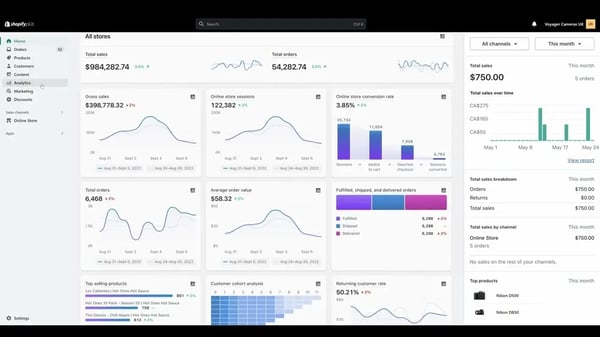
Cost is the first thing G2 users bring up, including the platform fee and a revenue share that scales with sales. For brands that make full use of the advanced features, that investment buys enterprise-grade reliability, automation, and checkout control.
Some advanced checkout and backend changes still require developer involvement or third-party apps, according to G2 users. For teams with developer support, the checkout extensibility and API access leave plenty of room to build.
Shopify Plus is the one I would shortlist for brands that expect traffic spikes, multi-store growth, or a wholesale channel alongside direct sales. Its mix of reliability, checkout control, and automation gives larger teams room to grow without leaving the Shopify ecosystem.
What I like about Shopify Plus:
- Steady performance through peak sales and launches is a recurring point in G2 reviews of Shopify Plus.
- Flow automation and checkout customization also earn credit from G2 users for cutting manual work and giving teams more say over the buying experience.
What G2 users like about Shopify Plus:
“What I like most about Shopify Plus is how scalable and dependable it is for a growing business. It handles high traffic smoothly and provides advanced customization options when you need more control. The automation tools save me a lot of time, and the integrations make it easier to manage everything in one place. Overall, it helps streamline day-to-day operations and supports long-term business growth in a practical, effective way.”
– Shopify Plus review, Ashwinkumar B.
What I dislike about Shopify Plus:
- Cost is the main caution in G2 feedback, from the platform fee to the revenue share, yet many brands feel it pays off once they put the advanced features to work.
- G2 users say bigger checkout and backend changes can still need developers or apps, but the extensibility and API access leave teams plenty of room to build.
What G2 users dislike about Shopify Plus:
“Some areas that could be improved include the high cost, limited native checkout customization without apps, and occasional dependence on third-party apps for advanced features. More built-in flexibility and deeper reporting options would make Shopify Plus even stronger.”
– Shopify Plus review, Abhishek S.
Once your store is live, the next step is driving traffic you only pay for when it converts. Explore the best affiliate marketing software to recruit affiliates, track referral sales, and automate commission payouts.
3. Salesforce B2C Commerce: Best for enterprise B2C brands built around the Salesforce ecosystem
Salesforce B2C Commerce is an enterprise storefront platform for brands that want storefront, customer, marketing, and service data to work more closely together. I evaluated it as a B2C commerce platform for teams already invested in the Salesforce ecosystem.
The clearest strength I saw in the G2 data was how well it integrates with the broader Salesforce stack. G2 reviewers frequently mention connections with Salesforce CRM, Marketing Cloud, and Service Cloud, which helps teams avoid managing customer data across disconnected systems. Its meets requirements score is 88%, and ease of doing business with is 88% on G2. For businesses already on Salesforce, that continuity ties commerce to sales, marketing, and service.
Personalization also stood out. Several G2 users point to Einstein AI, especially product recommendations, as useful for tailoring shopping experiences to customer behavior, and I found that especially relevant for merchandising and marketing teams that want AI-driven personalization without building a separate data science workflow.
It also looks well-suited to enterprise traffic and multi-region operations. G2 users describe high-volume storefronts, multi-currency selling, and storefronts spread across multiple brands and markets. For brands planning to expand, that matters because growth doesn’t mean rebuilding core commerce infrastructure.
Merchandising gets its own share of praise. G2 reviewers mention managing catalogs, discounts, promotions, and cart workflows from a single interface, and some say they can view products, pricing, and orders without switching between tools. That kind of consolidation makes daily work easier for teams that would otherwise juggle several systems.
Larger teams will also care about the API and headless support. Technical G2 users highlight decoupling the storefront from the backend and connecting payment gateways, ERPs, shipping tools, and other third-party systems. For more complex architectures, that flexibility lets teams build experiences across channels while keeping Salesforce’s commerce foundation.

Getting B2C Commerce live takes effort, with G2 users frequently mentioning setup complexity, a learning curve, and the need for experienced Salesforce resources or developers. Many add that day-to-day operations become far more manageable once the platform is configured and teams are trained.
Pricing is the other thing to weigh, since G2 users note that licensing, GMV-based pricing, and implementation costs add up to a bigger investment than lighter platforms. For enterprise teams already committed to Salesforce, that investment comes with a commerce foundation built on the customer data they already have.
Salesforce B2C Commerce makes the most sense for enterprise organizations that want storefront experiences connected to the same customer data foundation as sales, marketing, and service. When CRM integration, personalization, and scalability are the priorities, it is the option on this list I would look at first.
What I like about Salesforce B2C Commerce:
- Tight integration with Service Cloud, Marketing Cloud, and the rest of the Salesforce stack is a recurring favorite among G2 reviewers, since it keeps commerce, customer, and service data in one place.
- Einstein recommendations and storefronts that scale across markets round out the praise from G2 users.
What G2 users like about Salesforce B2C Commerce:
“I really like the ease of UI and UX, which makes it simple to use and implement. The support from the Salesforce team as a partner in growing the business is invaluable. The seamless integration with other Salesforce clouds, like Salesforce Experience Cloud, Salesforce Marketing Cloud, and Salesforce Data Cloud, is a huge plus for me. I also appreciate the new Contentful integrations for content management, which have been really helpful. The ability to manage products, pricing, and order management effectively is the best from both customer and implementation perspectives.”
– Salesforce B2C Commerce review, Kalarav C.
What I dislike about Salesforce B2C Commerce:
- Implementation is the hard part for G2 users, who point to a learning curve and the need for experienced Salesforce help, though day-to-day work gets easier once teams are trained.
- Licensing, GMV-based pricing, and implementation costs add up in G2 feedback, and teams already committed to Salesforce find the connected commerce foundation worth the spend.
What G2 users dislike about Salesforce B2C Commerce:
“What I dislike about Salesforce B2C Commerce is that it can be complex to set up and customize, especially for teams that are new to the platform. Some advanced features and integrations may require significant development effort and technical expertise, and the overall cost can be high compared with simpler e-commerce platforms. I also find that managing customizations and platform updates can require careful planning to avoid maintenance challenges.”
– Salesforce B2C Commerce review, Jigar K.
4. Wix Studio: Best for design-led teams building custom storefronts without code
Wix Studio is a cloud-based website builder that combines website creation, hosting, e-commerce, marketing tools, and domain management in a single platform. During my evaluation, I found that Wix Studio is built for agencies, freelancers, and design-led teams that want a professional online presence without relying on developers.
Ease of use was the most consistent theme I saw across G2 reviews. People talk about building and launching a site without writing code, and Wix Studio’s ease of use is rated 92% on G2, with many saying they got started in just a few clicks.
The drag-and-drop editor is a big reason Wix Studio suits design-led teams. G2 users highlight how easy it is to customize layouts, update branding, and rearrange content without touching code, and a few mention the responsive tools that speed up the process of optimizing for desktop, tablet, and mobile. Ease of admin ranks 94% on G2, and many say they can shape a custom look without developer help.
The template library gives teams a structured starting point for getting online quickly, and a few G2 users say they start with a standard template and later move to custom code and integrations.
Wix also bundles hosting, analytics, SEO features, domain management, and other business tools in one place, and based on the feedback I’ve read, many G2 users prefer managing it all from a single dashboard rather than coordinating with several vendors.
Agencies and teams get real value from the collaboration tools. G2 reviewers describe multi-user editing, live comments right on the canvas, and a central workspace for managing multiple client sites, domains, and team permissions, which can shorten feedback cycles for anyone handling several builds at once.
Wix Studio’s AI-powered features are drawing growing interest. Recent G2 users describe using AI to draft wording, templates, and layouts, and a few mention built-in SEO and marketing tools such as automated campaigns and Google Search Console integration. For smaller teams without dedicated content or marketing staff, that takes some of the work out of launching and maintaining a site.
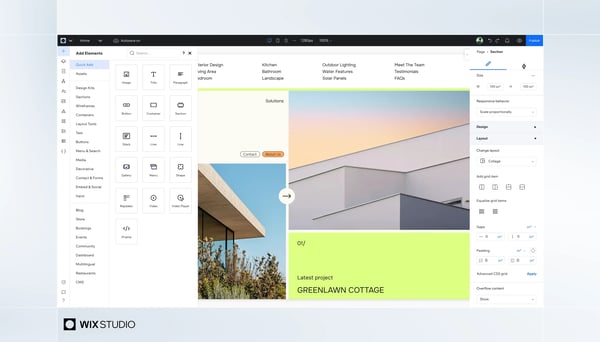
Those with advanced design requirements may hit limits, with some G2 users mentioning workarounds for certain changes. For most teams, that may never matter, and the structure is a big part of why the editor stays easy to use.
Across several G2 reviews, I also noticed the editor can feel slower on larger or more complex projects. Teams building bigger sites may notice that lag, but the build speed, reusable components, and collaboration tools often make up for it.
Design-led teams and agencies that want to build custom storefronts and websites without writing code are who Wix Studio is built for. Next to the more commerce-focused platforms on this list, it stands out when design freedom, speed to launch, and all-in-one site management matter most.
What I like about Wix Studio:
- Building and launching a custom site without writing code is the headline praise from G2 users.
- G2 reviewers from agencies and freelance teams also single out multi-user editing and the ability to have hosting, SEO, and analytics in one place.
What G2 users like about Wix Studio:
“I use Wix Studio to create websites, and I really appreciate that there are existing templates, so I don’t have to start from scratch. I find it very easy to use, especially with the drag and drop features, which are great for someone like me who doesn’t have HTML knowledge. The initial setup was also very easy. To be honest, it’s the perfect site.”
– Wix Studio review, Aashif R.
What I dislike about Wix Studio:
- Advanced design needs can push past what the editor allows, according to G2 users, which is the same structure that keeps it easy for everyone else.
- The editor slows down on larger projects, as noted in several G2 reviews, but many G2 users still find the build speed worth it.
What G2 users dislike about Wix Studio:
“Sometimes the editor can feel a bit slower on larger projects. Certain advanced customizations still require extra work or workarounds. I’d like to see more flexibility in some design controls and smoother performance when managing complex sites.”
– Wix Studio review, Justin M.
A great storefront won’t drive results without visibility, so explore the best free SEO tools to improve your search performance.
5. Salesforce B2B Commerce: Best for B2B sellers that need account-based pricing and CRM-connected ordering
Salesforce B2B Commerce is an enterprise platform for companies that sell to other businesses and want ordering, pricing, and buyer accounts tied to Salesforce CRM. I evaluated it with that kind of structured, account-driven selling in mind.
Native CRM integration was the strongest theme I saw in the G2 reviews. G2 users say account-based catalogs, contract pricing, and buyer groups run on the same Accounts and Orders they already manage in Salesforce, and that Flows and Order Management keep commerce from becoming a separate system of record. On G2, it earns 89% for meets requirements and 90% for ease of doing business with, both above the category average.
On the B2B side, Salesforce B2B Commerce tackles requirements that general-purpose e-commerce platforms handle less comfortably. G2 users mention account-specific pricing, contract-based buying, negotiated pricing, and buyer groups, which I see as a strong fit for companies selling to business buyers with more structured procurement.
Scalability and flexibility also came up. G2 users describe complex purchasing scenarios and extensive catalogs that still give customers a self-service experience, and some note how easy it is to manage different storefronts as the business grows.
Self-service reordering is worth calling out as well. G2 feedback points to ordering experiences that speed up repeat purchases for business buyers, and one G2 user mentions single-click reordering and CSV order uploads for high-volume transactions.
Unified customer data is a smaller but consistent theme. Having customer, account, order, and service data in one place helps sales and operations teams track revenue across direct and digital channels, according to G2 users.

Setup complexity is the main trade-off I saw, with G2 users frequently noting that custom pricing, large catalogs, and integrations require significant development effort and ongoing maintenance. Teams already working in Salesforce often find it gets easier once the groundwork is in place.
Licensing and implementation costs run high in G2 reviews, though those who value the CRM connection tend to see that spend as an investment in one connected system rather than a standalone storefront.
Business sellers who want ordering, pricing, and buyer accounts tied directly to their CRM will get the most from Salesforce B2B Commerce. It earns its place on the shortlist when account-based pricing, self-service reordering, and a single view of the customer matter most.
What I like about Salesforce B2B Commerce:
- Native CRM integration leads the praise from G2 reviewers, with account-based catalogs and contract pricing running on the same Accounts and Orders teams already manage.
- Buyer-group logic and self-service reordering are also mentioned as ways to handle procurement without a separate system.
What G2 users like about Salesforce B2B Commerce:
“Native Salesforce integration is the real win: account-based catalogs, contract pricing, and buyer groups use the same Accounts and Orders we already manage. Storefronts on Experience Cloud plus platform automation (Flows, sharing, reports) keep commerce from becoming a separate system of record.”
– Salesforce B2B Commerce review, Kasi C.
What I dislike about Salesforce B2B Commerce:
- Setup is the biggest hurdle in G2 feedback, with custom pricing, large catalogs, and integrations needing developer time, but the connected data pays off for teams already in Salesforce.
- High licensing and implementation costs are other common complaints, and G2 users see real value in having commerce and CRM in a single system.
What G2 users dislike about Salesforce B2B Commerce:
“What I dislike about Salesforce B2B Commerce is that the setup can be complex, especially when dealing with custom pricing, large product catalogs, integrations, and unique checkout requirements. It can also take significant development and ongoing maintenance to keep everything running smoothly.”
– Salesforce B2B Commerce review, Teng V.
6. WooCommerce: Best for WordPress teams that want full control over their store
WooCommerce is a free, open-source e-commerce plugin built for WordPress. During my evaluation, I found that its biggest advantage is how naturally it extends the WordPress ecosystem, allowing businesses to add online selling capabilities without moving to a separate commerce platform.
Because WooCommerce is built specifically for WordPress, setup feels familiar for anyone already running a WordPress website. G2 reviewers frequently mention managing content, products, orders, and payments from the same admin, which makes the move into e-commerce much smoother, and WooCommerce’s meets requirements score is 90% on G2.
Getting a store running is quick too. G2 users describe installing the plugin from the WordPress dashboard and being ready to sell within minutes, and its ease of setup is 87% on G2.
One of the first things that stood out to me was the cost of getting started. WooCommerce itself is free, and the core functionality covers product management, inventory tracking, checkout, and payment processing. Based on G2 feedback, many businesses like being able to launch a store without a monthly platform subscription or a percentage taken from every sale.
Flexibility comes up repeatedly in G2 feedback. Because the platform is open source, store owners control their site’s design, functionality, and data, and I found that developers and technically experienced users often see that ownership as a major advantage over more restrictive hosted platforms.
WooCommerce also supports a large ecosystem of plugins and extensions for adding capabilities as needs evolve. G2 users mention connecting CRM systems, payment providers, shipping tools, subscriptions, and SEO and analytics plugins without being tied to one vendor’s ecosystem, and the community helps too, with documentation, tutorials, and forums on hand when something goes wrong.
Core store features get attention as well. Built-in coupons, payment gateways, and cart and checkout features come up, along with the ability to sell physical products, digital downloads, and other product types without extra tooling.
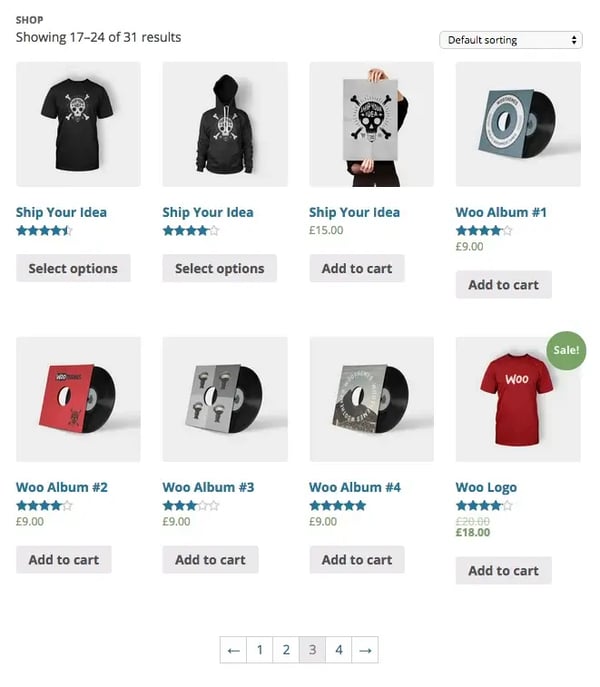
Performance needs some planning as stores grow, with G2 users mentioning slower speeds on large catalogs or plugin-heavy builds and some extra hosting upkeep. Many add that good hosting, caching, and optimization keep things fast, which leaves the outcome largely in the store owner’s hands.
I also found that while the core plugin is free, costs can rise as businesses add premium extensions for things like subscriptions or advanced SEO. That said, many G2 users prefer that model because they only pay for the capabilities they need.
WooCommerce works best for businesses already invested in WordPress and for teams that value flexibility, ownership, and customization. When control over your store’s data, design, and technology stack matters most, it’s one of the best e-commerce solutions to consider on this list.
What I like about WooCommerce:
- WooCommerce sits naturally within WordPress, so content, products, and orders live in a single dashboard, a recurring favorite in G2 feedback.
- Open-source flexibility, a large plugin library, and no per-sale platform fee come up often as reasons G2 users picked it and stayed.
What G2 users like about WooCommerce:
“What makes WooCommerce so powerful is that it essentially removes the “ceiling” on what you can build. Since it’s an open-source plugin that integrates directly with WordPress, you’re not locked into a rigid, proprietary ecosystem where you have to pay a percentage of every sale or operate by someone else’s rules.”
– WooCommerce review, Derek W.
What I dislike about WooCommerce:
- Larger or plugin-heavy stores can slow down and need extra hosting attention, G2 reviewers say, though good hosting and optimization keep performance in check for many.
- Premium extensions for things like subscriptions or advanced SEO add cost, but G2 users like paying only for what they need.
What G2 users dislike about WooCommerce:
“It relies on plugins, and I’ve noticed performance slowdowns when working with a high volume of SKUs. On top of that, the hosting maintenance adds extra overhead and makes ongoing upkeep more time-consuming than I’d like.”
– WooCommerce review, Sanjay S.
7. Adobe Commerce: Best for brands with complex catalogs and multi-store operations
Adobe Commerce, formerly Magento Commerce, is an enterprise e-commerce platform built for businesses with requirements that extend beyond what most out-of-the-box commerce platforms can support. My evaluation showed that organizations typically choose Adobe Commerce because they need flexibility, control, and scalability that can accommodate highly specific business processes.
Customization sits at the center of Adobe Commerce’s value proposition. G2 reviewers consistently point to tailored pricing models, custom checkout experiences, unique product structures, and industry-specific workflows, and it scores 87% for meets requirements on G2. For businesses that treat commerce as a competitive differentiator rather than a standardized process, that flexibility is hard to replicate elsewhere.
I noticed integration depth came up often as well. G2 users describe connecting Adobe Commerce to ERP, CRM, OMS, and PIM systems without hitting hard platform limits, with a big extension ecosystem and agency community to help. Some build headless or composable storefronts on its APIs, and teams already using Adobe’s other products point to the native connections.
Catalog complexity is another place Adobe Commerce stands out. G2 users manage large assortments, advanced attributes, configurable products and variants, inventory across multiple locations, and sophisticated pricing within one platform, and I found that many organizations adopt it precisely because their catalog and merchandising needs keep getting more complex.
Scalability also got steady mentions in what I read. Enterprise teams describe handling traffic spikes and large catalogs on the cloud version, and its likelihood to recommend score on G2 is 80%.
Enterprise G2 reviewers often mention running multiple storefronts from a centralized backend. Managing different brands, regions, currencies, and languages in one environment cuts operational duplication, and what stood out to me in the B2B feedback was the ability to run wholesale and direct-to-consumer from shared infrastructure, with company accounts, custom pricing tiers, and quote management.
Marketing teams seem to benefit from the content tools too. G2 users cite Page Builder and Content Staging for scheduling promotions, previewing campaign launches, and getting sign-off before anything goes live, without a developer for every change, and a few mention AI-driven product recommendations.
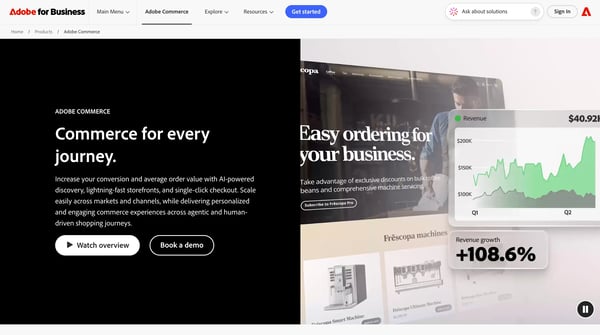
The biggest trade-off I saw was developer dependency, with G2 users citing a steep learning curve, upgrades and maintenance that need experienced developers, and longer implementation timelines. Many of those same G2 users attribute that complexity to the flexibility they value, making it a strong match for teams with dedicated technical resources.
Licensing, development, hosting, extensions, and ongoing maintenance add up, and G2 reviews often describe Adobe Commerce as one of the larger investments in this category. Businesses managing large catalogs and multiple storefronts often find it easier to justify keeping those capabilities than replacing them with separate tools.
Adobe Commerce is best suited for organizations that have outgrown simpler platforms and need a commerce foundation for highly customized operations. For teams where customization, multi-store management, and catalog complexity come first, it earns a spot at the top of the shortlist.
What I like about Adobe Commerce:
- G2 reviewers praise how far they can customize pricing, checkout, and product structures.
- Multi-store management, B2B company accounts, and large-catalog handling are other strengths that G2 users return to.
What G2 users like about Adobe Commerce:
“What I like best about Adobe Commerce is its flexibility, scalability, and powerful customization options. It works especially well for large ecommerce businesses that need advanced features, multi-store support, and deep integrations with other systems.”
– Adobe Commerce review, Balkishan N.
What I dislike about Adobe Commerce:
- Developer dependency is the most common complaint in G2 reviews, with issues spanning upgrades, maintenance, and a steep learning curve, though many tie that depth directly to the platform’s flexibility.
- Licensing, hosting, and development costs get flagged too, yet many G2 users consider the spend worthwhile for large catalogs and multiple storefronts.
What G2 users dislike about Adobe Commerce:
“It’s pretty expensive compared to other options in the marketplace. I need developers to keep it running. It’s a lot to maintain.”
– Adobe Commerce review, Daze M.
8. BigCommerce: Best for growing brands that want built-in features and open APIs
BigCommerce is a hosted e-commerce platform built for businesses that need more advanced commerce functionality without relying heavily on third-party apps. During my evaluation, I found that it is particularly well-suited for growing retailers and B2B businesses that want a platform capable of supporting more complex operations as they scale.
Ease of management came through consistently in the feedback I reviewed. BigCommerce scores 87% for ease of use and 86% for ease of admin on G2, and G2 users describe building and editing a site without coding skills and running products, promotions, inventory, and orders from a central dashboard that stays manageable as catalogs grow.
One theme that appeared repeatedly in G2 reviews was the depth of native functionality. Abandoned cart recovery, a discount engine, gift cards, customer groups, and reporting all get mentioned as things that work without extra apps, which can lower both software costs and the complexity of a big app ecosystem.
Integrations and APIs came up often too. G2 users mention API connections to ERP, SAP, and fulfillment systems, and one describes a built-in ERP connector that a non-developer could set up and modify. I also noticed teams running it headless with a separate front end, which fits the open API approach.
Performance and reliability get strong marks as well. G2 users describe a platform that stays stable through sales, product additions, and pricing changes, with checkout holding up during seasonal spikes, which matters for businesses planning long-term growth.
Bulk product management is another area G2 users appreciate. Several mention recent updates to product listing organization that make bulk edits easier, and one says the platform handles product variants well, which cuts down repetitive editing for catalogs that change often.
I also found BigCommerce’s B2B and pricing tools noteworthy. G2 reviewers describe customer-specific price lists, customer groups, and flexible discount rules, including bulk discounts and percentage or fixed-amount pricing, and several wholesale-focused teams manage those relationships from one platform instead of maintaining separate systems.
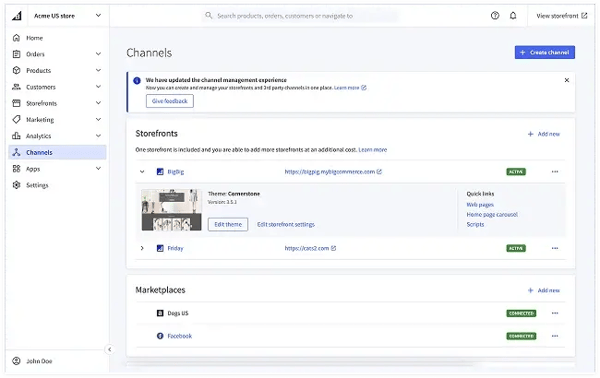
Design flexibility is a trade-off worth weighing, since G2 users say the page builder is basic compared with drag-and-drop website builders and advanced theme changes may need developer support. For teams with technical resources, the Stencil framework offers meaningful customization, which makes that added control worthwhile.
Some out-of-the-box tools and the third-party app ecosystem feel less developed than G2 users expected, which can mean extra apps or custom work. Teams that value the platform’s stability and built-in commerce features often find that a reasonable exchange.
BigCommerce makes the most sense for retailers and B2B sellers that have outgrown basic storefront builders and want more functionality built directly into their commerce platform. It is worth a close look when stability, open APIs, and built-in pricing tools are the priorities, particularly for teams looking to rely on fewer paid apps.
What I like about BigCommerce:
- Building and editing a site without coding, and running everything from one dashboard, earn steady praise from G2 reviewers.
- Built-in features such as abandoned cart recovery and discount tools, plus open APIs for ERP and fulfillment integrations, mean fewer paid apps are needed for G2 users.
What G2 users like about BigCommerce:
“BigCommerce makes it easy to build and edit our website. We started our project to build a new website for our company late last year and we went live within 3 months with a small team. The user experience is amazing, and the performance has been great so far, we haven’t run into any issues.”
– BigCommerce review, Stephanie D.
What I dislike about BigCommerce:
- The page builder feels basic to G2 reviewers, and advanced theme changes often need a developer, but the Stencil framework gives technical teams real control.
- Some out-of-the-box tools and third-party apps feel less mature than G2 users expected, while the built-in commerce features cover a lot of ground without them.
What G2 users dislike about BigCommerce:
“We find ourselves needing a BigCommerce developer more often than I think should be necessary. Some apps require custom integration, especially if your website has any custom development.”
– BigCommerce review, Phil S.
Frequently asked questions about the best e-commerce platforms
Have more questions? Find more answers below.
Q1. Which e-commerce platforms are most trusted by operations leaders, based on user reviews?
Based on G2 reviews, Shopify and Shopify Plus are the platforms operations teams most often describe as dependable for day-to-day order, product, and inventory management. Salesforce B2C Commerce and Salesforce B2B Commerce are trusted by larger organizations that want commerce tied to their CRM and service data, while Adobe Commerce earns trust from teams with the technical resources to run complex catalogs and multiple stores. The right fit depends on the size and technical depth of the operation.
Q2. What are the highest-rated e-commerce platforms for retailers managing 500+ SKUs across channels?
Shopify Plus and Adobe Commerce come up most often for large catalogs in G2 reviews. Shopify Plus is praised for handling high order volumes, and Adobe Commerce for complex product structures, attributes, and pricing rules. BigCommerce users on G2 also highlight bulk product management, which helps when a catalog changes often. WooCommerce can work at this scale, but some G2 reviewers report slowdowns with high SKU counts, so hosting quality and optimization matter.
Q3. Which e-commerce platforms maintain checkout performance during peak traffic spikes?
Shopify Plus is the platform G2 reviewers most often describe as steady during traffic spikes, with several saying checkout stays fast and stable during flash sales and big launches. Shopify, Salesforce B2C Commerce, and BigCommerce users also describe dependable storefront and checkout performance during busy periods. Adobe Commerce can handle peak traffic, particularly on its cloud version, though some G2 reviewers say tuning performance takes experienced developers. For peak-day performance, requesting references from brands with similar traffic is the most reliable check.
Q4. Which e-commerce platforms maintain inventory accuracy during concurrent sales across multiple channels?
Shopify and Shopify Plus are the platforms G2 reviewers most often describe as dependable for tracking stock across multiple fulfillment locations and keeping orders organized. Adobe Commerce users also mention handling inventory across multiple locations. For concurrent multichannel sales, buyers should confirm how each platform reserves inventory across channels. A trial with realistic order volumes, including simultaneous orders for the last unit, shows how it behaves.
Q5. Which e-commerce platforms have built-in fraud prevention that avoids blocking legitimate purchases?
Shopify Plus is the platform G2 reviewers most often tie to automated fraud checks, using Shopify Flow to run fraud checks and tag orders for review. Salesforce B2C Commerce and Adobe Commerce have strong integration options that leave room to add a dedicated fraud tool. Whichever platform is chosen, testing it against real order data helps confirm that legitimate customers aren’t blocked.
Q6. What are the best e-commerce platforms for multi-currency checkout and region-specific payment methods?
Shopify Plus users mention managing multiple currencies, languages, and expansion stores from one backend, and Salesforce B2C Commerce users describe multi-currency selling across brands and markets. Adobe Commerce users also point to multi-store setups with local currency handling. For region-specific payment methods, some G2 reviewers note that local payment options on WooCommerce need additional plugins, so buyers should check whether the methods their customers use are supported natively or through an add-on.
Q7. Which e-commerce platforms sync inventory in real time when sales spike during peak campaigns?
Shopify Plus is the platform G2 reviewers most often describe as stable during high-traffic sales while connecting to the ERP, fulfillment, and 3PL tools where inventory updates flow. Adobe Commerce and Salesforce B2C Commerce users also mention ERP and order management integrations. Because sync speed depends on how the store connects to those systems, load-testing the full chain during a trial confirms inventory updates keep pace with peak order volume.
Q8. What are the best e-commerce platforms for managing complex product variants and regional pricing rules?
Adobe Commerce is the platform G2 reviewers most often credit for complex product structures, configurable options, and tailored pricing logic across multiple stores. Salesforce B2C Commerce users mention managing different storefronts and price lists on one platform, Shopify Plus users mention markets and catalogs that vary by region, and BigCommerce users say it handles product variants well. Heavier pricing setups tend to need developer support, so the platform should match how many rules and regions the business manages.
Q9. How do e-commerce platforms compare for automating order fulfillment without manual SKU lookups?
Shopify Plus is the platform G2 users most often cite for fulfillment automation. Shopify Flow handles order tagging, notifications, and routing that would otherwise take manual effort, and several users mention managing multiple warehouses and fulfillment locations. Adobe Commerce users mention order management and routing, and Salesforce B2C Commerce users describe keeping merchandising and order information in the same environment. To avoid manual SKU lookups, buyers should confirm product identifiers sync with their ERP or fulfillment provider during setup.
Q10. Which e-commerce platforms manage unified inventory across a website, mobile app, and Amazon marketplace?
Shopify Plus users mention multi-channel selling that connects a store to marketplaces such as Amazon, social channels, and international markets, which makes it the most frequently cited option here. Salesforce B2C Commerce users describe delivering experiences across web, mobile, and multiple channels, and Adobe Commerce users describe building headless storefronts on its APIs. Before launch, buyers should confirm that the inventory source of truth syncs with each channel in both directions.
Q11. Which e-commerce platform is best for small businesses and beginners?
Shopify is the best fit for most small businesses and first-time sellers in G2 reviews, because a basic store needs no code, setup is quick, and the app ecosystem adds features as the business grows. Shopify’s ease of setup is rated 90% on G2, its ease of use 91%, and 80% of its reviewers are small businesses. Wix Studio suits beginners who want drag-and-drop design control, with ease of use rated 92% on G2. WooCommerce works well if the site already runs on WordPress. Beginners should start with the platform that matches their technical comfort and expected catalog size.
Q12. Which e-commerce platform is the cheapest?
WooCommerce has the lowest entry cost because the core plugin is free, but hosting ($25–$350 a month, per WooCommerce) and extensions ($29–$299 a year each) add to the total. Among hosted platforms, Wix Studio’s Standard plan starts at $27 a month for basic e-commerce, per G2’s Wix Studio pricing page. Shopify Basic and BigCommerce Core are each $29 a month on annual billing ($39 billed monthly). Shopify Starter costs $5 a month but is built for selling through social media and links, not running a full storefront. Shopify Plus (from $2,300 a month on a 3-year term), Salesforce B2C Commerce, Salesforce B2B Commerce, and Adobe Commerce are priced for larger organizations, and the Salesforce and Adobe products are priced on request.
Q13. Which e-commerce platforms are best for enterprise businesses?
Salesforce B2C Commerce, Adobe Commerce, and Shopify Plus are the main enterprise options in G2 reviews. Salesforce B2C Commerce suits enterprise brands built around the Salesforce stack, and 35% of its G2 reviewers are enterprise. Adobe Commerce fits teams with developers who need custom pricing, checkout, and catalog logic across multiple stores. Shopify Plus fits high-volume brands that need reliability during traffic spikes, starting at $2,300 a month on a 3-year term. For enterprise B2B selling, Salesforce B2B Commerce is the match, with 34% of its G2 reviewers at enterprise companies.
Q14. What are the most popular e-commerce platforms?
By G2 review volume, Shopify is the most popular e-commerce platform. As of October 2026 it has 5,146 reviews and a 4.4 rating, and it holds the top G2 score of 99 in the Fall 2026 Grid® Report. WooCommerce (1,283 reviews) and Shopify Plus (873) follow, then Salesforce B2C Commerce (704), Adobe Commerce (623), BigCommerce (582), Salesforce B2B Commerce (369), and Wix Studio (83). Popularity doesn’t equal fit, so the choice should rest on catalog size and technical resources.
Q15. Which e-commerce platforms are best for headless commerce?
Salesforce B2C Commerce, Adobe Commerce, and BigCommerce are the strongest headless options in G2 reviews. Technical G2 users describe decoupling the storefront from the backend on Salesforce B2C Commerce, building headless or composable storefronts on Adobe Commerce’s APIs, and running BigCommerce with a separate front end. Shopify Plus also supports headless builds, and Shopify says its React-based headless stack carries no extra cost. Headless setups need developer time, so team capacity should factor into the decision.
Q16. Which e-commerce platforms are best for SEO?
Wix Studio and WooCommerce are the two platforms G2 reviewers most often connect to SEO. Wix Studio reviewers highlight built-in SEO tools and Google Search Console integration. WooCommerce runs inside WordPress, so content and products live in one dashboard, and reviewers mention connecting SEO and analytics plugins. Advanced SEO can require paid WooCommerce extensions, so that cost belongs in the budget.
Q17. What is the best e-commerce platform for full control?
According to G2 reviews, WooCommerce and Adobe Commerce give store owners the most control. WooCommerce is open source and sits on the owner’s own WordPress hosting, so the owner controls the code, design, and data. Adobe Commerce offers deep customization of checkout, pricing, and catalog logic. Both ask more of a technical team than hosted platforms, so developer time and ongoing maintenance should be planned for.
Q18. Which e-commerce platform is best for B2B?
Salesforce B2B Commerce is the best match for sellers that want account-based catalogs, contract pricing, and ordering tied directly to their CRM, according to G2 reviewers. Adobe Commerce supports company accounts, custom pricing tiers, and quote management. Shopify Plus offers wholesale tools such as price lists and dedicated B2B storefronts, and BigCommerce users mention customer groups and price lists. The right choice depends on how complex the pricing and approval workflows are.
Q19. Which e-commerce platform is best for WordPress?
WooCommerce is the natural choice for WordPress sites because it runs as a plugin inside the same dashboard used to manage content. G2 reviewers highlight quick installation, a large plugin ecosystem, and the ability to manage content and commerce in one place. Larger stores should plan for hosting quality and performance optimization.
Q20. How do I migrate to a new e-commerce platform?
A migration starts with listing the data to move, such as products, customers, orders, and redirects, then checking which import tools and migration apps the new platform offers. G2 reviews describe moving from WordPress to Shopify using import sheets and exporting basic data, and from Magento to WooCommerce, with orders and customer accounts the harder data to migrate. Running a test migration with a small catalog first and scheduling the switch outside the busiest sales period reduces risk.
Choose where your business is going next
As I evaluated these platforms, one thing became clear: the best choice isn’t always the platform with the most features. It’s the one that can support your business as it grows. Migrating e-commerce software later can be expensive and disruptive, which makes long-term fit just as important as immediate needs.
Shopify and Wix Studio are strong options for teams that want speed and simplicity, while Shopify Plus gives high-volume brands more reliability and checkout control. WooCommerce offers more ownership and flexibility through WordPress, and BigCommerce balances built-in functionality with open APIs. Salesforce B2C Commerce, Salesforce B2B Commerce, and Adobe Commerce are better suited to organizations managing more complex commerce operations and with dedicated technical or implementation resources, which is worth asking e-commerce providers about early on.
If you’re still comparing options, focus on your growth plans, technical resources, and operational requirements rather than feature lists alone.
And once you’ve chosen a platform, I recommend exploring shopping cart software to learn how different checkout experiences can impact conversions and customer satisfaction.

💸 Earn Instantly With This Task
No fees, no waiting — your earnings could be 1 click away.
Start Earning
