


After watching an HR team juggle onboarding paperwork, payroll runs, performance reviews, and compliance requirements across a single workweek, I came away with one clear takeaway: the software behind those processes matters enormously. The best human capital management (HCM) tools, including Gusto, Paycom, Rippling, BambooHR, UKG Ready, Deel HR, and Paylocity, can turn those moving parts into a coordinated system. A poorly chosen platform, on the other hand, creates bottlenecks at every stage.
To put this list together, I evaluated G2 reviews for 20+ human capital management (HCM) software platforms on the 2026 G2 Grid Report. Rather than relying solely on feature checklists, I focused on verified reviewer patterns: what users consistently praise, where they run into limitations, and how each platform performs across different team sizes and use cases.
The importance of getting this decision right is reflected in the market itself. The global human capital management market is projected to grow to $76.22 billion by 2034, representing a 9.4% CAGR.
My goal was to identify the tools that genuinely stand out in their category, not just the ones with the longest feature lists, but the ones that G2 reviewers return to, recommend, and rely on for real HR operations. Here is what I found.
7 best HCM software in 2026: My top picks
- Gusto: Best for small business payroll and HR simplicity
For intuitive payroll, automated tax filing, and benefits administration built for growing teams. (Pricing available on request) - Paycom: Best for employee-driven HR self-service
For empowering employees to manage their own data, reducing HR administrative burden. (Pricing available on request) - Rippling: Best for global HR operations and seamless integrations
For teams that need HR, IT, and payroll unified in one platform at scale. (Pricing available on request) - BambooHR: Best for PTO tracking and organizational management
For intuitive data management, onboarding workflows, and time-off visibility. (Pricing available on request) - UKG Ready: Best for process automation and employee self-service
For customizable dashboards, time and attendance automation, and modular workforce management. (Pricing available on request) - Deel HR: Best for global contractor management and international payments
For managing distributed workforces across 150+ countries with built-in compliance. (Pricing available on request) - Paylocity: Best for mid-market HR teams needing an all-in-one suite
For payroll, benefits, onboarding, performance, and community tools on a single platform. (Pricing available on request)
According to G2 Summer 2026 Grid Reports, these HCM software tools are top-rated in their category. I’ve also noted their pricing availability to make comparisons easier for you.
7 best HCM software I recommend in 2026
Managing a modern workforce requires much more than processing payroll. Today’s HR teams need software that can support recruiting, onboarding, employee management, payroll, benefits administration, performance reviews, workforce planning, compliance, and employee engagement from a single system.
The best HCM software helps bring these functions together, giving organizations a centralized platform to manage the entire employee lifecycle while reducing administrative overhead and improving workforce visibility. Whether you’re a growing business looking for an HR software solution, a mid-market company replacing disconnected systems, or an enterprise seeking advanced workforce management capabilities, choosing the right platform can have a significant impact on efficiency and employee experience.
The seven tools on this list stood out because they consistently earned strong feedback from verified G2 reviewers across core areas such as payroll management, talent management, reporting, automation, ease of use, and customer support. I also considered G2 Grid Report performance, market presence, and return-on-investment metrics when evaluating each platform.
Collectively, these HCM platforms demonstrate strong business value, with an average 79% user adoption rate and an estimated 13-month ROI payback period, according to G2 Data. Those metrics suggest that organizations aren’t just purchasing these tools; they’re actively using them and seeing measurable operational benefits.
If you’re comparing HCM software, HR management systems, payroll platforms, or workforce management tools, these are the solutions that stood out most in my research.
How did I find and evaluate the best HCM tools?
Choosing the best HCM tools takes more than comparing feature lists. I started with G2 Grid Reports to identify top-rated platforms based on customer satisfaction, market presence, and user adoption.
From there, I analyzed verified G2 reviews to understand how each tool performs in real HR workflows, including payroll, onboarding, reporting, compliance, employee self-service, automation, and support. I also looked for repeated pain points to understand where each platform may fall short.
Since I couldn’t personally test every tool, I supplemented the review analysis with insights from HR and operations professionals, then cross-checked their feedback against G2 reviewer patterns. The screenshots in this article may include images from G2 vendor pages and publicly available product materials.
What makes the best human capital management (HCM) software? My criteria
Not every HCM platform solves the same problems. Some excel at payroll and compliance, while others focus on talent management, workforce planning, or global hiring. To evaluate the best HCM tools, I looked beyond feature lists and focused on the capabilities that consistently matter most to HR teams and business leaders.
Not every HCM platform solves the same problems. Some excel at payroll and compliance, while others focus on talent management, workforce planning, or global hiring. To evaluate the best HCM tools, I looked beyond feature lists and focused on the capabilities that consistently matter most to HR teams and business leaders.
- Core HR and employee data management: A strong HCM platform should serve as a centralized system for employee records, organizational structures, benefits information, and workforce data.
- Payroll, benefits, and compliance management: The best tools simplify payroll processing, benefits administration, tax reporting, and labor law compliance while reducing manual work and errors.
- Talent acquisition and onboarding: Modern HCM software should support recruiting, applicant tracking, digital onboarding, and employee provisioning to help teams hire and ramp talent efficiently.
- Performance and talent management: I looked for platforms that support goal setting, performance reviews, employee development, succession planning, and career growth initiatives.
- Workforce analytics and reporting: HR leaders need visibility into headcount, turnover, compensation, hiring performance, and workforce trends. Robust reporting and dashboards were a key consideration.
- Employee self-service and user experience: Employees should be able to access pay information, benefits, time-off requests, and personal records without relying heavily on HR administrators.
- Automation and workflow management: The best platforms reduce repetitive administrative work through automated approvals, onboarding workflows, document management, and HR process orchestration.
- AI-powered HR capabilities: AI is becoming a major differentiator in HCM software. I gave additional consideration to platforms that offer features such as AI-assisted recruiting, candidate matching, job description generation, skills intelligence, workforce forecasting, employee sentiment analysis, performance insights, and conversational assistants that help employees and HR teams find information faster.
- Integrations and scalability: Finally, I considered how well each platform integrates with payroll providers, accounting systems, productivity tools, learning platforms, and other business applications, along with its ability to scale as organizations grow.
Here is the list of genuine reviews from the HCM software category page. To be included in this category, software must:
- Be present in three of the four categories: core HR, corporate LMS, performance management, or any recruiting software.
- Offer a series of modules that can be purchased separately
- Include multiple modules that integrate to create a unified system for HR management.
- Provide functionalities across more than one HR software category destination.
*This data was pulled from G2 in 2026. Some reviews may have been edited for clarity.
1. Gusto: Best for small business payroll and HR simplicity
Gusto is a payroll and HR platform built to handle the full employment lifecycle for small and mid-sized businesses, from onboarding and benefits enrollment to automated tax filings and contractor payments. According to G2 Data, 93% of reviewers would recommend Gusto, and the platform earns a 95% ease-of-use score, reflecting how consistently users find it approachable regardless of their HR background.
The payroll experience is the foundation that everything else builds on, and G2 reviewers return to it constantly. Users highlight how smoothly multi-state payroll runs, how accurately taxes get calculated and filed, and how little manual intervention is needed once the system is configured. For small business owners who previously handled payroll manually or through spreadsheets, the time savings are significant. What stands out in the reviews is not just that payroll works, but that it keeps working reliably across multiple pay cycles without requiring constant oversight.
Automated tax compliance draws consistent praise from HR teams dealing with multi-state or complex employee arrangements. Reviewers note that Gusto handles federal, state, and local tax filings automatically, reducing the administrative burden that typically accompanies payroll in regulated environments. According to G2 Data, 84% of Gusto’s user base comes from small businesses with 50 or fewer employees, which reflects how well-tuned the platform’s compliance automation is for teams that do not have dedicated tax specialists on staff.
Onboarding workflows earn strong marks from reviewers who describe a system that guides new hires through document completion, direct deposit setup, and benefits enrollment without requiring heavy HR involvement. The self-service nature of the process is frequently called out: employees complete most of the setup on their own, which frees HR teams to focus on higher-value work rather than chasing paperwork. Reviewers managing multiple new hires per month describe the workflow as one of the most reliable parts of the platform.
Benefits administration is another recurring positive in G2 feedback. Reviewers appreciate how Gusto surfaces health, dental, and vision plan options in a clear, comparative format during open enrollment, and how it keeps deductions synced with payroll automatically. For small teams navigating the complexity of group benefits for the first time, this integration removes a layer of coordination that would otherwise require a third-party broker or manual reconciliation each pay period.
Employee self-service functionality reduces the day-to-day volume of HR inquiries in a meaningful way. From checking pay stubs and updating direct deposit information to submitting time-off requests and reviewing benefits details, reviewers describe employees being able to handle most routine tasks independently through the app or portal. This pattern shows up repeatedly in reviews from HR administrators who say the platform has meaningfully reduced the number of questions they field from employees each week.
The integration ecosystem also earns consistent positive mentions. Reviewers describe connecting Gusto to accounting tools like QuickBooks and Xero, time-tracking software, and other HR systems without significant friction. G2 Data shows Gusto’s estimated ROI payback period at just 7 months, one of the fastest in the category, which reviewers corroborate by describing how quickly the platform recouped setup investment through time savings on payroll and compliance tasks.
Customer support response times are an area where reviews diverge. While many users describe helpful, knowledgeable interactions, a significant number of reviewers report that reaching a knowledgeable specialist can take longer than expected. For time-sensitive issues with regulatory deadlines, the reliance on chat and email rather than direct phone access to senior support has been a source of friction. Teams that anticipate needing hands-on support for compliance issues should factor this into their evaluation.
The mobile app experience is functional but limited compared to the full desktop platform. Reviewers note that certain tasks, particularly admin-side functions like editing employee records, managing time-off requests, or accessing detailed reports, work better on a browser than through the app. For managers who need to perform routine HR actions from their phones, the gap between mobile and desktop functionality can require an extra step. That said, for employees checking pay stubs or requesting time off, the mobile experience is generally well-regarded.
For growing businesses that want payroll, taxes, onboarding, and benefits in one place without requiring a dedicated HR team to operate it, Gusto remains one of the most trusted options in the small business HCM category.
What I like about Gusto:
- I appreciate how users consistently describe payroll as smooth and reliable, taxes file automatically, multi-state setups work without manual intervention, and the whole process becomes something teams stop having to actively manage.
- The onboarding workflow stands out across reviews for how much setup it puts in the employee’s hands, freeing HR from chasing paperwork and letting new hires get themselves ready without extensive back-and-forth.
What G2 users like about Gusto:
“Gusto is by far the most user-friendly HR/Payroll platform I have ever used. I love the fact that I am able to split my payroll to multiple accounts, including the Gusto bank/debit account. Additionally, I like the payroll advance option it gives you to help you out between pay periods but do wish it allowed for more of an advance at first – I was limited to just $50 to help until my first paycheck, which unfortunately was 3 full weeks and it would have been exceedingly more helpful if I could have advanced at least $100.”
– Gusto review, Wayne L.
What I dislike about Gusto:
- Gusto’s core payroll and compliance tools are genuinely strong, but getting specialized support for complex payroll or tax issues can sometimes take longer than expected. For routine questions, however, the help resources and support team generally meet users’ needs.
- The platform handles admin tasks beautifully on desktop, but some management functions are less robust in the mobile app. Employees can easily access pay and time-off features on mobile, while managers typically rely on the browser version for more advanced tasks.
What G2 users dislike about Gusto:
“So far, I’ve been pleased with Gusto overall. What I don’t like is the pricing model that charges per staff member and/or for any additional contractor added to the platform. As you add people, the cost keeps going up, and as a nonprofit organization, that’s difficult to sustain in the long term. I’d love for all of my external vendors and contractors to track their time through the platform, but paying an additional $16 per person isn’t worth it for us right now.”
– Gusto review, Monique R.
2. Paycom: Best for employee-driven HR self-service
Paycom is a comprehensive HCM platform that brings payroll, talent management, time and attendance, benefits, and HR data into a single employee-facing system. Based on my evaluation of G2 reviews, it is a platform where the design philosophy, putting employees in charge of their own data, creates tangible operational benefits for HR teams over time.
The self-service model embedded in Paycom’s design is something reviewers notice and value almost immediately. Rather than routing routine requests through HR, the platform puts employees in direct control of their own records, allowing them to update direct deposit details, approve their own timecards, enroll in benefits, and request time off without an intermediary. What I found across the reviews is that this shift in ownership does not just reduce HR’s workload; it also places responsibility for accuracy closer to the source, which reviewers describe as a meaningful improvement in data quality over time.
Payroll accuracy and the employee-driven check approval process are among the most consistently praised features I came across. Reviewers describe how Paycom’s self-service payroll model lets employees review and approve their own checks before payroll is finalized, surfacing errors earlier in the cycle rather than after the fact. According to G2 Data, 90% of Paycom reviewers would recommend the platform, and 75% of its user base comes from mid-market organizations, which explains why this accountability-focused design resonates strongly in environments where HR teams can’t manually audit every paycheck.
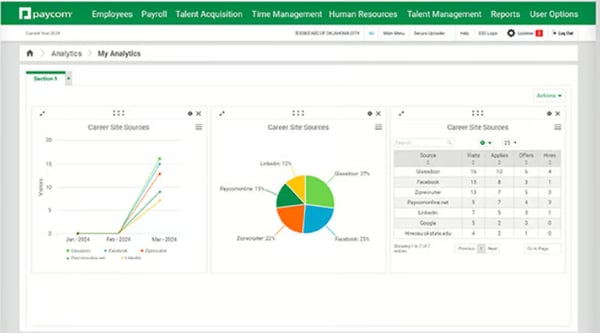
Time and attendance management is a core strength that comes through clearly in the review data. What I see users highlighting most is the reliability of the time clock across formats, mobile, kiosk, and web, and how cleanly that data flows into payroll without requiring manual transfers. Managers appreciate real-time timecard visibility, the ability to flag missed punches, and the elimination of the reconciliation step that typically sits between time tracking and payroll processing.
Talent acquisition and onboarding capabilities receive positive attention from HR teams managing recurring hiring. From what I found reviewing feedback from mid-market users, the structured applicant tracking flow, moving candidates from application to offer to onboarding checklist within the same system, removes the need for a separate ATS. New hire onboarding, from document completion to direct deposit setup to required training, is described as consistent, largely self-guided, and significantly lighter on HR coordination than comparable platforms.
The unified platform design is a recurring theme in the most enthusiastic reviews I came across. Reviewers describe the value of keeping payroll, compliance, time, HR data, and benefits linked in one system rather than reconciling across separate tools. G2 Data shows Paycom’s estimated ROI payback period at 12 months, and the consolidation of previously siloed systems is consistently cited as the primary driver of that return, particularly for organizations that previously managed these functions across multiple vendors.
Paycom covers a wide range of HR functions, and that breadth comes with a learning curve. New users typically need a few weeks to get fully comfortable with where things are housed across the platform, especially those transitioning from simpler tools. Planning for structured onboarding time upfront, rather than learning on the fly, makes the adjustment period significantly smoother for both HR teams and employees.
Reviewers note that pages sometimes take longer than expected to load, which creates friction when timing matters, early-morning clock-ins or last-minute payroll corrections being the most common examples cited. The platform functions reliably for most daily tasks, and most reviewers describe this as a manageable inconvenience, but it is a pattern worth noting in environments where system responsiveness affects punctuality or payroll deadlines.
Paycom is a strong fit for mid-market organizations that want a single HR system covering the full employment lifecycle, with particular depth in payroll accuracy, time management, and the kind of employee self-service model that systematically reduces HR’s administrative burden over time.
What I like about Paycom:
- I appreciate how the employee-driven check approval model shifts accuracy responsibility closer to the source; reviewers describe fewer post-payroll corrections and a cleaner audit trail as a direct result of this design.
- I noticed reviewers consistently calling out the unified platform as the feature that delivers the most long-term value.
What G2 users like about Paycom:
“Paycom makes it easy to view my paychecks, tax documents, and work information all in one place. I like being able to quickly check my hours, earnings, and direct deposit details without having to contact payroll. The mobile app is convenient and helps me stay organized while working freelance and event-based jobs with Rhino Staging.”
– Paycom review, Nakeithia B.
What I dislike about Paycom:
- Paycom’s breadth is a genuine strength, but the navigation takes more getting used to than reviewers expect, finding specific features requires exploration in the first few weeks, though most users describe growing comfortable with the layout over time.
- Page load times run slower during peak periods, which reviewers notice most around clock-ins and payroll deadlines, a manageable inconvenience for most teams, but worth noting for time-sensitive environments.
What G2 users dislike about Paycom:
“The biggest issue I have found with Paycom is the Time Clock application. While trying to run a Time Clock kiosk on an iPad, it can be difficult to setup based on how Paycom requires a link to authenticate, then the active link changes. This makes it cumbersome when trying to use the kiosk in single app mode.”
– Paycom review, Jeremy H.
Build accurate and timely payrolls with the best payroll software to give a consistent salary experience across your workforce.
3. Rippling: Best for global HR operations and seamless integrations
Rippling is an all-in-one workforce management platform that unifies HR, payroll, IT, compliance, and benefits administration into a single interconnected system. From what I found while evaluating G2 reviews, it earns some of the highest satisfaction scores in the HCM category, and the patterns behind those scores are consistent across team sizes and use cases.
The interface experience is something I see reviewers highlight with genuine enthusiasm and specific detail. What stands out across the feedback is that users across HR and non-HR roles describe navigation as clean and logical, payroll, onboarding, benefits, and time-off features are laid out in ways that do not require extensive training to find. For employees using the platform to check pay stubs or complete onboarding tasks, reviewers frequently contrast Rippling’s usability with previous HR tools they have used, describing it as a meaningful step forward in accessibility.
Onboarding speed and structure earn strong marks from every segment of the review data I analyzed. Reviewers describe a system that walks new hires through device setup, benefits enrollment, document signing, payroll enrollment, and app provisioning in a coordinated sequence, rather than scattered steps across separate systems. According to G2 Data, 95% of Rippling reviewers would recommend the platform, and HR teams managing frequent hiring consistently link this to onboarding efficiency as one of the primary drivers of that trust.
Payroll processing draws consistent praise for accuracy and real-time sync. From what I see in the reviews, changes to salary, benefits, and time-off data are automatically reflected in payroll, eliminating the reconciliation step that typically adds time and error risk to each payroll cycle. Multi-state and international payroll users note that Rippling handles jurisdictional differences reliably, a specific capability that matters for growing teams managing distributed workforces across multiple locations.
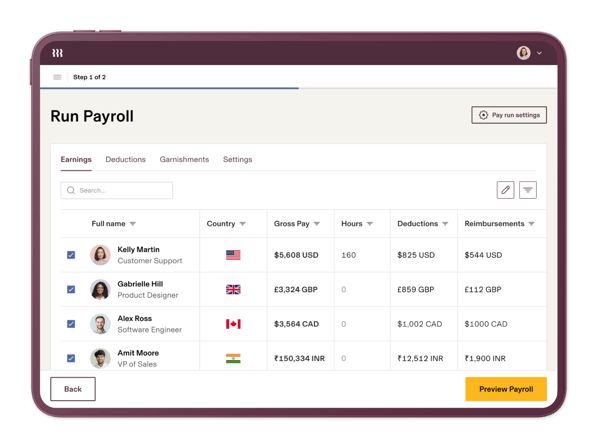
The integration with third-party tools is a differentiator I found reviewers returning to repeatedly. Rippling connects with a wide range of SaaS applications, from Slack and Google Workspace to tools specific to engineering, finance, and operations teams. G2 Data shows that 62% of Rippling’s reviewer base comes from mid-market organizations, and 96% of reviewers rate it highly on ease of use, a combination that illustrates both the platform’s scalability and how accessible it remains even as configuration complexity grows.
Benefits administration consistency was something I noticed as a strength, even among reviewers who were otherwise neutral on the platform. Open enrollment, plan comparisons, dependent management, and deduction syncing are all handled within the platform, and for HR teams managing benefits across a distributed workforce, the ability to administer the full benefits process without a separate tool is a practical time-saver that reviewers describe with specificity.
Initial setup and configuration is the area where I found the most consistent friction in the reviews. Rippling is highly customizable, which is a genuine asset for complex organizations, but setting up permissions, workflows, automations, and integrations from scratch requires a real investment of time and attention. Reviewers also mention that a smooth experience once the system is running, but smaller teams without dedicated IT or HR administrators should explicitly build configuration time into the implementation plan.
While Rippling stores significant HR and payroll data, its reporting flexibility has not fully kept pace with the depth of that data. Pulling together data from different areas of the platform into a single, tailored view requires more effort than the system’s overall sophistication implies. Teams with standard reporting needs will find the pre-built options enough, but those with more complex analytics requirements should evaluate this capability closely during their trial period.
For teams that want a unified platform covering HR, IT, payroll, and integrations in one place, and are willing to invest time in a thorough setup, Rippling consistently earns its reputation as one of the most capable HCM platforms in the market.
What I like about Rippling:
- I found the onboarding workflow to be one of the most coordinated in the category across my review analysis.
- Reviewers with complex tech stacks consistently describe Rippling as the platform that connects most reliably with the tools their teams already use.
What G2 users like about Rippling:
“Experience that I enjoy is the tool to manage the spend management module in Rippling. It connects directly to employee records, making a big operational difference for us. When someone changes roles, their spend limit and approval routing update automatically, without anyone needing to email finance for manual changes. This feature saves me time and allows me to focus on more important tasks as I don’t have to remember to make these changes manually anymore.”
– Rippling review, Imadah A.
What I dislike about Rippling:
- While customization depth is a real strength, initial setup, configuring workflows, permissions, and automations takes more time than teams typically expect; building that timeline upfront makes the difference between a smooth launch and a rushed one.
- Rippling centralizes a lot of valuable HR and payroll data, but the reporting tools lack the flexibility needed for cross-module analysis. Standard pre-built reports cover routine needs well, while more complex analytics requirements often need workarounds.
What G2 users dislike about Rippling:
“One area that could be improved is the initial setup and configuration process. Rippling is highly customizable, which is great in the long run, but it can feel a bit overwhelming when you’re first setting up workflows, permissions, and automations. Some advanced features also have a learning curve, especially if you’re trying to optimize processes across multiple teams.”
– Rippling review, Abhishek S.
Build a comprehensive, data-driven workforce strategy by understanding real-time metrics using the best HR analytics software and plan successful, data-backed initiatives.
4. BambooHR: Best for PTO tracking and organizational management
BambooHR is an HRMS and HCM platform that centralizes employee records, onboarding, PTO management, performance reviews, and organizational data in one place. From my evaluation of G2 reviews, it stands out for the breadth of positive feedback it earns from non-HR employees, a sign that the platform succeeds at usability beyond just the HR team.
What I consistently see in the reviews is praise for the interface’s intuitive design across different roles. Users across HR manager, administrator, and team member levels describe being able to navigate to time-off requests, org charts, team member records, and onboarding tasks without training or significant orientation. This ease of access is especially valued at companies where not everyone using the platform has an HR background, and it comes up repeatedly as the primary reason teams recommend BambooHR to peers.
Automated onboarding and offboarding workflows are a recurring highlight that I found across the full spectrum of review data. Reviewers describe a system that handles document e-signatures, task checklists, new hire notifications, and equipment assignments in a structured sequence without requiring HR to manage each step manually.
The PTO tracking functionality earns equally strong marks; managers and employees describe clear visibility into accruals, balances, and approval status, with customizable policies that handle different accrual rules without workarounds. According to G2 Data, 89% of BambooHR reviewers would recommend the platform, and 66% of its user base comes from mid-market organizations, a distribution that reflects how well it scales alongside a growing company.
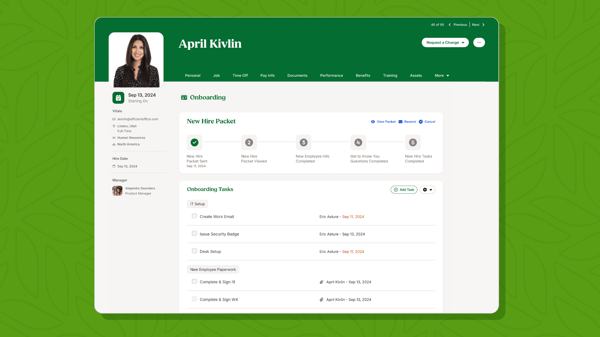
Reporting and dashboard tools are something I see HR leaders highlight when describing what helps them communicate with leadership. Reviewers describe pulling headcount, turnover, and performance data quickly and sharing it in a format that does not require additional cleanup. The standardized report formats are cited as particularly useful for teams running routine HR reporting cycles who want consistent outputs without building custom queries each time.
The performance management module is appreciated by reviewers for being integrated into the same environment as payroll and onboarding, rather than operating as a disconnected tool. From what I found in the reviews, goal tracking, review cycles, and continuous feedback all run alongside the employee records teams use for PTO and onboarding, keeping performance data in context and reducing the need to reconcile information across platforms. G2 Data shows BambooHR’s estimated ROI payback period at 11 months, with performance and onboarding efficiency consistently cited as the primary drivers of that return.
The organizational chart and people directory features receive consistent positive feedback from managers navigating growing team structures. What I noticed across reviews from managers at fast-growing companies is how specifically they describe the org chart’s value during restructuring, rapid hiring, or leadership changes. Being able to see reporting relationships, departments, and contact information in a single, easy-to-update view is a practical advantage that compounds over time.
What I found across the feedback is that the reporting customization has limits, which reviewers encounter when they need to go deeper than the standard templates allow. For teams whose reporting needs stay within standard HR metrics, this is rarely an issue, but those with specialized analytics requirements should evaluate reporting depth during a trial period.
BambooHR covers core HR needs reliably, but some of its more advanced capabilities, deeper integrations, and expanded reporting options are not part of the base package. Organizations that grow into more complex HR requirements may find the platform’s out-of-the-box scope more limited than expected. Reviewing what is included at each tier before committing helps ensure the platform aligns with the team’s actual needs rather than discovering gaps mid-implementation.
BambooHR earns its position in this list through a combination of usability, onboarding reliability, and PTO management precision that HR teams at growing companies consistently rely on, particularly when the goal is centralized HR data without significant technical overhead.
What I like about BambooHR:
- I found the onboarding workflow genuinely well-executed; it puts setup in new hires’ hands through a structured sequence that reduces HR coordination and makes a strong first impression from day one.
- Reviewers describe managers and employees seeing balances, accruals, and approval status clearly without navigating multiple screens.
What G2 users like about BambooHR:
“I like having the vacation days tracker and being able to use the calculator to determine how many days off I will have accrued and used by the end of the year or other time. It is also helpful to have a calendar with my team’s time off. I don’t have to check in with everyone; I can just look at the calendar and request time off.”
– BambooHR review, Osama A.
What I dislike about BambooHR:
- BambooHR’s standard reports handle routine HR metrics well, but deeper customization, non-standard filters, or cross-module data tends to require a spreadsheet export; teams with frequent custom reporting needs should evaluate this closely.
- Several advanced features and integrations sit behind higher-tier plans rather than being included in the base subscription, worth clarifying upfront to avoid surprises during implementation.
What G2 users dislike about BambooHR:
“One thing I believe could be improved is the notification system. The platform could do a better job of notifying users about important events and personal updates, such as birthdays, salary adjustments, or when new people join the team. Having more proactive alerts and reminders would make the experience even more engaging and help teams stay more connected.”
– BambooHR review, Larissa F.
5. UKG Ready: Best for process automation and employee self-service
UKG Ready is a cloud-based HCM solution that centralizes payroll, time and attendance, leave management, and workforce scheduling under a single platform. From my evaluation of G2 reviews, it earns its strongest marks from organizations managing complex workforce structures at scale, where the depth of its time and attendance automation directly translates to operational efficiency.
Time and attendance management is where I see reviewers express the most consistent and specific satisfaction. What comes through across the feedback is that clocking in, requesting time off, reviewing schedules, and approving timesheets all operate within the same system, eliminating the data-transfer friction that typically comes from managing these functions across separate tools.
Managers describe real-time visibility into workforce attendance as one of the features that most directly simplifies scheduling and payroll preparation. According to G2 Data, 32% of its reviewer base comes from enterprise organizations with over 1,000 employees, a segment share that reflects the platform’s capacity to handle workforce management at a significant scale.
The mobile app is something I found earning positive marks specifically from employees in distributed or field-based roles. Reviewers describe the app as reliable for clocking in and out, reviewing schedules, submitting time-off requests, and checking pay information in real time. For workforces where mobile HR access is a practical requirement rather than a convenience, reviewers in those environments consistently describe UKG Ready’s app as meeting that need without requiring them to default to a desktop.
Dashboard configuration draws consistent praise from HR administrators who value flexibility in how they surface key metrics. From what I gathered reviewing the data, users describe customizing widgets to display pay dates, hours worked, PTO balances, and scheduled shifts in formats that match how different team members use the system day-to-day. The configurability of the home screen comes up as a quality-of-life feature that makes the platform feel personalized compared to less flexible HR systems.
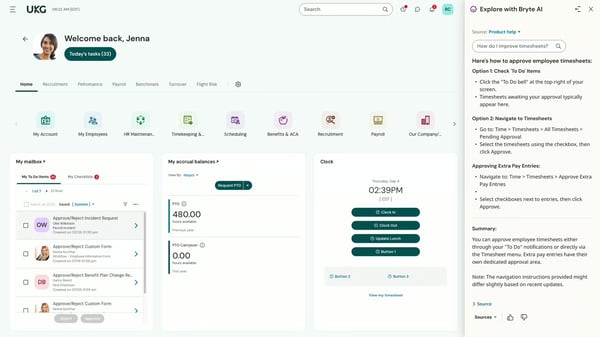
The modular structure of UKG Ready is something I see reviewers highlighting as a long-term value driver rather than an immediate feature. Organizations describe starting with core HR and payroll and adding capabilities, talent acquisition, performance management, advanced scheduling, as the business grows, without having to switch platforms. G2 Data shows UKG Ready’s estimated ROI payback period at 14 months, and reviewers link this directly to the modular approach: each addition builds on data and workflows already established in the system rather than requiring parallel setup.
Payroll processing reliability is a consistent theme in the positive reviews I analyzed. Reviewers describe the payroll cycle, from timesheet finalization to distribution, as structured and dependable, with compliance handling built into the workflow. For organizations managing payroll across multiple departments, locations, or pay structures, the platform’s ability to handle that complexity without introducing manual checkpoints is a practical advantage that HR teams highlight repeatedly.
UKG Ready effectively covers a broad range of HR functions, but the user interface is an area reviewers flagged consistently enough to surface clearly. Once teams become familiar with the layout, day-to-day use becomes predictable, but organizations onboarding large employee groups should plan for adequate orientation time, particularly for employees who use the system independently for timekeeping and self-service tasks.
Custom report building is less flexible than reviewers anticipate, given the volume of data the platform stores. From the feedback I found, users who need to filter data in non-standard ways or combine fields from different sections report that the process requires more effort than expected, and several supplement this with data exports. The standard report library handles routine operational use cases reliably, but teams with frequent custom reporting requirements should evaluate this depth during a trial period.
UKG Ready is a strong choice for mid-market and enterprise organizations that need a scalable, modular HCM platform with particular strength in time and attendance automation, and that are willing to invest in thorough user onboarding to get the most out of its configuration depth.
What I like about UKG Ready:
- I noticed reviewers describing the time and attendance system as the feature that most directly reduces day-to-day HR coordination, clocking, scheduling, and payroll prep, staying connected in one place.
- I appreciate the modular design philosophy, it lets organizations build the platform incrementally as their needs evolve, rather than committing to full-suite complexity from day one.
What G2 users like about UKG Ready:
“Ease of use, it is very fast to answer.”
– UKG Ready review, Thomas G.
What I dislike about UKG Ready:
- UKG Ready is feature-rich and reliable, but the user interface shows its age, and certain features require more clicks to reach than users expect, though familiarity with the system makes day-to-day use more predictable over time.
- The pre-built reports cover standard needs well, but custom reporting with non-standard filters takes more effort than the platform’s data depth implies; teams with frequent custom analytics needs often supplement with exports.
What G2 users dislike about UKG Ready:
“This review site is difficult to read. It’s off-center, and I have to guess at the wording.”
– UKG Ready review, Stephanie E.
6. Deel HR: Best for global contractor management and international payments
Deel HR is a global workforce management platform designed to handle international contractor payments, Employer of Record (EOR) services, compliance, onboarding, and HR operations across more than 150 countries. Based on my evaluation of G2 reviews, it is the platform that consistently earns the strongest sentiment from organizations managing cross-border teams, where compliance complexity and payment reliability are non-negotiable.
Multi-currency payment processing is the feature I see drawing the most consistent enthusiasm across reviews. What stands out is not just that payments work, but that they work reliably across regions where currency conversion, local banking requirements, and payment routing have historically required significant manual coordination. Reviewers managing international contractors describe the variety of withdrawal methods, bank transfer, PayPal, Wise, and Revolut, as a practical advantage that gives distributed teams flexibility without creating additional overhead for HR or finance.
Automated contract generation and localized compliance handling are capabilities I found reviewers describing as genuine time-savers at scale. Rather than manually researching labor laws in each country where a contractor or employee is being onboarded, Deel HR surfaces jurisdiction-appropriate contract templates and compliance requirements within the platform.
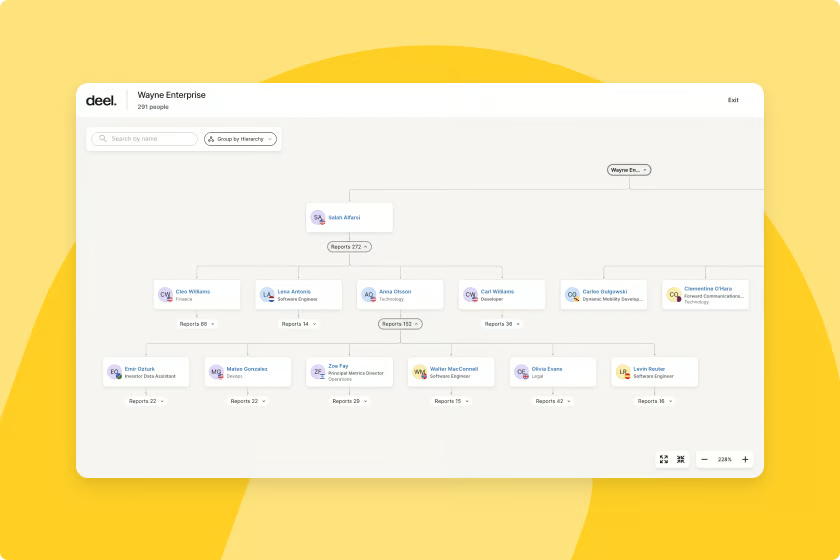
Reviewers who manage hiring across multiple countries describe this as one of the platform’s most practical differentiators. The alternative is significant legal research time or per-country outside counsel, both of which represent meaningful cost and effort savings when handled in-platform.
The Employer of Record (EOR) service earns strong reviews from organizations that want to hire employees in countries where they do not have a local legal entity. From what I found in the reviews, EOR enables compliant employment in new markets, Brazil, the Philippines, and across the EU, without requiring the company to establish a local subsidiary. For teams pursuing international expansion without the infrastructure investment that typically precedes it, this service is consistently described as a strategic enabler rather than just a feature.
Customer support responsiveness is something I noticed reviewers highlighting alongside the platform’s technical capabilities, which is significant for a tool operating across 150+ jurisdictions. Users describe interactions with the support team as prompt, helpful, and resolution-oriented across contract adjustments, payroll questions, visa assistance, and compliance clarifications. According to G2 Data, 96% of Deel HR reviewers would recommend the platform, the highest recommendation rate in this comparison, reflecting the level of trust that global teams place in both its functionality and its support experience.
Document management and contractor record-keeping are areas where, from what I gathered reviewing the data, reviewers describe solid and audit-friendly functionality. Users managing large contractor populations across multiple countries, currencies, and contract types describe Deel HR’s document storage, signature collection, and record organization as reliable. For teams that need to maintain clean records across jurisdictions with different documentation requirements, managing contracts, amendments, and compliance documentation within the payments platform simplifies the operational picture significantly.
Transaction and withdrawal fees are a consistent point of friction I found across the reviews. Reviewers describe fees as higher than alternatives for certain payment routes, and some note that the fee structure is not always as transparent as they would prefer before initiating a transfer. For contractors and organizations that factor total payment costs into compensation planning, understanding the full fee model for specific payment routes remains a worthwhile step in the evaluation process.
Platform performance, particularly in the mobile app, is an area where I noticed reviewers flagging room for improvement. Users describe the app and certain web sections as occasionally slow when navigating between features or loading payment history, which creates friction during routine tasks. The desktop browser version performs more consistently, and most reviewers describe this as a quality-of-life gap rather than a functional blocker, but it is a pattern that shows up with enough frequency to note for teams whose workflows are mobile-heavy.
For organizations managing distributed teams across international markets, whether contractors, employees through EOR, or a mix of both, Deel HR remains one of the most purpose-built platforms in the HCM category for global workforce complexity.
What I like about Deel HR:
- I see the multi-currency payment infrastructure drawing the most consistent praise across reviews; it is one of the few platforms where international payments feel genuinely reliable rather than something to monitor and troubleshoot each cycle.
- I found the combination of automated contract generation and localized compliance handling particularly compelling; it removes the per-jurisdiction research burden that would otherwise require legal support for each new hire market.
What G2 users like about Deel HR:
“I feel that Deel is a safe, fast and efficient way to receive our salary. Making it simple to integrate with my international money exchange account and receive in my country’s monetary value.”
– Deel HR review, Jonathan V.
What I dislike about Deel HR:
- Deel HR handles international payments reliably, but withdrawal fees for certain methods are higher than reviewers expect, understanding the full fee model for your specific payment routes before committing helps avoid surprises.
- The mobile app covers the essentials, but navigation between sections can feel slower than the platform’s overall quality suggests, the desktop browser version is consistently the better choice for tasks that require moving quickly between features.
What G2 users dislike about Deel HR:
“One downside is that certain withdrawal methods and international transfers can involve relatively high fees depending on the country and banking method used. Some users also report occasional delays with customer support or payment resolution duri
ng high-volume periods. Additionally, some advanced features or workflows can take time to fully understand when first using the platform.”
– Deel HR review, Alejandro C.
If you are evaluating core HR software as the foundation of a broader HCM stack, see how the top tools compare across organization management, compliance, and payroll in our feature breakdown based on G2 Data.
7. Paylocity: Best for mid-market HR teams needing an all-in-one suite
Paylocity is a comprehensive HCM platform that combines payroll, benefits administration, onboarding, talent management, time tracking, and community tools in a single connected system. From my evaluation of G2 reviews, it earns its strongest marks from mid-market HR teams who want a platform that covers the full employment lifecycle without needing to stitch together separate tools.
The payroll and benefits integration is the feature I see reviewers describing as the foundation that makes everything else work. What comes through clearly in the feedback is that payroll, benefits deductions, time data, and HR records stay in sync without manual reconciliation, a practical advantage for HR teams running regular payroll cycles across large workforces.
The self-service portal amplifies this: employees access pay stubs, update direct deposit, manage benefits elections, and request time off without involving HR, which reviewers describe as a meaningful reduction in the administrative volume HR handles each week. According to G2 Data, 89% of Paylocity reviewers would recommend the platform, and 74% of its reviewer base comes from mid-market organizations, a segment alignment that reflects how well the platform’s feature depth matches the operational complexity of growing companies.
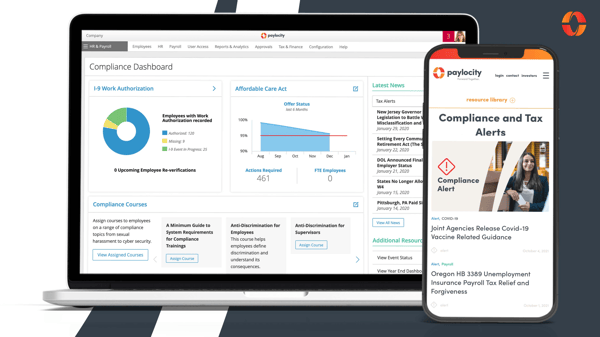
Mobile responsiveness earns strong marks across both employee and manager-facing use cases. From what I found reviewing the data, users describe approving time-off requests, checking payroll status, reviewing schedules, and managing onboarding tasks on their phones as meaningful day-to-day conveniences, particularly for managers working across multiple locations. The mobile experience for employees is described as intuitive and consistent with the desktop interface, which reduces training overhead for distributed teams.
Onboarding functionality receives consistent positive feedback from HR teams managing recurring hiring. Reviewers describe a structured onboarding flow that guides new hires through document completion, direct deposit setup, benefit elections, and required training within the platform, without requiring HR to manually shepherd each step. The ability to assign tasks, track completion status, and surface missing information before the new hire’s first day is a specific workflow improvement that HR managers highlight as a practical time-saver during high-volume hiring periods.
The performance management module is something I see reviewers valuing for its integration into the broader HR record rather than sitting as an isolated feature. Using goal tracking, continuous feedback, and review cycle management in the same environment as payroll and HR data keeps performance information in context and allows for more connected talent decisions. G2 Data shows Paylocity’s estimated ROI payback period at 13 months, and reviewers link this to the efficiency gains from consolidating performance, payroll, and compliance tools, rather than managing them in separate systems.
The Community feature is something I noticed earning positive mentions from HR and communications teams, specifically looking to maintain culture at scale. Reviewers describe using it for company announcements, recognition posts, team updates, and celebrations, all within the same platform employees use for payroll and time management. For dispersed teams where maintaining connections across locations is a top priority, integrating an engagement channel into the HCM system eliminates the need for a separate tool.
Benefit enrollment workflows and carrier integrations also receive recognition from reviewers managing open enrollment at scale. From what I gathered across the feedback, the enrollment experience is described as organized and trackable, with EDI file feeds that reduce the manual data transfer typically required during benefits season. For HR teams managing elections across multiple carriers and plan types, administering the process and pushing data to carriers within one platform is a meaningful reduction in coordination overhead.
Custom reporting is the limitation I found raised most consistently across the review data, and with enough specificity to flag clearly. Reviewers describe needing multiple attempts to pull the exact data they are looking for, running several reports and merging them in spreadsheets, or relying on support to build custom queries. Pre-built reports handle standard operational use cases reliably, but organizations with frequent custom analytics needs should evaluate the reporting functionality carefully during their trial period.
Customer support consistency is an area where reviews diverge, and the divergence is meaningful enough to surface clearly. Positive experiences are present particularly for straightforward questions handled by a dedicated account manager, but a notable portion of reviewers describe longer-than-expected response times for escalated issues, knowledge gaps among front-line staff, and account manager turnover that disrupts institutional knowledge about their configuration. For organizations with complex payroll setups or compliance-sensitive operations, clarifying support tier expectations before signing is a worthwhile step.
Paylocity is well-suited for mid-market organizations that want a single platform covering the full HR lifecycle, from onboarding and payroll to performance management and employee engagement, and that are building HR infrastructure to support sustained workforce growth.
What I like about Paylocity:
- I appreciate how the payroll and benefits integration keeps deductions, time data, and HR records synchronized automatically, reviewers describe fewer manual reconciliation steps and a cleaner audit trail as a direct result.
- I found the mobile responsiveness particularly well-regarded across reviews; both employees and managers describe the phone experience as reliable for the tasks they perform most frequently, which matters for distributed teams operating outside a traditional office.
What G2 users like about Paylocity:
“I find Paylocity very effective for fixing issues like holiday dates on employee time cards. I also appreciate that Paylocity assists in a timely manner, and most managers are very knowledgeable of the software. The initial setup of Paylocity was very easy. I would rate it a 10 out of 10 because it is fairly easy to use.”
– Paylocity review, Geoffrey C.
What I dislike about Paylocity:
- Paylocity stores rich HR and payroll data, but building custom reports across modules requires more effort than the platform’s depth suggests. Pre-built reports reliably cover standard needs, but teams with custom analytics requirements should evaluate them carefully.
- Support quality is consistent for routine questions, but escalated issues, payroll corrections, compliance edge cases, can take longer to resolve than time-sensitive situations allow; clarifying support tier expectations before implementation is worth doing.
What G2 users dislike about Paylocity:
“I do not like the changes being made without notifying the user.”
– Paylocity review, Tatum S.
If you are evaluating core HR software as the foundation of a broader HCM stack, see how the top tools compare across organization management, compliance, and payroll in our feature breakdown based on G2 Data.
Best HCM Software: Frequently Asked Questions (FAQs)
Q1. What is the best HCM software for large companies?
Workday, SAP SuccessFactors, and Oracle HCM are leading choices for large enterprises. They provide global compliance, robust scalability, and integrations designed for complex HR and finance operations.
Q2. What is the best HCM software for manufacturing companies?
UKG Ready, SAP SuccessFactors, and Oracle HCM Cloud are best suited for manufacturing. They deliver workforce scheduling, labor cost tracking, and compliance features tailored for shift-based operations.
Q3. What HCM does Accenture use?
Accenture uses SAP SuccessFactors to enhance HR and finance strategies. With machine learning and blockchain features, it supports innovation and scalability for global teams.
Q4. How does the HCM tool integrate with existing payroll and ERP systems?
HCM tools integrate via APIs, webhooks, or data connectors. Vendors like Rippling and Gusto are particularly strong at syncing payroll and HR data with accounting and ERP systems through robust APIs.
Q5. What data security and compliance standards does the HCM solution support?
Top HCM solutions comply with GDPR, SOC 2, and ISO 27001 standards. Platforms like Paylocity and Rippling also provide role-based access and encryption for sensitive HR data.
Q6. How scalable is the HCM platform for a growing workforce and global expansion?
HCM platforms like Rippling and Deel HR are built for global scalability. They manage international payroll, local compliance, and HR operations as companies expand globally.
Q7. What is the best HCM software for small businesses?
Gusto and BambooHR are highly recommended for small businesses. Gusto delivers intuitive payroll and automated tax filing, while BambooHR provides excellent PTO tracking and onboarding workflows at an accessible entry point.
Q8. What are the top-rated human capital management systems for mid-sized companies?
UKG Ready and Paylocity are popular with mid-sized companies. They offer strong workforce management, employee self-service, and comprehensive HR suites designed for growing teams.
Q9. What is the best-rated HCM software for managing office supplies?
Rippling stands out for managing HR alongside IT and office operations. Its deep integrations let businesses track assets and supplies while handling HR processes in one platform.
Q10. Which human capital management software has the best reviews?
According to G2 Grid Reports, Rippling, Gusto, and BambooHR consistently earn strong ratings. Reviewers highlight ease of use, payroll accuracy, and reliability as key strengths across these platforms.
Q11. What are the recommended HCM systems for professional services?
Deel HR and Rippling are well-suited for professional services firms. Deel HR simplifies global contractor management and compliance, while Rippling offers modern onboarding and deep integration capabilities for distributed teams.
Q12. What is the best human resources management tool for tech firms?
Rippling is favored by tech firms for its integrations with SaaS tools and global HR capabilities. Its automation helps startups and scaleups manage hybrid and remote teams effectively.
Q13. What’s the leading HCM software for startups?
Gusto and Rippling are popular choices for startups. Gusto supports modern payroll and onboarding workflows with fast setup, while Rippling scales effectively as the business grows.
Q14. What HCM platform do successful companies use?
Successful enterprises frequently use platforms like Workday, SAP SuccessFactors, and Oracle HCM. These tools balance global compliance with advanced HR and finance automation.
Q15. What is the most popular HCM software solution for large enterprises?
Workday remains one of the most widely adopted HCM systems in the enterprise market. Its deep integrations and global compliance features make it a trusted choice.
Q16. What’s the best HCM software for my business needs?
The best choice depends on your business size and priorities. Gusto or BambooHR work well for small businesses, UKG Ready and Paylocity suit mid-sized firms, while Rippling and Deel HR support global growth. For enterprises, Workday, SAP, or Oracle HCM provide the most comprehensive functionality.
The right HCM platform is the one your team will actually use
What came through most clearly across all seven evaluations is that the best human capital management software is not necessarily the most feature-complete; it is the one that fits how your HR team works and scales with how your workforce grows. Gusto excels in small business simplicity. Rippling and Deel HR are built for global complexity. BambooHR and Paycom deliver strong self-service foundations for growing mid-market teams. UKG Ready and Paylocity serve organizations that need modular depth and workforce management at scale.
The G2 review patterns are consistent in one other respect: platforms succeed when they are implemented thoughtfully, with adequate time for configuration, user training, and alignment between what the platform offers and what the business actually needs. The tools on this list have earned their positions through sustained positive feedback from verified users, and the next step is to take the shortlist that fits your organization’s size, workforce complexity, and HR priorities and conduct a hands-on evaluation. The right fit is knowable, and worth the time to find it.
Cap employee reimbursements to balance team budgets and satisfaction. Discover the best free business expense trackers of the year.

💸 Earn Instantly With This Task
No fees, no waiting — your earnings could be 1 click away.
Start Earning
