


You know how it goes. One incident, one rushed report, and suddenly a minor oversight turns into a major compliance issue. Not because your team isn’t capable, but because even the best people can only do so much with systems that aren’t built for the realities of environmental health and safety.
That’s what made me dig deeper into the best environmental health and safety (EHS) software, not just what these platforms promise, but how they actually support teams managing workplace safety, compliance, incident reporting, and risk across multiple sites.
I reviewed G2 feedback, compared leading EHS management software platforms, and examined what sets the strongest tools apart from the rest. The biggest differentiator often comes down to workflow fit: how well a platform automates compliance tasks, simplifies incident management, streamlines workplace inspections, and provides teams with visibility before issues escalate.
This guide covers top EHS software solutions such as VelocityEHS, SafetyCulture, Ideagen EHS, Octave Reliance (ETQ Reliance), Avetta, and Vector EHS. Whether you need enterprise EHS software for manufacturing, mobile-first safety inspection software for field teams, or a cloud-based compliance management solution, this breakdown focuses on the features and user feedback that matter most.
6 best environmental health and safety software: My picks for 2026
- VelocityEHS Accelerate | EHS Software to Outpace Risk: Best for all-in-one EHS and ESG management
Known for its robust platform that combines EHS, ESG, and sustainability tools with strong compliance support. - SafetyCulture: Best for mobile inspections and frontline safety
Popular for its easy-to-use app (iAuditor) that empowers frontline teams to conduct inspections, audits, and checklists on the go (free plan available, advanced plans starting at $24/user/mo). - Ideagen EHS: Best for high-risk industries with complex compliance needs
Trusted in sectors like aerospace and manufacturing for managing EHS risks, audits, and regulatory reporting at scale. - Octave Reliance: Best for quality-driven EHS compliance
Known for its strong quality management integration with EHS, helping organizations simplify audits, CAPAs, and document control. - Avetta: Best for contractor and supplier compliance management
Widely used for contractor prequalification, supplier compliance tracking, and workplace risk management across construction, energy, and industrial operations. - Vector EHS: Best for OSHA compliance and safety training management
Recognized for its strong safety training, incident management, and OSHA compliance tools that help organizations improve workforce readiness and reduce workplace risks.
*These environmental health and safety software solutions are top-rated in their category, according to G2 Spring 2026 Grid Reports. Pricing for most of these tools is available on request.
My top 6 environmental health and safety software recommendations for 2026
The best environmental health and safety software helps organizations simplify regulatory compliance, strengthen workplace safety, and centralize EHS reporting across teams, sites, and operations.
The growing demand for EHS management software reflects that shift. The global EHS software market is projected to reach $2.19 billion by 2030, growing at a CAGR of 19.9%.
As I evaluated these platforms, the biggest differentiators were how effectively they handled incident management, compliance workflow automation, workplace inspections, and risk assessment without adding operational complexity. The strongest tools also improved visibility through real-time safety dashboards, mobile-first reporting, and automated corrective action tracking.
The best EHS software platforms combine environmental compliance, safety management, and operational risk management into a single system, making them especially valuable for manufacturing, construction, and other highly regulated industries where audit readiness and workplace hazard identification are critical.
How did I find and evaluate the best environmental health and safety software?
I started by reviewing G2 Grid Reports to identify the environmental health and safety software platforms most trusted by EHS professionals, compliance teams, and enterprise organizations. From there, I analyzed verified G2 reviews to understand how these tools performed across incident management, workplace inspections, compliance tracking, risk assessment, and EHS reporting.
To get a clearer picture beyond feature lists, I used AI to analyze recurring review themes around usability, deployment experience, mobile accessibility, customer support, scalability, and workflow automation. I also looked closely at how well each platform handled operational risk management, corrective action tracking, and real-time safety visibility in highly regulated industries.
The screenshots featured in this article are sourced from vendor listings on G2 or official product websites. By combining G2 insights, user feedback, and AI-assisted review analysis, I curated this list of the best EHS software platforms for organizations looking to improve workplace safety, strengthen compliance readiness, and simplify environmental and safety management at scale.
What makes environmental health and safety software worth it: My opinion
When evaluating the best environmental health and safety software, I focused on several key capabilities to determine each platform’s overall value and effectiveness for safety teams and compliance-driven organizations:
- Incident reporting and compliance tracking: Top EHS platforms should make it easy to log, track, and investigate incidents while staying compliant with regulations like GDPR, OSHA, ISO 45001, and EPA standards. I assessed how well each tool supports structured reporting, root cause analysis, regulatory forms, and corrective actions.
- Automation and workflow management: Reducing manual effort is critical for busy safety teams. I looked for tools that support automated workflows, for example, triggering follow-up tasks after an incident, sending alerts for overdue inspections, or escalating audit findings. Platforms with visual workflow builders and low-code customization stood out.
- Dashboards, audit trails, and real-time monitoring: Visibility and accountability are key. I evaluated how well each solution provides real-time dashboards, audit logs, and historical tracking of safety events, training completion, and compliance metrics. Tools that support configurable KPIs, exportable reports, and automated alerts ranked higher.
- Role-based access and permissions: Data protection is essential in safety systems, especially when handling sensitive incident reports or compliance audits. I reviewed how platforms implement role-based access control (RBAC), permissions by module or site, SSO integration, and user authentication to prevent unauthorized access.
- Predictive analytics and AI risk detection: Modern EHS software is moving beyond reactive incident tracking toward predictive safety analytics. I looked for platforms that use AI and historical safety data to identify patterns, flag high-risk behaviors, predict potential incidents, and help teams take preventive action before issues escalate. Tools with intelligent alerts, trend analysis, and proactive risk scoring stood out for organizations focused on operational risk management and workplace hazard identification.
- ESG and sustainability reporting: As environmental compliance and ESG initiatives become more closely aligned, I evaluated whether platforms support sustainability reporting, emissions tracking, and broader ESG data management alongside traditional safety workflows. Solutions that combine EHS and ESG reporting in a single system provide greater visibility for enterprise compliance and corporate governance teams.
- Mobile usability and frontline adoption: Even the most feature-rich EHS management software loses value if frontline teams avoid using it. I assessed how intuitive each platform felt for mobile inspections, field reporting, and day-to-day safety tasks. Tools with offline access, simple mobile workflows, and faster incident capture performed better in environments where speed and usability directly impact reporting accuracy.
- Scalability and deployment options: Scalability matters whether your organization operates from a single site or across global facilities. I considered whether platforms offer cloud-based, on-premise, or hybrid deployment options, along with mobile access for field teams and multilingual support for global operations.
- Integration and API access: EHS software needs to connect with your broader tech stack, HR systems, learning management systems, maintenance software, and more. I evaluated each tool’s API capabilities, integration options, and ability to work within enterprise ecosystems to support seamless data flow and reduce double entry.
By focusing on these areas, I was able to identify the most capable EHS platforms that support both day-to-day safety operations and long-term compliance strategies.
- Monitor company waste and incidents related to safety
- Include regulatory incident reporting and corrective actions
- Perform proactive environmental and safety risk assessments
- Manage an audit trail of compliance and safety data
- Provide tools for safety assessment and inspections
- Analyze environmental, health, and safety activities
- Provide security features to protect sensitive environmental data
This data was pulled from G2 in 2026. Some reviews have been edited for clarity.
1. VelocityEHS | EHS Software to Outpace Risk: Best for all-in-one EHS and ESG management
VelocityEHS | EHS Software to Outpace Risk is a well-rounded platform that simplifies OSHA compliance, especially for chemical safety. It is a strong fit for industries like manufacturing, hospitals, and health care.
According to G2 data, the platform is especially popular among mid-market (46%) and enterprise (42%) organizations, reflecting its scalability and effectiveness in handling complex safety and compliance needs across larger operational environments.
Many G2 reviews highlight how the software integrates key tasks, like managing chemical inventories, tracking SDS records, and organizing compliance documents, into one place. This helps reduce manual work and gives users more confidence in meeting regulations.
A major plus for users is the platform’s easy-to-use interface. While other EHS tools are often called clunky or overly complex, this one stands out for being clean and intuitive.
According to user feedback, onboarding is smoother than expected. Many also appreciate the helpful support resources, FAQs, video tutorials, and live monthly training sessions, that keep users informed about new features and updates.
From what I found during my research, users also value how the platform centralizes multiple EHS functions, inspections, incident tracking, safety meetings, and even ergonomic assessments, into a single system. Several reviewers mention that this consolidated approach reduces the need to switch between tools, making it easier to manage compliance across departments and locations from one dashboard.
Another theme that came through in recent G2 reviews is how well the platform supports reporting and leadership communication. Users describe how the dashboards and reporting tools provide clear visibility into trends and outstanding actions, which helps streamline communication with leadership and site managers. This kind of built-in visibility seems especially valuable for organizations managing EHS across multiple facilities.
That said, several reviewers mention a learning curve during the initial setup. The wide array of buttons and database features can feel overwhelming at first. However, many of those same users report that, with regular use, navigation becomes second nature and the platform’s depth turns into an asset rather than a hurdle.
Another frequently mentioned feature is the chemical labeling tool. Users find it helpful for managing containers, though a recurring frustration is its incompatibility with common printers like Dymo, especially for teams that rely on those devices for other labeling needs.
VelocityEHS Accelerate is a robust and continually evolving solution that delivers real value for organizations aiming to strengthen their EHS and ESG programs. While there’s room for refinement in some areas, user feedback shows that its benefits, intuitive design, strong compliance tools, and reliable support, far outweigh the drawbacks.
What I like about VelocityEHS Accelerate EHS & ESG:
- I found that users really appreciate how the platform simplifies OSHA compliance, especially by centralizing chemical inventory and SDS tracking in one place.
- The interface seems to be a big win. G2 reviewers describe it as clean and intuitive, which makes onboarding smoother than with other EHS tools.
What G2 users like about VelocityEHS | EHS Software to Outpace Risk:
“I appreciate the ease of use of VelocityEHS. It’s very simple to find what needs to be uploaded, unlike other platforms like Avetta, which can be cumbersome. Nothing really needs improvement in my opinion; I enjoy using the software. If it is easy, I am all good with it!”
– VelocityEHS Accelerate EHS & ESG review, Rod S.
What I dislike about VelocityEHS | EHS Software to Outpace Risk:
- G2 reviewers clearly appreciate how comprehensive the platform is across modules and compliance tools, but teams new to the system will need some time to get familiar with the breadth of options and build a navigation routine that works for them.
- A recurring note in the reviews is around the chemical labeling tool, users find it helpful for container management, but those who rely on specific label hardware like Dymo printers may want to verify compatibility before committing, since that integration is not fully supported.
What G2 users dislike about VelocityEHS | EHS Software to Outpace Risk:
“The support. When I submit a support request, it takes forever to get an answer then when I get an answer I don’t have long to respond before they close the ticket out. Maybe better tracking and more updates.”
– VelocityEHS Accelerate EHS & ESG review, Ryan B.
2. SafetyCulture: Best for mobile inspections and frontline safety
SafetyCulture as an EHS is easy to integrate and implement. Users consistently describe the setup as quick and straightforward, often requiring little or no help from IT.
Many mention they were able to get the platform up and running with their existing workflows in a short time, allowing teams to adopt it smoothly and without major disruptions. Its strong usability appeal is reflected in G2 data, with 44% mid-market and 38% small-business adoption, highlighting its accessibility and flexibility for organizations of varying sizes.
Another aspect users really appreciate is the customer support. Across many reviews, whether users are on the free plan or paying customers, the support team is described as responsive and helpful, even with small or specific questions. This level of attention makes users feel genuinely supported, not just like another service ticket.
The form-building feature also gets a lot of praise. According to the feedback I’ve seen, users find it easy to create and edit custom forms, choose response types, and build smart checklists. The ability to add conditional sub-questions based on user answers is often called a game-changer, especially for audits and inspections that need to adapt in real time.
From my analysis of recent G2 reviews, the analytics and reporting capabilities stand out as a consistent theme. Users describe how the platform lets them generate professional reports in PDF, Word, or Excel formats, and the analytics feature provides quick data snapshots that make it easy to track trends, monitor performance, and spot issues across teams and locations. According to G2 Data, templates are rated at 97%, one of the highest feature scores across the entire EHS category.
Another notable strength is how well SafetyCulture supports real-time evidence capture during inspections. Reviewers frequently mention the ability to take photographs, use voice-to-text, and create instant evidence files as part of the inspection workflow. This reduces rework, saves time, and ensures that documentation is accurate and actionable right from the field.
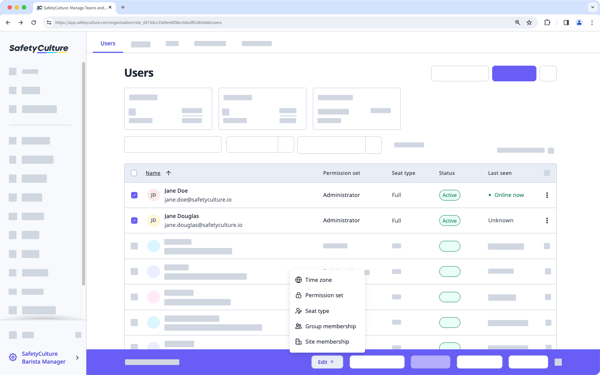
That said, some users report occasional issues with duplicate reports when multiple team members work on the same form simultaneously. While this can lead to extra cleanup initially, many reviewers mention that the problem tends to subside as teams become more comfortable with the platform’s collaboration and version control features.
A few users also point to a mild learning curve when it comes to mastering the platform’s more advanced tools. These features are not inherently difficult, but may require some time and practice to use confidently and effectively.
SafetyCulture is a powerful yet approachable EHS platform that delivers real value through quick setup, responsive support, and highly customizable tools. While teams may experience some initial bumps, particularly around collaboration and advanced features, the platform’s strengths in usability, flexibility, and support infrastructure make it a solid choice for organizations looking to streamline their safety processes.
What I like about SafetyCulture:
- I saw that many users find the platform incredibly easy to set up and integrate; it fits into existing workflows quickly, often without needing IT support.
- The responsive customer support really stood out to me; even free users seem to get timely and helpful responses, which makes people feel genuinely supported.
What G2 users like about SafetyCulture:
“I use SafetyCulture for Move In and Move out forms at our co-working and private office space. It streamlines move in and move out procedures and helps with operations. I love the ability to make templates – it saves our team a lot of time and makes it consistent across locations. It helps by making the SOP for all move in and move out forms the same and saves lots of time. Setting it up was easy!”
– SafetyCulture review, Eva L.
What I dislike about SafetyCulture:
- From the G2 reviews I read, the collaborative inspection workflow is a clear strength, but when multiple people edit the same form simultaneously, duplicate reports can occur, which creates some cleanup work until teams get comfortable with the version control features.
- Several reviewers also flag that while the free tier and entry plans are accessible, per-user pricing can add up as organizations scale, particularly in manufacturing environments where frontline participation requires broader access, so teams planning wider rollouts may want to assess the cost structure early.
What G2 users dislike about SafetyCulture:
“At the moment, I’m looking for a new package, an updated package. And that’s something that I think, in the library, if users had a particular industry or area or type, tick and flick, boxes, that could reduce the time it takes to search for the appropriate audit pack that’s already been prepared by somebody else.”
– SafetyCulture review, Chris E.
3. Ideagen EHS: Best for high-risk industries with complex compliance needs
From what I’ve seen in G2 reviews, one of Ideagen EHS’s biggest strengths is its ability to handle incident tracking and safety audits across multiple locations.
According to G2 data, Ideagen EHS is especially popular among enterprise organizations (54%), with a notable presence in the mid-market segment (23%). This demonstrates its effectiveness at scale in industries where multi-site coordination and compliance are critical.
Users frequently highlight how easy it is to log events, whether they occur in manufacturing, logistics, automotive, construction, or office environments, and follow up with corrective actions. Centralizing all safety activities in one platform gives teams a clear, unified view of what’s happening on the ground, which many say has significantly improved their incident response and management.
A common theme in the feedback is the platform’s flexible setup. I’ve noticed that many reviewers like being able to pick only the modules they need. This keeps the system from feeling cluttered and allows companies to scale it based on their size and changing needs. From what I’ve seen, this flexibility makes the platform more efficient and better suited to different compliance approaches.
Another standout is the automated alerts and reminders. Several users say these notifications help them stay on top of inspections, audits, training deadlines, and other compliance tasks. Instead of manually chasing people, the system reminds the right people at the right time, helping to reduce compliance gaps and last-minute scrambles.
From my analysis of recent reviews, the platform’s customer success support also comes through as a recurring positive. Multiple reviewers call out specific support team members by name, describing them as knowledgeable, proactive, and genuinely invested in helping clients get the most out of the platform. According to G2 Data, ease of doing business with Ideagen EHS is rated at 85%, and security and privacy at 87%, which reinforces the reliability that enterprise users expect.
Another theme in recent G2 feedback is how well the platform supports accident investigation and observation reporting. Users describe how the detailed questionnaire during investigation procedures helps ensure thorough, consistent root cause analysis, which contributes to building a stronger EHS culture across the organization.
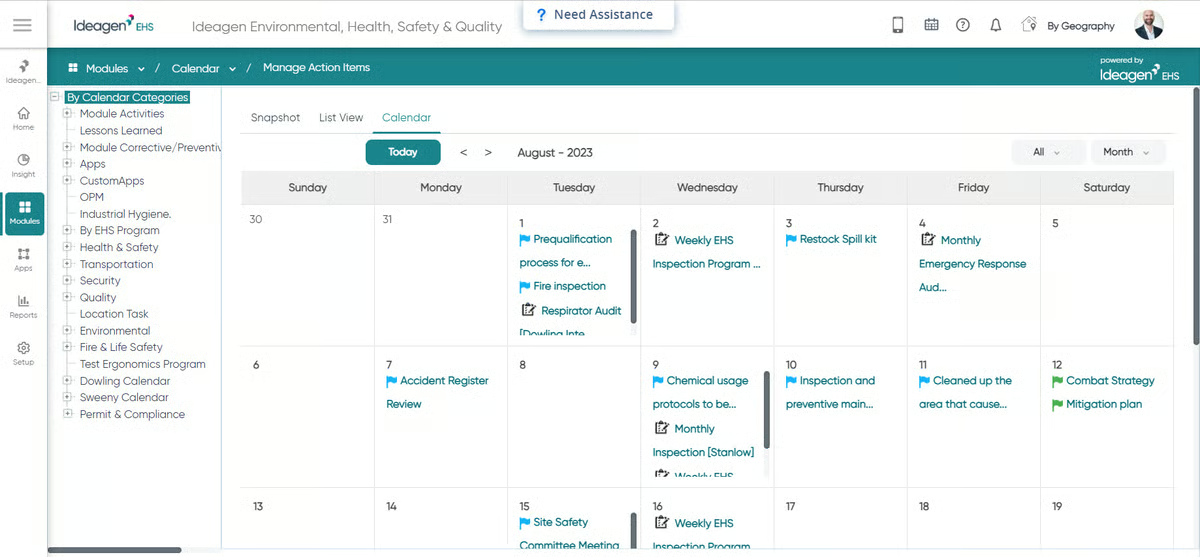
Despite these strong points, users report a few areas where usability could be enhanced. A common frustration involves navigation: locating specific records or historic incident data can require several clicks, which may hinder productivity during urgent situations. Some reviewers have suggested that streamlining data access and reducing screen depth would significantly improve the user experience.
Another issue relates to workflow consistency and discoverability. Some users find that features are unintuitively placed or “hidden,” making it difficult for teams to access and apply them uniformly. This inconsistency can lead to departments using the same tool in varying ways, complicating collaboration and slowing down resolution timelines on shared safety issues.
Overall, Ideagen EHS is recognized as a scalable solution for organizations committed to maintaining high safety and compliance standards. While there is room to improve the user interface and workflow standardization, the platform’s strengths, particularly in incident tracking, modular customization, and automated compliance support, make it a strong fit for teams operating in complex or multi-site environments.
What I like about Ideagen EHS:
- I noticed that users really value how easy it is to track incidents and manage safety audits across various locations, which seems to streamline corrective actions and improve overall incident management.
- The platform’s modular setup stood out. The ability to choose only the features needed helps keep things efficient and scalable for different organizations.
What G2 users like about Ideagen EHS:
“It is very user friendly. The interface is easy to navigate and is pleasant. The customer support team that i have dealt with have always been very helpful and answered every question i had promptly and in a detailed manner. Integrating over from our previous form was simple and efficient.”
– Ideagen EHS review, Colm H.
What I dislike about Ideagen EHS:
- Based on G2 reviews, I get the sense that users value the depth of data the platform captures for incident tracking and compliance, but locating specific records or historic incident data can require several clicks, which may take additional time during urgent situations where quick access to information matters most.
- I also noticed on a few G2 reviews that while the platform offers a wide range of features, some are not always intuitively placed, which can lead to different departments using the tool in varying ways and may require additional alignment to ensure consistent workflows across teams.
What G2 users dislike about Ideagen EHS:
“Well, the way they handle fire extinguishers can be improved and they can also improve a bit on the data.”
– Ideagen EHS review, Arturo A.
4. Octave Reliance (ETQ Reliance) : Best for quality-driven EHS compliance
When evaluating Octave Reliance (ETQ Reliance) through G2 user feedback, one of the most consistently praised features is its scalable and customizable module architecture. Users find it easy to build and tailor modules without impacting performance or data integrity, allowing the platform to grow alongside the organization. This flexibility means teams can adapt the system to match their evolving quality processes without needing to start over with a new solution.
Octave Reliance is especially well-suited for highly regulated industries like medical devices and pharmaceuticals, where customization and compliance are critical. According to G2 data, its adoption is strongest among enterprise organizations (52%) and mid-market businesses (42%), underscoring its capacity to support complex, large-scale quality management needs.
Another standout is the platform’s workflow engine. It allows for quick setup of approval chains, task routing, and escalations, all without needing coding expertise. The no-code and low-code configuration is frequently highlighted as a major advantage, enabling quality and compliance teams to customize workflows independently. Promoting a healthy environment and providing detailed audit trails give users added confidence in staying compliant with regulatory requirements.
Document control is particularly well-received among users. Reviewers describe how easy it is to manage versions, track changes, and ensure only the latest approved documents are in use. The ability to link documents to training, CAPAs, and audits strengthens compliance and reduces the risk of outdated information being followed. According to G2 Data, workflows are rated at 89% and corrective actions at 89%, reflecting the platform’s strength in structured compliance management.
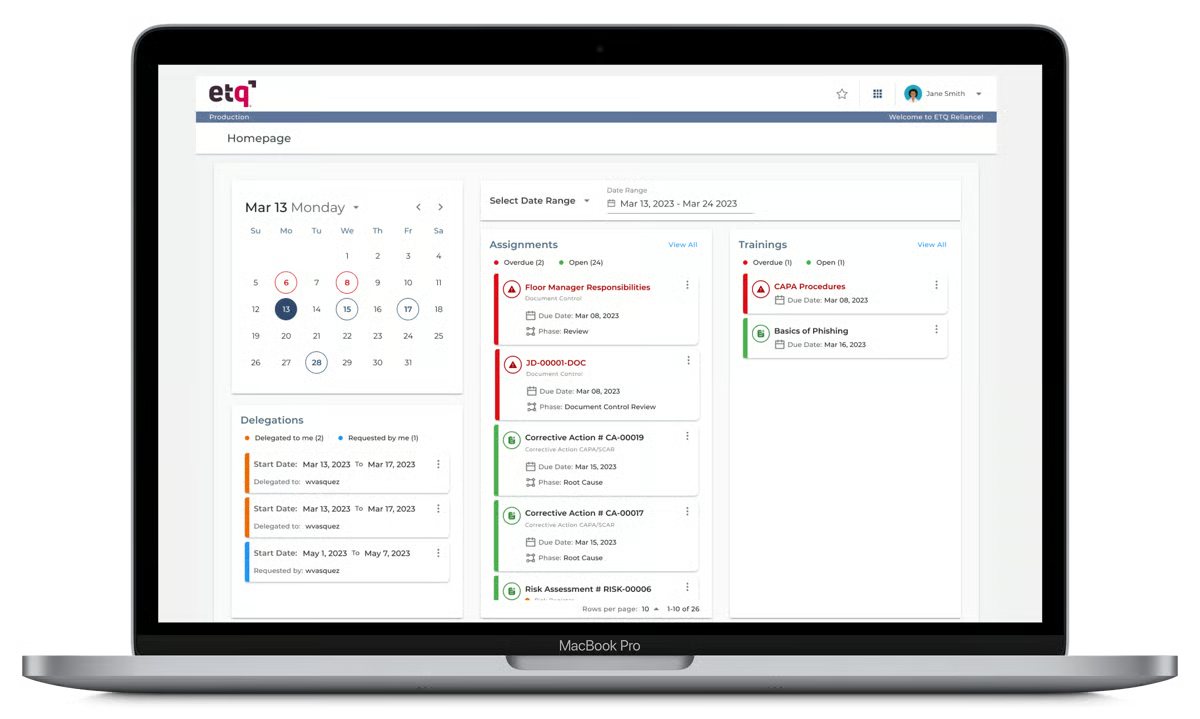
From my analysis of recent G2 reviews, users also value how the platform enhances accountability across departments. Reviewers describe how audits, CAPAs, and documentation can be managed daily to ensure everyone stays informed about their responsibilities. ERP and HR integration helps keep training and compliance records up to date, which minimizes errors and improves cross-departmental coordination.
Another theme that came through in recent feedback is how well the platform supports centralized compliance monitoring, particularly for EHS-related use cases. Users describe how the platform handles EHS incidents, permit tracking, and environmental obligations in a structured way, simplifying what used to be fragmented paper trails and disconnected spreadsheets into a single, trackable system.
Despite these strengths, users do point to areas where Octave Reliance could improve. A recurring theme is the limited and unclear REST API documentation. While there is enthusiasm about the platform’s expanding API capabilities, many users express frustration with the lack of robust guides and practical examples. Improved documentation would help users implement integrations more confidently and reduce the learning curve during setup.
Another commonly mentioned challenge is the limited flexibility in reporting and user-level interface customization. Users note that they’re unable to save custom filters or easily configure centralized dashboards, which can hinder collaboration, particularly in larger organizations managing complex quality management needs. Enhanced customization in these areas would make the platform even more adaptable for enterprise environments.
Overall, Octave Reliance is widely regarded as a flexible and powerful solution for organizations with intricate quality management needs. While users would welcome improvements in API documentation and reporting customization, the platform’s strengths in modular design, workflow automation, and document control make it a solid choice for scaling quality initiatives with confidence.
What I like about Octave Reliance (ETQ Reliance):
- I found that users consistently appreciate the scalable and customizable modules. They seem easy to build and expand without disrupting system performance or data accuracy.
- The way modules integrate and workflows are configured is frequently mentioned; reviewers highlight how intuitive it is to set up approval chains and audit trails to meet compliance needs.
What G2 users like about Octave Reliance (ETQ Reliance):
“What I like best about ETQ Reliance is its flexibility and ability to adapt to different quality management processes. It provides strong workflow automation, which makes it easier to manage audits, document control, CAPA, and compliance activities in a structured way. The no code or low code configuration is a big advantage because it allows customizing workflows without heavy technical dependency. I also like how it centralizes quality data, making tracking and reporting much more efficient.”
– Octave Reliance (ETQ Reliance) review, Dharamveer p.
What I dislike about Octave Reliance (ETQ Reliance):
- A theme that keeps coming up in G2 reviews is around advanced reporting. Users appreciate the platform’s compliance tracking depth, but creating highly customized reports can require technical knowledge of the database structure, so teams without dedicated technical resources may need additional support to get the most out of that capability.
- Reviewers also point out that while the desktop experience is solid, the mobile interface does not yet fully match it in terms of functionality, which is something field teams conducting inspections or entering observations on-site may want to factor into their evaluation.
What G2 users dislike about Octave Reliance (ETQ Reliance):
“Reporting is a pain. Anything beyond basic reports gets complicated fast and kinda needs tech knowledge. Mobile experience is clunky too, feels like a shrunken web page for field staff. Per user licensing also adds up quick, so we had to limit access which defeats the point of a company wide QMS.”
– Octave Reliance (ETQ Reliance) review, Abel T.
5. Avetta: Best for contractor and supplier compliance management
From what I have seen in G2 reviews, Avetta’s strongest value proposition is how it centralizes contractor and supplier compliance into a single, structured platform. Users consistently describe how the platform replaces fragmented processes, emails, spreadsheets, and shared folders, with a unified system for tracking safety documentation, insurance certificates, and regulatory approvals.
According to G2 Data, Avetta’s adoption is strongest among small businesses (50%) and mid-market organizations (38%), with 12% enterprise representation. This distribution reflects its accessibility for organizations managing contractor networks of varying sizes. The platform’s ease of setup is rated at 90% on G2, one of the highest in the category, which aligns with how quickly many users report getting started.
One of the most frequently praised features is the centralized dashboard. Reviewers describe how it provides a clear, real-time view of which contractors are approved, which documents are missing, and what still needs attention. This kind of visibility eliminates guesswork and reduces the need for manual follow-ups, which is especially valuable for safety and procurement teams managing dozens or hundreds of contractor relationships.
Automated alerts and document tracking also receive strong praise. Users note that the platform sends timely reminders about expiring insurance certificates, missing documentation, and compliance gaps, which helps keep contractors up to date without constant manual intervention. This kind of proactive notification system seems to reduce the administrative burden significantly for compliance managers.
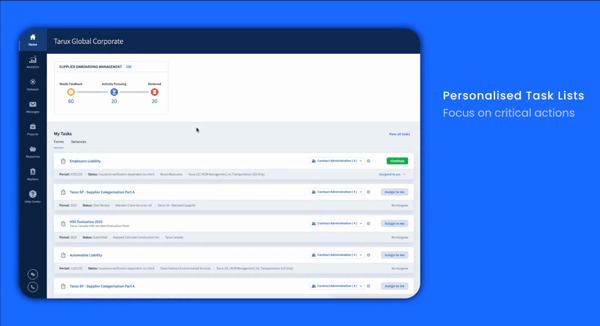
From my analysis of recent reviews, risk reporting is another capability users value highly. The platform flags potential issues before they arise by checking compliance criteria and surfacing gaps early, which gives organizations more time to address risks before they affect operations. According to G2 Data, the estimated ROI payback period for Avetta is 8 months, suggesting that teams see measurable returns relatively quickly.
Another theme in recent G2 feedback is how the platform supports auditing and record-keeping. Users describe how Avetta provides good auditing capabilities to track compliance records and surface problems, making audit preparation more structured and less time-intensive. For organizations operating in industries like construction, energy, and logistics where contractor oversight is mission-critical this kind of built-in accountability is a significant advantage.
That said, some users report that the onboarding process for new contractors and suppliers can take longer than expected. While the hiring organization’s setup is typically smooth, smaller or less technically advanced suppliers sometimes need additional guidance to complete their documentation requirements within the platform. Teams managing large contractor networks may want to plan for this during initial rollouts.
Another observation that comes up in reviews is around reporting flexibility. While the dashboard provides strong real-time visibility, some users note that customizing reports beyond the default options is limited. Teams that need highly tailored analytics or exportable data may want to evaluate how well the reporting capabilities align with their specific needs.
Overall, Avetta is recognized as a dependable and structured platform for organizations that need to manage contractor and supplier compliance at scale. While there is room to improve supplier onboarding workflows and reporting customization, its strengths, centralized compliance visibility, automated alerts, early risk flagging, and quick ROI, make it a strong choice for safety and procurement teams focused on supply chain risk management.
What I like about Avetta:
- I found that users consistently appreciate how the platform centralizes contractor and supplier compliance in one place, replacing scattered emails and spreadsheets with a structured, real-time dashboard.
- Automated alerts and document tracking stood out in the reviews; users describe how the platform proactively surfaces expiring certificates and compliance gaps, reducing manual follow-ups significantly.
What G2 users like about Avetta:
“I like that Avetta makes it easy to manage supplier compliance in one place. It saves time by keeping supplier documents and compliance status organized. Avetta also helps me quickly verify supplier requirements and avoid delays.”
– Avetta review, Yahaya S.
What I dislike about Avetta:
- The G2 feedback makes it clear that hiring organizations appreciate how structured the compliance process is, but the onboarding experience for new contractors and suppliers can take longer than expected, particularly for smaller or less technically advanced vendors who may need additional guidance to complete their documentation within the platform.
- On the reporting side, reviewers note that while the dashboard provides strong real-time visibility into compliance status, customization beyond the default views is limited, so teams needing highly tailored analytics or exportable data may want to evaluate how well it fits their specific reporting needs.
What G2 users dislike about Avetta:
“While it’s a good platform that’s easy to use, it’s not cost effective for a lot of the smaller or less technically advanced suppliers. It can make compliance slow and requires hand holding. Also, a lot of the reporting is not customizable.”
– Avetta review, Viral S.
6. Vector EHS: Best for OSHA compliance and safety training management
From what I have seen in G2 reviews, Vector EHS stands out for its strength in automated OSHA compliance and safety training content. Users consistently describe how the platform serves as a reliable digital paper trail that simplifies recordkeeping and ensures teams stay aligned with OSHA standards.
According to G2 Data, Vector EHS is most popular among enterprise organizations (50%) and mid-market businesses (38%), with 13% small-business adoption. This distribution reflects the platform’s fit for organizations that need structured compliance management and training delivery at scale. The platform’s user adoption rate on G2 is 83%, one of the higher figures in the category, suggesting that teams find real value once the platform is integrated into their workflows.
One of the most praised features is the automated OSHA recordkeeping capability. Reviewers highlight how the platform auto-determines whether incidents are recordable and organizes the relevant logs, including 300, 301, and 300A forms, without manual classification. This kind of automation removes a significant compliance burden from safety managers and reduces the risk of misclassification.
The training content library is another consistent strength. Users describe a wide range of content that extends beyond traditional safety topics into operations, HR, and custom content areas. According to G2 Data, training is rated at 88%, reflecting the depth and breadth of the available learning materials. Reviewers appreciate that the training modules are well-structured and easy to assign across teams and departments.
From my analysis of recent reviews, users also value the closed-loop corrective actions feature. The platform automatically assigns follow-up tasks to specific supervisors with due dates, removing the need for manual tracking and improving accountability. This structured approach to corrective actions ensures that identified issues are not just logged but actively resolved.
Another theme that came through in recent G2 feedback is how well Vector EHS supports mobile field inspections. Users describe using the mobile app to snap photos of hazards, assign fixes on-site, and sync data once they return to connectivity range. The offline capability is noted as a significant advantage for teams conducting site walks in areas with limited network access. The dashboard also receives praise for providing a clear, at-a-glance view of safety performance and compliance status.
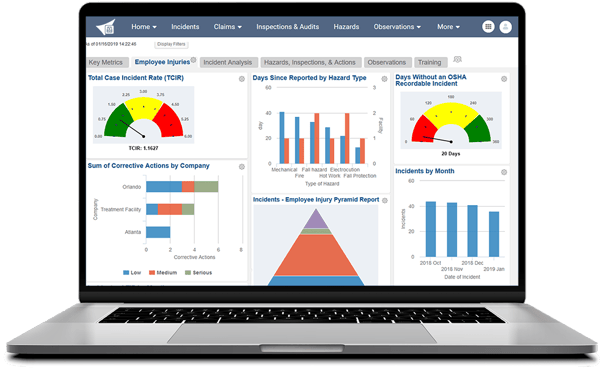
That said, some users note that the platform’s interface could benefit from modernization. Reviewers describe navigating through several layers of menus to find specific reports, and the search functionality requires exact keyword matching rather than flexible lookups. Teams that rely on quick data retrieval may want to factor this into their evaluation.
Another observation from reviews is around the depth of advanced features. While the platform is described as easy to navigate for day-to-day use, some of the more advanced capabilities require additional training and onboarding time. Organizations rolling this out to larger teams may want to plan for an enablement period to help users get the most out of the platform’s full feature set.
Overall, Vector EHS is recognized as a practical, compliance-focused platform that delivers strong value for OSHA recordkeeping, safety training, and corrective action management. While there is room to improve the interface design and advanced feature discoverability, the platform’s core strengths, automated compliance, extensive training content, and structured accountability workflows, make it a solid choice for organizations prioritizing regulatory adherence and safety culture.
What I like about Vector EHS:
- I found that users consistently praise how the platform automates OSHA recordkeeping, auto-determining recordability and organizing logs like 300, 301, and 300A without manual classification.
- The breadth of safety training content stood out; reviewers describe a wide library that covers safety, operations, HR, and custom content, making it easy to assign relevant training across departments.
What G2 users like about Vector EHS:
“I like that Vector EHS is easy to use while still being powerful, which lets me manage workplace health and safety compliance effectively. I appreciate the dashboard that gives a clear view of safety, making it straightforward to monitor everything at a glance. The customization and reporting capabilities are also great because we can tailor workflows from the dashboard to match our internal processes. I also like that it integrates well with our HR system for employee data, which helps streamline workflows. The initial setup was fairly smooth and well-supported, thanks to the platform providing guided onboarding templates and documentation.”
– Vector EHS review, Rushi A.
What I dislike about Vector EHS:
- Where reviewers consistently push back is on the interface. Users value the platform’s compliance depth and OSHA automation, but navigating through multiple menu layers to find specific reports can take additional time, and the search functionality requires exact keyword matching rather than flexible lookups, something teams used to modern search experiences may notice.
- The other observation that surfaces across G2 feedback is that while the platform is easy to navigate for day-to-day tasks, some of the more advanced features require additional training and onboarding time, so organizations rolling this out to larger teams may want to plan for an enablement period to help users build confidence with the full feature set.
What G2 users dislike about Vector EHS:
“It’s very time-consuming. The safety trainings can be very long and although you are allowed to skip through the videos, I know a lot of time administrators require a certain number of minutes watched in the videos.”
– Vector EHS review, Nicole R.
Environmental health and safety software: Frequently asked questions (FAQs)
Got more questions? We have the answers you need!
Q1. What are the industry’s best EHS systems for improving efficiency?
VelocityEHS Accelerate is one of the most efficient EHS systems available. It integrates EHS, ESG, and sustainability tools into a single platform, helping companies reduce manual work, automate compliance tasks, and improve visibility across operations. It is widely used by enterprise teams looking to scale environmental and safety management with maximum efficiency.
Q2. What is the best environmental health software with mobile access?
SafetyCulture (via its iAuditor app) is the leading choice for mobile EHS. It allows teams to complete inspections, submit reports, and manage checklists directly from mobile devices. It also supports offline access and is especially valuable for field workers and distributed teams who need flexibility and speed.
Q3. What’s the best EHS app for compliance tracking?
Octave Reliance (ETQ Reliance) is considered one of the best compliance-focused EHS platforms. It merges quality and safety management, enabling detailed audit tracking, document control, and CAPA workflows. Its structured, risk-based approach makes it a top pick for regulated industries that prioritize accountability and transparency.
Q4. What is the best free EHS software?
Most robust EHS platforms are paid, but some offer free trials or limited-feature community editions. Vendors like SafetyCulture (iAuditor), EcoOnline, and Safesite provide starter plans or freemium versions for smaller teams. It is best to compare options on platforms like G2 based on your industry, compliance needs, and team size.
Q5. Which EHS management tool is best for mid-sized companies?
Avetta is a strong option for mid-sized organizations managing contractor and supplier compliance. It centralizes safety documentation, automates alerts for expiring certificates, and provides real-time visibility into compliance status — all without the complexity of a full enterprise rollout. Its ease of setup is rated at 90% on G2, making it accessible for growing teams.
Q6. What is the best environmental health and safety software for small businesses?
SafetyCulture stands out for small businesses due to its affordability, ease of use, and strong mobile capabilities. With a free tier and low-cost plans, it allows smaller teams to stay compliant, manage inspections, and log incidents without investing in a large-scale system.
Q7. What is the best AI-powered EHS software?
Vector EHS is a strong choice for organizations that prioritize automated OSHA recordkeeping and structured safety training. The platform auto-determines incident recordability and organizes OSHA logs without manual classification, while its training library covers safety, operations, and HR topics. It is especially well-suited for enterprise and mid-market teams that need compliance automation and consistent training delivery at scale.
Q8. Which EHS software is best for manufacturing companies?
Vector EHS and ETQ Reliance are strong choices for manufacturing environments. Vector EHS focuses on workforce training, incident management, and compliance tracking, while ETQ Reliance offers advanced quality management, audit workflows, and risk-based compliance tools. Both platforms support highly regulated operations where workplace safety and process consistency are critical.
Q9. Which EHS software is best for construction companies?
Avetta is one of the best EHS platforms for construction and contractor-heavy industries. It specializes in contractor safety management, supplier compliance, and risk assessment, helping organizations monitor third-party safety performance and maintain compliance across job sites.
Q10. What features should the best EHS software include?
The best environmental health and safety software should include incident management, compliance tracking, workplace inspections, audit management, corrective action workflows, mobile reporting, and real-time dashboards. Platforms like Ideagen EHS, VelocityEHS, and SafetyCulture also offer workflow automation, risk assessment tools, and cloud-based reporting for better operational visibility.
Q12. Which EHS software offers the best mobile inspections and field reporting?
SafetyCulture is one of the top EHS platforms for mobile inspections and frontline reporting. Its mobile-first design allows workers to complete audits, submit hazard reports, and track corrective actions directly from the field, even in offline environments. This makes it especially valuable for distributed teams and fast-paced operational settings.
Q13. What is the difference between EHS software and ESG software?
EHS software focuses on workplace safety, compliance management, incident reporting, and operational risk reduction. ESG software is broader and includes environmental, social, and governance reporting related to sustainability and corporate responsibility. Platforms like VelocityEHS increasingly combine EHS and ESG capabilities into a unified system for enterprise reporting and governance.
Stay ahead of safety standards, without the headache
After digging deep into today’s best environmental health and safety software solutions, I’ve noticed how the right platform can transform compliance from a reactive chore into a proactive strategy. Whether your priority is managing audits, tracking incidents, or keeping up with ever-changing regulations, there’s an EHS tool designed to help.
Here’s the reality: safety risks won’t wait, audits come fast, and compliance deadlines don’t move. Trying to juggle it all with spreadsheets and scattered processes only increases the chances of missed tasks or non-compliance. But with the right EHS software, you can centralize data, automate safety workflows, and stay ahead of regulatory demands without burning out your team.
I hope these insights help you find an EHS solution that fits your organization’s needs. Because when it comes to workplace safety and compliance, confidence and control should always come standard.
Streamline compliance, reduce risk, and stay audit-ready by using G2’s trusted insights to choose the best GRC platform for your industry and needs.

💸 Earn Instantly With This Task
No fees, no waiting — your earnings could be 1 click away.
Start Earning
